Tutorial: Using Claude Code to Auto-Generate Video Chapter Progress Bar Animations
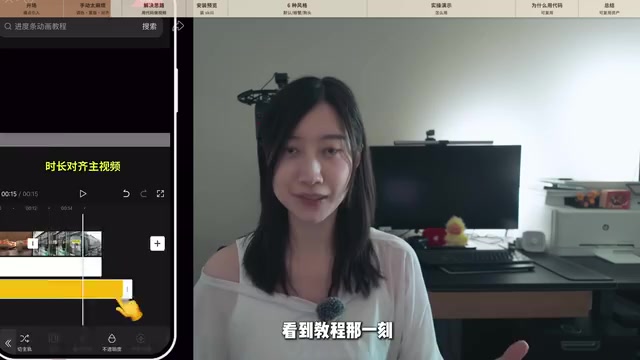
Auto-generate video chapter progress bars from subtitle files using Claude Code and Remotion.
This tutorial shows how to use Claude Code's Skill mechanism combined with the Remotion React video library to automatically generate video chapter progress bar animations. By simply importing an SRT subtitle file, AI analyzes the content, suggests chapter divisions, and renders polished progress bar animations in six built-in styles — eliminating tedious manual editing and embodying a reusable workflow automation mindset.
The Soul-Crushing Repetitive Work in Video Editing
Anyone who's made videos knows the pain: chapter progress bar animations seem like a small decorative element, but creating them is incredibly tedious every single time. You have to manually pick background colors, adjust masks, align tick marks and timelines one by one, add text, center it, tweak fonts… and every new video means starting this entire process from scratch.
Bilibili creator CinCin shared a compelling idea: if this task is so tedious and highly repetitive, why not turn it into an automated workflow? Using Claude Code's Skill mechanism and the Remotion frontend library, he built a complete solution that takes a subtitle file as input and automatically generates chapter progress bar animations — and open-sourced it on GitHub.
Core Concept: Creating Video Animations Through Code
Why Code Instead of Editing Software?
The core philosophy behind this approach is simple — let AI do what it's good at. Dragging, aligning, and tweaking parameters in editing software isn't AI-friendly; but generating animations through code is exactly where AI excels.
Specifically, the solution uses Remotion — a React-based video generation frontend library. Created and open-sourced by Jonny Burger in 2021, Remotion's core idea is "write videos with React." Traditional video production relies on timeline dragging, but Remotion treats every frame of a video as the render output of a React component — you can use JavaScript to precisely control what content appears on which frame and what animations to trigger. It comes with built-in tools like the interpolate() interpolation function and spring() elastic animations, allowing developers to write video animations just like web animations, ultimately rendering to MP4 files via FFmpeg. This approach is especially well-suited for video scenarios that require batch generation and parameterized control.
In this solution, each progress bar animation is essentially a React component — change one parameter and the style changes; swap in a new set of timestamps and a new progress bar appears. Every iteration is just changing parameters, not starting over from scratch.
More importantly, the code-based approach enables frame-precise calculations — a level of accuracy that's extremely difficult to achieve with manual editing.
Claude Code's Skill Mechanism Makes Workflows Reusable
Claude Code is Anthropic's command-line AI coding assistant, and the Skill mechanism is a core feature that lets users encapsulate common workflows into reusable modules. Specifically, a Skill typically includes a set of predefined system prompts, code templates, and execution logic. When a user installs a Skill, Claude Code loads these presets into context, enabling the AI to follow specific workflow procedures in subsequent conversations. It's like installing a "professional plugin" for the AI — you no longer need to describe your requirements from scratch every time, because it already understands the full context of the workflow. Skills can be shared and installed via links, allowing best practices from the community to spread and be reused quickly.
CinCin packaged the video chapter progress bar generation logic into a Skill. Once installed, you can view and use it by entering the skill command in Claude Code. This means anyone who installs this Skill immediately gains the same automation capability without needing to understand the underlying code implementation.
Hands-On Demo: From Subtitles to Animation in Just a Few Steps
Step 1: Export the SRT Subtitle File
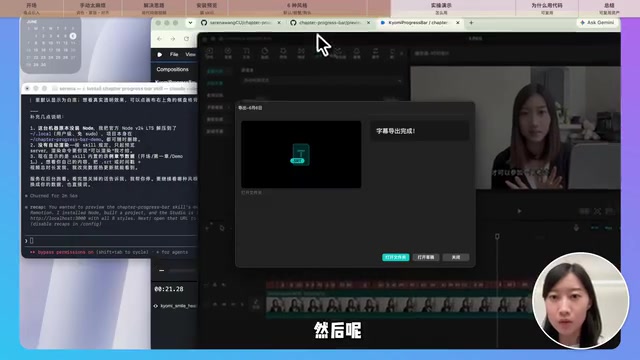
Open your editing software and export the video's timestamped SRT subtitle file. SRT (SubRip Subtitle) is one of the most common subtitle formats, supported by virtually all major editing software and media players. Its structure is very simple: each subtitle entry consists of a sequence number, timestamp, and text. Timestamps are precise to the millisecond, formatted as "hours:minutes:seconds,milliseconds --> hours:minutes:seconds,milliseconds." Because SRT is a plain text format with a clean structure, AI can very easily parse the time information and text content, then automatically determine which segments belong to the same chapter based on semantics. This is why CinCin chose SRT as the input — it's both a standard output from editing software and one of the most AI-friendly structured data formats.
Step 2: Let AI Automatically Divide Chapters
Feed the subtitle file to Claude Code (or Codex), and it will automatically analyze the content and suggest chapter divisions. What the AI does at this step is essentially natural language understanding — it reads the text in the subtitles, identifies topic transition points, and then combines this with timestamps to determine chapter boundaries. Of course, you can also directly tell the AI how you want to divide things, such as "0:00 is the intro, 1:00 is part one, 1:50 is part two."
The AI will present what it considers a reasonable division plan, and you confirm before moving to the next step.
Step 3: Choose a Style and Generate with One Click
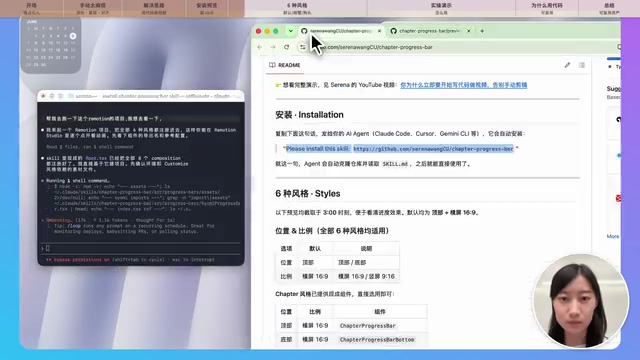
After confirming the chapter divisions, the AI will ask about your preferred style, aspect ratio (landscape/portrait), and position (top/bottom). The project currently includes six built-in progress bar animation styles:
- Default Style: Classic chapter progress bar with main title and subtitles
- Bottom Progress Bar: Places the progress bar at the bottom of the frame
- Dash Style: Clean dash-separated layout
- Minimal Style: No chapter names displayed, just progress divisions
- Text Highlight Style: Current chapter text is highlighted
- Vector Animation Style: A small vector graphic (like a little crab) follows along the progress bar
Once you've selected your parameters, the AI automatically modifies the configuration file and generates the corresponding progress bar animation. Since the underlying framework is Remotion, all styles are essentially different React components — switching styles just means switching components and passing in different props. Finally, click the Render button to export the video file.
Custom Stickers and Logo Options
CinCin also demonstrated a fun customization example: he uploaded a photo of his dog to Krea (an AI image processing tool that supports smart background removal, style transfer, and more), automatically removed the background and added a yellow outline, then embedded this sticker into the progress bar animation. This means you can upload any sticker, logo, or photo to create your own unique progress bar style.
A Deeper Perspective: Building Reusable Creative Assets
The value of this project goes beyond just a progress bar animation tool — it's really about the workflow automation mindset behind it.
CinCin proposed a principle worth considering for every content creator: In your daily work, whenever you find yourself doing something repeatedly, ask whether you can turn it into something reusable.
Video chapter progress bars are one example, subtitle animations are another, and there are countless other repetitive, tedious tasks that add no creative value — all of which can be solved with the same approach. Every Skill you create is like adding a building block to your workflow. Gradually, you free up your time and energy to focus on truly creative work.
This also echoes a point he made previously: Creating videos through code is the direction video production is heading. In fact, this trend is already emerging across the industry. Beyond Remotion, there are tools like Motion Canvas (a TypeScript-based animation engine), Manim (the Python library 3Blue1Brown uses for math animations), and other programmatic video tools. Major platforms are also investing in this space: Canva acquired a video automation company, and Adobe launched template-based batch video generation features. The core trend is shifting video production from "craftsmanship" to "parameterized production" — designers define templates and styles, while AI handles content filling and render output.
This doesn't mean every creator needs to learn programming. Rather, by leveraging AI's coding capabilities, repetitive visual production work can be automated, allowing creators to return to what matters most — the creative work itself.
How to Get Started with This Progress Bar Animation Tool
- Get the Skill installation link on GitHub (provided in the original video's comment section)
- Run the installation command in Claude Code or Codex
- Prepare your SRT subtitle file or manually specify chapter divisions
- Choose your style, aspect ratio, and position, then generate with one click
For creators who frequently produce videos, this tool can significantly reduce the time spent on repetitive decorative animations. And for anyone using AI tools, the mindset of "packaging repetitive work into reusable assets" may be even more valuable than the tool itself.
Key Takeaways
Related articles
SpaceX: A Multi-Dimensional Analysis of Engineering Marvels, Business Revolution, and the Mars Vision
A deep multi-dimensional analysis of SpaceX covering engineering breakthroughs, business revolution, organizational culture, and the Mars colonization vision that is redefining the boundaries of human space exploration.
Claude Code Practical Guide: From Installation & Configuration to Production-Grade Project Delivery
Complete guide to Claude Code + Opus for production projects: CC Switch setup, engineering-minded prompting, and a real case study delivering a complex payment system in 4 hours.
How to Use Claude Code for Free Without Limits: A Zero-Cost Full Multimodal AI Solution
Use Claude Code for free with Agnes AI's free models and the CC Switch open-source tool. Full setup guide for zero-cost AI coding, image, and video generation.