Claude Code Skill Mechanism Explained: Progressive Loading & Practical Creation Guide

Master Claude Code Skills: progressive loading, on-demand context, and reusable AI workflow automation.
This guide explains Claude Code's Skill mechanism—reusable instruction documents that teach AI how to handle tasks. Skills use progressive loading (metadata → instructions → scripts) to minimize context usage, unlike CLAUDE.md which loads everything. The article covers creation methods, permission controls, dynamic context injection, subagent integration, and how Skills form composable pipelines for maximum efficiency.
What Is a Skill? In One Sentence: A Job Training Manual
If you're using Claude Code but find yourself repeatedly telling it how to do things, you probably haven't mastered the Skill mechanism yet.
The essence of a Skill is simple—it's a "job training manual." Just like when you hire someone new, you can't hand-hold them every time, so you write a training manual that explains how to do the job, what processes to follow, and what to watch out for. Once Claude Code reads this manual, it knows how to handle similar tasks without you explaining everything from scratch each time.
It's not a plugin, not an MCP server—its essence is turning your "how to do things" experience into a reusable document.
Progressive Loading: The Truly Brilliant Design Behind Skills
But the real power of Skills isn't that they "remember"—it's how they remember. There's a very clever design here called Progressive Loading, which works in three layers.
Progressive loading is a design pattern widely used in software engineering. Its core idea comes from virtual memory management in operating systems—data is only loaded from disk to memory when it's actually accessed. In the context of large language models, this design is especially critical because the context window is a limited and expensive resource. Take Claude as an example: although its context window has expanded to 200K tokens, every token affects reasoning quality and API call costs. Progressive loading achieves an effect similar to database indexing by layering information into metadata, instruction, and execution layers—using minimal indexes to determine whether full data needs to be loaded, avoiding the waste of stuffing everything into a limited window at once.
Layer 1: Only Metadata Loads at Startup
At startup, only the Name and Description—two lines of text, roughly 100 tokens—are loaded. Even with 100 Skills installed, startup only consumes about 10,000 tokens—equivalent to a few paragraphs of text. You can install as many as you want without worry.
Here's some context on tokens: A token is the basic unit that large language models use to process text. In English, each word corresponds to roughly 1-1.5 tokens; in Chinese, each character corresponds to about 1.5-2 tokens. In API calls, both input and output tokens incur costs, and the more input tokens there are, the more dispersed the model's attention becomes, potentially causing key information to get "drowned out." This is why 100 Skills occupying only 10,000 tokens (about 6% of context) is a significant engineering advantage—it means the model's attention resources are almost entirely reserved for the current task itself.
Layer 2: Full Instructions Load On Demand
Only when Claude determines that your task might require a particular Skill does it load the complete instruction content. This judgment relies on the Description loaded in Layer 1—the more precise the Description, the more accurate Claude's matching judgment, and the lower the probability of false triggers or missed triggers.
Layer 3: Scripts Execute On Demand
If a Skill also has bound scripts or reference documents, Claude reads them on demand. Moreover, scripts are executed via the command line—the script code itself doesn't enter the context window; only the execution results consume tokens. This means you can bind a Python script with hundreds of lines, but only its output—perhaps just a few lines of text—appears in the context.
"Only spend when used, no space occupied when not"—these words capture the most fundamental difference between Skills and all other approaches.

Core Differences Between Skills, Prompts, CLAUDE.md, and MCP
You might ask: Can't I just write everything in CLAUDE.md? Isn't it the same? No, it's completely different.
CLAUDE.md is the global configuration file in a Claude Code project, similar to how README.md serves as project documentation. It defines the AI's behavioral guidelines, code style preferences, and architectural conventions for that project. Its design intent is to provide "always-needed background information," such as "this project uses TypeScript" or "the database is PostgreSQL"—factual descriptions. But when developers start stuffing operational procedures into it (like "when deploying, first run tests, then build the Docker image, then push to ECR"), CLAUDE.md quickly bloats, forcing these potentially unused lengthy instructions to load with every conversation, wasting context.
| Approach | Characteristics | Analogy |
|---|---|---|
| Prompt | Instructions manually given in conversation, discarded after use, must be repeated next time | One-time use |
| CLAUDE.md | Global project config, loaded with every conversation, always in context | Always loaded |
| Skill | Only 100-token metadata when not triggered, full content loads only when triggered | Loaded on demand |
| MCP | Gives AI hands to reach out—read databases, call APIs, operate browsers | Connection layer |
MCP (Model Context Protocol) is an open protocol launched by Anthropic aimed at standardizing how AI models connect with external tools and data sources. It's similar to what the USB protocol does for hardware devices—providing a unified interface that lets AI read databases, call REST APIs, operate browsers, access file systems, and more. An MCP server is essentially a middleware layer that exposes external capabilities as tools the AI can invoke. But MCP solves the problem of "can it be done," while Skills solve the problem of "how should it be done"—often the AI already has the tools; what's missing is the correct workflow for using them.
A one-sentence rule of thumb: If a section in your CLAUDE.md has shifted from "factual description" to "operational guidance," that section should be extracted into a Skill.
Real-world data is compelling: with 60+ Skills installed, startup only occupies 6% of context. If all 60 sets of rules were written in CLAUDE.md, the context window would be essentially wasted. Some community members have even replaced 80% of their MCP servers with just 6 Skills—because you don't need to connect Claude to that many external tools; you just need to teach it to use existing tools following the correct workflow. This phenomenon reveals an important insight: the bottleneck for AI programming assistants is often not a lack of tool capabilities, but a lack of correct methodology for using tools.
Skill File Structure and Creation Methods
File Structure
The structure of a Skill is extremely simple: a folder + a Skill.md file constitutes a complete Skill. The folder can also contain templates, examples, reference documents, and scripts—these are optional.
Skill.md has two required fields:
- Name: The Skill's name, which appears in slash commands. Naming convention should follow a verb+noun format (e.g., "review-pr," "deploy-staging")—both intuitive and easy to type quickly in the command line.
- Description: Trigger condition explanation, telling Claude when to invoke this Skill. This is the most critical part of the entire Skill design—the quality of the Description directly determines whether Claude can trigger the right Skill at the right time. A good Description should include clear trigger scenarios, keywords, and boundary conditions.
Scope
- For current project only: Place in the
.skilldirectory within the project folder - Available across all projects: Place in the user directory's Claude configuration folder for global effect
This layered design is similar to Git's configuration priority—project-level config overrides global config, letting you customize workflows for different projects while retaining the reusability of universal Skills.
Four Creation Methods
- Manually create a folder and write Skill.md—lowest barrier, but you need to think through the instructions yourself
- Use Claude's built-in Skill Creator—guides you step by step, ideal for beginners
- Describe your needs directly in conversation with Claude—let it generate the Skill for you
- Search for existing community Skills—modify others' Skills together with Claude
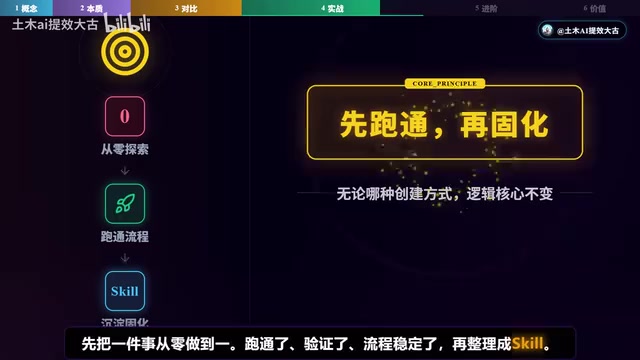
Regardless of the method, the core principle is four words: run it through first, then codify. First complete something from 0 to 1, validate it, stabilize the process, then organize it into a Skill. The focus is never on writing the Skill—it's on getting the process working. Going from 0 to 1 is always the hardest part. This principle has a corresponding concept in software engineering: "Make it work, make it right, make it fast." Premature abstraction is the root of all evil, and the same applies to Skills—a process that hasn't been battle-tested will only codify mistakes when turned into a Skill.
Advanced Features: From Functional to Excellent
Dynamic Context Injection
Skills can automatically inject real-time data. For example, a code review Skill can inject Git Diff, so every time it triggers, Claude sees the latest changes and reviews based on real data rather than analyzing in a vacuum. This design transforms Skills from static instruction documents into dynamic workflow engines—they not only tell Claude "how to do it" but also automatically prepare "what it needs to see to do this." Other common dynamic injection scenarios include: injecting current branch information, recent CI/CD build status, related Jira/Linear ticket content, etc.
Subagent Integration
Skills support isolated execution in independent Subagents without disrupting the main conversation. You can even specify which type of Agent to use—search-oriented, planning-oriented, or custom.
Subagent is a core concept in multi-agent architecture. In Claude Code's implementation, the main Agent is responsible for understanding user intent and coordinating tasks, while Subagents execute specific subtasks in isolated context environments. This design borrows from the process isolation concept in operating systems—a child process crash doesn't affect the parent process. In the Skill context specifically, when a complex Skill executes in a Subagent, its intermediate reasoning, temporary variables, and tool calls don't pollute the main conversation's context. After execution, only the final result is returned to the main Agent. This allows Skills to perform complex multi-step operations without cluttering the main conversation.
Fine-Grained Permission Control
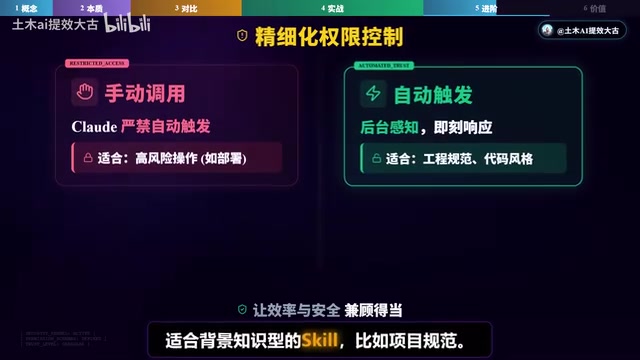
- Set to manual invocation only: Claude cannot auto-trigger, suitable for operations with side effects like deployment
- Set to background auto-trigger: No manual invocation needed, suitable for background knowledge Skills (like project specifications)
- Tool whitelists and blacklists: Precisely control which tools a Skill can use
This permission model follows the security principle of "Principle of Least Privilege." A Skill responsible for code formatting doesn't need network access; a Skill responsible for documentation generation doesn't need shell command execution permissions. By precisely defining each Skill's capability boundaries, you prevent accidental operations and make it easier to build trust in team collaboration—you can confidently use Skills written by colleagues because their permission scope is transparent and auditable.
Open Standard & Instant Effect
Skills aren't exclusive to Claude Code—they're an open standard. Claude Code, Codex, and an increasing number of programming tools all use the same Skill system. Moreover, after modifying a Skill file's content, the current session can immediately use the new version without restarting.
Skills as an open standard means they don't depend on any specific vendor's implementation. This is similar to Docker's containerization standard—once you package an application according to OCI specifications, it can run on any compatible runtime. OpenAI's Codex, Claude Code, and other compatible tools are all adopting the same Skill file format, meaning Skills written by developers have cross-platform portability. This standardization also fosters a community ecosystem—developers can share and reuse each other's Skills, forming network effects similar to the npm package ecosystem. The instant-effect characteristic means the iteration cost of Skills is extremely low—you can fine-tune instructions at any time during use, see results immediately, and form a rapid feedback loop.
The True Value of Skills: Summarized in Four Keywords
Looking back at the core value of Skills, it can be summarized in four keywords:
- Space-efficient: Progressive loading—no space occupied when not in use
- Repetition-free: Process codification—run through once, reuse forever
- Evolvable: Every unexpected situation is an opportunity to optimize it—it's a living document
- Composable: Multiple Skills can be chained into a pipeline
The "evolvable" point deserves special emphasis. Traditional automation scripts are fixed once written, have high maintenance costs, and easily break when environments change. Skills, being essentially natural language documents, have an extremely low modification threshold. When Claude encounters an edge case not covered in the Skill documentation, you just add one sentence to Skill.md, and it handles it correctly next time. This characteristic of "continuously evolving through use" makes Skills more like a constantly learning system rather than an unchanging script.
The biggest takeaway from AI development is this—the gap isn't in technology; it's in how you direct the AI. Think back: in every conversation with Claude Code, how much time do you spend repeatedly telling it how to do things? Skills solve exactly this problem.
A single Skill is already useful, but the real efficiency leap comes when you chain multiple Skills into a pipeline—how different Skills coordinate, what multi-Skill workflows actually look like—that's a more advanced approach worth exploring in depth. The power of multi-Skill composition lies in achieving "separation of concerns": each Skill handles only one clear responsibility, and complex workflows are achieved through composition—just like the Unix philosophy of small tools that "do one thing well" being piped together into powerful data processing pipelines.
Key Takeaways
Related articles
Remotion: The Open-Source Framework for Code-Driven Video Production with React
Deep dive into Remotion, the open-source framework for writing videos with React components. Covers core principles, use cases, comparison with traditional editors, and quick start guide.
Nex N2 Pro Real-World Testing: Top 5 on Official Benchmarks, Only 12th in Independent Tests
Deep-dive testing of Nex N2 Pro open-source Agent model comparing official benchmarks vs independent results. The 397B parameter model shows decent frontend generation but ranks 12th independently, not top 5 as claimed.
Claude Code Workflow in Practice: From Requirement Grilling to AFK Agent Auto-Coding
A detailed walkthrough of building real features with Claude Code: Grill Me requirement interrogation, auto-generated PRDs, AFK agent coding, and QA iteration loops with DDD and TDD strategies.