Claude Code Skills Mechanism Explained: On-Demand Loading for Token Savings and Better Performance

Claude Code Skills use on-demand loading to cut Token waste and boost AI output quality.
Claude Code's Skills mechanism solves context overload by loading only relevant expertise on demand instead of dumping all project specs into the context window at once. Using a three-layer structure (metadata triggers, instruction body, and auxiliary examples), Skills leverage progressive disclosure to match keywords, activate precise modules, and execute efficiently — saving Tokens and improving output. The official Skill Generator automates file creation, but the real competitive edge lies in modularizing your professional experience into reusable digital assets.
Many people rush to try Claude Code after seeing it hyped everywhere online, only to find the experience far below expectations — inconsistent output, excessive verbosity, and costs that burn through money faster than the code is worth. The root cause isn't the tool itself, but the fact that most people overlook a key mechanism provided officially: Skills (the skill system).
Why Does Using Claude Code Directly Feel So Bad? The Problem Is Context Overload
To understand the value of Skills, you first need to understand what actually happens when you use Claude Code "raw."
Every time you ask it even a simple question, it tries to appear "professional" by cramming the entire project's background information and all development standards into the context window at once. The result is information overload — the large language model gets confused first, not only responding slower but also producing serious logical interference.
Here's the key technical background: The Context Window is the maximum text length a large language model can process at once, measured in Tokens. Tokens are the smallest units the model uses to process text — one English word typically corresponds to 1–2 Tokens, and one Chinese character typically corresponds to 1–2 Tokens. Although Claude-series models have expanded their context windows to the 200K Token level, a larger window doesn't necessarily mean better results. Research shows that when the context is filled with large amounts of information irrelevant to the current task, the model experiences "attention dilution" (known in academia as the "Lost in the Middle" problem), where the model's focus on key information decreases, leading to significantly lower output quality. At the same time, API calls are billed by Token count — both input and output Tokens incur costs — so redundant information in the context directly translates to unnecessary expenses.
Worse still, every additional message you send causes these hefty specifications to be resent in the context. Token consumption skyrockets, and your bill follows suit. This is why many people want to uninstall after just a few days: It's not that the tool is bad — it's that the usage approach is wrong.
Claude Code Skills Mechanism: The Core Logic of On-Demand Loading
The design inspiration for Skills comes from how human experts work. When asked a specific question, you don't recite an entire textbook from cover to cover — you check the index first, find the relevant chapter, and then look up the precise information.

Skills perfectly replicate this logic in the AI workflow, with the entire process divided into three phases:
Phase 1: Lightweight Index Loading
When the AI starts up, it only reads each skill's name and trigger conditions, which occupy minimal context space. It no longer loads all specifications at once like before.
Phase 2: Keyword-Based Precise Matching
When you input specific terms — such as "write tests," "debug code," or "deploy" — the large model precisely matches keywords and instantly "wakes up" the corresponding skill module.
Phase 3: Skill Expansion and Execution
Only the activated skill fully expands its core operational steps for precise execution. The entire process wastes not a single extra Token.
This Progressive Disclosure strategy ensures output quality while dramatically reducing costs. It's worth noting that Progressive Disclosure was originally a classic design principle from the Human-Computer Interaction (HCI) field, proposed by IBM researchers in the 1980s. Its core idea is: don't present all information and features to the user at once; instead, progressively reveal relevant content based on the user's current level of need. This principle is widely applied in software interface design — for example, Photoshop's tool panel shows only common tools by default, with advanced options requiring the user to actively expand them. Migrating this principle to AI prompt engineering means no longer stuffing all instructions and specifications into the context at once, but instead establishing a layered index mechanism: the first layer exposes only lightweight metadata, and the second layer loads complete instructions only after matching a specific need. This design fundamentally solves the performance degradation problem that large models experience under information overload.
The Three-Layer Structure of a Skill File Explained
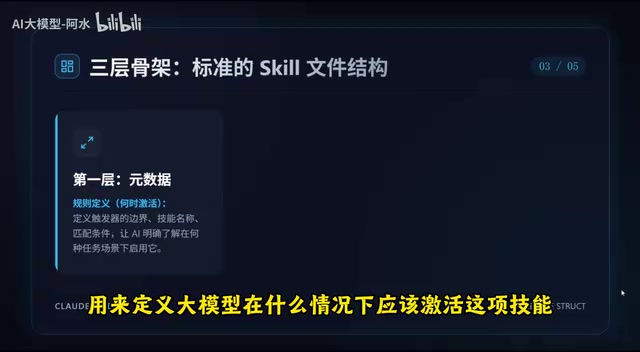
Now that you understand the principles, let's look at the specific structure of a skill file. It consists of three main layers:
Layer 1: Metadata (Trigger Switch)
Defines under what circumstances the large model should activate this skill. For example, it triggers when the user mentions keywords like "unit test" or "code review." This is the entry point for the entire skill.
Layer 2: Instruction Body (Operational Steps)
This is the core of the skill, containing the operational standards you actually want the AI to follow. For example, you can explicitly specify: code must follow a particular style, unit test coverage must reach 90% or above, function naming must comply with team conventions, etc.
Layer 3: Auxiliary Components (Examples and Scripts)
You can include well-written example cases from the past, letting the large model "learn by example." You can also configure external automation scripts to enable more complex workflow integrations. This "example-driven" approach is known in the machine learning field as Few-shot Learning — by providing a small number of high-quality examples, you guide the model to understand the expected output patterns and quality standards. This approach often significantly outperforms abstract instructions described purely in text.
Using the Skill Generator to Automatically Create Skill Files
Do you need to write these skill files line by line yourself? Of course not.
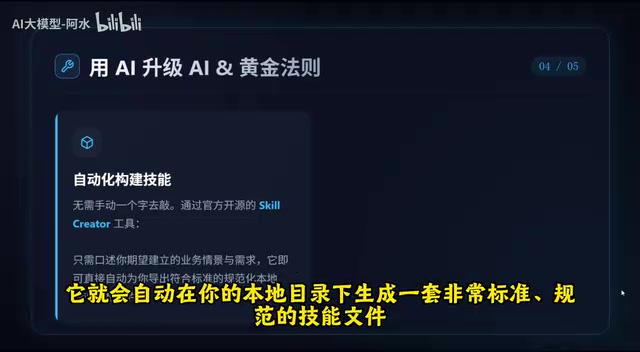
The official Skill Generator is provided — you simply describe your development scenarios and requirements in plain language, and it automatically generates a set of standardized skill files in your local directory. The Skill Generator works similarly to "scaffolding tools" in modern software engineering, such as Create React App in the frontend world or Spring Initializr in the backend — users describe requirements in natural language, and the generator converts them into structured configuration files. These skill files are typically stored in Markdown format in the project's .claude/ directory, following the Claude Code CLAUDE.md specification system. This approach is essentially a form of declarative programming — you only need to declare "what result you want" without manually writing every step of "how to achieve it."
However, there's a golden rule here: organize first, automate second.
If your offline workflow is already a mess, the AI will only use the loaded skills to produce more code garbage faster. The quality of skill files fundamentally depends on how deeply you understand your own business processes. As with an inherent limitation of declarative tools: output quality is highly dependent on input quality. If developers themselves lack a clear understanding of their business processes, the auto-generated skill files will merely be a structured expression of vague requirements.
Experience Modularization: The Core Competitive Advantage of the AI Era
This leads to a deeper insight: The core competitive advantage of the future isn't about who can write longer prompts, but about who can abstract, encapsulate, and accumulate business experience into a proprietary digital skill library.
This concept aligns with classic theories in the Knowledge Management field. Japanese scholar Ikujiro Nonaka proposed the SECI model in his book The Knowledge-Creating Company, describing the transformation process of knowledge between tacit (personal experience, intuitive judgment) and explicit (documents, standards, processes) forms. In the AI era, this transformation has gained an entirely new medium — skill files are essentially the encoding of personal tacit knowledge into machine-executable explicit knowledge. This also echoes the "Infrastructure as Code" philosophy in software engineering: transforming operational experience that previously existed only in people's minds into version-controlled, reusable, and shareable code assets.
When everyone has access to the same AI tools, the differentiating competitive moat shifts from "whether you can use the tool" to "whether you have reusable professional experience assets."
If you've accumulated ten years of experience in a particular domain and can structurally encapsulate it into a set of Skills, that skill library becomes your unique digital asset. It not only enables AI to work better for you but can also be shared and passed down within teams. When every team member encapsulates their professional experience into standardized Skill files, the entire team's knowledge assets achieve a leap from individual dependency to organizational accumulation — meaning that even if core members leave, their accumulated expertise remains in the organization in an executable form.
Practical Optimization Tips for Claude Code Skills
If you're currently using or planning to use Claude Code, here are the recommended steps to optimize your workflow:
- Stop ineffective information dumping: Don't write those massive prompts running hundreds of words — information overload only backfires
- Organize your workflow: Before creating skills, clearly map out your development processes, coding standards, and quality criteria
- Create skill files: Use the official Skill Generator to convert your organized processes into standard Skill files
- Continuously iterate and optimize: Adjust skill trigger conditions and execution steps based on actual usage results
- Build a skill library: Accumulate over time to form a complete skill system covering all your daily development scenarios
At the end of the day, Claude Code is just a tool. What truly determines whether it works well is the "experience fuel" you feed it. Instead of complaining that AI doesn't listen, invest time in modularizing your professional knowledge — that's the most worthwhile investment in the AI era.
Related articles

A Systematic Guide to Claude Code: From Deployment to Architectural Analysis of 510K Lines of Source Code
A systematic guide to Claude Code covering environment deployment, domestic model integration, six core systems (memory, multi-Agent, etc.), a full-stack ChatBot project, and eight design patterns from 510K lines of open-source code.

N2 Model as a Free Claude Code Alternative: Does Voice-Driven AI Coding Actually Work?
N2 model, built on Qwen 3.5, is completely free and integrates with Claude Code. Real-world tests show voice commands generating full landing pages, with AgentOS enabling shared memory and multi-model collaboration for zero-cost AI coding.

Multi-Agent Cost-Cutting Guide: 4 Documents to Slash 60-80% of Your Token Spending
Multi-agent bills out of control? This article breaks down two core token cost pain points and provides 4 actionable documents to cut multi-agent task costs by 60-80%.