Claude Code + Typst: An AI Typesetting Workflow Where Speaking Creates Slides

Create academic slides through pure conversation using Claude Code + Typst + Skim
A Chinese tech creator shared an AI-driven academic presentation workflow: Claude Code converts natural language requests into typesetting code, Typst's lightweight compiler generates PDFs in seconds, and Skim provides real-time preview. This approach combines LaTeX Beamer's professional typesetting quality with zero learning cost — users simply speak to create slides, representing the trend of AI reducing professional tool barriers to zero.
When an AI Coding Assistant Meets Academic Typesetting
Creating academic presentations has long been a pain point for researchers and technical professionals — LaTeX Beamer produces beautiful typesetting, but comes with a steep learning curve and tedious environment configuration. A Chinese tech content creator recently shared a brand-new workflow: using Claude Code as an AI coding assistant, paired with the lightweight typesetting engine Typst and the real-time preview tool Skim, to achieve the ultimate experience of "speaking slides into existence."
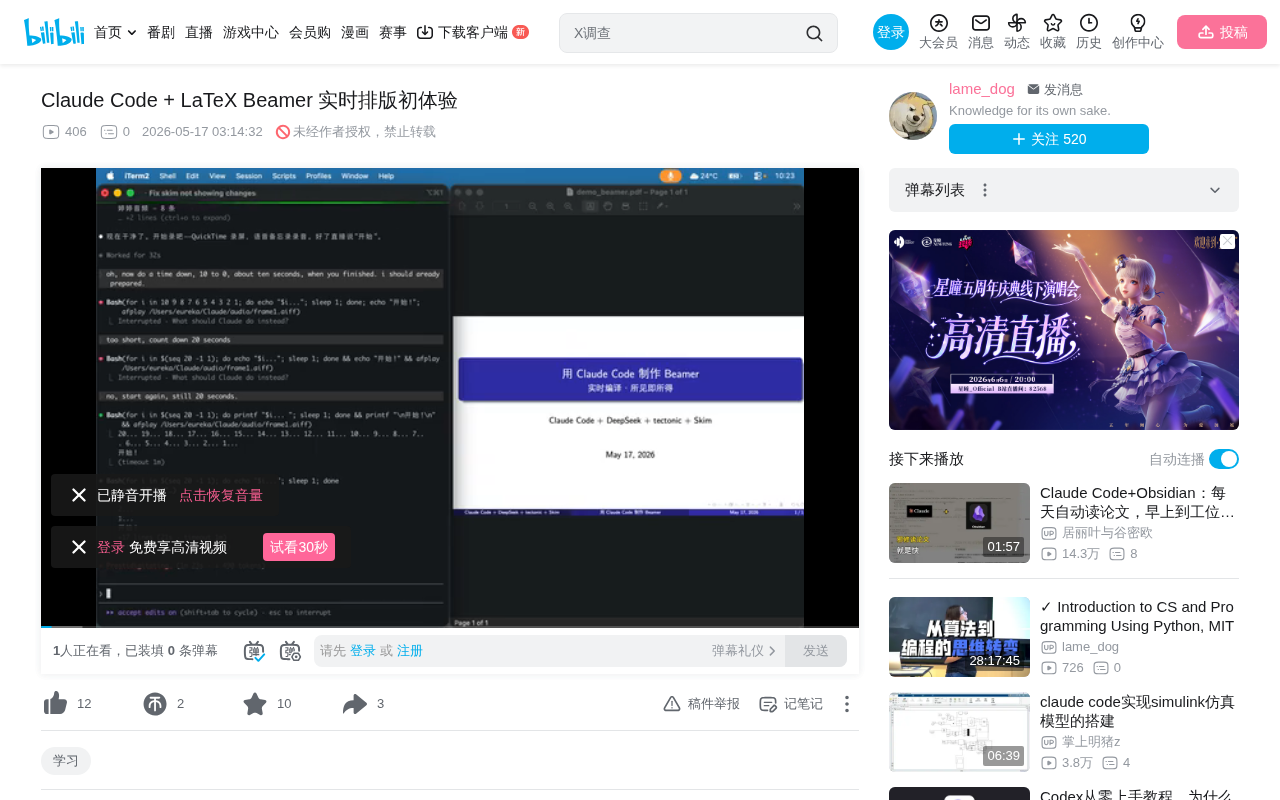
The core philosophy of this approach is simple: you're the director, Claude Code is the screenwriter and stage manager — you focus on content, and AI handles the typesetting.
A Three-in-One Technical Architecture
Claude Code: The Bridge from Natural Language to Code
Claude Code is Anthropic's command-line AI coding assistant, playing the role of an "always-ready collaborator" in this workflow. Users simply describe their needs in natural language, and Claude Code translates them into precise Typst or LaTeX code.
Unlike traditional IDE plugin-style AI assistants, Claude Code operates in an agentic mode — it doesn't just generate code snippets, but autonomously plans multi-step tasks, creates and modifies files, runs compilation commands, and automatically fixes errors based on error messages. This end-to-end autonomous execution capability makes it particularly suited as the "all-in-one butler" in a typesetting workflow, transforming users' natural language instructions into complete file operation chains. It runs directly in the terminal environment, capable of reading and writing files, executing shell commands, managing git repositories, and deeply integrating with the entire development environment.
The key point is that users don't need to know what \begin{frame} is or what a preamble is — all these technical details are handled by AI. This dramatically lowers the barrier to entry for academic typesetting, allowing content creators to focus on "what to say" rather than "how to format it."
Typst Compiler: A Lightweight and Efficient Typesetting Engine
A traditional MacTeX full installation requires over 4GB of space, includes hundreds of packages and complex path configurations, and the installation process often takes an entire afternoon. Typst, as a next-generation typesetting engine, offers clear advantages:
- Single executable file, ready to use immediately
- On-demand downloads: only downloads packages you actually use
- Extremely lightweight: the entire compilation cache is only 46MB, compared to 4GB for traditional solutions — nearly 100x smaller
- One-command compilation, naturally compatible with Claude Code
Typst is a next-generation academic typesetting system developed by the German startup Typst GmbH, officially open-sourced in 2023 and written in Rust. It uses an incremental compilation architecture — only recompiling the parts that changed — making it one to two orders of magnitude faster than LaTeX. Typst's syntax design draws from Markdown's simplicity and LaTeX's expressiveness, for example using = Title instead of \section{Title}, and writing math formulas directly with $ x^2 $. Its package management system uses a centralized repository (Typst Universe), similar to Rust's crates.io, achieving true on-demand loading. For Beamer-style presentations, the Typst community already has mature template packages like Polylux and Touying, covering common needs such as frame-by-frame animations and multi-column layouts.
Typst is becoming a strong alternative to LaTeX, especially suited for efficiency-minded technical workers.
Skim Real-Time Preview: Instant Feedback Loop
Skim handles real-time PDF preview refreshing. After each code modification, you can see the latest result in under a second, forming an instant feedback loop. This "edit and see" experience improves iteration speed by an order of magnitude.
Skim is an open-source PDF reader for macOS, originally designed for academic users. Its core feature is support for file-system-level auto-reload. When it detects that a PDF file has been rewritten by an external program, Skim instantly refreshes the display without losing the current reading position. This mechanism pairs perfectly with Typst's watch mode (the typst watch command monitors source file changes and automatically recompiles): Claude Code modifies the .typ source file → Typst watch detects the change and completes incremental compilation in milliseconds → Skim detects the PDF update and refreshes the display. The entire pipeline typically has less than 1 second of latency.
Why Not Just Use LaTeX Beamer?
To understand the value of this approach, you first need to understand LaTeX Beamer's historical significance and pain points. Beamer is the most widely used presentation framework in academia, released by Till Tantau in 2003, and remains the de facto standard at international academic conferences. Its strength lies in full compatibility with the LaTeX ecosystem — math formulas, bibliography management (BibTeX), cross-references, and more work out of the box.
However, its pain points are equally significant: a complete TeX Live distribution contains over 4,000 packages with an installation size exceeding 7GB; compiling a complete document requires multiple passes (latex→bibtex→latex→latex); error messages are cryptic, and a single mismatched bracket can produce dozens of lines of errors. These issues often deter researchers outside computer science, pushing them toward WYSIWYG tools like PowerPoint, sacrificing typesetting quality in the process. The Typst + Claude Code combination precisely solves this dilemma: maintaining professional typesetting quality while completely encapsulating technical complexity beneath the AI layer.
Five-Step Workflow: From Idea to Slides in Seconds
The entire creative process is compressed into five minimal steps:
- State your need: Tell Claude Code in natural language, "I want a slide about floating-point numbers"
- AI writes code: Claude Code writes the typesetting code directly into the file
- Instant compilation: Typst generates the PDF in one to two seconds
- Auto-refresh: Skim immediately displays the new slide
- Iterate and refine: Not satisfied? Just say "add an example" or "delete that line," repeating until perfect
The entire process requires no editor, no memorized commands, and no mouse. This is a purely conversation-driven slide creation mode.
Capability Boundaries: What This AI Typesetting Combo Can Do
Content Level
- Mixed Chinese-English typesetting: Seamlessly handles multilingual content
- Code blocks with syntax highlighting: Essential for technical talks
- Mathematical formulas: LaTeX's traditional strength perfectly inherited
- TikZ vector graphics: From simple charts to complex diagrams
- Tables, lists, multi-column layouts: All standard typesetting needs covered
- Frame-by-frame animation overlays: Beamer's full repertoire of tricks
Process Level
- Generate a new page with a single sentence
- Second-level compilation feedback
- Add, delete, modify, and merge — all within the conversation
- Complete all operations through pure voice interaction
Deeper Significance: How AI Is Redefining Professional Tool Usage
The essence of this approach is "welding" three capabilities together: Beamer/Typst's professional typesetting capability, Claude Code's natural language understanding, and the rapid iteration enabled by real-time feedback loops.
Many people feel intimidated when they hear "LaTeX," thinking they need to memorize hundreds of commands, configure environments, and tweak formatting. But this demonstration shows another possibility: technical complexity is completely absorbed by AI, and users only need to describe what they want in their most familiar language.
This reflects a paradigm shift happening in software engineering: from "humans learning the tool's language" to "tools understanding human language." In the traditional model, users must master domain-specific languages (DSLs) to use professional tools — whether it's LaTeX's markup syntax, Photoshop's layer operations, or Excel's function formulas. The emergence of large language models has made natural language itself a universal programming interface. The profound impact of this shift is that professional tools' value is no longer diluted by their learning costs — anyone can achieve expert-level output quality at zero learning cost. This also explains why Anthropic positions Claude Code as a "colleague in the terminal" rather than a simple code completion tool — it takes on complete task execution, not fragment generation.
This isn't merely a demonstration of a tool combination; it represents a trend — AI is reducing the barrier to using professional tools to zero, making "being able to speak" the only prerequisite skill. For academic researchers, technical instructors, and anyone who needs to create professional presentations, this workflow is worth trying.
Summary: Three Tools, Each with Its Role
| Role | Tool | Responsibility |
|---|---|---|
| Brain | Claude Code | Understands needs, generates code |
| Hands | Typst | Lightweight compilation, instant PDF |
| Eyes | Skim | Real-time preview, instant feedback |
All you need to do is one thing: speak. And then the slides, one by one, simply "grow" themselves into existence.
Related articles
 Tutorials
Cursor + Codex Dual-IDE Collaboration: A Practical Methodology for Open-Source Project Customization
A complete methodology for open-source project customization based on real-world experience, detailing the Cursor+Codex dual-IDE workflow, seven-stage process, MVP validation, and AI source code reading techniques.
 Tutorials
Cursor Multi-Agent in Practice: Building a Full-Stack Next.js Blog in 50 Minutes
Build a full-stack blog in 50 minutes using Cursor IDE's multi-Agent mode with Next.js, Clerk auth, and Supabase. Learn the 4-phase AI Agent workflow and key integration pitfalls.
 Tutorials
Building an AI Software Factory from Scratch: A Cursor Engineer's Hands-On Experience with Multi-Agent Collaboration
Cursor engineer Eric shares practical insights on building an AI software factory: automation levels, guardrail design, parallel Agent management, and scaling to 1000+ Agents for 24/7 development.