Claude Code vs Regular AI Chat: An In-Depth Comparison Across Five Dimensions
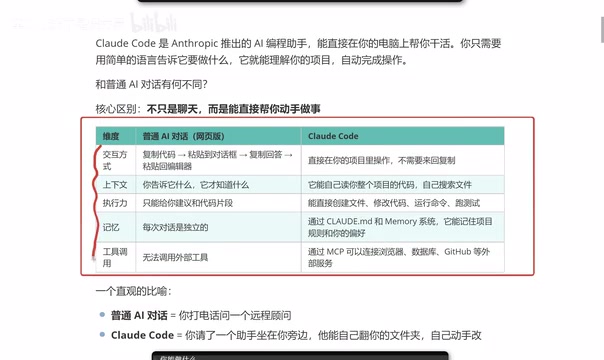
Claude Code vs regular AI chat compared across interaction, context, execution, memory, and tools.
This article provides an in-depth comparison between Claude Code and regular AI chat tools across five key dimensions: interaction method, context understanding, execution power, memory capability, and tool invocation via MCP. It explains how Claude Code evolves AI programming from a copy-paste advisory model to a hands-on autonomous coding assistant that reads your project, executes changes, remembers preferences, and connects to external services.
What is Claude Code?
Claude Code is an AI programming assistant launched by Anthropic, but it's fundamentally different from the AI chat tools we're familiar with, like ChatGPT or DeepSeek. Simply put, it doesn't just chat — it can directly take action and get things done for you.
You no longer need to copy and paste between a web chat window and your code editor. Claude Code can directly read files, modify code, and run commands within your project. Here's an intuitive analogy: regular AI chat is like calling a remote consultant on the phone, while Claude Code is like having an assistant sitting right next to you who can browse through your folders and make code changes themselves.
From a technical paradigm perspective, Claude Code belongs to the emerging "Agentic Coding" direction. Unlike traditional code completion tools (such as GitHub Copilot's inline completions), Agentic Coding emphasizes AI participating in the development workflow as an autonomous agent — it can plan tasks, break down steps, execute independently, and verify results. Anthropic designed Claude Code as a command-line tool (CLI) that runs in the terminal, powered by Claude's large language models (currently primarily Claude 4 Sonnet and Claude 4 Opus), interacting directly with the model via API. This architectural design bypasses many limitations of web interfaces, enabling it to handle complex programming tasks with lower latency and larger context windows.
Five-Dimension Comparison: Claude Code vs Regular AI Chat
Below is a detailed breakdown of the differences between Claude Code and regular web-based AI chat across five core dimensions.
1. Interaction Method: Say Goodbye to Copy-Paste
The traditional workflow looks like this: copy code → paste into chat → get a response → copy it back to your editor. While not complicated, this process is extremely tedious, especially when dealing with multi-file projects where efficiency drops dramatically.
Claude Code runs directly in your project directory, with all operations completed locally, eliminating the back-and-forth pasting steps.
2. Context Understanding: Automatically Reads Your Entire Project
Regular AI chat context depends entirely on what you actively provide — it only knows what you tell it. If you forget to paste the code from a key file, it can't give accurate suggestions. The more fundamental limitation is the context window size — the maximum text length a model can process in a single interaction. Even the most advanced models have context window limits (e.g., Claude 3.5's 200K tokens), and when project code exceeds this limit, users must manually select the most relevant code snippets.
Claude Code can automatically read your entire project's code structure, proactively search for relevant files, and understand inter-module dependencies. It achieves this through a mechanism similar to RAG (Retrieval-Augmented Generation): it first indexes the entire project, then when a user asks a question, it automatically retrieves the most relevant files and code snippets to inject into the context, rather than loading all code at once. This intelligent retrieval strategy enables it to effectively handle large projects with hundreds of thousands of lines of code, providing a depth of project understanding far beyond regular chat mode.
3. Execution Power: From Suggestions to Action
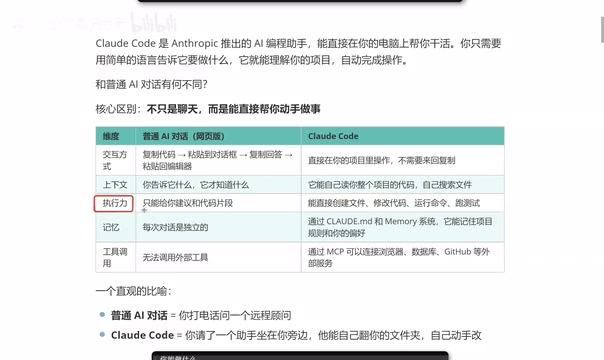
Regular AI can only give you code suggestions or snippets — it can't provide complete project-level solutions, since a real project consists of numerous files and complex code.
Claude Code's execution power is demonstrated through:
- Creating files: Directly generating new code files
- Modifying code: Making precise changes in existing files
- Running commands: Executing build, test, and other CLI commands
- Running tests: Automatically running test suites to verify changes
4. Memory: Remembering Your Coding Style
Web-based AI chat memory is ephemeral — close the window, start a new conversation, and the previous context disappears. Each conversation is independent.
Claude Code can persistently remember through configuration files (like CLAUDE.md):
- Your project rules and conventions
- Your coding style preferences
- Your commonly used tech stack and toolchain
CLAUDE.md is essentially a Markdown-formatted project description document placed in the project root directory. Each time Claude Code starts, it automatically reads this file and treats the rules and preferences within it as system-level instructions. This design draws from the configuration file philosophy of development tools like .editorconfig and .eslintrc, but is more flexible — you can describe any rule in natural language, such as "All React components should use functional syntax," "Commit messages should follow Conventional Commits conventions," or "Don't use the any type." CLAUDE.md also supports multi-level configuration: project-level (root directory), directory-level (subdirectories), and user-level (global), with priority from high to low, enabling flexible layering of team standards and personal preferences.
This "long-term memory" makes collaboration increasingly smooth, eliminating the need to repeatedly explain your preferences.
5. Tool Invocation: MCP Connects External Services
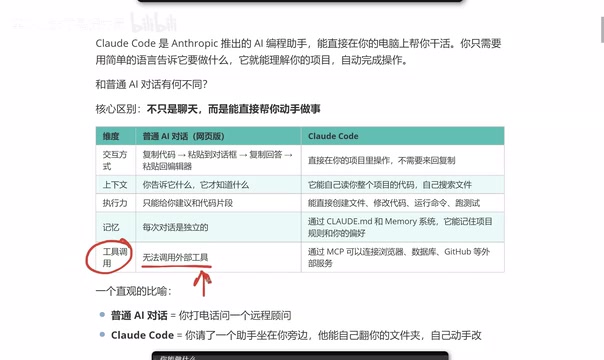
Regular AI chat essentially cannot invoke external tools (although GPT has some plugins, they have high barriers to use and some require payment).
Through the MCP (Model Context Protocol), Claude Code can directly connect to:
- Browsers (fetching web content)
- Databases (querying and modifying data)
- GitHub (managing repositories, PRs, Issues)
- Other external services
MCP is an open standard protocol released by Anthropic in late 2024, designed to establish a unified communication interface between AI models and external tools. Before MCP, every AI tool needed to develop separate integration interfaces to connect with external services, leading to severe ecosystem fragmentation. MCP uses a client-server architecture: Claude Code acts as the MCP client to initiate requests, while various external services (databases, GitHub, browsers, etc.) expose their capabilities through MCP servers. Developers can define tool input/output formats using the JSON-RPC protocol, and the AI model automatically selects the appropriate tool to invoke based on user intent. Similar to how the USB interface unified the connection method for various peripherals, MCP unifies how AI interacts with the external world. Currently, MCP has gained widespread community support, with thousands of open-source MCP server implementations covering common services from Slack and Notion to various databases.
Claude Code's Complete Capability Map
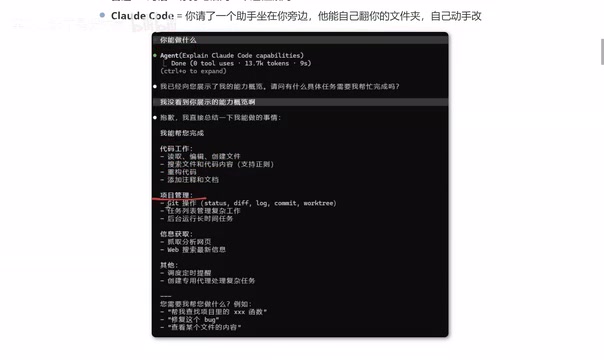
Based on real-world usage feedback, Claude Code's capabilities cover the following major areas:
Code Work: Read/edit/create files, search code content, refactor code, add comments and documentation
Project Management: Git operations (commit, branch, merge), task list management, running long-duration tasks in the background
Information Retrieval: Fetching and analyzing web pages, web search, real-time news
Advanced Features: Scheduled tasks, creating specialized agents for complex tasks
Claude Code vs Cursor: How to Choose?
As equally popular AI programming tools, Cursor and Claude Code are frequently compared. From a practical usage perspective:
- Token consumption: Claude Code is relatively more token-efficient, making long-term costs more manageable
- Output quality: In frontend development scenarios, Claude Code's generated results often better match expectations
- Learning curve: Cursor has a graphical interface that's more intuitive, while Claude Code's command-line operation requires some adaptation
Regarding cost, it's worth understanding the concept of tokens: a token is the basic billing unit for large language models, roughly equivalent to one English word or 2-3 Chinese characters. The cost of AI programming tools is primarily determined by input tokens (code and instructions sent to the model) and output tokens (responses and code generated by the model). Claude Code's advantage in token efficiency comes from several factors: first, intelligent context management that retrieves only necessary code snippets rather than sending everything; second, stronger task planning capabilities that reduce the number of revision rounds; and third, support for more cost-effective models like Claude 4 Sonnet. Anthropic offers both a Max subscription plan (approximately $100-200/month) and pay-per-use API pricing, allowing developers to choose the most economical option based on usage frequency. In comparison, Cursor uses a fixed monthly fee plus usage limits model, with additional charges when limits are exceeded.
The two are not entirely interchangeable — which one to choose depends on your usage habits and project needs. If you're already comfortable with Cursor and your workflow is smooth, there's no need to force a switch. But if you're pursuing higher token efficiency and more precise code generation, Claude Code is worth trying.
Summary
Claude Code represents the evolution of AI programming tools from "conversational consultant" to "hands-on assistant." Its core advantages lie in: deep understanding of project context, direct code execution, persistent memory of coding preferences, and flexible connection to external tools. For developers, this means less repetitive work and higher development efficiency.
Key Takeaways
Related articles
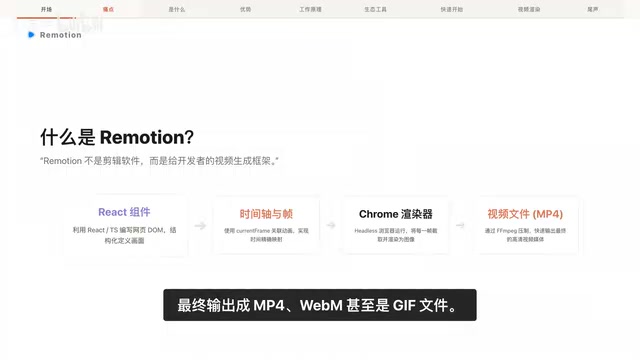
Remotion: The Open-Source Framework for Code-Driven Video Production with React
Deep dive into Remotion, the open-source framework for writing videos with React components. Covers core principles, use cases, comparison with traditional editors, and quick start guide.
Nex N2 Pro Real-World Testing: Top 5 on Official Benchmarks, Only 12th in Independent Tests
Deep-dive testing of Nex N2 Pro open-source Agent model comparing official benchmarks vs independent results. The 397B parameter model shows decent frontend generation but ranks 12th independently, not top 5 as claimed.
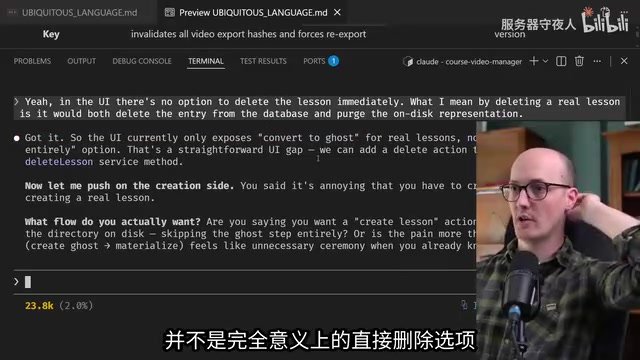
Claude Code Workflow in Practice: From Requirement Grilling to AFK Agent Auto-Coding
A detailed walkthrough of building real features with Claude Code: Grill Me requirement interrogation, auto-generated PRDs, AFK agent coding, and QA iteration loops with DDD and TDD strategies.