Claude Code vs Traditional AI Chat: An In-Depth Comparison Across Five Key Dimensions
A five-dimension deep dive comparing Claude Code's agentic approach to traditional AI chat tools.
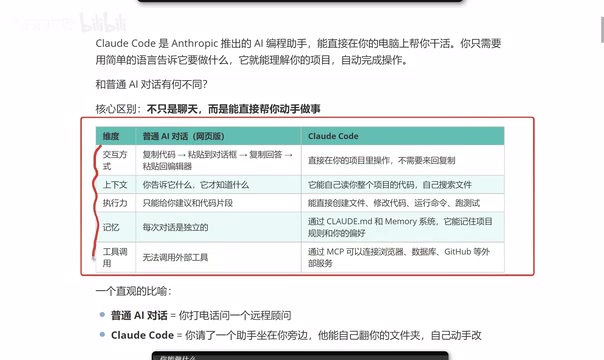
This article compares Claude Code with traditional AI chat tools like ChatGPT across five key dimensions: interaction model, context understanding, execution power, memory persistence, and tool integration via MCP. It explains how Claude Code moves beyond copy-paste workflows to directly operate within projects, and also compares it with Cursor to help developers decide which tool fits their needs.
Introduction: Why Did Claude Code Suddenly Blow Up?
Recently, Claude Code has been rapidly gaining traction in the developer community. Unlike the traditional AI chat tools we're familiar with—such as ChatGPT and DeepSeek—Claude Code isn't just a "chatbot." It's an AI programming assistant that can roll up its sleeves and work directly in your project.
Claude Code is developed by Anthropic and built on top of their Claude large language model as a command-line programming tool. Anthropic was founded by Dario Amodei, former VP of Research at OpenAI, among others, with "AI safety" as its core philosophy. The design philosophy behind Claude Code stems from a key insight: what developers truly need isn't a chat window, but an intelligent agent that understands project context and can execute actions directly. This shift from conversational AI to Agentic AI represents the broader industry trend moving from "tool-assisted" to "autonomous collaboration."
Here's a simple analogy: traditional AI chat is like calling a remote consultant on the phone—they're knowledgeable about everything, but you have to do all the work yourself. Claude Code, on the other hand, is like having an assistant sitting right next to you who can browse through your folders and modify code on their own.
This article will walk you through five core dimensions to help you thoroughly understand the fundamental differences between Claude Code and traditional AI chat tools, so you can decide whether it's worth making the switch.
Five-Dimension Comparison: Claude Code vs Traditional AI Chat
Dimension 1: Interaction Model — Say Goodbye to Copy-Paste
The typical workflow with traditional AI chat tools (like ChatGPT or DeepSeek) looks something like this:
- Copy code from your editor
- Paste it into the AI chat window
- Wait for the AI to generate a response
- Copy the code from the response back into your editor
This workflow isn't exactly complicated, but it's definitely tedious—especially when you need to debug frequently. Constantly switching windows and copy-pasting severely disrupts your development flow. Research shows that developers need an average of 15–25 minutes to regain deep focus after a context switch, and the hidden productivity cost of frequent window switching is far greater than most people realize.
Claude Code, on the other hand, runs directly in your project directory. All operations happen within the terminal, completely eliminating the copy-paste step. You simply tell it what to do in natural language, and it operates directly on your project files.
Dimension 2: Context Understanding — From "It Only Knows What You Tell It" to "Automatic Global Awareness"
A core pain point of traditional AI chat is limited context. It only knows what you tell it. If you forget to provide the code from a critical file, the AI's suggestions are likely to be inaccurate.
The technical root of this problem lies in the "context window" limitation of large language models. The context window refers to the maximum number of tokens a model can process in a single inference. Early GPT-3.5 supported only 4K tokens (roughly 3,000 English words), and even after expanding to 128K or beyond, users still had to manually paste code into the chat window—the model couldn't proactively retrieve information that wasn't provided. More critically, even when the context window is large enough, the model's attention distribution across long texts is uneven. Research has found that models tend to pay more attention to the beginning and end of the input, while the middle portion is easily "forgotten"—a phenomenon known as the "Lost in the Middle" problem.
Claude Code takes a completely different approach—it can automatically read your entire project's codebase, proactively search for relevant files, and understand the overall structure and dependencies of your project. By running locally with file system access, it can read project files on demand and dynamically construct the most relevant context, rather than relying on fragmented information manually provided by the user. This means its suggestions and modifications are based on a holistic view of the project, not on the piecemeal information you happen to share.
Dimension 3: Execution Power — From "Giving Advice" to "Getting Things Done"
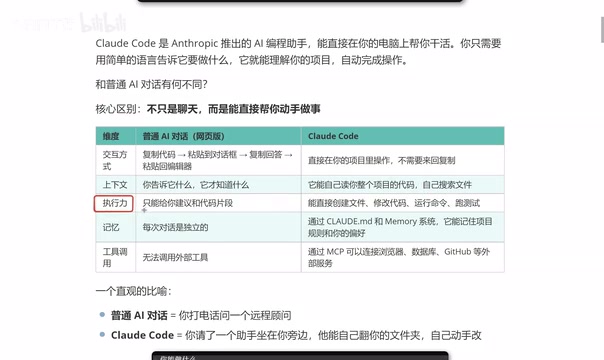
Traditional AI chat can only give you suggestions or code snippets, but a real project isn't a single file—it's composed of numerous files and complex code structures. After receiving a snippet from the AI, you still need to figure out where to put it, how to integrate it, and whether it conflicts with existing code.
Claude Code's execution capabilities are far more powerful. It can:
- Create files: Generate new project files directly
- Modify code: Make precise edits within existing files
- Run commands: Execute build, test, and other terminal commands
- Run tests: Automatically execute test suites and analyze results
This leap from "armchair strategizing" to "hands-on execution" is Claude Code's most critical competitive advantage. It's worth noting that Claude Code displays the changes it's about to make and requests confirmation before executing file operations. This "Human-in-the-Loop" design ensures AI autonomy while giving developers ultimate control, mitigating the risks that fully automated AI operations might introduce.
Dimension 4: Memory — Persistent Project Rules and Coding Style
Traditional AI chat has short-lived memory. Close the chat window and open a new one, and all previous context is lost. Every conversation is independent, forcing you to repeatedly explain the same background information.
Claude Code, through configuration files like CLAUDE.md, can remember your project rules and personal preferences. CLAUDE.md is essentially a "project manual" written in natural language. When Claude Code starts up, it automatically reads the CLAUDE.md file in the project root directory and injects its contents as a system-level prompt into every interaction. Developers can define their tech stack preferences (e.g., "This project uses TypeScript + React"), code style conventions (e.g., "Use functional components; class components are prohibited"), Git commit conventions, testing requirements, and more.
The elegance of this mechanism is that it makes a team's implicit knowledge explicit, enabling the AI assistant to follow team conventions like a newly onboarded team member—without needing verbal instructions every time. Things like your preferred code style, project tech stack conventions, and naming conventions can all be persisted. This means Claude Code gets better at "understanding you" over time, generating code that increasingly matches your habits.
Dimension 5: Tool Integration — MCP Connects the External Ecosystem
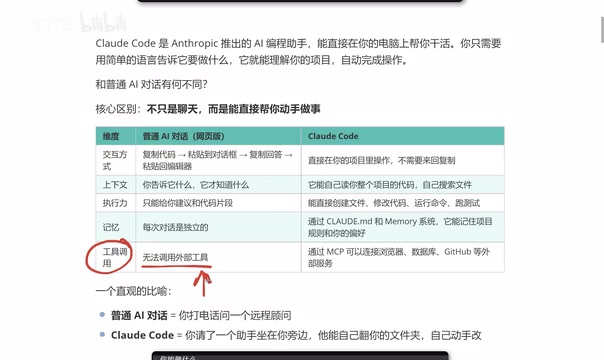
Traditional web-based AI chat has limited tool integration capabilities. While ChatGPT has introduced some plugins and external tools, the barrier to entry is relatively high, and some require additional payment.
Claude Code, through the MCP (Model Context Protocol), can directly connect to various external services. MCP is a standardized protocol open-sourced by Anthropic in late 2024, designed to establish a unified communication interface between AI models and external tools. Before MCP, every AI tool that needed to integrate with external services (such as databases, APIs, file systems, etc.) required custom adapter code, leading to severe ecosystem fragmentation. MCP uses a client-server architecture: the AI application acts as the client making requests, while external tools expose their capabilities by implementing an MCP server. This is similar to how the USB protocol unified peripheral interfaces—with MCP, any tool supporting the protocol can be plug-and-play for AI invocation.
There are currently hundreds of community-developed MCP servers covering mainstream development tools and services:
- Browsers: Scrape and analyze web content
- Databases: Directly query and manipulate data (e.g., PostgreSQL, MySQL)
- GitHub: Manage repositories, commit code, handle PRs
- Other services: Slack, Notion, Jira, and virtually any tool that supports MCP
This open tool ecosystem extends Claude Code's capabilities far beyond what traditional AI chat can offer.
Claude Code's Complete Capability Map
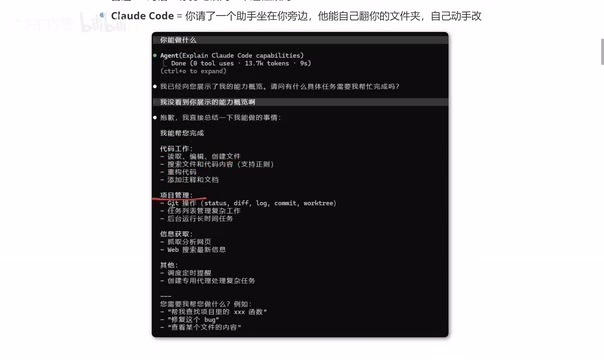
When you first launch Claude Code and ask it "What can you do?", it provides a comprehensive list of capabilities:
Code Work:
- Read, edit, and create files
- Search files and code content
- Refactor code, add comments and documentation
Project Management:
- Git operations (commit, branch, merge, etc.)
- Task list management
- Run long-running tasks in the background
Information Retrieval:
- Scrape and analyze web pages
- Web search for the latest information
Advanced Features:
- Scheduling and timed reminders
- Create dedicated agents for complex tasks
For developers, this covers virtually every scenario in day-to-day development.
Claude Code vs Cursor: How to Choose?
Many developers ask: I've been using Cursor—should I switch to Claude Code now?
To understand this question, you first need to know the technical approach each takes. Cursor is a deeply customized AI code editor based on VS Code, developed by Anysphere. Its core idea is to embed AI capabilities into a graphical IDE, offering code completion (Tab), inline editing (Cmd+K), and conversational programming (Chat), with support for multiple underlying models (including GPT-4, Claude, etc.). Claude Code, on the other hand, takes a pure command-line approach with no graphical interface—all interactions happen in the terminal. The difference fundamentally reflects two design philosophies in AI programming tools: Cursor aims to "enhance the existing IDE experience" and lower the barrier to entry, while Claude Code aims to "maximize AI autonomy" and give AI more complete control over the project. For developers accustomed to GUI operations, Cursor has a gentler learning curve; for those comfortable with the command line who need to handle complex multi-file tasks, Claude Code may be more efficient.
From a practical usage standpoint, both have their strengths. Whichever one you're proficient with, stick with it—there's no need to force a switch. However, Claude Code has one notable advantage worth paying attention to: more efficient token consumption. Tokens are the basic unit of measurement for how large language models process text—one English word typically corresponds to 1–2 tokens, and one Chinese character typically corresponds to 1–2 tokens. In traditional chat mode, users often need to include large amounts of code context in their prompts, and multi-turn conversations cause historical messages to be repeatedly transmitted, resulting in redundant token consumption. Since Claude Code can directly access the local file system, it can more precisely read relevant code snippets on demand, avoiding redundant context transmission. When completing tasks of equivalent complexity, Claude Code's token usage is relatively more economical. Currently, Claude Code uses Anthropic's subscription or API billing model—users can choose a Max subscription plan ($100 or $200 per month) or use an API Key with pay-as-you-go billing, offering considerable flexibility.
Additionally, for front-end developers, some users have reported that Claude Code's output better matches expectations, with higher code quality and style alignment. Of course, this may vary from person to person, so it's best to try it yourself before making a judgment.
Conclusion
Claude Code represents an important evolutionary direction for AI programming tools: moving from "conversational suggestions" to "embedded collaboration." It's no longer an external tool you need to constantly switch to and from—it's a smart assistant that truly integrates into your development workflow.
From a broader perspective, the Agentic Coding trend that Claude Code represents is reshaping the software development paradigm. Traditional AI-assisted programming (such as code completion and chat-based Q&A) is fundamentally still a "human-driven, AI-assisted" model, while tools like Claude Code are evolving toward a "human defines the goal, AI executes autonomously" model. This doesn't mean developers will be replaced—rather, the developer's role will gradually shift from "code writer" to "architecture designer" and "AI collaboration manager."
If you're a developer—especially a full-stack or front-end engineer who frequently works on complex projects—Claude Code is worth your time to try. It may not completely replace your existing toolchain, but it will certainly become a powerful addition to it.
Related articles
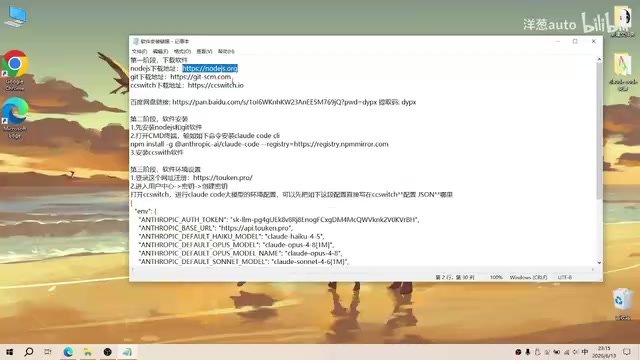
Complete Guide to Installing Claude Code CLI in China: Four Simple Steps
Step-by-step guide to installing Claude Code CLI in China using Node.js, Git, CC Switch, and an API relay service to bypass Anthropic's access restrictions.

The Compute Crisis: Why Google and Anthropic Are Paying SpaceX a Premium to Rent GPUs
Microsoft, Google, and Anthropic face severe compute shortages. Anthropic pays SpaceX $1B/month for GPUs. From TSMC capacity to HBM, storage, and power, the AI supply chain is in full crisis.
Mistral Le Chat Image Generation Review: Can It Replace Fable?
Mistral AI launches image generation in Le Chat, dubbed Le Chaton Fat. We analyze its capabilities, compare it with Fable, and explore the trend of AI chat platforms integrating image generation.