Complete Guide to Installing Claude Code CLI in China: Four Simple Steps
A four-step guide to installing and configuring Claude Code CLI in China using CC Switch and API relay services.
This tutorial walks through the complete process of installing Claude Code CLI in China, where Anthropic's direct access is restricted. The four-step approach covers installing Node.js, Git, and CC Switch, then configuring an API relay service to route Claude Code's requests through an accessible endpoint. The guide also covers model selection advice, cost control tips, and common troubleshooting.
For developers in China, many want to try out Anthropic's Claude Code CLI but get stuck at the installation and configuration stage. Due to Anthropic's access restrictions for users in China, the tool won't work properly after a direct installation. Based on a hands-on tutorial from a Bilibili creator, this article presents a complete installation guide that uses CC Switch and an API relay service to get Claude Code CLI up and running in four steps.
Overall Strategy: Four Steps to Install Claude Code
The entire installation process breaks down into four steps:
- Download software: Prepare three essential tools — Node.js, Git, and CC Switch
- Install software: Install them in the correct order
- Configure the environment: Set up CC Switch and the API relay service
- Launch and verify: Confirm that Claude Code can successfully call the LLM
The most critical part is Step 3 — environment configuration — which is also where most people run into trouble. Let's walk through each step.
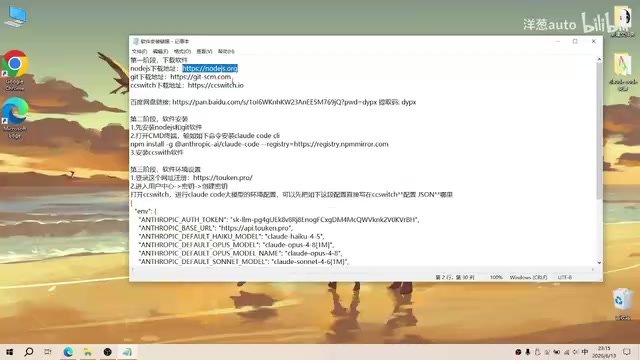
Step 1: Download the Three Essential Tools for Claude Code CLI
Node.js — The Runtime Environment
Node.js is the programming runtime environment for Claude Code CLI — without it, Claude Code simply cannot start. Node.js is a JavaScript runtime built on Chrome's V8 engine that allows JavaScript code to run on servers or local machines outside of a browser. Since Claude Code CLI is essentially a command-line application written in JavaScript/TypeScript, it relies on Node.js to parse and execute its code.
Head to the official Node.js website and download the installer for your operating system. It's recommended to choose the LTS (Long Term Support) version for better stability. LTS versions typically release a new major version every two years and receive up to 30 months of maintenance support, making them ideal for production use; the Current version includes the latest features but is slightly less stable. Installing Node.js also includes npm (Node Package Manager), which is Node.js's package management tool — similar to Python's pip or Java's Maven. You'll need npm later to install Claude Code CLI.
Git — Version Control Tool
Claude Code's core use case is programming, and the official recommendation is to use it alongside Git. Git is a distributed version control system developed by Linus Torvalds (the creator of Linux) in 2005, and it's currently the world's most widely used code version management tool. Its core function is tracking every modification to files, allowing developers to freely switch between versions, create branches for parallel development, and quickly roll back to a previous stable state when issues arise.
As an AI coding assistant, Claude Code frequently creates, edits, and deletes files when modifying code. Using Git ensures that every AI modification is traceable — if AI-generated code causes problems, developers can use git diff to see exactly what changed, or use git revert to undo an entire batch of modifications. This is why Anthropic officially and strongly recommends using Claude Code within a Git repository. Simply download the Windows installer from the official Git website.
CC Switch — The Key Tool for Bypassing Access Restrictions
CC Switch is the core of this entire solution. Since Anthropic doesn't allow users in China to directly call the Claude LLM, installing CC Switch lets you route the model API calls from the Claude Code Agent to a domestically accessible API relay service.
CC Switch's working principle is essentially an API request proxy or redirection mechanism. When Claude Code CLI runs, it sends HTTP requests to Anthropic's official API endpoint (api.anthropic.com) to call the Claude LLM. CC Switch redirects these requests to a user-specified third-party API endpoint by modifying environment variables or intercepting network requests. Technically, this is similar to a Reverse Proxy — the relay server receives the request, makes the actual API call to Anthropic's servers on behalf of the user, and then returns the response back through the same path.
Here's an important recommendation: Try to choose a relay service that provides Claude models, rather than substituting with other LLMs. The reason is simple — Claude Code's Agent is specifically designed and optimized for the Claude LLM, and the two work best together.
More specifically, Claude Code is not a simple chatbot but an AI programming tool built on an Agent architecture. Agent mode means the AI can not only answer questions but also autonomously plan tasks, invoke tools (such as reading/writing files, executing terminal commands, searching codebases), observe execution results, and adjust its next actions accordingly. This loop is known as the ReAct (Reasoning + Acting) paradigm. Claude Code's Agent contains carefully designed System Prompts and Tool Definitions, all tailored to Claude model's response characteristics and capability boundaries. For example, Claude models have particularly strong comprehension of tool calls formatted with XML tags, while other models may parse this format differently. While it's theoretically possible to connect to domestic models like DeepSeek, the actual experience may be degraded due to differences in underlying prompt engineering compatibility.
Step 2: Install Node.js, Git, and Claude Code in Order
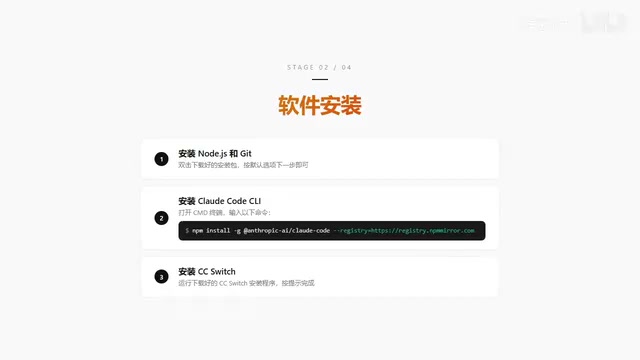
The installation order matters — make sure to follow these steps:
Install Node.js and Git
Both of these are straightforward to install — just open the installer and click Next with default settings throughout. For Git, you can modify the installation path if needed, but keep all other options at their defaults.
After installation, open a terminal to verify everything installed correctly:
node -v    # Should display the Node.js version number
npm -v     # Should display the npm version number
git --version  # Should display the Git version number
If all three commands return version numbers, the base environment is successfully installed.
Install Claude Code CLI via npm
Claude Code CLI itself is installed via an npm command. Enter the following in your terminal:
npm install -g @anthropic-ai/claude-code
The -g flag means global installation, which allows you to use the claude command from any directory, not just a specific project folder. npm will download the Claude Code CLI package and all its dependencies from the official registry (registry.npmjs.org) and complete the installation automatically.
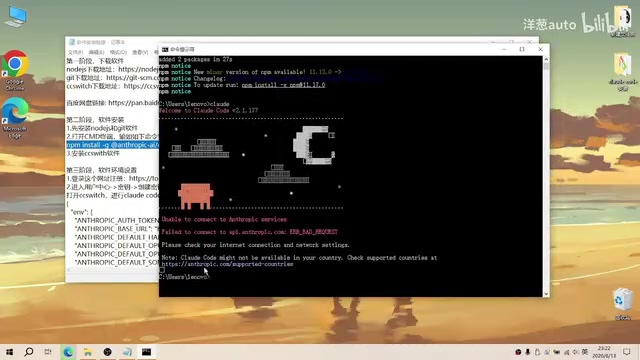
The installation is quite fast. Once complete, type claude to launch it. Under normal circumstances, you'll see a welcome screen, but it will indicate that it cannot be used — this is because a usable API endpoint hasn't been configured yet.
Install CC Switch
Open the CC Switch installer and follow the default Next prompts to complete the installation.
Step 3: CC Switch Environment Configuration (The Critical Step)
This is the most important step in the entire process. You need to accomplish three things: configure CC Switch, register with an API relay service, and enter the API key.
Configure CC Switch Custom Endpoint
After opening CC Switch, perform the following operations:
- Remove the default official endpoint: The official API endpoint is inaccessible from China, so remove it first
- Add a custom endpoint: Select "Custom Configuration" and add a new API provider
- Fill in provider details: Including provider name, website URL (optional), and request chain address (required)
- Paste JSON configuration: Copy the corresponding JSON configuration file content into CC Switch's configuration dialog and click Save
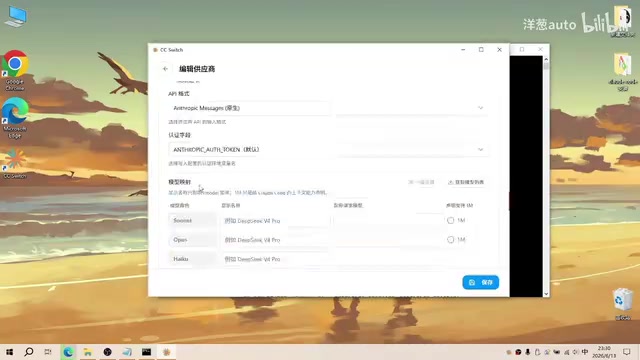
The JSON configuration file defines the specific format of API requests, including headers, authentication methods, model name mappings, and other key information. Different relay services may require different configuration formats, so be sure to follow the documentation provided by your chosen relay service.
Register with an API Relay Service and Obtain a Key
The tutorial uses a relay service called "Token Store." After registering an account, go to your profile page:
- Navigate to the API Key management page
- Create a new API Key with an easily identifiable name (e.g., "Claude Code CLI Key")
- Copy the generated API Key
The API Key is the credential for accessing the relay service — similar to a password. Keep it safe, and never share it with others or upload it to public code repositories.
Enter the API Key and Save Configuration
Paste the copied API Key into the corresponding input field in CC Switch, leave other settings unchanged, and click Save. At this point, you can test whether the model configuration is working.
Note: API relay services are typically paid services, billed by Token usage. Tokens are the basic units that large language models use to process text — they don't simply correspond to individual characters or words. For English text, one Token is roughly 4 characters or 0.75 words; for Chinese text, one Chinese character is typically encoded as 1-2 Tokens. API call costs consist of input Tokens (content sent to the model) and output Tokens (the model's generated response), with output Token pricing typically 3-5x that of input Tokens.
It's especially important to note that Claude Code's Token consumption during actual use far exceeds that of ordinary chat scenarios, because each interaction carries a large amount of context information, including system prompts, file contents, tool call results, and more. A single complex code modification task can consume tens of thousands or even hundreds of thousands of Tokens. Before using the service, make sure you understand the relay service's specific pricing, and set usage limits if necessary to control costs.
Step 4: Launch Claude Code CLI and Verify
With all configuration complete, enter the claude command in your terminal again to launch Claude Code CLI. This time, you should be able to enter the working interface normally, without the previous restriction messages.
Type a simple question to test whether the LLM call is working properly. If you see the model start thinking and producing output, the entire configuration process has been completed successfully. In the tutorial's verification, the Claude Opus 4 model was used, with Extended Thinking mode supported, and responses were normal.
Extended Thinking is an advanced reasoning feature that Anthropic introduced for Claude models. When enabled, the model performs an internal Chain of Thought reasoning process before generating its final answer — this thinking process is visible to the user, similar to how humans use scratch paper when solving complex problems. In programming scenarios, Extended Thinking is particularly valuable — the model first analyzes code structure, traces dependencies, considers edge cases, and then provides its modification plan. However, note that Extended Thinking consumes more Tokens, which means higher costs when using it through a relay service.
Common Issues and Tips for Claude Code Installation
About Model Selection
Although CC Switch supports routing requests to different LLMs, it's strongly recommended to use Claude series models. Claude Code's prompt engineering and tool-calling logic are all optimized for Claude models — switching to other models may cause functionality issues or degraded performance. Specifically, Claude Code internally uses extensive structured prompts to guide the model in correctly invoking tools for file reading/writing, command execution, and more. The format and phrasing of these prompts are carefully tuned based on Claude model's training characteristics. Even if a replacement model is highly capable on its own, differences in how it interprets specific prompt formats may lead to tool call failures, garbled output formatting, and other issues.
About Network Environment
Even with a relay service, some operations (like npm installation) may still require a stable network connection. If npm installation is too slow, consider switching to a domestic mirror:
npm config set registry https://registry.npmmirror.com
This command switches npm's default download source from the international official registry to a domestic Taobao mirror, which can typically improve download speeds by several times or even tenfold. If you need to restore the official source later, simply run npm config set registry https://registry.npmjs.org.
About Software Download Sources
If downloading software from official websites is difficult, you can look for Baidu Netdisk backup links provided by the tutorial creator. However, it's recommended to download from official channels whenever possible to ensure software security and the latest versions.
About Cost Control
Since Claude Code has high Token consumption, it's recommended to set daily or monthly usage limits in the relay service dashboard. You can also use the /compact command within Claude Code to compress conversation context and reduce unnecessary Token consumption. When working on large projects, try to break tasks into small, specific instructions rather than having the AI process too many files at once — this improves success rates and effectively controls costs.
Conclusion
The core challenge of using Claude Code CLI in China is the API access restriction, and the CC Switch + API relay service approach provides a viable solution. The installation process itself isn't complicated — the key is understanding what each component does: Node.js provides the JavaScript runtime environment so Claude Code CLI can execute locally; Git assists with code version management, ensuring AI modifications are traceable and reversible; CC Switch handles API request routing, redirecting requests originally destined for Anthropic's official servers to the relay service; and the relay service acts as an intermediary proxy, providing a domestically accessible model endpoint. By installing and configuring everything in the correct order, you can smoothly experience Claude Code's powerful programming capabilities from within China.
Related articles
Claude Generates 10 Web Games from One-Line Prompts: Zero-Code AI Programming in Action
Use Claude Code to generate 10 web games like 2048, Gomoku, and Tetris from one-line prompts — zero manual coding. A full walkthrough of AI programming in practice.

Cloning Successful Apps to $35K/Month: An Indie Developer's Validation-First Methodology
A former optometrist self-taught coding and earns $35K/month by cloning validated apps. Learn his 4-step screening, data-driven validation, and growth strategy.

The Compute Crisis: Why Google and Anthropic Are Paying SpaceX a Premium to Rent GPUs
Microsoft, Google, and Anthropic face severe compute shortages. Anthropic pays SpaceX $1B/month for GPUs. From TSMC capacity to HBM, storage, and power, the AI supply chain is in full crisis.