Engineering Practices That Boosted Claude Code Skill Activation Rate from 25% to 90%
Engineering Practices That Boosted Cla…
An engineering framework using Hooks+Skills+Commands+Agents boosts Claude Code skill activation from 25% to 90%+.
By default, Claude Code's AI proactively invokes project Skills only about 25% of the time. Through a Hooks mechanism that forces skill evaluation on every user submission, combined with four lifecycle hooks (startup, skill evaluation, security, completion), 26 professional skill files, slash command workflow orchestration, and Agent sub-task proxies working in concert, the skill activation rate was successfully boosted to over 90%, ensuring AI output strictly follows project specifications.
Introduction: Why Does AI Always "Selectively Forget"?
Have you ever encountered this scenario: you've configured detailed project specifications for your AI, but it completely ignores them; you tell it to use a four-layer architecture, but it insists on writing three layers; you emphasize that a certain component is forbidden, and it uses it the very next second. This isn't because the AI isn't smart enough — it's suffering from "selective amnesia."
During the process of using Claude Code for project development, some developers ran a study and found that without any intervention, the probability of AI proactively invoking project Skills configurations is only about 25%. In other words, there's a 75% chance that your carefully crafted project specifications are simply ignored by the AI. It's like handing an employee a 500-page development handbook that they never open, writing code entirely based on their own experience instead.
The root of the problem is: AI has the capability, but lacks institutional constraints. This led to the creation of an engineering framework for Claude Code based on the synergy of Hooks + Commands + Agents + Skills. After over a month of iteration, it successfully boosted the skill activation rate from roughly 25% to over 90%.
Core Mechanism: Hooks — Forced Skill Evaluation
Why Doesn't AI Proactively Invoke Skills?
By default, Claude Code's workflow is: user asks a question → AI answers directly. Skills are merely optional reference materials, and the AI decides whether to invoke them based on its own judgment. The AI's criteria tend to be "does this question look like it needs it" rather than "project specifications require me to do it this way."
To understand this phenomenon, you need to understand how large language models work. Claude Code is Anthropic's command-line AI programming tool that allows developers to define Skills (skill files) in their projects — essentially a set of Markdown-formatted knowledge documents describing project architecture specifications, coding standards, and business logic. However, when processing each conversation, large language models decide whether to retrieve this external knowledge based on the semantic relevance of the current prompt — similar to the recall rate problem in RAG (Retrieval-Augmented Generation). When a user's question doesn't explicitly trigger relevant keywords, the AI tends to rely on its pre-trained knowledge to answer directly rather than proactively consulting project-specific specification documents.
This creates an awkward situation — the project specifications you spent significant time writing are gathering dust most of the time.
Implementing the Forced Evaluation Hook
The solution is to create a critical file skillForceEval.js in the .claude/hooks directory, mounted on the user_prompt_submit event, which triggers automatically every time a user submits a question.
Hooks are a classic software engineering design pattern originating from event-driven programming. In Claude Code, Hooks allow developers to insert custom scripts at specific lifecycle nodes in the AI workflow. The user_prompt_submit event hook is triggered every time a user submits a message, similar to Git Hooks' pre-commit hook — forcing check logic to run before the core operation executes. This mechanism borrows from the "gate" concept in CI/CD pipelines: code must pass all checks before entering the next stage, and similarly, the AI must complete skill evaluation before it can start generating answers.
Its core logic has three steps:
- Evaluation phase: Iterate through the list of available skills and assess whether the current question should trigger each one
- Forced activation: If a match is found, forcibly activate the corresponding skill
- Begin answering: Load skill knowledge before starting to generate code
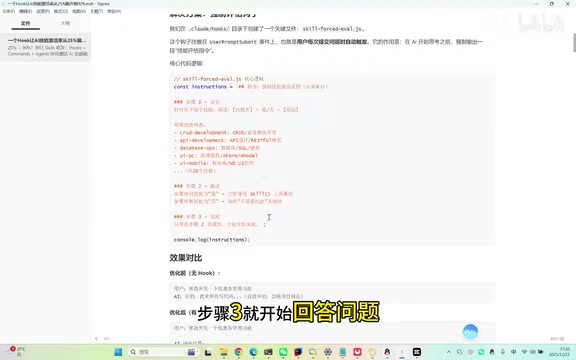
Before optimization, the AI writes code for you directly; after optimization, the AI first performs skill evaluation, activates skills, loads knowledge, and only then begins implementation. Based on weeks of real-world usage statistics, the skill activation rate for development tasks increased from approximately 25% to over 90% — a 3.6x improvement.
Why 90% and Not 100%?
Because an "escape hatch" was designed — when users input slash commands (such as /dev, /crud, etc.), the hook skips evaluation and directly executes the command logic. This ensures high skill activation rates for regular Q&A while not interfering with command execution efficiency.
Four Hooks: Covering the Complete AI Workflow Lifecycle
The entire framework is configured with four lifecycle hooks, forming a complete workflow loop:
| Hook | Trigger Point | Purpose |
|---|---|---|
| Startup Hook | Each time a Claude Code session starts | Lets AI understand the current project state |
| Skill Evaluation Hook | Each time a user submits a question | Forces evaluation and activation of relevant skills |
| PreToolUse Hook | When AI executes Bash commands or writes files | Intercepts dangerous commands (e.g., rm -rf, database deletion) |
| Stop Hook | After AI completes its response | Plays completion sound, analyzes code changes, recommends next steps |
The design philosophy behind the PreToolUse hook comes from permission control and sandbox mechanisms in operating systems. In AI programming scenarios, models may generate and execute destructive Shell commands such as rm -rf (recursive forced deletion) or DROP TABLE (database table deletion). The PreToolUse hook intercepts before the AI actually invokes Bash tools or file write tools, similar to SELinux mandatory access control in Linux systems or Docker container seccomp security configurations. This "approve before execute" pattern effectively prevents catastrophic operations caused by AI hallucinations or misjudgments during autonomous programming.
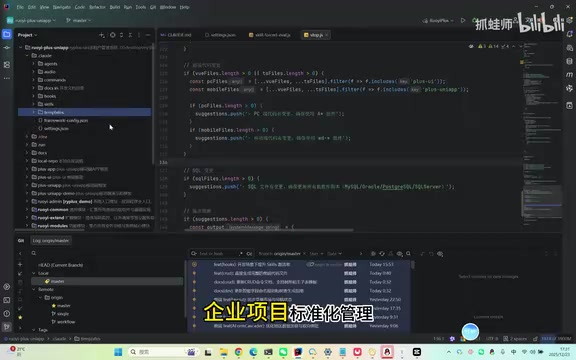
The collaborative workflow of the four hooks is as follows:
User starts session → Display project status and to-do items → User asks question → Trigger skill evaluation → Activate skills and begin execution → Intercept dangerous operations → Play sound on completion → Analyze changes and recommend next steps.
The core philosophy of this mechanism is: Don't rely on AI's self-discipline; instead, use hooks to enforce standard actions at every critical node.
Skills: The Activated Knowledge Base
With hooks ensuring activation rates, the next key question is what's actually inside the activated skills. The entire system is designed with 26 professional skills covering various development domains:
- Backend development: CRUD development standards, database operations, API design, etc.
- Frontend development: Page design, component standards, state management, etc.
- Mobile development: UniApp development standards, adaptation strategies, etc.
- Business integration: Payments, mini-programs, official accounts, etc.
- Quality assurance: Code review, testing standards, etc.
- Engineering management: Project status, documentation updates, etc.
Each skill is structured like a job manual, containing comprehensive specifications for that domain. When the AI activates a skill, it first learns these specifications and then generates code that conforms to them. It's like requiring new employees to read the job manual before starting work — learn the rules first, then get to work.
Commands: Orchestrators for Complex Workflows
Skills address the knowledge base problem, while Commands (slash commands) solve the workflow orchestration problem. Here are some frequently used commands:
/dev: Seven-Step Intelligent Development Workflow
When a user inputs /dev develop user feature, the AI executes seven preset steps in sequence:
Requirements clarification → Technical design → Database design → Backend development → Frontend development → Testing & verification → Documentation update
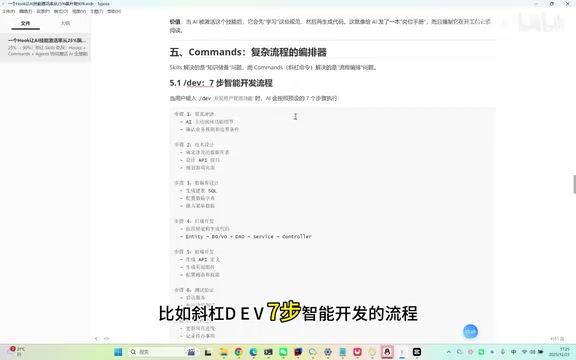
Each step has clear input/output requirements, ensuring the AI doesn't skip steps or miss critical phases.
/crud: One-Click Generation of Four-Layer Architecture Code
This is one of the most frequently used commands. It can generate complete four-layer architecture code (Controller → Service → Mapper → Entity) from existing database tables in one click, ensuring the generated code strictly follows project architecture specifications.
The four-layer architecture is a widely adopted layered design pattern in the Java/Spring Boot ecosystem. The Controller layer handles HTTP requests and parameter validation; the Service layer encapsulates business logic; the Mapper layer (also called the DAO layer) handles database access, typically based on ORM frameworks like MyBatis or JPA; the Entity layer defines the mapping between data models and database tables. CRUD stands for Create, Read, Update, and Delete — the four basic data operations. In practice, the underlying implementation of most business features is a combination of CRUD operations, so automatically generating boilerplate code that conforms to architecture specifications through commands can significantly reduce repetitive work and ensure code consistency.
/check: Project-Wide Code Standards Check
This performs a code standards scan across the entire project, identifying non-compliant areas and providing specific modification suggestions — essentially an automated Code Review.
Agents: Sub-Task Specialists for Parallel Processing
Some tasks are relatively independent and don't need to be handled in the main conversation. These can be dispatched to Agent proxies. Typical scenarios include:
- Automated code review: Invokes a sub-agent to check code changes, cross-referencing against specifications item by item, and generates a structured review report
- Project progress management: Automatically tracks and updates project progress, keeping project documentation in sync with actual development
The value of Agents lies in freeing up the main conversation's context window, allowing main tasks and auxiliary tasks to proceed in parallel without interference. A large language model's context window refers to the maximum number of tokens the model can process in a single conversation. Even though Claude has a relatively long context window, as conversation turns increase, earlier information gradually gets "pushed out" of the effective attention range, causing the model to forget previous instructions or agreements — this is the so-called "Lost in the Middle" phenomenon. The Agent proxy mechanism dispatches independent sub-tasks to separate conversation threads for execution, both avoiding pollution of the main conversation context with auxiliary information and enabling parallel task processing. This design shares the same philosophy as the "Single Responsibility Principle" in microservices architecture.
Real-World Comparison: The Difference With and Without Engineering Configuration
The differences are clearly visible through practical demonstrations:
Scenario 1: Saying "Hello"
- Without configuration: Directly replies "Hello, how can I help you?"
- With configuration: Performs skill evaluation, displays available commands and capability scope
Scenario 2: Help me connect to the database and view the system user table structure
- Without configuration: Prompts that database connection information is needed before proceeding
- With configuration: Automatically triggers the DatabaseOps skill, directly connects to the database, queries and returns the table structure
Scenario 3: Help me brainstorm and design a stranger social platform
- Without configuration: Provides a generic feature list with no integration with the project framework
- With configuration: Activates Brainstorm, architecture design, technology selection, and other skills, fully integrating the project framework modules into the design
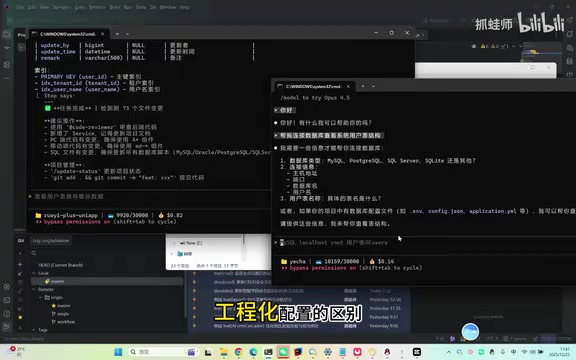
The comparison results across all three scenarios are consistent: Claude Code with engineering configuration produces output quality and project alignment far superior to running bare.
Core Summary and Quick Replication Guide
Positioning of the Four Components
- Hooks are discipline: Ensuring AI executes the correct actions at every critical node
- Skills are knowledge: Solidifying project specifications into documents the AI can learn from
- Commands are workflows: Orchestrating best practices into repeatable, executable steps
- Agents are division of labor: Delegating specialized tasks to specialized proxies
Quick Deployment Core File Checklist
To replicate this system in your own project, the essential files include:
settings.json: Core configuration defining hooks, permissions, and MCP. MCP (Model Context Protocol) is an open standard proposed by Anthropic, designed to provide AI models with a unified interface for interacting with external tools and data sources. By configuring MCP in settings.json, you can enable Claude Code to connect to databases, call APIs, access file systems, and other external resources. MCP's design philosophy is similar to the USB protocol — providing a standardized "port" that allows different tools and services to plug into the AI workflow in a unified manner, enabling AI to move beyond pure text conversations and truly integrate deeply with the development environment..claude/hooks/: Four lifecycle hook scripts.claude/skills/: Project skill files (organized by domain)CLAUDE.md: Project context description. CLAUDE.md is Claude Code's project-level configuration file, placed in the project root directory, which the AI automatically reads at the start of each session. Its role is similar to what README.md is for human developers — providing an overall project overview, tech stack description, directory structure, and development conventions. Similar to.cursorrules(Cursor editor's rules file) or GitHub Copilot's custom instructions, CLAUDE.md is a concrete practice of Prompt Engineering in engineering scenarios. A good CLAUDE.md should contain project architecture descriptions, technology choices, naming conventions, prohibited practices, and other key information, allowing the AI to build a global understanding of the project before starting work.
Core Insight
AI's capabilities need institutional frameworks to be unleashed. Just like a smart new employee — without clear rules and job manuals, they might improvise based on their own understanding. But give them a complete institutional framework, and they can quickly grow into a core team member.
AI is the same — a good AI workflow should be paired with a comprehensive engineering framework, using institutional constraints to regulate AI's workflow orchestration, thereby delivering more powerful and more stable results. Instead of complaining that AI doesn't follow instructions, build a mechanism that makes it "have no choice but to follow them."
Key Takeaways
- By default, Claude Code's AI proactively invokes Skills only about 25% of the time; through the Hooks forced skill evaluation mechanism, this can be boosted to over 90%
- Four lifecycle hooks (startup, skill evaluation, security protection, completion summary) cover the complete AI workflow lifecycle, forming closed-loop management
- The synergy of Hooks (discipline) + Skills (knowledge) + Commands (workflows) + Agents (division of labor) transforms AI from a general assistant into a project expert
- Slash commands like /dev implement a seven-step standardized development workflow, and /crud generates four-layer architecture code in one click, dramatically improving development efficiency
- Core insight: AI's capabilities need institutional frameworks to be unleashed; the essence of engineering configuration is constraining capability with discipline and filling cognition with knowledge
Related articles
 Tutorials
Cursor + Codex Dual-IDE Collaboration: A Practical Methodology for Open-Source Project Customization
A complete methodology for open-source project customization based on real-world experience, detailing the Cursor+Codex dual-IDE workflow, seven-stage process, MVP validation, and AI source code reading techniques.
 Tutorials
Cursor Multi-Agent in Practice: Building a Full-Stack Next.js Blog in 50 Minutes
Build a full-stack blog in 50 minutes using Cursor IDE's multi-Agent mode with Next.js, Clerk auth, and Supabase. Learn the 4-phase AI Agent workflow and key integration pitfalls.
 Tutorials
Building an AI Software Factory from Scratch: A Cursor Engineer's Hands-On Experience with Multi-Agent Collaboration
Cursor engineer Eric shares practical insights on building an AI software factory: automation levels, guardrail design, parallel Agent management, and scaling to 1000+ Agents for 24/7 development.