Claude Code Keeps Forgetting Everything? Build an AI Project Manager with 3 Documents and 4 Commands
Claude Code Keeps Forgetting Everythin…
Transform AI coding assistants into project managers with memory using 3 documents and 4 commands.
This article addresses the pain point of AI coding assistants like Claude Code losing context with every new session. It proposes a standardized project management system: three documents (requirements doc, project status, todo list) form the AI's "long-term memory," while four slash commands (/start, /progress, /next, /update status) drive automated project management. A hands-on demo building a dating platform from scratch showcases multi-window parallel development and other efficient workflows, achieving approximately 13x efficiency improvement.
Why Your AI Coding Assistant Keeps "Losing Its Memory"
Many developers have encountered this frustrating scenario with Claude Code: every time you open a new window, the AI has no idea where you left off; it knows nothing about your project's modules; and you have to re-explain yesterday's completed work all over again. You finish a feature but forget to update the docs, team members have no visibility into each other's progress — all these problems stem from a single root cause: no unified project state management.
This "amnesia" fundamentally originates from the context window limitations of Large Language Models (LLMs). Every LLM can only process a limited number of tokens in a single conversation — while Claude's context window has expanded to the 200K token level, previous conversation history doesn't automatically carry over when you start a new session. This is similar to "stateless" architecture in traditional software: each HTTP request is independent, and the server doesn't remember the previous request's content. The solution is analogous too — just as web applications use Sessions, Cookies, or databases to maintain state, AI coding assistants need externalized persistent storage (i.e., documents) to maintain project context.
The core insight is this: no matter how powerful the AI is, it needs context. It can write code and debug errors for you, but it doesn't know what stage the project is at, what modules exist, or what happened yesterday. The solution is to provide the AI with standardized project management context, upgrading it from a "code assistant" to a "project manager."
Core Architecture: 3 Documents + 4 Commands
Three Documents: Giving AI Complete Memory
The foundation of standardized project management consists of three key documents that together form the AI's "long-term memory." This approach aligns with the emerging concept of Context Engineering. Context Engineering is a core concept in AI development during 2024-2025, popularized by Andrej Karpathy and others. It refers to the systematic design, organization, and management of contextual information provided to AI models to maximize output quality. Unlike early "Prompt Engineering," which focused on optimizing the wording of individual prompts, Context Engineering addresses the entire information architecture: which documents should be loaded, in what order they should be presented, and how to maintain consistency across multiple interactions.
1. Requirements Document (What to Build)
The requirements document ensures the team is aligned on requirements, allows the AI to correlate code implementation with requirements, and makes requirements traceable. Every feature requirement has a clear description and acceptance criteria.
2. Project Status Document (Where We Are)
This is the most critical document in the entire system. It records completed, in-progress, and pending tasks, with the key feature being automatic AI updates. Each task includes completion time, duration, and description. Progress is organized by module, categorized by business domain, and includes completion percentages. Through this document, you always have a complete picture of the project.
3. Todo List (What's Next)
Tasks are organized by priority across three levels — high, medium, and low — along with lists of in-progress and recently completed tasks. It serves as the basis for AI-driven intelligent task scheduling.
Four Commands: Turning AI into a Project Manager
With the document foundation in place, four commands drive AI project management. These commands are implemented through the Slash Commands mechanism in Claude Code, which are essentially Markdown files stored in the .claude/commands/ directory at the project root. Each file contains predefined prompt templates and execution logic. When a user inputs a command, Claude Code reads the corresponding command file and merges its instructions with the current project context before sending it to the model. The advantage of this mechanism is that commands can be version-controlled (included in the Git repository), allowing team members to share the same workflow and ensuring consistent AI interactions for everyone.
-
/start— Quickly understand project status. When opening a new window, returning from a break, or continuing development the next day, a single command gets you into working mode. It reviews recent Git history, checks code status, scans business modules, and counts TODO and FIXME occurrences. -
/progress— View detailed project progress. The AI automatically generates progress reports that can be sent directly to product managers — no more manual tallying. -
/next— Get suggestions for the next step. Not sure what to work on? Let the AI prioritize for you. Instead of vague advice like "continue development," it provides specific guidance like "complete the XX method in XX file," while also scanning TODO comments and considering dependency relationships (complete the Service before the Controller). These dependency relationships follow standard Java backend layered architecture principles — the Controller layer depends on Service layer interface definitions, and the Service layer depends on Mapper/DAO layer data access methods. If the generation order is reversed, the code won't compile. -
/update status— Automatically update project status. This is the most powerful feature — after completing a feature, a single command automatically updates all documents. The AI reads existing documents, reviews the latest Git commits, scans business modules, calculates completion rates, and intelligently updates the documentation.
Hands-On Demo: Building a Dating Platform from Scratch
Step 1: Let AI Analyze Requirements and Business Model
In the practical demonstration, the author started from a simple idea — "develop a stranger dating platform" — built on a self-developed RuoYi Plus framework. RuoYi is a widely-used open-source Java rapid development platform in China, built on Spring Boot and Vue.js, providing enterprise-grade foundational features like permission management, code generation, and system monitoring. RuoYi Plus is its enhanced version, typically integrating more middleware support (such as MyBatis-Plus, Sa-Token, Redis, etc.) and a more standardized code structure. The core value of such frameworks lies in standardizing 80% of common functionality (user authentication, role permissions, CRUD templates, data dictionaries), allowing developers to focus on the 20% of business logic. When AI works on such a framework, the framework's own code conventions and layering constraints serve as natural contextual constraints, significantly reducing the probability of AI generating non-standard code.
After entering the /dev command, simply tell the AI:
I want to develop a stranger dating platform, because the future will be a singles economy society. You need to help me organize complete WeChat Mini Program requirements, analyze the business model, and give me suggestions.
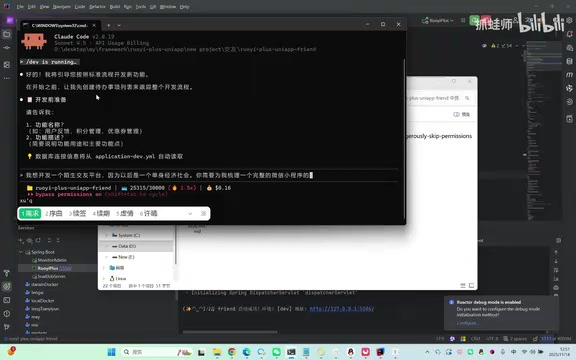
The AI immediately produced an extremely detailed plan: target user positioning (singles aged 18-35), user system design (WeChat login, facial recognition, real-name verification), matching system (geolocation, interest tags, partner preferences, activity weighting), interaction features, VIP membership tiers (Basic at 30 yuan/month, Premium at 88 yuan/month, Annual at 288 yuan), virtual currency system, offline event monetization, anti-fraud security mechanisms, and even cold-start strategies and competitive analysis.
Here's a notable detail: the AI even considered user retention risk — the problem of "users churning after finding a partner" — and suggested developing community features and couple-oriented social functions to address it. This level of comprehensiveness far exceeds typical requirements analysis.
Step 2: Initialize Documents and Generate the Database
After confirming requirements, entering /init docs initializes the project documents, and the AI automatically generates the three core documents — requirements document, project status, and todo list — based on templates. Key reminder: you should initialize documents immediately after requirements analysis is complete, so that the business model and requirement details the AI has worked through are fully preserved.
The AI then automatically designed a complete database structure covering user systems, matching recommendations, social modules, offline events, security operations, and more, generating SQL files accordingly.
Step 3: CRUD Code Generation and Multi-Window Parallel Development
Entering the /crud command, the AI connects to the database, reads the table structure, and generates backend code strictly following the framework's coding standards and layered architecture. CRUD stands for Create, Read, Update, and Delete — the four basic data operations that form the foundation of virtually every business system. In standard Java backend layered architecture, CRUD operations are typically divided into the Controller layer (receiving HTTP requests), Service layer (handling business logic), Mapper/DAO layer (database access), and Entity layer (data models). The AI must strictly follow these layering conventions when generating code to ensure clear structure and well-defined responsibilities. Frontend menus, dictionary data, and initialization tags (46 interest tags) are all completed automatically.
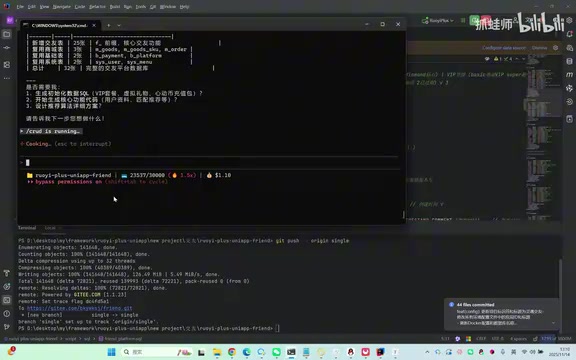
The most exciting part is the multi-window parallel development mode: open 5 Claude Code windows simultaneously, enter /next in each window to get task suggestions, and have each window handle a different module. Each window is essentially a programmer, massively multiplying a single person's output.
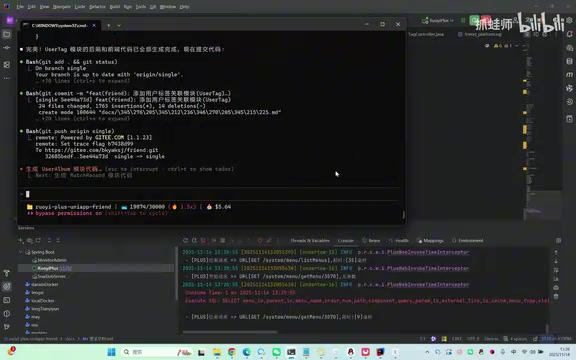
However, there's an important caveat: don't open too many windows at the beginning — beware of conflicts caused by multiple AI instances modifying the same file simultaneously. Multi-window parallel development is essentially similar to concurrency control in multi-threaded programming. When multiple Claude Code instances modify the same codebase simultaneously, you may encounter file-level conflicts (two windows modifying the same file) and logic-level conflicts (inconsistent interface definitions between two modules). While Git's merge mechanism can detect text conflicts, it cannot identify semantic conflicts. The industry best practice is to adopt a "module isolation" strategy: divide tasks along microservice or layered architecture boundaries, ensuring that the file sets each window operates on don't overlap. Additionally, frequent small-granularity commits (rather than large batch commits) can significantly reduce the cost of conflict resolution. It's recommended to split the todo list into multiple sub-lists, with each console corresponding to one, making the process both more efficient and safer.
Efficiency Comparison and Best Practices
Efficiency Improvement Data
| Dimension | Traditional Approach | Standardized Approach |
|---|---|---|
| Understanding project status | Digging through Git history, ~2 hours | /start, ~10 minutes |
| Progress reports | Manual tallying, based on gut feeling | /progress auto-generated |
| Task planning | Figure it out yourself, easy to miss things | /next AI-powered suggestions |
| Documentation updates | Often forgotten | /update status automatic updates |
| Team collaboration | 1-hour meetings | Review documents in 5 minutes |
Overall time efficiency improved approximately 13x, with accuracy increasing from about 60% to 72%.
Team Collaboration Best Practices
In multi-person collaboration, each member plays their role: Member A develops a feature then runs /update status to update progress; Member B uses /progress to check overall progress; Member C uses /next to get tasks and avoid conflicts; the project manager uses /progress to generate status reports.
Project handoffs are equally simple: new team members use /start to quickly understand the project, review the requirements document and project status in the Docs folder, then use /next to get their starting tasks and hit the ground running.
Automation Integration Suggestions
- Integrate
/update statusinto Git Hooks so documents are automatically updated with every commit. Git Hooks are built-in event hook mechanisms in the Git version control system that allow custom scripts to execute automatically before or after specific Git operations (such as commit, push, merge). Common hooks include pre-commit (run code checks before committing), post-commit (trigger notifications after committing), and pre-push (run tests before pushing). Integrating status updates into a post-commit Hook means the project status document is automatically updated via Claude Code after every code commit. In practice, this is typically implemented through Husky (for Node.js projects) or custom Shell scripts. - Use CI/CD pipelines (such as GitHub Actions, Jenkins, GitLab CI) to periodically generate progress reports, achieving a fully automated flow from code commits to document updates to report generation.
- Establish a unified team workflow:
/startevery morning, use commands as needed during development,/update statuswhen development is complete, and auto-generate weekly reports every Friday.
Core Takeaway: A Good Framework Is the Prerequisite for Efficient AI Development
The author repeatedly emphasizes one point: good AI must be paired with a good foundational framework. With a well-designed base framework, you can skip a huge amount of wheel-reinventing work, and the code AI generates on top of it is more elegant and maintainable. The context engineering built into the framework (development standards, hooks, document templates, standard commands) gives Claude Code persistent memory, eliminating the need to re-explain everything every time you open it.
The essence of this methodology is: using standardized documents and commands to transform AI from a stateless code generator into a project manager with memory, planning capability, and collaboration skills. Only when your project management is sufficiently standardized can AI's capabilities be truly unleashed.
Related articles
 Tutorials
Cursor + Codex Dual-IDE Collaboration: A Practical Methodology for Open-Source Project Customization
A complete methodology for open-source project customization based on real-world experience, detailing the Cursor+Codex dual-IDE workflow, seven-stage process, MVP validation, and AI source code reading techniques.
 Tutorials
Cursor Multi-Agent in Practice: Building a Full-Stack Next.js Blog in 50 Minutes
Build a full-stack blog in 50 minutes using Cursor IDE's multi-Agent mode with Next.js, Clerk auth, and Supabase. Learn the 4-phase AI Agent workflow and key integration pitfalls.
 Tutorials
Building an AI Software Factory from Scratch: A Cursor Engineer's Hands-On Experience with Multi-Agent Collaboration
Cursor engineer Eric shares practical insights on building an AI software factory: automation levels, guardrail design, parallel Agent management, and scaling to 1000+ Agents for 24/7 development.