Claude Design + GPT Image 2: A Complete Zero-to-Website AI Workflow Breakdown
Claude Design + GPT Image 2: A Complet…
Build a professional website with zero coding using Claude Design, GPT Image 2, and Claude Code.
This article presents an AI-powered website-building workflow for non-technical users: start with Claude Design wireframes to establish page structure and conserve credits, then use GPT Image 2 to generate style-consistent custom visual assets, and finally leverage Claude Code to automatically convert designs into deployable website code. Following the professional design principle of "structure before details, low-fidelity before high-fidelity," this workflow achieves approximately 80% website completion—ideal for MVPs and project showcase pages.
The Way We Build Websites Has Changed in the AI Era
Building a website used to mean either learning to code yourself or paying someone else to do it. Now, with the right combination of AI tools, you can create a clean, professional webpage from scratch—even if you've never written a single line of code.
This article breaks down a complete AI-powered website building workflow: design wireframes with Claude Design, generate visual assets with GPT Image 2, then integrate everything in Claude Code to go live. This workflow is reusable, low-barrier, and perfect for solo developers, independent creators, and small teams who need to quickly build project showcase pages.
Step 1: Build Wireframes with Claude Design
Why Start with Wireframes?
Many people's first instinct with AI tools is to jump straight to generating a complete page. But this approach has a major problem—wasted credits. Claude Design has limited usage credits, and if you start generating high-fidelity designs and visual assets before you've figured out the structure, you'll likely end up with a pile of materials you never use.
The right approach is: use wireframes to clarify your thinking and structure first, then spend your credits on final generation once you're satisfied with the overall layout.
Wireframing is a standard starting point in professional UI/UX design workflows, with its core value being the validation of information architecture at minimal cost. In the traditional design industry, wireframes are typically divided into two levels: low-fidelity (Lo-Fi) and high-fidelity (Hi-Fi). Lo-Fi wireframes use simple boxes and placeholders to represent page structure, while Hi-Fi wireframes closely approximate the final visual output. This methodology originates from the "Double Diamond" design thinking framework—first diverge to explore the problem space, then converge to define the solution, avoiding heavy investment in the wrong direction. In the AI website-building context, this principle applies equally: Claude Design's generation credits are equivalent to "designer hours" in traditional design. Locking down structure with low-cost wireframes first, then concentrating limited resources on high-value visual generation, is fundamentally a rational allocation of design resources.
In Practice: From Prompt to First Draft
After entering Claude Design, select "Wireframe" mode and create a new project. The key lies in crafting your prompt, which should include:
- Overall style definition: e.g., "Inspired by Assassin's Creed visual style—dark, cinematic, atmospheric"
- Specific section requirements: Cinematic hero section (with game logo), story overview, world-building and lore, interactive map, pre-order editions, footer (newsletter signup and social media links), etc.
- Asset notes: Mention upfront that you'll be using GPT Image 2 to generate visual assets
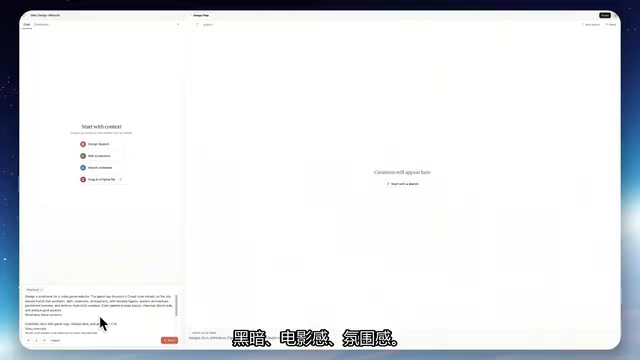
The first wireframe draft won't include logos or other visual elements—that's exactly the point of wireframing: focus on structure without burning resources on details.
Iterative Refinement: Quick Layout Adjustments
Once you have the first version, review it holistically, then provide targeted feedback. In this case, the following adjustments were made:
- Remove the news/media section and replace it with a user reviews block (better suited for a gaming website)
- Brighten the background—the original was too dark
- Change the font—the handwritten style was hard to read; switch to something more legible
- Trim the copy—reduce the amount of text
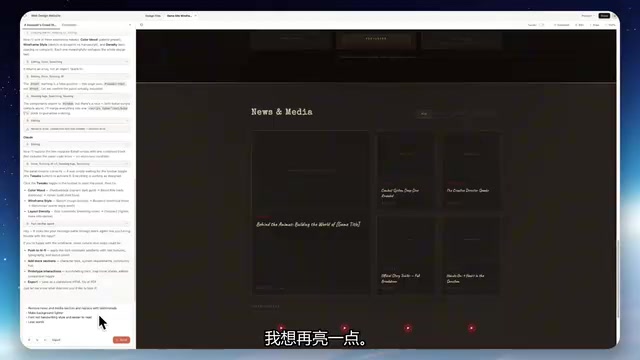
This is the core value of the wireframe stage: changes cost almost nothing—a few sentences can reshape the entire layout. If you skip this step and go straight to high-fidelity design, every revision means significant credit waste.
Step 2: Generate Visual Assets with GPT Image 2
Once the wireframe is finalized, the next step is generating professional visual assets for the website. GPT Image 2 can produce high-quality images from text descriptions, including:
- Game scene backgrounds
- Character concept art
- UI elements and icons
- Map assets, etc.
GPT Image 2 (the upgraded image generation capability of GPT-4o) is built on a Diffusion Model architecture, trained on massive text-image pairs to establish semantic mappings between text descriptions and visual features. Compared to the earlier DALL-E series, GPT Image 2 shows significant improvements in style consistency, detail fidelity, and text rendering capability—particularly excelling at commercial visual assets that require specific aesthetic styles.
Compared to free stock photos or generic templates, AI-generated assets have one significant advantage: unified style and high customization. By consistently describing color tones, lighting, and composition style in your prompts, you can ensure that multiple generated images maintain a highly consistent visual language—you can make sure all assets follow the same dark-toned, cinematic aesthetic, so the website doesn't look like it was built from a template. This consistency is crucial for brand perception and represents the core competitive advantage of AI-generated assets over cobbled-together stock photos.
Step 3: Integrate and Deploy with Claude Code
Seamless Handoff from Design to Code
This step is the critical connection point in the entire workflow. Claude Design offers a "Share" feature that can pass the design directly to Claude Code.
The operation is simple: click the share button in Claude Design, copy the generated command, paste it into Claude Code, and hit Enter. Claude Code will automatically generate runnable website code based on the wireframe structure combined with the previously generated visual assets.
Claude Code is Anthropic's AI programming tool for developers, with underlying capabilities based on the Claude model's deep understanding of code semantics. Unlike code completion tools like GitHub Copilot, Claude Code excels at end-to-end generation tasks—going from design descriptions to complete code—understanding layout intent, component relationships, and interaction logic. In the workflow described here, Claude Code reads the structured design information output by Claude Design and converts visual layouts into HTML/CSS/JavaScript code. This process involves parsing "Design Tokens"—mapping design variables like colors, spacing, and fonts to specific CSS properties. This automated design-to-code conversion traditionally requires front-end engineers several days of manual implementation.
Final Result Showcase
The integrated website looks remarkably polished:
- The cursor transforms into a crosshair style, matching the gaming theme
- The interactive map is fully functional
- Various interaction animations feel natural and smooth
- The overall visual style is unified and professional
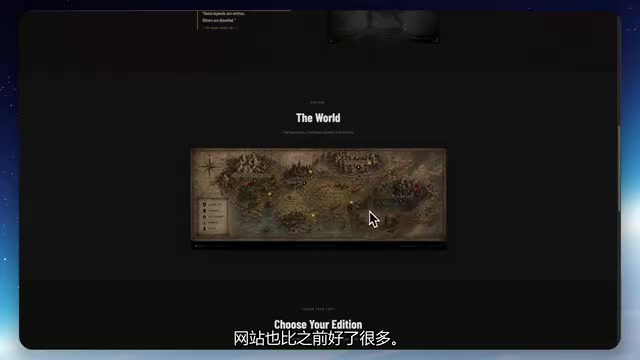
The generated website can be further deployed to GitHub, or even published via services like Cloudflare to become a publicly accessible live page. Cloudflare Pages is Cloudflare's static site hosting service, deeply integrated with GitHub, supporting direct deployment from code repositories to accessible live pages—completely free for individual users. In the modern front-end deployment ecosystem, this "JAMstack" (JavaScript, APIs, Markup) architecture has become mainstream—static files hosted on CDN edge nodes deliver fast global access, high security, and near-zero maintenance costs. For AI-generated websites, Claude Code typically produces pure front-end code requiring no server environment. Once pushed to GitHub, Cloudflare Pages automatically triggers builds and deployment, taking just minutes from code to live site.
A Realistic View of Completion Level
This workflow enables non-designers and non-programmers to achieve approximately 80% completion on a website—a very pragmatic assessment. The remaining 20% includes:
- Copy refinement: AI-generated copy often needs human polishing
- Typography details: Professional designers have more experience with font selection and pairing
- Interaction details: Micro-animations, responsive adaptation, etc. need further tuning
- Asset quality: Higher-resolution images and video assets
This "80% completion" aligns closely with the MVP (Minimum Viable Product) concept from lean startup methodology. The core logic of MVP is: in the resource-constrained early stage, prioritize building the simplest version that can validate core assumptions, rather than pursuing a perfect full-featured product. For project showcase pages, personal portfolios, or product landing pages, users typically form their core judgment within the first 5 seconds—visual impact and clarity of information hierarchy matter far more than typography details or micro-animations. The remaining 20% belongs to the "polishing phase," best addressed after receiving initial user feedback and confirming the direction is correct.
But for MVPs, project showcase pages, personal portfolios, and similar use cases, 80% completion is more than sufficient.
Summary: A Reusable AI Website-Building Workflow
The entire workflow can be summarized in three steps:
- Claude Design for wireframes → Clarify structure, conserve credits
- GPT Image 2 for assets → Unified style, no more template look
- Claude Code for integration → Automatically generate a runnable website
The core philosophy of this workflow is structure before details, low-fidelity before high-fidelity. This isn't just best practice for AI website building—it's the fundamental logic of professional design workflows. AI tools simply lower the execution barrier at each stage, but the thinking and process still matter.
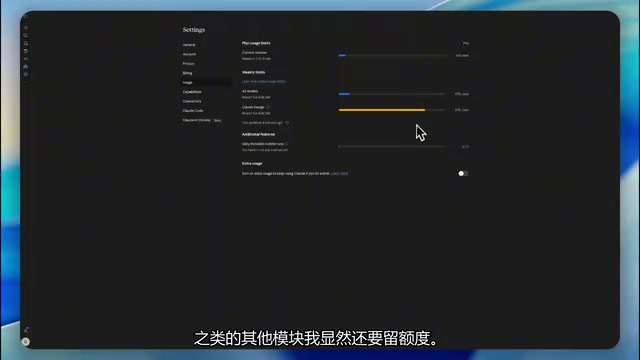
Interestingly, Claude Design's credits deplete quickly (in this case, the design phase alone consumed 81%), so allocating credits wisely and minimizing unproductive iterations is key. Think before you act—this principle remains just as relevant in the AI era.
Key Takeaways
- Start with Claude Design wireframes to clarify structure and avoid wasting credits on high-fidelity design iterations
- Use GPT Image 2 to generate style-consistent custom visual assets that eliminate the template look
- Leverage Claude Code to automatically convert designs into runnable website code ready for deployment
- This workflow enables non-technical users to achieve approximately 80% website completion—ideal for MVPs and showcase pages
- Strategic allocation of AI tool credits is crucial; Claude Design depletes quickly and requires advance planning
Related articles
 Tutorials
Cursor + Codex Dual-IDE Collaboration: A Practical Methodology for Open-Source Project Customization
A complete methodology for open-source project customization based on real-world experience, detailing the Cursor+Codex dual-IDE workflow, seven-stage process, MVP validation, and AI source code reading techniques.
 Tutorials
Cursor Multi-Agent in Practice: Building a Full-Stack Next.js Blog in 50 Minutes
Build a full-stack blog in 50 minutes using Cursor IDE's multi-Agent mode with Next.js, Clerk auth, and Supabase. Learn the 4-phase AI Agent workflow and key integration pitfalls.
 Tutorials
Building an AI Software Factory from Scratch: A Cursor Engineer's Hands-On Experience with Multi-Agent Collaboration
Cursor engineer Eric shares practical insights on building an AI software factory: automation levels, guardrail design, parallel Agent management, and scaling to 1000+ Agents for 24/7 development.