CLAUDE.md: Making Your AI Coding Assistant Truly Understand Your Project

CLAUDE.md gives Claude Code persistent project memory to dramatically boost AI coding efficiency.
CLAUDE.md is a Markdown file placed in your project root that serves as persistent memory for Claude Code, allowing the AI to automatically load your tech stack, code conventions, and architecture guidelines on every startup — eliminating repetitive explanations. It supports a layered configuration system with both project-level and personal-level files, and can be committed to version control for team-wide sharing. Anthropic recommends running without it first, then gradually adding corrections to keep the file lean and effective.
What Is CLAUDE.md?
Anthopic recently released an introductory video that walks through an incredibly useful feature in Claude Code — the CLAUDE.md file. In short, it's a Markdown file placed in your project's root directory that gives Claude Code persistent memory of your project.
Without CLAUDE.md, every time you open Claude Code it's like onboarding a new colleague: it has to re-familiarize itself with the codebase structure, understand dependencies, and figure out existing features and implicit assumptions. This process wastes time and can easily send the AI in the wrong direction. With CLAUDE.md, Claude Code automatically reads this file on startup — like an onboarding guide for your codebase — helping the AI quickly grasp the full picture of your project.

From a technical standpoint, the contents of CLAUDE.md are prepended to every prompt you send, serving as background context for the model. You can even run an init command to have Claude automatically generate an initial CLAUDE.md file based on your existing codebase.
What Should You Put in CLAUDE.md?
Take a concrete example: a Next.js 15 application using App Router, Tailwind CSS, and Drizzle ORM. A typical CLAUDE.md might include:
- Command definitions: Common commands for starting, testing, and linting
- Code conventions: Two-space indentation, prefer named exports
- Architecture guidelines: API routes go in the
app/apidirectory; prefer Server Actions over API routes when possible - Tech stack notes: Use Tailwind for styling instead of other CSS solutions
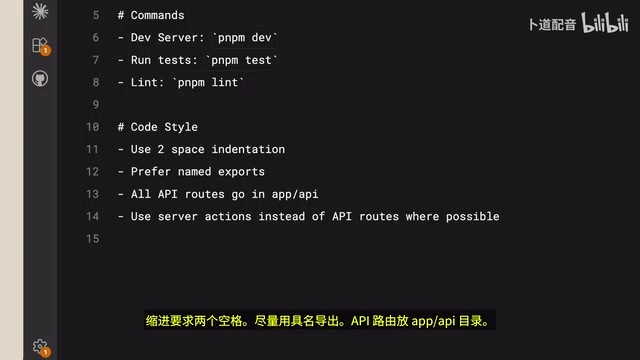
These rules are straightforward and deliver immediate results. For example, when you ask Claude Code to create a React component, it automatically knows to use Tailwind for styling without you having to explain. Claude can hit the ground running, and its output is noticeably better.
More importantly, CLAUDE.md can be committed to version control, so the entire team shares the same AI collaboration guidelines.
The Memory File Priority System
Claude Code's memory files aren't one-size-fits-all — they come in different priority levels designed for different use cases:
Project-Level CLAUDE.md
Placed in the project root, this targets a specific project. It contains information about the tech stack, architecture conventions, command definitions, and is shared across all team members.
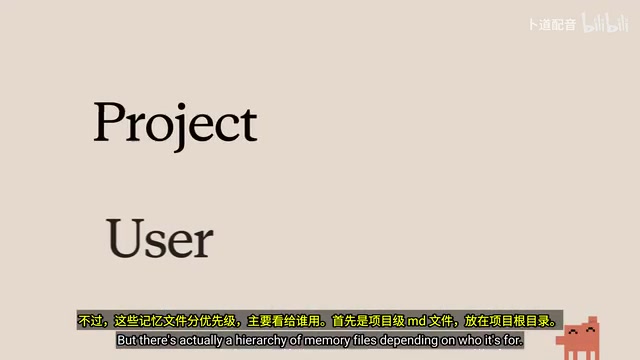
Personal-Level CLAUDE.md
Placed in your user config folder (e.g., ~/.claude/CLAUDE.md), this is for personal use and applies across all projects. You can record personal preferences here, such as commenting habits and naming conventions.
This layered design makes a lot of sense: project-level files ensure team consistency, while personal-level files preserve individual preferences.
Three Practical Tips
Anthopic offers three best practices for CLAUDE.md:
1. Correct and Commit to Memory
When you catch Claude doing something wrong and need to correct it — say it keeps trying to use Server Actions instead of API routes — you can tell Claude to "save this to memory." The next time you return to the project, it will immediately know the right approach without you having to repeat the correction.
2. Reference Project Documentation
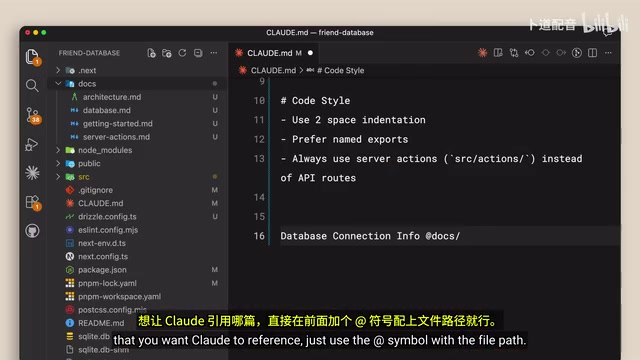
If your project has documentation you want Claude to consult, you can use the @ import symbol followed by a file path in CLAUDE.md to directly reference relevant docs. This way, Claude can look up those resources when needed.
3. Don't Rush to Create the File
This one might surprise you: the official recommendation is to hold off on creating CLAUDE.md at first. The reasoning is simple — run without it for a while, and you'll clearly see where you keep having to correct Claude over and over. This approach keeps your CLAUDE.md lean, retaining only the essential information Claude actually needs, and avoids stuffing it with useless context.
Conclusion: Context Determines Experience
Whether Claude Code feels smooth or frustrating to use comes down to the quality of your context, and CLAUDE.md is the core tool for managing that context.
Getting started is straightforward:
- Start with the basics: Write down your tech stack, personal preferences, and common commands
- Add as you go: When you spot things that need correcting during actual use, gradually fill them in
- Keep it lean: Only retain information that's genuinely useful — avoid information overload
This incremental approach lowers the barrier to entry while ensuring high-quality file content. For developers currently using or planning to use Claude Code, spending a few minutes understanding and configuring CLAUDE.md might be the most cost-effective investment you can make in boosting your AI-assisted coding efficiency.
Related articles
 Tutorials
Cursor + Codex Dual-IDE Collaboration: A Practical Methodology for Open-Source Project Customization
A complete methodology for open-source project customization based on real-world experience, detailing the Cursor+Codex dual-IDE workflow, seven-stage process, MVP validation, and AI source code reading techniques.
 Tutorials
Cursor Multi-Agent in Practice: Building a Full-Stack Next.js Blog in 50 Minutes
Build a full-stack blog in 50 minutes using Cursor IDE's multi-Agent mode with Next.js, Clerk auth, and Supabase. Learn the 4-phase AI Agent workflow and key integration pitfalls.
 Tutorials
Building an AI Software Factory from Scratch: A Cursor Engineer's Hands-On Experience with Multi-Agent Collaboration
Cursor engineer Eric shares practical insights on building an AI software factory: automation levels, guardrail design, parallel Agent management, and scaling to 1000+ Agents for 24/7 development.