Cloudflare AI Search in Practice: Building an Intelligent Knowledge Base Q&A System from Scratch
Cloudflare AI Search in Practice: Buil…
Cloudflare AI Search: deploying a managed RAG service for intelligent knowledge base Q&A
Cloudflare's AI Search is a managed RAG service that eliminates the need for self-managed vector databases and GPU servers. Supporting R2 storage and website crawling, it uses recursive text chunking, two-stage retrieval (vector recall + Reranker), and semantic caching. The entire deployment completes through a six-step console wizard, dramatically lowering the barrier to building intelligent search applications.
What is Cloudflare AI Search?
Cloudflare recently launched AI Search—a managed RAG (Retrieval-Augmented Generation) service. It automatically indexes your knowledge base and returns precise answers through natural language queries.
RAG Technical Background: RAG (Retrieval-Augmented Generation) is an architectural paradigm that combines information retrieval with LLM generation capabilities. Traditional LLMs suffer from knowledge cutoff dates and hallucination problems. RAG addresses this by retrieving relevant document fragments from an external knowledge base before generating answers, injecting them as context into the prompt so the model responds based on real data. This architecture was formally proposed by Meta AI in their 2020 paper "Retrieval-Augmented Generation for Knowledge-Intensive NLP Tasks" and has since become the mainstream approach for enterprise AI applications.
Compared to traditional RAG solutions, AI Search offers clear advantages:
- No self-managed vector database: Eliminates operational costs of Pinecone, Weaviate, etc.
- No GPU server management: All model inference is handled by Cloudflare Workers AI
- Deep global network integration: Leveraging Cloudflare's worldwide edge nodes for ultra-fast response times
Vector Database Principles: Embedding models map text into numerical representations in high-dimensional vector space, where semantically similar texts are closer together. Vector databases specifically store and retrieve these vectors, using Approximate Nearest Neighbor (ANN) algorithms to complete semantic similarity searches in milliseconds. Self-building this system requires handling vector dimension selection, indexing strategies, sharding and scaling—complex operational challenges that Cloudflare wraps into a managed service powered by their proprietary Vectorize vector database.
In short, AI Search lets developers quickly build production-grade intelligent search applications without worrying about underlying infrastructure. This article demonstrates the complete process of creating and deploying a knowledge base Q&A system based on AI Search from scratch.
Pre-Deployment Preparation
Preparing the Data Source (R2 Bucket)
Cloudflare AI Search currently supports two data source modes:
- R2 Storage: Upload files to Cloudflare R2 object storage
- Website Crawling: AI Search automatically crawls specified web pages
If you choose the website mode, AI Search will automatically scrape page content for indexing. This demo uses R2 storage, with several PDF files pre-uploaded to an R2 bucket as the knowledge base.
AI Search supports a rich variety of file types:
| Type | Supported Formats |
|---|---|
| Plain text | TXT, JSON, YAML, JS, etc. |
| Rich text | PDF, HTML, CSV, PNG, etc. |
Interestingly, AI Search automatically converts rich text files to Markdown format for processing, meaning even complex layouts in PDFs can be effectively parsed and indexed.
Creating an AI Gateway
AI Search calls AI models at different processing stages (text vectorization, query rewriting, answer generation), and these calls are managed uniformly through an AI Gateway.
Creating an AI Gateway is straightforward: go to the AI Gateway page, click create, name your Gateway, and keep other settings at their defaults. AI Gateway serves not only as a unified entry point for model calls but also provides logging, rate limiting, and request tracing capabilities—essential for monitoring AI call costs and troubleshooting in production environments.
Creating an AI Search Instance: Step-by-Step Guide
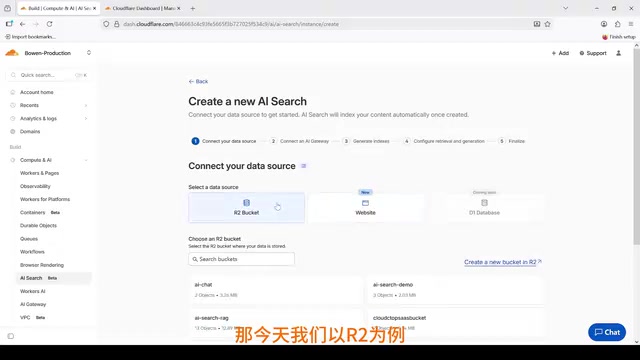
Step 1: Select Data Source
Navigate to the AI Search page in the Cloudflare dashboard and click the Create button. First, select your previously prepared R2 bucket as the data source.
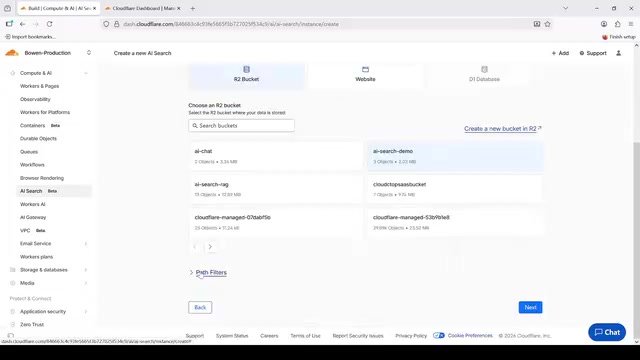
The Pass Filter option below controls the indexing path for your knowledge base. If files are in the root directory, no extra configuration is needed; if files are organized in specific subdirectories, you can use path filters to precisely control the indexing scope.
Step 2: Configure AI Gateway
Select the AI Gateway you just created. This step links AI Search with the model invocation channel—all subsequent model inference requests will be routed through this Gateway.
Step 3: Embedding Model and Text Chunking
The Embedding Model converts text into vector representations, forming the foundation of semantic retrieval. Embedding models use neural networks to compress arbitrary-length text into fixed-dimension dense vectors (typically 768 or 1536 dimensions), so semantically similar expressions like "Apple phone" and "iPhone" are closer in vector space, enabling semantic search beyond keyword matching. Cloudflare Workers AI includes multiple built-in embedding models, eliminating the complexity of handling data vectorization yourself. Select the default embedding model here.
Text Chunking is a critical step before vectorization—splitting large documents into smaller content fragments. AI Search uses a recursive chunking approach with this strategy:
- Preferentially split at natural boundaries like paragraphs or sentences
- If content is still too large, continue subdividing
- Use an Overlap mechanism to retain shared text between adjacent chunks
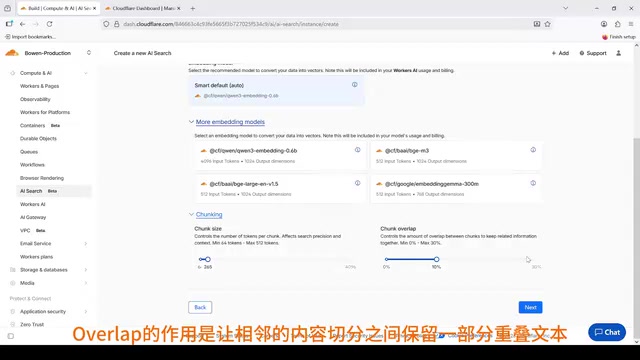
Deep Dive into Recursive Chunking: Recursive Character Text Splitting is a mainstream strategy popularized by frameworks like LangChain. It attempts splits in priority order: paragraphs → sentences → words, trying to break at semantically complete boundaries. Overlap is typically set at 10%-20% of chunk size—for example, with a chunk size of 512 tokens, adjacent chunks share about 50-100 tokens. This ensures that even if a key concept spans a split boundary, it's fully preserved in at least one chunk, preventing retrieval failures caused by semantic fragmentation.
The Overlap design is elegant—it prevents critical information from being severed. For example, if an important concept spans two fragments at the boundary, the overlapping region ensures more complete context during semantic retrieval and more accurate hits.
Step 4: Reranker Model
This step selects the model for Reranking. The Reranker's role is to re-score and re-order candidate results using a second model after initial retrieval, then output the final results.
This is a two-stage retrieval architecture:
- Stage 1: Coarse filtering based on vector similarity for fast candidate recall
- Stage 2: Reranker fine-ranking, significantly improving result relevance and quality
Two-Stage Retrieval Principles: Two-stage retrieval is the standard paradigm in modern search systems. The first stage uses lightweight vector retrieval to quickly recall Top-K candidates (typically 20-100), optimizing for high recall; the second stage uses a more computationally expensive Cross-Encoder model to score each candidate individually, optimizing for high precision. Cross-Encoders process the complete semantic relationship between query and document simultaneously, achieving higher accuracy than the first stage's Bi-Encoder approach, but cannot pre-compute document vectors so they're unsuitable for large-scale initial filtering. This layered architecture achieves optimal balance between precision and efficiency.
You can also configure the maximum number of results and similarity threshold—keep the defaults here.
Step 5: Semantic Cache
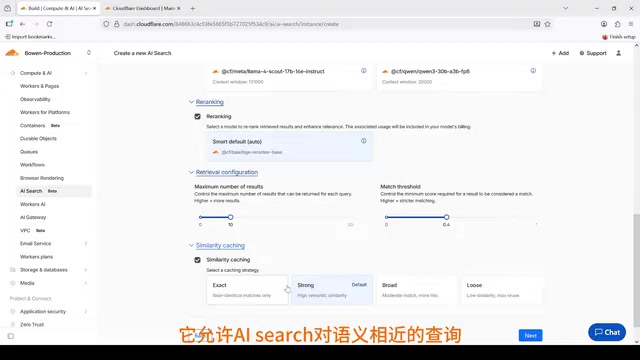
Similarity-based semantic caching is a major highlight of AI Search. It allows the system to hit Cloudflare's cache for semantically similar queries instead of regenerating answers every time.
How Semantic Cache Works: Unlike traditional exact string-matching cache, semantic cache vectorizes and stores historical queries. When a new query arrives, it first calculates vector similarity with cached queries—if it exceeds a set threshold, the cached answer is returned directly. This mechanism operates at the Cloudflare edge node level, meaning cache hits don't even need to reach the backend model service. In enterprise knowledge base scenarios, user questions tend to cluster around a few hot topics, and semantic cache hit rates typically reach 30%-60%, significantly reducing LLM API call costs.
For example: User A asks "How to configure DNS?" and User B asks "How do I set up DNS?"—these questions are highly semantically similar, and the second query can directly reuse the first one's cached result. Benefits include:
- Cost reduction: Fewer model invocations
- Speed improvement: Near-instant response on cache hits
Step 6: Naming and Authorization
In the final step, name your AI Search instance and configure a Service API Token. This token grants AI Search permission to access and configure Cloudflare account resources, including R2, Vectorize, and Workers AI. Without it, AI Search cannot index data or respond to queries.
You can create a new token or use an existing one. Click Create, and your AI Search instance is ready.
Architecture Summary and Reflections
Looking back at the entire creation flow, Cloudflare AI Search encapsulates a complete RAG pipeline:
Document Upload → Text Extraction → Chunking → Vectorization → Index Storage
                                                                ↓
User Query → Query Rewriting → Vector Retrieval → Reranker → Answer Generation
Building this pipeline yourself typically requires integrating document parsers, vector databases, embedding model APIs, LLM APIs, and other components—with significant development and operational costs. AI Search packages all of this into a managed service, making it a highly practical choice for small-to-medium teams or rapid prototyping.
Of course, a managed service also means limited flexibility in model selection, chunking strategies, and other areas. For scenarios requiring deep customization—such as privately deployed embedding models, custom Reranker training, or strict data sovereignty requirements—self-built solutions may still be necessary. But as a starting point for getting into RAG applications, Cloudflare AI Search undoubtedly lowers the barrier significantly.
Key Takeaways
- Cloudflare AI Search is a managed RAG service that enables building intelligent search applications without self-managed vector databases or GPU servers
- Supports both R2 storage and website crawling as data sources, processing PDF, HTML, CSV and other rich text formats with automatic Markdown conversion
- Uses recursive text chunking with overlap mechanisms to ensure complete context and accurate hits during semantic retrieval
- Built-in two-stage retrieval architecture (vector recall + Reranker fine-ranking) and semantic caching balance retrieval quality with response speed
- The entire deployment is completed through a console wizard covering six configuration steps: data source, AI Gateway, embedding model, ranking model, cache strategy, and authorization
Related articles
 Tutorials
Cursor + Codex Dual-IDE Collaboration: A Practical Methodology for Open-Source Project Customization
A complete methodology for open-source project customization based on real-world experience, detailing the Cursor+Codex dual-IDE workflow, seven-stage process, MVP validation, and AI source code reading techniques.
 Tutorials
Cursor Multi-Agent in Practice: Building a Full-Stack Next.js Blog in 50 Minutes
Build a full-stack blog in 50 minutes using Cursor IDE's multi-Agent mode with Next.js, Clerk auth, and Supabase. Learn the 4-phase AI Agent workflow and key integration pitfalls.
 Tutorials
Building an AI Software Factory from Scratch: A Cursor Engineer's Hands-On Experience with Multi-Agent Collaboration
Cursor engineer Eric shares practical insights on building an AI software factory: automation levels, guardrail design, parallel Agent management, and scaling to 1000+ Agents for 24/7 development.