Codex Beginner's Guide: A Complete Walkthrough from Installation to Sandbox Environment Setup
A step-by-step guide to setting up OpenAI Codex from account creation to sandbox configuration.
This article provides a comprehensive beginner's guide to OpenAI's Codex AI programming assistant. It covers the three essential setup steps: preparing a ChatGPT account with regional pricing tips, installing the Codex client via Microsoft Store with OAuth login, and configuring the sandbox environment for secure isolated code execution. The guide also explains Codex's agentic capabilities and how it differs from other AI coding tools.
Introduction
Codex, OpenAI's powerful AI programming assistant, is transforming the way developers work. Codex can be traced back to the Codex model released by OpenAI in 2021 (fine-tuned from GPT-3), which served as the core engine behind GitHub Copilot. The all-new Codex client launched in 2025 represents OpenAI's latest move in the AI programming space — it's no longer just a code completion plugin within an IDE, but a full-fledged AI coding agent with its own independent runtime environment, capable of autonomously executing complex programming tasks. For users in China, every step from account preparation to software installation to environment configuration can present various challenges. This article systematically walks through the complete Codex onboarding process to help beginners get up and running quickly.
Prerequisites: Account and Subscription
A ChatGPT Account Is Required
Using Codex requires a ChatGPT account — this is the most fundamental prerequisite. During registration, you'll need an overseas email address, and when selecting your region, it's recommended to choose Turkey or another overseas region (rather than the United States), as this can offer advantages in subscription pricing.
This price difference exists because OpenAI employs a Regional Pricing strategy. Similar to international subscription services like Netflix and Spotify, OpenAI adjusts pricing based on the Purchasing Power Parity (PPP) of different countries and regions. For example, the same ChatGPT Plus subscription costs $20/month in the US, while in regions like Turkey, the equivalent cost in local currency may be significantly lower. This strategy is very common in the SaaS industry and is designed to make services more affordable for users in developing countries.
It's important to emphasize that Codex is fundamentally designed to leverage ChatGPT's capabilities. If you plan to use Codex with other models like DeepSeek, there's really no need to choose Codex — there are many other tools on the market that can better serve that purpose. The AI programming assistant market has already developed a diversified competitive landscape: Cursor is an AI-native editor deeply rebuilt on VS Code that supports multiple large models (including Claude, GPT, DeepSeek, etc.) with extremely high flexibility; GitHub Copilot is deeply integrated into mainstream IDEs like VS Code and JetBrains, excelling at code completion and chat functionality; Windsurf (formerly Codeium) focuses on a free and lightweight approach. In contrast, Codex's core advantage lies in its independent sandbox execution environment, enabling it to work like a true "AI programmer" that autonomously completes the entire workflow from code writing to build testing, rather than merely providing code suggestions. Choosing Codex means fully leveraging GPT's programming capabilities and this end-to-end autonomous execution ability.
Subscription Cost Recommendations
For working developers, a subscription cost of around 100 RMB per month is absolutely worth the investment. In terms of ROI, a developer proficient with AI programming assistants can typically boost daily coding efficiency by 30%-50%, especially in scenarios like writing boilerplate code, unit tests, code refactoring, and bug investigation. If you're a student, you might consider cost-saving alternatives (such as the free Copilot quota provided by the GitHub Student Developer Pack), but if you're a professional developer, it's recommended to subscribe through the standard process for the full experience.
Installing the Codex Client
Download and Installation Process
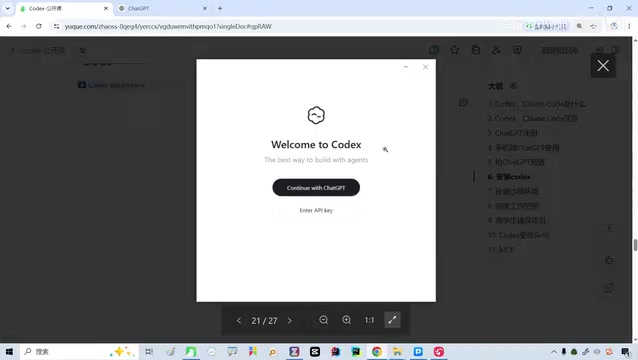
The Codex installer isn't a traditional installation program in the conventional sense — it's more like a trigger, with the actual download completed through the Microsoft Store. This distribution method is increasingly common in the Windows ecosystem and is known as MSIX packaged distribution. Apps distributed through the Microsoft Store undergo Microsoft's security review and support features like automatic updates and clean uninstallation. OpenAI chose this approach partly to simplify the installation process, and partly because Codex's sandbox functionality requires deep integration with Windows' underlying virtualization capabilities, making Store distribution better suited for managing system permissions and dependency components. After installation, you'll see a "Welcome to Codex" screen.
Login and Initial Setup
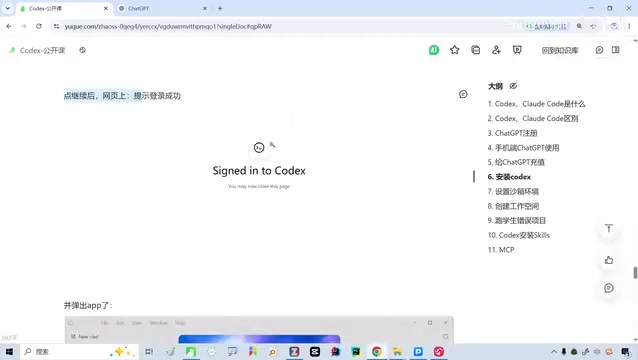
After installation, the interface will prompt "Continue with ChatGPT." Clicking this redirects you to a login page. This uses the standard OAuth 2.0 authorization flow — the Codex client never directly handles your username and password. Instead, it redirects through your browser to OpenAI's official login page for authentication, then passes the authorization token back to the client. As long as your browser is already logged into the ChatGPT web version, the system will automatically recognize and link your account, making the entire process very smooth.
After successful login, Codex will automatically launch the desktop client. On first entry, the system will introduce the default GPT model in use (typically GPT-4o or a newer version optimized for code tasks — these models have undergone specialized reinforcement training for code generation, comprehension, and debugging). Click "Get Started" to enter the main interface.
Core Configuration: Sandbox Environment Explained
What Is a Sandbox Environment
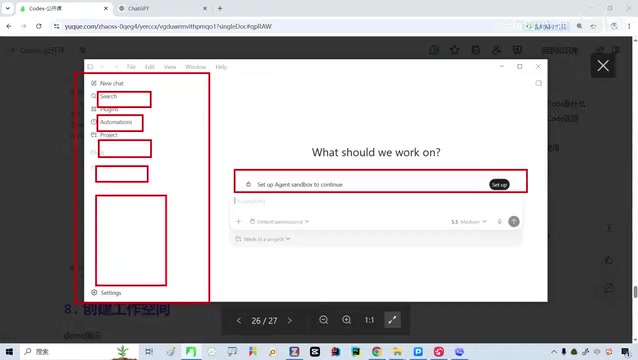
The sandbox environment is one of Codex's most essential features. Simply put, it creates an isolated workspace within your computer. Think of it this way: your computer has WeChat, browsers, IDEs, games, and various other software, while Codex's sandbox is like a separate "room" where the AI can only work inside that room without touching anything else on your system.
From a technical perspective, a Sandbox is a classic concept in computer security, first widely adopted in browser security (such as Chrome's multi-process sandbox architecture) and mobile operating systems (such as iOS's App Sandbox). The core idea is to use OS-level isolation mechanisms to confine a program's runtime environment within controlled boundaries. Codex's sandbox implementation likely leverages Windows containerization technology or lightweight virtualization (such as Windows Sandbox, Hyper-V containers, etc.), using file system virtualization, network namespace isolation, and process permission controls to ensure all AI operations are confined to designated directories and permission scopes. This is similar in concept to Docker container isolation but more lightweight, specifically optimized for AI programming scenarios.
Why Sandbox Isolation Is Necessary
The core purpose of the sandbox environment is security. When you ask Codex to help develop a project, it may execute various commands, such as:
- Maven build commands
- Java compilation commands
- File read/write operations
- System-level configuration changes
It's worth elaborating on Maven here — it's the most mainstream project build and dependency management tool in the Java ecosystem. When the AI executes a command like mvn clean install, Maven automatically downloads required third-party libraries from remote repositories (such as Maven Central), compiles source code, runs test cases, and ultimately packages everything into a deployable JAR or WAR file. This process involves extensive file I/O, network requests, and system resource calls. Similarly, pip install in Python projects and npm install in Node.js projects perform comparably complex operations. If these commands run in an un-isolated environment and the AI misunderstands the project structure, the consequences could be severe.
Without sandbox isolation, the AI could:
- Accidentally modify system files: Inadvertently alter critical OS configurations during command execution — for example, the PATH environment variable could be incorrectly overwritten, causing system commands to stop working
- Accidentally delete important files: Remove content that shouldn't be deleted during cleanup or refactoring — for instance, the AI might misjudge a path when executing
rm -rfcommands - Affect other programs: Cause unexpected side effects on installed software — for example, modifying the global Python or Node.js version, breaking other projects
With the sandbox in place, Codex can only access folders you've authorized and only perform operations you've permitted. Even if something goes wrong, you can simply wipe and rebuild the sandbox without any impact on your main system. This "disposable and rebuildable" characteristic is the greatest value of sandbox architecture in AI programming scenarios — it lets developers boldly allow the AI to try various approaches without worrying about the cost of trial and error.
Sandbox Configuration Steps
The configuration process is very straightforward:
- When you first enter Codex, the left panel will display a "Setup" button
- Click "Setup" and the system will automatically configure the local sandbox environment (during this process, Codex initializes the virtualization environment, installs the base development toolchain, and configures file system mappings in the background)
- Once configuration is complete, the Setup prompt disappears, indicating the sandbox is ready
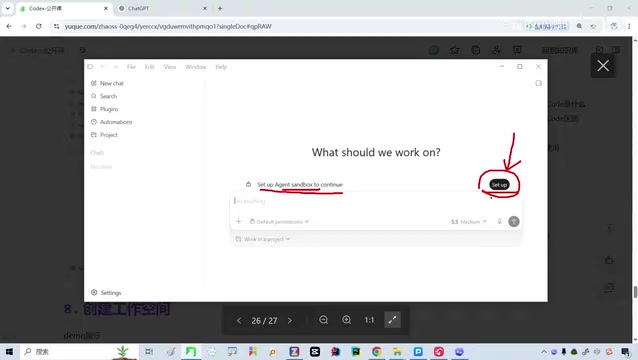
This step is mandatory for every new user. Without configuring the sandbox, environment isolation won't take effect, and subsequent project development and code debugging will carry security risks.
Codex Use Cases
Once the sandbox environment is configured, Codex can safely help you with the following tasks:
- Reading project code: Analyzing the structure and logic of existing codebases. Codex can understand project directory structures, module dependencies, and code call chains, thanks to the GPT model's pre-training on massive amounts of open-source code, which gives it deep comprehension of mainstream programming languages and frameworks
- Modifying files: Refactoring or optimizing code based on requirements, including applying design patterns, performance optimization, and code style standardization
- Running commands: Executing build, test, and deployment operations. Within the sandbox environment, Codex can safely run commands like
mvn test,pytest, andnpm run build, automatically adjusting code based on execution results - Debugging programs: Locating bugs and providing fix recommendations. Codex can analyze error logs and stack traces, combining code context to deliver precise fix suggestions
- Developing new projects: Building Java, Python, LLM, and other types of projects from scratch, including project scaffolding generation, dependency configuration, and foundational architecture setup
Unlike traditional AI code completion tools, Codex's agentic working mode means it can autonomously plan task steps, execute multi-round operations, and iteratively optimize based on feedback, rather than simply responding to one-off queries. This working mode more closely resembles how a junior programmer operates, capable of handling more complex and complete development tasks.
Summary
The Codex onboarding process can be summarized in three steps: prepare a ChatGPT account → install the client and log in → configure the sandbox environment. While there are some network access hurdles for users in China, once configuration is complete, Codex becomes a powerful and secure AI programming partner. The sandbox mechanism's design allows users to confidently let the AI perform various operations without worrying about damage to the host system — this is a significant advantage Codex holds over other AI programming tools.
From a broader perspective, Codex represents the evolution of AI programming tools from "assisted completion" to "autonomous agents." Future AI programming assistants won't just help you write a few lines of code — they'll be complete development partners capable of understanding requirements, planning solutions, writing code, testing and validating, and continuously iterating. Mastering Codex isn't just about learning a tool; it's about preparing for the upcoming AI-driven development paradigm.
Related articles

Wise Large Transfer Delayed Two Weeks: How Should Cross-Border Entrepreneurs Respond?
Wise Business users face 10-14 day delays on large transfers, sparking debate on whether fintech is repeating traditional banking mistakes. Analysis and practical tips for cross-border entrepreneurs.

Perplexity Partners with Intel: Local AI Models and Hybrid Inference Come to Laptops
Perplexity partners with Intel to bring local AI models and hybrid inference to Core Ultra Series 3 laptops. We break down the architecture, NPU capabilities, and the cloud-to-edge AI trend.

AI Large Model Learning Roadmap Breakdown: Three Stages from Application Development to Model Fine-Tuning
Deep breakdown of a popular AI large model learning roadmap covering LangChain, RAG, Agent, and LoRA fine-tuning across three stages, with analysis of its strengths and limitations for career changers.