Codex Chat History Recovery Guide: Migration Methods After API and Subscription Switching
Codex Chat History Recovery Guide: Mig…
Codex conversations "disappear" after subscription switching due to provider isolation—fix it by editing config files.
When switching between official subscriptions and third-party APIs in OpenAI Codex, conversations appear to vanish but are actually isolated by provider partition. To migrate conversations, close Codex and simultaneously modify the model_provider field in both the sessions folder JSON files and the state.db SQLite database. Setting a fixed custom provider name for third-party APIs prevents future confusion, and bulk migrations can be automated with a Python script.
Background: Why Do Conversations Disappear After Switching Subscriptions?
Users of OpenAI Codex frequently encounter a confusing issue: after switching between official subscriptions and third-party APIs, their previous chat conversation history seems to vanish into thin air. In reality, the conversations haven't been deleted—they've been isolated into different provider partitions.
For example, suppose you have conversations 01 and 03 under third-party API mode. After switching to the official subscription, you can only see conversation 02, while 01 and 03 have "disappeared." The reverse is also true. The root cause lies in Codex's conversation management mechanism—conversations are tied to their provider.
Once you understand this principle, you can manually modify configuration files to migrate conversations from one provider to another, recovering your "lost" chat history.
Core Principle: Provider Determines Conversation Ownership
Technical Background of Provider Isolation
Provider isolation is a common multi-backend management pattern in modern AI client applications. When a client needs to support multiple AI service sources simultaneously, developers typically introduce a "provider" abstraction layer that binds authentication information, model configurations, and session data to specific service provider identifiers.
This design pattern is known as the "Strategy Pattern" in software engineering—the client interacts with different backends through a unified interface, with each provider being an interchangeable "strategy." The benefits include clear data isolation and safe switching, where credentials and session data from different service providers don't interfere with each other. The trade-off is that users experience a confusing "data disappearing" effect when switching between providers. Codex's design is essentially an architectural compromise made to support multi-provider coexistence, and understanding this is a key prerequisite for solving the problem.
Configuration File Structure
Codex's configuration consists of two main files: auth.json and config.toml, located in the .codex folder under the user directory.
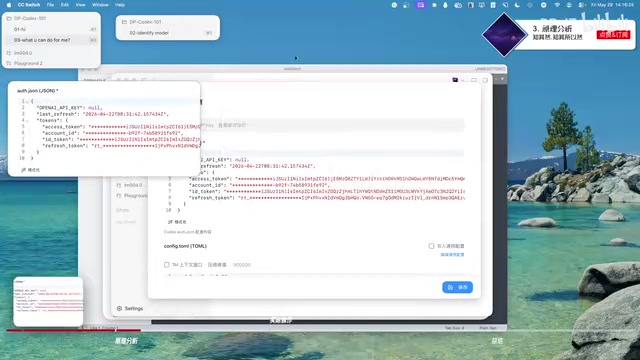
- auth.json: Stores authentication information. Official subscriptions use an access token / refresh token mechanism, while third-party APIs use an OpenAI API Key. This file has a fixed format and typically doesn't need manual editing.
- config.toml: Stores model configuration and project settings. The key difference is that when using a third-party API, an additional
model_providerfield appears.
About the access token / refresh token mechanism: This is the dual-token authentication system from the OAuth 2.0 standard. The access token is a short-lived credential (typically valid for a few hours to a day) used for actual API request authentication; the refresh token is a long-lived credential used to automatically obtain a new access token after the current one expires, without requiring the user to log in again. This mechanism strikes a balance between security and user experience—even if an access token is leaked, the attacker's window of opportunity is extremely limited.
The Critical Role of Provider
In the official subscription's config.toml, you'll only see basic settings like model name and thinking intensity. After connecting a third-party API, a model_provider field appears in the configuration, such as dp-walking.
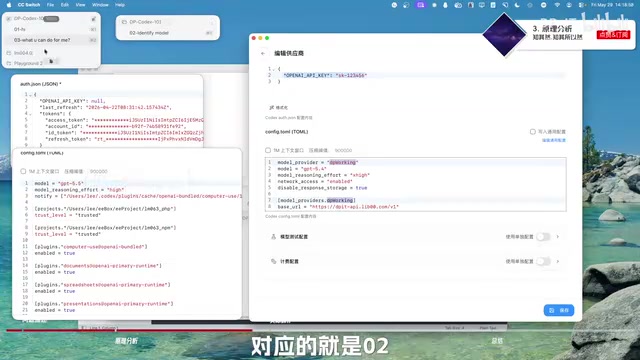
Core rule: The conversation list is bound to the provider. The official subscription corresponds to an internal provider (like openai), while the third-party API corresponds to your custom provider name. As long as the provider doesn't change, the conversation list you see won't change.
This also explains why conversations "disappear" after switching—they simply belong to another provider and haven't been deleted. A practical tip: give your provider a fixed custom name (like "myname-walking"), so that regardless of which third-party API service you switch to, as long as the provider name remains consistent, your conversation history will remain visible.
Step-by-Step: Manually Migrating Conversation History
Below we'll demonstrate the complete workflow using "migrating conversation 02 from official subscription to third-party API" as an example.
Step 1: Get the Conversation's Session ID
In Codex, find the target conversation, right-click and select "Copy Session ID," then save the obtained ID to a text file for reference. For example: 02 - 7FC... (a unique identifier string).
Design principle of Session IDs: Session IDs are typically in UUID (Universally Unique Identifier) format—128-bit random numbers generated by an algorithm and represented in hexadecimal. The collision probability of UUIDs is extremely low (approximately 1/2¹²²), allowing each session to have a globally unique identifier generated locally without relying on a central server. This is why Codex can create new conversations offline—ID generation doesn't require an internet connection.
Step 2: Close the Codex Application
You must close Codex first, otherwise files may be locked and cannot be edited properly. This step is easy to overlook but is crucial.
This involves the operating system's file locking mechanism. When an application is reading or writing a file, the operating system locks that file to prevent other processes from simultaneously modifying it and causing data corruption. SQLite databases are particularly sensitive to this—SQLite uses file-level locks to guarantee transaction atomicity and consistency (ACID properties). If you forcibly modify state.db while the application is running, at best your changes will be overwritten; at worst, the database file will be corrupted, causing all session records to be lost.
Step 3: Modify the Conversation File in the Sessions Folder
Open the .codex folder in your user directory and find the sessions subfolder. This is where all conversation JSON files are stored, organized by date in a directory structure.
Search for the corresponding file using the Session ID you copied earlier (the ID is part of the filename), open it with a text editor, and find the model_provider field:
Change "model_provider": "openai"
to "model_provider": "dp-walking"  // Replace with your third-party API provider name
Save the file.
Step 4: Modify the SQLite Database File
Find state.db (the SQLite database file) in the .codex folder and open it with a database management tool.
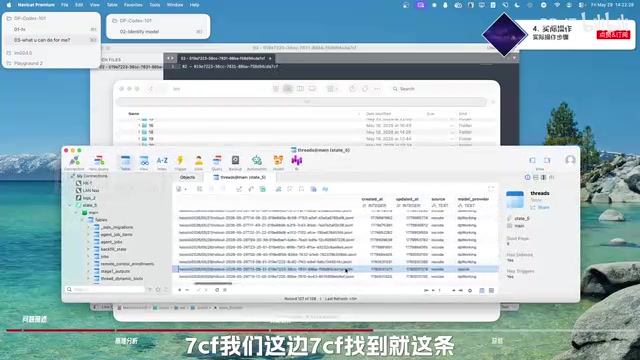
About SQLite and recommended tools: SQLite is a lightweight embedded relational database widely used for local data persistence in desktop and mobile applications. Unlike PostgreSQL or MySQL which require separate service processes, SQLite stores the entire database as a single file (like state.db) and can be used without installing additional services. Codex uses SQLite to store session metadata while using JSON files to store conversation content—a typical "hybrid storage" architecture that puts structured index data in the database and unstructured conversation content in the file system, balancing query efficiency and storage flexibility. We recommend using DB Browser for SQLite (free and open source) or graphical tools like TablePlus for editing, which is more intuitive and safer.
In the database tables, find the last table, locate the corresponding record by Session ID, and change the model_provider field from openai to the target provider name. Save and close the database.
Note: Both the sessions file and the database must be modified simultaneously. If you only change one, anomalies like conversation names being overwritten may occur. Testing has shown that when only the database is modified without changing the session file, the system may automatically correct the provider back to its original value.
This "dual-write" design is called redundant storage in software architecture—the same data is recorded in two places to improve read performance or fault tolerance. Codex likely uses SQLite for fast index queries and JSON files for complete data storage. When the two are inconsistent, the application corrects based on one as the "authoritative source," which is why both locations must be modified simultaneously.
Step 5: Switch to the Target API and Verify
Use tools like CCSwitch to switch to the third-party API configuration (make sure to switch to the one you actually use with correct authentication information, not a demo), then launch Codex.
At this point, you should be able to see the migrated conversation 02 in the third-party API's conversation list. Switch back to the official subscription to verify—conversation 02 should have disappeared from the official subscription's list, confirming a successful migration.
Advanced Ideas: Writing an Automated Migration Tool with Codex
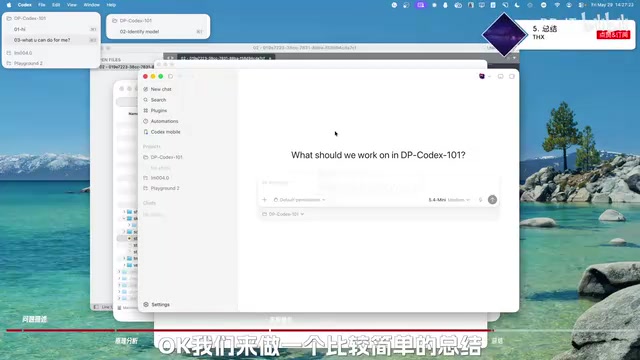
Manual operations are acceptable for a small number of conversations, but if you have many conversations to migrate, modifying them one by one is clearly impractical. A more efficient approach is to have Codex write a Python automation tool for you:
- Scanning phase: The program reads the sessions folder and lists all existing providers and their corresponding conversation IDs
- Selection phase: Interactively asks the user which provider to move conversations into
- Input phase: The user enters the Session IDs of conversations to migrate
- Execution phase: The program automatically completes the synchronized modification of the
model_providerfield in both session files and the database
Technical considerations for Python implementation: Python has mature standard library support for file system operations and SQLite interaction—os/pathlib for file traversal, the json module for processing session files, and the sqlite3 module for direct database operations, requiring no third-party dependencies. The core challenge of the automation tool is ensuring operational atomicity: modifications to session files and the database should either both succeed or both roll back, avoiding inconsistent intermediate states. It's recommended to back up original files before executing modifications and use try/except to catch exceptions, automatically restoring backups on error to ensure migration safety.
The core logic of this tool is simply automating the two manual modification steps described above. If you're interested, you can summarize the principles from this article into a prompt and give it to Codex to implement this migration tool in Python.
Summary
The conversation "loss" caused by switching between API and official subscription in Codex is essentially the provider isolation mechanism at work. Once you understand the core principle that "conversations follow the provider," the migration operation becomes clear: find the conversation file and database record, and modify the model_provider field.
Key takeaways:
- Both files (session JSON + state.db) must be modified simultaneously
- Always close the Codex application before making changes
- Giving your provider a fixed name can save you a lot of trouble
- For bulk migrations, writing an automation script is recommended
Related articles
 Tutorials
Cursor + Codex Dual-IDE Collaboration: A Practical Methodology for Open-Source Project Customization
A complete methodology for open-source project customization based on real-world experience, detailing the Cursor+Codex dual-IDE workflow, seven-stage process, MVP validation, and AI source code reading techniques.
 Tutorials
Cursor Multi-Agent in Practice: Building a Full-Stack Next.js Blog in 50 Minutes
Build a full-stack blog in 50 minutes using Cursor IDE's multi-Agent mode with Next.js, Clerk auth, and Supabase. Learn the 4-phase AI Agent workflow and key integration pitfalls.
 Tutorials
Building an AI Software Factory from Scratch: A Cursor Engineer's Hands-On Experience with Multi-Agent Collaboration
Cursor engineer Eric shares practical insights on building an AI software factory: automation levels, guardrail design, parallel Agent management, and scaling to 1000+ Agents for 24/7 development.