Codex + Claude Code + Cursor: A Practical Breakdown of a Three-Tool AI Coding Workflow
Codex + Claude Code + Cursor: A Practi…
A practical guide to combining Codex, Claude Code, and Cursor into one AI coding workflow.
This article breaks down a collaborative workflow using three AI coding tools: Cursor (fast inline completion), Claude Code (1M-token deep context understanding), and Codex Goal Mode (goal-driven automated execution). Use Cursor for speed in daily coding, Claude Code for depth in cross-file architecture analysis, and Codex for automating large repetitive tasks. With 70% of developers already using 2-4 AI tools simultaneously, the key isn't picking the best one — it's finding the right combination.
Introduction: The Choice of 4 Million Developers
In early 2025, OpenAI Codex had only 600,000 weekly active users. In less than 4 months, that number skyrocketed to 4 million — nearly a 7x increase. What's even more noteworthy is that almost half of those 4 million users are no longer just using it to write code.
According to a Pragmatic Engineer survey of 906 engineers this year, 70% of developers are simultaneously using 2 to 4 AI coding tools. This means no single tool can "do it all" — the smartest approach is to let different tools handle different stages of the workflow.
This article breaks down a battle-tested collaborative workflow built around three mainstream AI coding tools: Codex, Claude Code, and Cursor.
Positioning the Three AI Coding Tools: Fast, Deep, and Automated
Cursor: The Cockpit for Daily Coding
Cursor is essentially VS Code with an AI layer on top. VS Code is currently the most popular code editor, used by over 70% of developers worldwide. If you're already using VS Code, switching to Cursor costs you virtually nothing.
Cursor's strongest capability is inline completion — as you type, it automatically continues your code at sub-second speed. You've barely typed the first three letters of a function name and it's already guessed what you want to write — just hit Tab to accept. Fast developers can save hundreds of manual inputs per day. Additionally, its built-in BugBot can automatically run a review when you submit a pull request, flagging potential issues.
But Cursor has an obvious weakness: when you need to work across multiple files and understand the overall project structure, it struggles — it sees the local context, not the big picture.
Claude Code: An AI Coding Assistant with an Architect's Brain
Claude Code runs in the terminal with no fancy interface, but it has something no one else can match — a 1 million token context window. One million tokens can roughly fit an entire 50,000-line project. It doesn't look at files one by one; instead, it understands the entire project's structure, dependencies, and call chains before answering your questions.
In the Pragmatic Engineer survey asking "What do you think is the best AI coding tool?", Claude Code ranked first (46%), Cursor second (19%), and GitHub Copilot third (only 9%). Even more interesting: the more senior the engineer, the more likely they are to hand off entire chunks of work to AI — 63.5% of Staff+ level engineers are using Agent mode.
After NVIDIA deployed related tools to over 10,000 employees in April this year, debugging cycles were compressed from days to hours — a bug that used to stump a team for a week can now be resolved in an afternoon.
Codex: A Goal-Oriented Automation Engine
Codex is no longer just a coding assistant — it's an Agent that can plan, execute, and verify results on its own. You don't need to tell it how to do things step by step; just tell it what the goal is. And it now has full platform coverage: command line, VS Code extension, desktop app, mobile, and even browser extension.
In one sentence: Cursor handles speed, Claude Code handles depth, Codex handles automation.
Goal Mode: Codex's Most Noteworthy New Capability
Goal Mode, officially released on May 21st this year, is Codex's most disruptive feature. Traditional AI coding assistants work like this: "you give an instruction → it executes one step → you check → you give the next instruction" — back and forth for many rounds. Goal Mode is completely different: you only need to clearly state where the finish line is.

For example, if you set the goal "Raise this project's test coverage from 38% to 75%," Codex will automatically: analyze which modules lack tests → write test code → run the tests → see which ones fail → fix the code → run tests again → iterate until the goal is achieved. You don't even need to be at your computer during this process — it can run for hours or even overnight.
Three Real-World Goal Mode Cases
Case 1: Node.js Major Version Migration. Upgrading from Node 14 to Node 20 isn't just changing a version number — many APIs have changed, dependencies need updating, and tests might all break. Previously, a team might spend one to two weeks on this. Now with Goal Mode set to "Migrate to Node 20, keep all tests passing," Codex modifies code, runs tests, and patches things up until everything is green.
Case 2: Pydantic V1 to V2 Migration. Pydantic is a very commonly used data validation library in Python, and V1 to V2 has major breaking changes. Manually migrating a mid-sized project might take two to three days. After setting the goal in Goal Mode, it automatically plans the steps, executes file by file, and runs tests to verify — all in one go.
Case 3: Test Coverage Improvement. The Auth directory's test coverage was only 38%. Set the goal to raise it to 75%, and Codex analyzes which functions aren't covered, writes corresponding tests, runs coverage checks, and adds more if needed. All you do is set the goal and wait for the notification.
There are also two handy smaller features: AppShots (on macOS, press Command to capture the current window content and feed it directly to Codex) and Lock Screen Continuation (Codex keeps working after your Mac locks — set a goal before heading out, check results when you're back). You can even use the ChatGPT App on your phone to remotely monitor Codex's progress and approve actions.
Practical Workflow: A Day in the Life of a Productive Developer
Here's a complete timeline showing how Codex, Claude Code, and Cursor naturally flow together.
9:00 AM: Start with Cursor (~2 hours)
Pull the latest code, check today's tasks — implement a new API endpoint. Open Cursor and start writing. Inline completion is blazing fast; most boilerplate code comes together with a few Tabs. Hit a small bug, and Cursor's auto-suggestions help you locate it. Fix it, submit a pull request, and BugBot automatically runs a review. At this stage, Cursor in hand, efficiency is high.
11:00 AM: Hit a Hard Problem, Switch to Claude Code
While coding, you discover the new endpoint requires changes to the underlying permission validation logic, which is scattered across seven or eight files — touch one thing and everything moves. Open the terminal and feed the project to Claude Code. It scans the entire project, understands the complete permission validation call chain, and tells you "change here, here, and here — the impact scope covers these three services." You make the changes as suggested and use Claude Code to help write a set of integration tests.
12:30 PM: Set a Goal, Go to Lunch
After modifying the permission logic, test coverage dropped from 62% to 48% (the new logic has no corresponding tests). Open Codex, set a Goal: "Restore the Auth module's test coverage to 65%," then close your laptop and go eat.
1:30 PM: Check Codex Progress on Your Phone
During lunch, you get a Codex notification on your phone. Open the ChatGPT App and see that Codex has automatically added 12 test cases, bringing coverage to 68% — exceeding the goal. Tap "Approve" on your phone.
2:00 PM to 5:00 PM: Back to Cursor
Codex's output has already been merged in. Open Cursor to review the tests Codex wrote, make some tweaks, then continue with afternoon feature development.
The entire process isn't about picking one tool and using it all day — it's about naturally flowing between three AI coding tools based on the type of task at hand.
AI Coding Tool Pricing Comparison and Pairing Recommendations

Here's how the three tools compare on pricing:
| Tool | Basic Tier | Advanced Tier |
|---|---|---|
| Cursor | Free tier available | Pro $20/month (unlimited completions) |
| Claude Code | Pro $20/month | Max $100-200/month |
| Codex | Included with ChatGPT Plus $20/month | Pro $100/month |
Recommended Pairings by Role
- Frontend/Full-Stack Developers: Primary Cursor Pro + supplementary Claude Code and Codex, ~$40/month
- Backend/Architects: Primary Claude Code + supplementary Codex Goal Mode and Cursor, $40-120/month
- Tech Leads/Team Managers: Primary Codex Pro (automating large repetitive tasks) + Claude Code and Cursor as supplements, starting at $120/month
- Beginners/Students: Cursor free tier + ChatGPT free tier, zero cost to get started
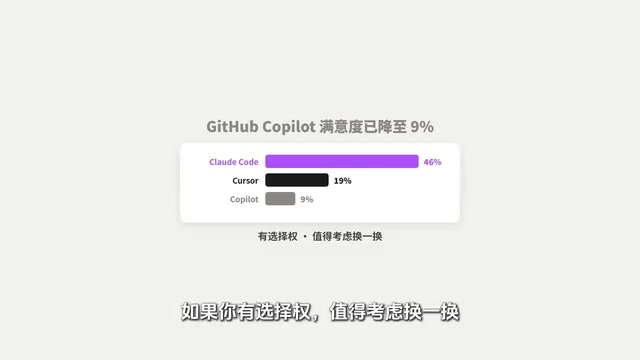
Worth noting: if you're at a large company, GitHub Copilot might be the team's default setup. However, the Pragmatic Engineer survey shows Copilot satisfaction has dropped to 9%, far below Claude Code's 46% and Cursor's 19%. If you have the choice, it's worth considering a switch. Additionally, WindSurf takes a similar AI IDE approach to Cursor and can serve as an alternative.
Conclusion: AI Coding Workflows Are Grown, Not Designed
The endgame for AI coding tools isn't "which one is best" — it's "how to combine them most effectively." The core principle is simple:
- Need speed → Cursor (inline completion, instant feedback)
- Need depth → Claude Code (large context, holistic understanding)
- Need automation → Codex Goal Mode (set goals, wait for results)
You don't need to get everything right from day one. Start with the one you use most, and once you're comfortable, add a second, then a third. Workflows are grown organically, not designed from scratch.
Related articles
 Tutorials
Cursor + Codex Dual-IDE Collaboration: A Practical Methodology for Open-Source Project Customization
A complete methodology for open-source project customization based on real-world experience, detailing the Cursor+Codex dual-IDE workflow, seven-stage process, MVP validation, and AI source code reading techniques.
 Tutorials
Cursor Multi-Agent in Practice: Building a Full-Stack Next.js Blog in 50 Minutes
Build a full-stack blog in 50 minutes using Cursor IDE's multi-Agent mode with Next.js, Clerk auth, and Supabase. Learn the 4-phase AI Agent workflow and key integration pitfalls.
 Tutorials
Building an AI Software Factory from Scratch: A Cursor Engineer's Hands-On Experience with Multi-Agent Collaboration
Cursor engineer Eric shares practical insights on building an AI software factory: automation levels, guardrail design, parallel Agent management, and scaling to 1000+ Agents for 24/7 development.