Codex++: Connect Codex to DeepSeek, GLM, and Other Chinese LLMs
Codex++: Connect Codex to DeepSeek, GL…
Codex++ open-source tool connects Codex to Chinese LLMs and unlocks all plugin features
Codex++ is a free, open-source Codex enhancement tool that solves two major pain points in API login mode: limited model options and locked plugins. It supports connecting Chinese LLMs like DeepSeek and GLM via OpenAI-compatible API format, while unlocking plugin features including Computer Use and Chrome control. Configuration is straightforward — just add a provider, enter the API Key and Base URL — and switching to Chinese models can reduce API costs to roughly one-tenth of GPT-4o pricing.
OpenAI's Codex desktop application has attracted significant attention for its powerful AI programming capabilities. Codex originally started as an OpenAI model focused on code generation, then evolved into a desktop application with Agent capabilities that can understand natural language instructions and translate them into complex operations like file read/write, terminal command execution, and browser control. It offers two login modes: ChatGPT account login and API Key login. The former unlocks all features, but in API login mode, the native plugin entry prompts users to log in with a ChatGPT account, preventing plugin functionality from working properly. Today we introduce an open-source enhancement tool — Codex++ — which not only enables Codex to seamlessly connect to Chinese LLMs like DeepSeek and GLM, but also unlocks plugin functionality, greatly expanding Codex's use cases.
What is Codex++
Codex++ is a free, open-source Codex enhancement management tool, positioned as an "add-on manager" for the Codex APP. Its core features include:
- Custom Model Integration: Supports connecting any third-party LLM via the standard OpenAI API format
- Plugin Unlock: Plugins that are normally unavailable in API login mode (such as Computer Use, Chrome control, etc.) can all be enabled
- Provider Management: Configure multiple model providers and switch between different models at any time
- Cross-platform Support: Supports both Windows and Mac systems
In short, Codex++ solves two major pain points of Codex in non-ChatGPT account login scenarios: freedom of model choice and restricted plugin functionality.
Detailed Configuration Steps
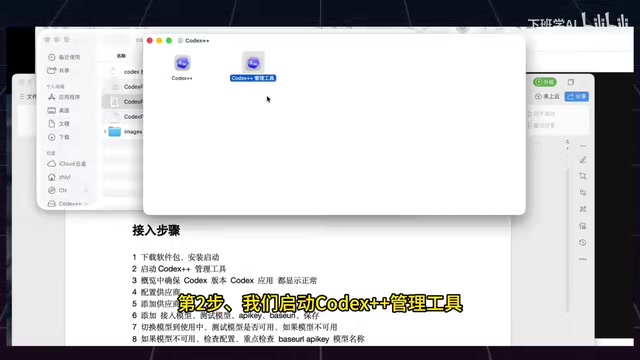
Step 1: Installation and Launch
After downloading the Codex++ installer, double-click to launch the management tool. After startup, confirm the following status:
- The "Overview" page in the Codex++ management tool displays correctly
- Codex version information is correctly identified
- Codex application status shows as available
This step mainly ensures that Codex++ can correctly identify and manage the locally installed Codex application.
Step 2: Configure DeepSeek Model
Using DeepSeek integration as an example, the specific workflow is as follows:
- Click "Add Provider" in Codex++
- Change the provider name to "DeepSeek"
- Select API as the connection method
- Enter DeepSeek's Base URL
- Select the test model to use
- Go to the DeepSeek website to create an API Key, copy and paste it into the configuration
- Select Chat as the type, then click Save
After configuration is complete, click the "Test" button to verify whether the model is available. If the test responds successfully, the configuration is correct.
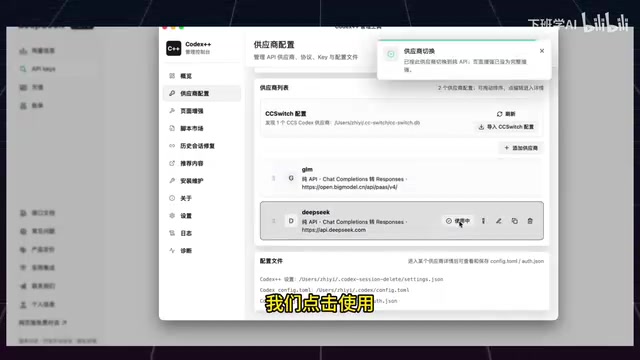
Common Error Troubleshooting: Many people encounter errors at the testing step. Focus on checking three configuration items — whether the API Key is correct, whether the Base URL is complete, and whether the model name matches.
Step 3: Configure GLM Model
The process for integrating Zhipu GLM is similar to DeepSeek, but with one key detail:
- Add a provider with the name set to "GLM"
- Select API as the connection mode
- Open the GLM website and select the OpenAI-compatible interface
- Copy the corresponding Base URL
- Select GLM-4.5 or another available version as the model
- Enter the API Key obtained from the Zhipu platform
- Save and test
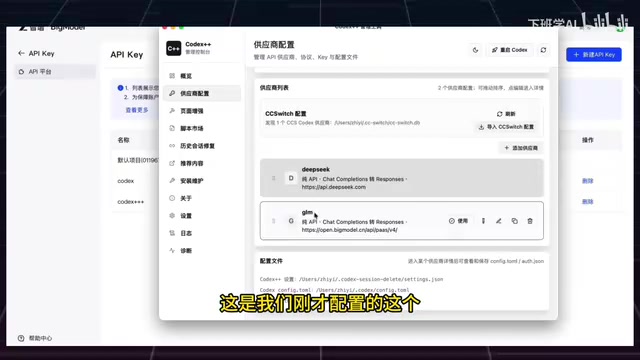
GLM provides an OpenAI-compatible API format, which reflects an important industry trend: the OpenAI API format has become the de facto industry standard interface specification in the LLM field. Its core is the /v1/chat/completions endpoint, using a unified request body structure (messages array, model parameter, temperature and other hyperparameters) and streaming response format (SSE protocol). Mainstream Chinese LLMs including DeepSeek, Zhipu GLM, Moonshot, and Baichuan all provide OpenAI-compatible interfaces, meaning you only need to replace the Base URL and API Key to seamlessly switch models in any tool that supports the OpenAI SDK, greatly reducing ecosystem migration costs. Therefore, theoretically any Chinese LLM that provides an OpenAI-compatible API can be integrated into Codex++ in the same way.
Launch and Usage
Launching Correctly Through Codex++
After configuration is complete, there is one critical note: you cannot launch Codex by double-clicking directly — you must launch it through Codex++. This is because Codex++ needs to inject configuration information and plugin unlock patches during the startup process.
After launching, the Codex interface will directly display the list of configured models. For example, after connecting DeepSeek, you can see multiple model options such as DeepSeek V3, Flash, and Pro, allowing users to freely switch based on task requirements.

Plugin Functionality Unlocked
After launching through Codex++, all plugin features that were previously locked in API login mode are fully unlocked, including:
- Computer Use: AI directly controls the computer to execute tasks
- Chrome Browser Control: Automated web operations
- Automation Tasks: Script execution and workflow orchestration
Computer Use is a cutting-edge capability that allows AI models to directly perceive and control computer graphical interfaces, first publicly demonstrated by Anthropic in Claude 3.5 Sonnet. Its technical approach typically includes: capturing screen images as visual input, identifying UI element coordinates, and generating operation instructions such as mouse clicks/keyboard inputs, forming a closed loop of "perception-decision-execution." Codex's Computer Use plugin is based on similar principles, enabling AI to operate desktop applications like a human user — a key capability for implementing complex automated workflows. This means that even without using an official ChatGPT account, you can enjoy the complete Codex feature experience while using lower-cost Chinese models to power it.
Practical Value and Use Cases
Cost Advantage
The API call prices for Chinese models like DeepSeek and GLM are far lower than models like GPT-4. Using mainstream pricing as reference, GPT-4o's API pricing is approximately $2.5/million tokens for input and $10/million tokens for output; while DeepSeek V3 is priced at approximately ¥2/million tokens for input and ¥8/million tokens for output, roughly one-tenth of GPT-4o's cost when converted to USD. GLM-4.5 also offers highly competitive pricing. For developers with high daily call volumes, switching to Chinese models can compress monthly API spending from hundreds of dollars to just tens of yuan RMB. For everyday programming assistance and code generation tasks, Chinese models are fully capable, with costs reduced by several times or even tens of times.
Enhanced Flexibility
Different models have different strengths for different tasks. Through Codex++'s multi-provider management, users can:
- Use lightweight models (like DeepSeek Flash) for simple tasks to save costs
- Switch to more powerful models (like DeepSeek Pro or GLM-4.5) for complex reasoning tasks
- Adjust at any time based on actual results, without being locked into a single model
Open-Source Ecosystem
As an open-source project, the community can continuously contribute new features to Codex++. It currently supports CC Switch configuration import, and in the future there may be more one-click configuration templates for model providers, further lowering the barrier to entry.
Summary
Codex++ provides Codex users with a viable path to bypass official account restrictions and connect to Chinese LLMs. Its core value lies in three points: free model switching, complete plugin unlock, and zero-cost open-source solution. For developers who want to use Chinese models within Codex's powerful interaction framework, this is a tool worth trying.
Related articles
 Tutorials
Cursor + Codex Dual-IDE Collaboration: A Practical Methodology for Open-Source Project Customization
A complete methodology for open-source project customization based on real-world experience, detailing the Cursor+Codex dual-IDE workflow, seven-stage process, MVP validation, and AI source code reading techniques.
 Tutorials
Cursor Multi-Agent in Practice: Building a Full-Stack Next.js Blog in 50 Minutes
Build a full-stack blog in 50 minutes using Cursor IDE's multi-Agent mode with Next.js, Clerk auth, and Supabase. Learn the 4-phase AI Agent workflow and key integration pitfalls.
 Tutorials
Building an AI Software Factory from Scratch: A Cursor Engineer's Hands-On Experience with Multi-Agent Collaboration
Cursor engineer Eric shares practical insights on building an AI software factory: automation levels, guardrail design, parallel Agent management, and scaling to 1000+ Agents for 24/7 development.