Codex from Beginner to Expert: A Comprehensive Hands-On Tutorial
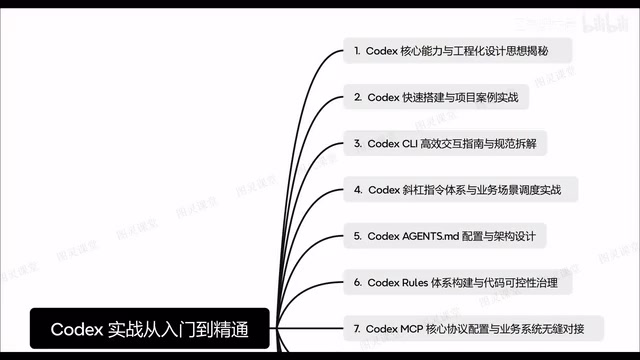
A complete guide to mastering OpenAI Codex from basic setup to enterprise-level RAG project development.
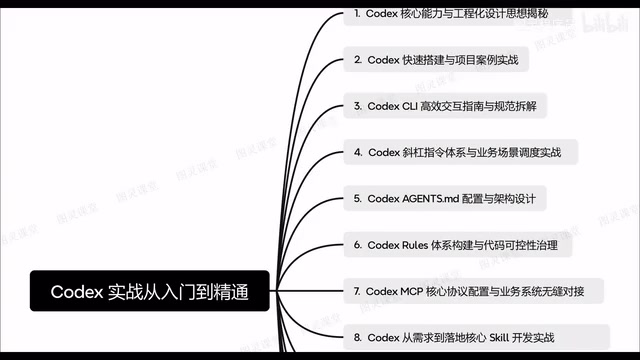
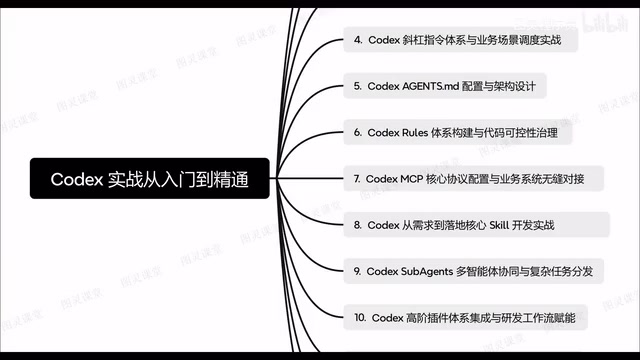
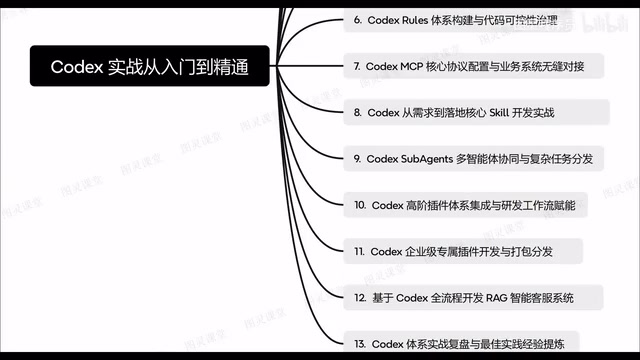
This article breaks down a comprehensive OpenAI Codex tutorial covering everything from environment setup and CLI interaction to advanced topics like agents.md configuration, MCP protocol integration, multi-agent collaboration, and building an enterprise-grade RAG intelligent customer service system. It outlines a three-tier learning path — foundation, intermediate, and advanced — to help developers systematically master Codex as a new development paradigm.
Introduction
Codex, OpenAI's next-generation AI programming assistant, is redefining how developers work. However, many developers don't know where to start with Codex, let alone how to truly integrate it into enterprise-level project development workflows. Recently, a Bilibili content creator released a systematic, hands-on Codex tutorial series covering the complete pipeline from basic installation to enterprise applications. This article provides a structured walkthrough and in-depth analysis of its core content.
Codex Core Capabilities and Engineering Design Philosophy
The first step to understanding Codex isn't jumping straight into hands-on work — it's grasping its core capability boundaries and engineering design philosophy. Codex is far more than a code completion tool. At its core, it's an AI programming agent with contextual understanding capabilities, able to comprehend project structure and business logic, and generate, refactor, and debug code on that basis.
The engineering design philosophy means that Codex usage shouldn't be ad hoc or fragmented — it should follow a systematic methodology. This includes how to organize project structures so Codex can better understand code context, how to guide Codex's behavior through configuration files, and how to standardize Codex usage across team collaboration.
Quick Setup and Project Practice
Environment Installation and Configuration
The second part of the tutorial focuses on hands-on setup. For beginners, the most critical first step is getting Codex up and running for normal project development. This involves installing the Codex CLI (command-line tool), configuring environment variables, and setting up coordination with existing development tools (such as Cursor and Claude Code).
Building a Project from Scratch
Even more valuable are the project examples included in the tutorial — how to develop a complete project from scratch. This isn't simply having Codex generate a few code snippets; it covers the entire workflow from requirements analysis, architecture design, code implementation, to testing and debugging. This kind of end-to-end practical experience is essential for understanding Codex's role in real-world development scenarios.
Codex CLI Interaction Guide and Slash Command System
Efficient Interaction Best Practices
The Codex CLI is the primary interface for interacting with Codex. Using the CLI efficiently requires mastering a set of interaction best practices: how to describe requirements precisely, how to provide sufficient context, and how to iteratively refine generated results. The quality difference between a good prompt and a poor one can be enormous.
Built-in Slash Commands Explained
Codex comes with a complete set of built-in slash commands — a feature many users tend to overlook. These commands aren't isolated instructions but rather a comprehensive system that can be deeply integrated with specific business scenarios. Mastering this command system is essentially learning the "language" for communicating efficiently with Codex, and it can significantly boost development productivity.
agents.md Configuration and Architecture Design
What Is agents.md?
agents.md is an extremely important configuration file in Codex projects. It defines the AI Agent's behavioral guidelines, capability boundaries, and workflows. Think of it as a "work manual" written for Codex — telling it what role to play in the project, what standards to follow, and what capabilities to leverage.
Architecture Design Best Practices
Writing a good agents.md is an art in itself. A well-crafted agents.md should include clear role definitions, explicit behavioral constraints, detailed business context, and a well-structured capability hierarchy. This directly determines the quality of Codex's performance within a project. The tutorial provides systematic guidance on agents.md architecture design, which is especially critical for enterprise-level applications.
Code Governance and MCP Protocol Integration
Rules System and Code Controllability
Codex's Rules system is the core mechanism for achieving code governance and controllability. Through Rules, teams can define code style standards, security constraints, architectural rules, and more — ensuring that Codex-generated code meets team standards. This addresses one of the biggest pain points of AI-generated code: lack of control.
MCP Core Protocol Configuration
MCP (Model Context Protocol) is the core protocol for connecting Codex with external systems. Through MCP configuration, Codex can seamlessly integrate with an enterprise's existing business systems, including databases, API services, and internal tools. This means Codex is no longer an isolated programming tool — it can become an organic component of an enterprise's technology ecosystem.
Multi-Agent Collaboration and Advanced Applications
Sub-Agents Multi-Agent Collaboration Mechanism
One of the most cutting-edge topics in the tutorial is Codex's sub-agents multi-agent collaboration mechanism. When facing complex tasks, a single Agent often falls short. By coordinating multiple sub-agents with a division of labor, complex tasks can be decomposed and processed in parallel. This architectural approach borrows from the microservices philosophy — each sub-agent handles a specific subtask, and together they accomplish the overall objective.
Advanced Plugin and Workflow Integration
Beyond basic functionality, Codex also supports advanced plugin integration. These plugins can extend Codex's capability boundaries and deeply connect with development workflows (such as CI/CD, code review, and automated testing). The tutorial also covers custom plugin development for enterprise-specific needs, as well as plugin packaging and distribution mechanisms — highly practical for teams with customization requirements.
Enterprise Project: RAG Intelligent Customer Service System Development
The tutorial's capstone content is a complete enterprise-level project — building a RAG (Retrieval-Augmented Generation) intelligent customer service system from scratch using Codex. This project covers:
- Requirements Analysis: Defining the functional boundaries and performance requirements of the intelligent customer service system
- Architecture Design: Designing the overall RAG system architecture, including knowledge base construction, retrieval module, and generation module
- Full-Stack Development: Using Codex to complete the entire development process from frontend to backend
- System Integration: Integrating all modules into a fully operational system
The value of this hands-on project lies in demonstrating Codex's complete application pathway in a real enterprise scenario — not just a demo-level showcase.
Summary: Codex Learning Path and Best Practices
Based on the content structure of this tutorial series, the Codex learning path can be divided into three levels:
- Foundation Level: Installation and configuration, CLI interaction, slash commands — solving the "can use it" problem
- Intermediate Level: agents.md configuration, Rules governance, MCP integration — solving the "use it well" problem
- Advanced Level: Multi-agent collaboration, plugin development, enterprise project practice — solving the "deep application" problem
For developers, Codex is not just a productivity tool — it represents a new development paradigm. The key to mastering Codex lies in understanding its engineering philosophy and building a systematic usage methodology, rather than staying at the surface level of simple code generation. As AI programming tools rapidly evolve, establishing this systematic understanding early on will become a core competitive advantage for developers.
Related articles

Five Common Claude Code Mistakes — How Many Are You Making?
Five common Claude Code mistakes developers make: copy-pasting code, skipping CLAUDE.md, inefficient prompting, ignoring docs, and poor context management — with fixes.

Andrew Ng's New Course Explained: A Practical Guide to Using OpenAI's O1 Reasoning Model
Deep dive into Andrew Ng and OpenAI's Reasoning with O1 course covering test-time scaling, new prompting paradigms, multi-model orchestration, and practical applications for developers.

Learning AI After College Entrance Exams: A Complete Path from Zero to Freelancing
How to efficiently learn AI skills during summer break after exams? A complete path from mastering prompts and hands-on projects to freelancing on platforms.