Codex Installation & Setup Guide: From Subscription to Installation to Real-World Use

Complete guide to subscribing, installing, and using OpenAI Codex CLI for AI-powered coding.
This article covers the growing trend of developers switching from Claude Code to OpenAI Codex due to its strong coding and debugging capabilities, better cost-effectiveness, and service stability. Codex is built into ChatGPT Plus ($20/month) and Pro ($200/month) subscriptions, with a simple one-click terminal installation on macOS. Real-world tests show Codex can autonomously build everything from web mini-games to e-commerce backend systems. The article also explores API proxy platforms as an alternative for using multiple AI coding tools simultaneously.
Why Are More and More Developers Switching from Claude Code to Codex?
A clear trend has emerged in the developer community recently — a large number of users are migrating from Claude Code to OpenAI's Codex. The reasons are straightforward: Codex delivers powerful programming capabilities, particularly outstanding debugging skills, while offering far better value than its competitors.
OpenAI Codex CLI is a command-line AI coding agent tool launched by OpenAI in 2025, built on its latest codex-1 model — an o3 variant specifically optimized for software engineering tasks. It can autonomously execute code, read and write files, and run tests within a local sandbox environment, automating the entire workflow from requirements to delivery. Its counterpart, Claude Code, is a similar product from Anthropic built on the Claude series of large language models. The core difference lies in their underlying model architectures and operational strategies — Codex uses a reinforcement learning-optimized reasoning model that excels at multi-step logical reasoning and code debugging, while Claude Code is known for its long-context understanding and code generation quality.
Many developers have reported that even with just ChatGPT Plus credits, the actual Codex experience rivals Claude Max. Coupled with Claude Code's frequent account suspension issues that have been a constant headache, Codex has naturally become the hottest alternative right now.
This Codex installation and usage guide will walk you through the complete onboarding process — from subscription to installation to real-world use — helping you quickly get started with this AI coding tool.


Subscribing to ChatGPT Plus or Pro: The Prerequisite for Using Codex
How to Choose a Subscription Plan
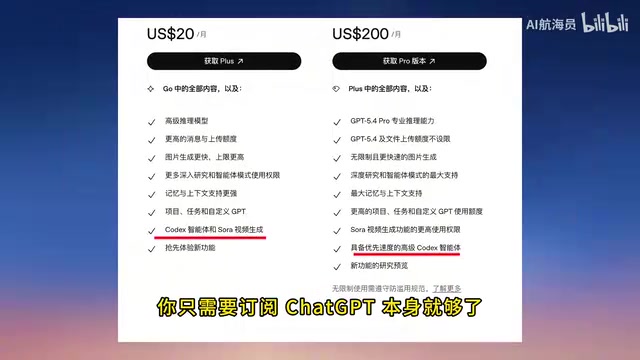
Codex is now built into ChatGPT's subscription plans and doesn't require a separate payment. Here are the specific options:
- ChatGPT Plus: $20/month, suitable for everyday coding use
- ChatGPT Pro: $200/month, suitable for heavy professional users
There's no standalone Codex subscription option — you just need to subscribe to ChatGPT itself. For most developers, the Plus plan is more than sufficient; there's no need to jump straight to Pro.
How Users in China Can Subscribe to ChatGPT
This is where many developers in China get stuck at the first step — not having an overseas credit card. The common workaround is to use third-party top-up platforms (such as WildCard), which support Alipay payments and are relatively straightforward to use. When choosing such services, pay attention to the platform's reputation and security to avoid account risks.
Codex CLI Installation Guide (Detailed macOS Steps)
Complete Installation Process for Codex CLI on macOS
Codex CLI runs as a Command Line Interface, which is fundamentally different from IDE plugin-style AI coding tools like GitHub Copilot. CLI tools run directly in the terminal, can access the project's complete file system, execute shell commands, and run test suites, offering stronger system-level operational capabilities. IDE plugins are typically limited to code completion and inline suggestions. The advantage of CLI is that it can operate on an entire project like a real developer — creating directory structures, installing dependencies, modifying configuration files, and running build scripts — making it particularly effective when handling complex full-stack projects.
Installing Codex CLI on a Mac is very simple, requiring just a few steps:
- Open Terminal
- Enter the installation command and wait for it to complete
- Type
codexand press Enter to launch the program - Log in to your ChatGPT account, and the system will automatically complete the association
It's worth noting that installing Codex no longer requires pre-installing Node.js, which is much more convenient than earlier versions. The entire installation process is essentially one-click, making it very beginner-friendly.
Once installed, Codex CLI runs within a Sandbox execution environment. A sandbox is a security isolation mechanism that confines AI-generated and executed code to a controlled environment, preventing accidental damage to the host system. On macOS, Codex uses Apple's Seatbelt sandbox technology, while on Linux it achieves isolation through network namespaces. This means code executed by Codex cannot access the network or modify files outside the sandbox by default. Users can choose different permission levels based on their needs: suggest mode (suggestions only, no execution), auto-edit mode (automatic file editing but command confirmation required), and full-auto mode (fully autonomous execution).
How to Check Codex Credits and Usage
There are significant differences in credits across subscription tiers:
| Subscription Tier | Local Messages (per 5 hours) |
|---|---|
| Plus | 30–150 messages |
| Pro | 300–1,500 messages |
To check your remaining credits, simply enter the status command in Codex CLI. Additionally, ChatGPT has published a comprehensive set of documentation for learning Codex systematically, which is recommended reading for developers interested in deeper usage.
Codex in Action: From a Web Mini-Game to an E-Commerce Backend System
One-Sentence Requirement, Fully Automated Delivery by Codex
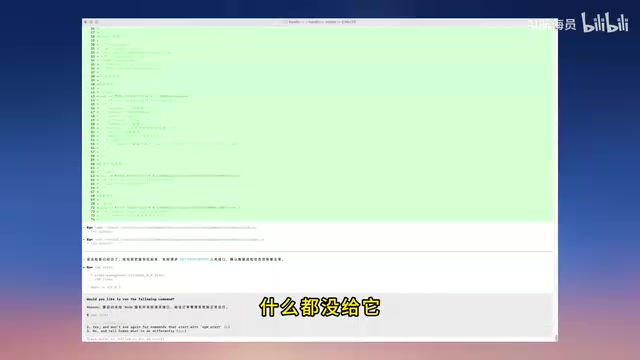
How does Codex actually perform in practice? Let's start with a simple test: giving it a single-sentence requirement — "Build a web mini-game."
Codex's execution process was impressive:
- Automatically created the project file structure
- Independently wrote complete code
- Handled both UI and gameplay logic
- Produced a result that runs directly in the browser
The entire process required zero manual intervention. If you're not satisfied with the result, just tell it what to change in natural language — switch styles, adjust logic — and it responds quickly.
Complex Project Test: Building an E-Commerce Backend Order Management System with Codex
A more advanced test involved having Codex build an e-commerce backend order management system from scratch, without providing any templates or reference code. Codex autonomously completed the following:
- Page structure planning: Sensible layout and navigation design
- Data table design: Order-related data models
- API logic implementation: Complete CRUD operations
- Frontend interaction implementation: Order list, status filtering, shipping operations, and more
CRUD stands for Create, Read, Update, and Delete — the four basic data operations that form the core functional pattern of virtually every backend management system. In an e-commerce backend order management system, typical CRUD operations include: creating new orders, querying order lists and details, updating order statuses (e.g., pending payment → paid → shipped → completed), and deleting or canceling orders. A complete e-commerce backend also involves RESTful API design, database table relationships (such as the connections between order, product, and user tables), state machine management, pagination and filtering, and other technical elements. Codex's ability to autonomously plan and implement these complex business logic patterns demonstrates its deep understanding of software engineering paradigms.
The final product had a remarkably high level of completeness — while not quite ready for direct commercial use, it was excellent as a prototype or MVP. MVP (Minimum Viable Product) is a core concept in lean startup methodology, referring to building a product version with minimal resources that includes core functionality, used to quickly validate market hypotheses and user needs. Traditional MVP development typically takes days to weeks, but AI coding tools are dramatically compressing this timeline. The value of tools like Codex lies not only in code generation speed but also in helping developers quickly jump from vague product ideas to runnable prototypes, significantly reducing the cost of experimentation. This is especially important for independent developers, startup teams, and scenarios that require rapid technical validation.
Smooth interactions, comprehensive features — it delivers tremendous value for quickly validating ideas or building project scaffolding.
Codex Alternatives: Who Are API Proxy Platforms For?
What Scenarios Are Proxy Platforms Suited For?
For users who want to use both Codex and Claude Code simultaneously, there's another option worth considering — API proxy platforms. These platforms typically use a credit-based system where a single subscription grants access to multiple AI coding tools.
The core principle of API proxy platforms is to act as a Proxy Layer, forwarding user requests to the official APIs of AI service providers like OpenAI and Anthropic. Users don't need to hold API Keys from each provider directly; instead, they make calls through a unified interface provided by the proxy platform. The technical implementation of this architecture typically includes: request routing (dispatching requests for different models to the corresponding upstream APIs), Token metering (precisely tracking the number of Tokens consumed per call for billing), load balancing (distributing requests across multiple API Keys to avoid rate limiting), and response caching. Tokens here refer to the basic units that large language models use to process text — one Token corresponds to roughly 4 English characters or 1–2 Chinese characters, and API call costs are typically priced separately based on input and output Token counts.
Key advantages include:
- One account, multiple tools: Access both Codex and Claude Code
- Pay-as-you-go options: Pay only for the Tokens you use, ideal for light users
- Simplified configuration: Usually offers one-click setup tools, eliminating manual configuration hassles
- Multi-device support: Some platforms support multiple devices online simultaneously, allowing cost-sharing with friends
What to Watch Out for When Choosing a Proxy Platform
There are several key points to keep in mind when selecting a proxy platform:
- Stability: The response speed and availability of the proxy service directly impact the development experience
- Security: API Key management and data transmission security should not be overlooked
- Cost comparison: Carefully calculate your actual usage and compare with official subscriptions before deciding
- Compliance risks: Understand the platform's terms of service to avoid potential account risks
Official Codex Subscription vs. Proxy Platforms: Which Option Suits You Better?
| Comparison | Option 1: Official Subscription | Option 2: Proxy Platform |
|---|---|---|
| Cost | $20/month (Plus) | Pay-as-you-go, flexible |
| Tool Coverage | Codex only | Codex + Claude Code |
| Stability | Officially guaranteed | Depends on platform quality |
| Best For | Users focused on Codex | Users who need multiple tools |
| Ease of Setup | Simple | Requires additional configuration |
Conclusion: Choose the AI Coding Solution That Fits You Best
The rise of Codex reflects an important trend in the AI coding tools market: developers care not only about peak capabilities but also about the balance between stability and cost-effectiveness. Claude Code is undeniably powerful, but frequent account suspensions have seriously impacted the development experience and workflow continuity.
For most developers, subscribing directly to ChatGPT Plus for Codex is currently the safest choice — a $20 monthly fee, generous credits, stable service, and continuously improving capabilities already meet the vast majority of everyday coding needs.
Of course, the AI coding tools landscape is still evolving rapidly. Staying informed about multiple tools and maintaining the flexibility to switch between them is the best strategy for developers navigating this era.
Key Takeaways
- Codex is built into ChatGPT Plus ($20/month) and Pro ($200/month) subscriptions with no separate fee required; Plus credits are sufficient for everyday coding needs
- The Codex installation process has been greatly simplified — macOS users don't need to pre-install Node.js; just install via terminal and log in to start using it
- Real-world testing shows impressive results: from web mini-games to e-commerce backend systems, Codex can autonomously handle project structure planning, code writing, and interaction implementation
- Plus users can send 30–150 messages per 5 hours, Pro users 300–1,500; use the status command to check remaining credits
- Compared to Claude Code's account suspension risks, Codex has clear advantages in stability and cost-effectiveness, making it the current go-to AI coding alternative
Related articles
 Tutorials
Cursor + Codex Dual-IDE Collaboration: A Practical Methodology for Open-Source Project Customization
A complete methodology for open-source project customization based on real-world experience, detailing the Cursor+Codex dual-IDE workflow, seven-stage process, MVP validation, and AI source code reading techniques.
 Tutorials
Cursor Multi-Agent in Practice: Building a Full-Stack Next.js Blog in 50 Minutes
Build a full-stack blog in 50 minutes using Cursor IDE's multi-Agent mode with Next.js, Clerk auth, and Supabase. Learn the 4-phase AI Agent workflow and key integration pitfalls.
 Tutorials
Building an AI Software Factory from Scratch: A Cursor Engineer's Hands-On Experience with Multi-Agent Collaboration
Cursor engineer Eric shares practical insights on building an AI software factory: automation levels, guardrail design, parallel Agent management, and scaling to 1000+ Agents for 24/7 development.