Codex + Ollama Local Deployment Guide: Build a Free AI Coding Assistant at Zero Cost

Ollama now integrates with Codex, enabling a free local AI programming environment.
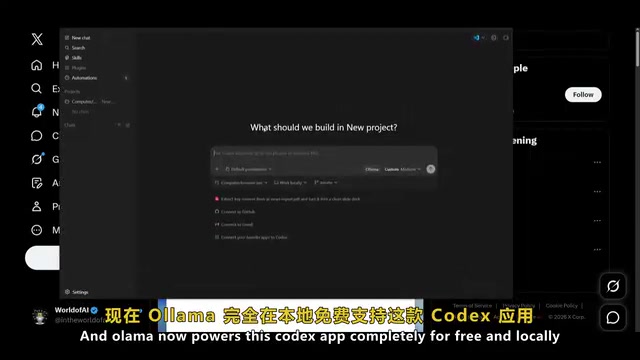
Ollama officially supports connecting to the Codex application, allowing developers to run open-source LLMs like Gemma, Qwen, and LLaMA locally for a complete AI programming experience at zero cost—including code generation, review, and visual editing. The solution keeps all data on your machine for full privacy protection, requires only a mid-range GPU to run smoothly, and can be configured in just four steps. While local small models can't match top-tier closed-source models on complex tasks, they more than cover the vast majority of everyday development needs.
Introduction: The Door to Local AI Programming Is Now Wide Open
The landscape of AI programming tools is being redrawn. Ollama recently added official support for connecting to the Codex application, meaning developers can now call locally-running open-source LLMs directly within Codex—getting a complete AI programming experience without spending a dime. For developers who prioritize privacy, want to cut costs, or prefer a local-first workflow, this is a pivotal breakthrough.
This tutorial covers everything from the underlying principles to hands-on setup for the Codex + Ollama integration—what it offers, how to configure it, and how it performs in practice—helping you build your own free AI programming environment in the shortest time possible.
What Are Codex and Ollama?
Codex: An AI Programming Assistant That Does More Than Write Code
Codex is a feature-rich AI programming assistant that helps developers with the entire workflow—from writing and editing code to reviewing and shipping it. Many developers consider it one of the best AI programming tools available today. Unlike mainstream AI coding tools such as GitHub Copilot or Cursor, Codex doesn't exist as an IDE plugin. Instead, it provides a standalone application environment that integrates code editing, browser preview, and AI conversation into a single interface. This design philosophy is closer to an "AI-native development environment"—rather than bolting AI features onto a traditional editor, it rebuilds the development workflow around AI capabilities.
Its core features include:
- Visual Editing: After loading a local server, you can visually edit virtually any page. This WYSIWYG editing mode eliminates the need to constantly switch between code and browser, dramatically shortening the frontend development feedback loop
- Built-in Browser: Access web pages directly and annotate them on-screen
- Code Review: Review code and leave comments within the workspace without switching to other tools
- Rapid Iteration: Apply changes directly through the chat interface with instant visual feedback
Codex currently supports macOS and Windows (Linux version coming soon), and the application itself is completely free.
Ollama: Run Open-Source LLMs With a Single Command
Ollama is a tool designed specifically for running open-source large language models locally. Installation is dead simple—a single command in the terminal gets it done. Once installed, you can run mainstream open-source models like Gemma, Qwen, and LLaMA on your own machine, completely independent of cloud services, with your code and data staying local at all times for complete privacy.
From a technical perspective, Ollama's core value lies in dramatically lowering the barrier to local LLM inference. Raw model weight files are typically enormous (a 70B parameter model at full precision can exceed 140GB), making direct loading nearly impossible on consumer hardware. Ollama has built-in support for the GGUF format—an efficient model format driven by the llama.cpp project—which uses quantization to compress model weights from 32-bit floating point to 4-bit or even 2-bit integers, shrinking model size to 1/4 to 1/8 of the original within acceptable accuracy loss. Additionally, Ollama automatically detects system GPUs and leverages CUDA (NVIDIA GPUs) or Metal (Apple Silicon) for hardware-accelerated inference. On machines without a discrete GPU, it falls back to CPU inference mode—just slower.
In the open-source LLM ecosystem, Ollama plays a role similar to Docker in containerized deployment—it doesn't produce models, but makes acquiring, running, and managing them as simple as installing regular software. Ollama's model library currently hosts hundreds of open-source models covering everything from general conversation to code generation, text processing to multimodal understanding.
Core Advantages of the Codex + Ollama Combo
Once Ollama is connected to Codex, developers essentially get an extremely cost-effective AI programming solution:
- Zero Cost: No paid subscriptions needed—your local GPU is your compute source. For reference, mainstream AI coding tools aren't cheap—GitHub Copilot Individual costs $10/month, Cursor Pro is $20/month, and using Claude or GPT-4o APIs for frequent coding assistance easily exceeds $50/month. The only cost of local deployment is a one-time hardware investment and electricity. For developers who already own a gaming GPU or Apple Silicon device, this cost is essentially zero
- Data Never Leaves Your Machine: All code and conversations are processed locally, eliminating privacy leak risks. This is especially important in enterprise development—many companies' security compliance policies explicitly prohibit uploading source code to third-party servers, even with encrypted transmission. In 2023, Samsung experienced a serious data breach when employees pasted internal code into ChatGPT, after which multiple tech companies imposed strict restrictions on cloud AI tools. Local deployment eliminates this risk at its root
- Switch Models at Will: Gemma 4, Qwen 3, LLaMA 3.1… use whichever you want
- Essentially Full Functionality: Code generation, review, visual editing, and other core Codex features work as normal
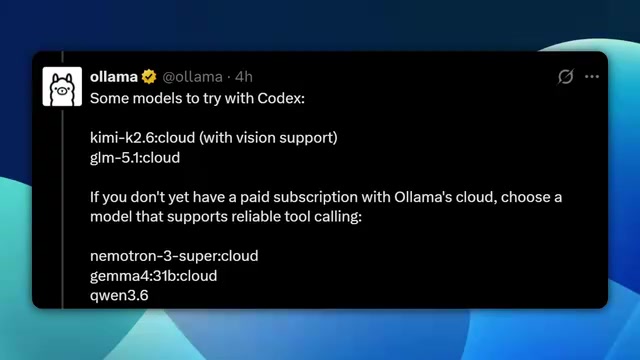
Side note: Ollama also offers paid cloud API services, with recommended models including Qwen 2.5, LLaMA 3.1 with vision capabilities, and Numatron 3 Super. However, this article focuses on the completely free local deployment approach.
Complete Setup Tutorial: Build Your Local AI Programming Environment in Four Steps
Step 1: Check If Your Hardware Can Handle It
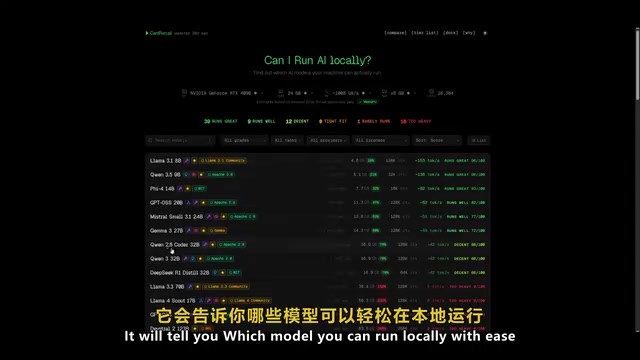
Before installing models, confirm your hardware is up to the task. We recommend using Can I Run AI (canirun.ai) for a quick assessment:
- Enter your GPU model
- Fill in VRAM size, system memory, and CPU core count
- The tool will automatically list models you can run smoothly
The key to understanding hardware requirements is VRAM (Video RAM). During LLM inference, model weights need to be fully loaded into VRAM. When VRAM is insufficient, data spills over to system memory or even disk, causing inference speed to drop off a cliff. A simple estimation formula: Required VRAM (GB) ≈ Parameters (B) × Quantization Bits ÷ 8. For example, LLaMA 3.1 8B at 4-bit quantization needs approximately 8×4÷8=4GB of VRAM, plus KV cache and context overhead during inference, requiring about 6-8GB VRAM for smooth operation.
If your device doesn't have a discrete GPU, don't give up entirely—Apple Silicon chips (M1/M2/M3/M4 series) have a unified memory architecture that allows the GPU to directly access system memory, so a MacBook with 16GB RAM can smoothly run most 7-8B parameter models. Pure CPU inference is also possible, but generation speed is typically only 1/5 to 1/10 of GPU inference, resulting in a noticeably degraded experience.
Generally speaking, a mid-range GPU (RTX 3060/4060 class, 12GB VRAM) can smoothly run LLaMA 3.1 8B. If you choose Gemma 4, the 2B version is the lightest, while the 4B version strikes a nice balance between performance and quality.
Step 2: Install Ollama
Installation is straightforward—pick one of two methods:
- Run the official install command directly in the terminal
- Download the installer from the Ollama website
⚠️ Version Requirement: Ollama must be version 0.24 or higher—lower versions may not properly connect to Codex. After installation, run ollama --version to confirm.
Step 3: Download a Model and Do a Quick Test
Here are several recommended models for local AI programming. Understanding their technical backgrounds will help you make a more informed choice:
| Model | Recommended Version | Highlights |
|---|---|---|
| Gemma 4 | 2B / 4B | Made by Google, lightweight and efficient |
| Qwen 3 | Multiple sizes available | Made by Alibaba, excellent Chinese programming capabilities |
| LLaMA 3.1 | 8B | Made by Meta, well-balanced overall performance |
Gemma 4 is a lightweight open-source model series from Google DeepMind, distilled from Gemini's technical architecture. Its standout feature is maintaining impressive code generation capabilities at extremely small parameter scales—the 2B version can even run on laptops without discrete GPUs. Gemma 4 also natively supports multimodal input, meaning it can understand UI layouts in screenshots and generate corresponding code, forming a natural complement to Codex's visual editing features.
Qwen 3 (Tongyi Qianwen) is an open-source LLM from Alibaba Cloud that performs impressively on code generation benchmarks (such as HumanEval and MBPP), with particularly strong advantages in Chinese programming scenarios—whether it's generating Chinese comments, understanding Chinese technical documentation, or writing code involving Chinese business logic, Qwen 3 outperforms other models at the same level. Qwen 3 also introduces a "Thinking Mode" that reasons through complex programming problems before outputting answers, similar to OpenAI o1's chain-of-thought mechanism.
LLaMA 3.1 is Meta's flagship open-source model, with the 8B version being the most well-rounded "all-rounder" in the open-source community. Its training data covers extensive high-quality code corpora (including public GitHub repositories and Stack Overflow), performing particularly well in mainstream programming languages like Python, JavaScript, and TypeScript. The LLaMA series also has the richest ecosystem of fine-tuned variants in the open-source community—if you later want to customize fine-tuning for specific programming tasks, LLaMA is the best starting point.
Using Gemma 4's 4B version as an example, open your terminal and run:
# Make sure Ollama is running in the background
ollama run gemma4:4b
The model file is approximately 9.6GB (this is the size after 4-bit quantization—a 4B parameter model at full precision would be about 8GB, with slight increases due to GGUF format metadata and quantization table overhead). After downloading, it will automatically enter the chat interface. Try asking a few programming questions to confirm the model responds normally before proceeding.
Step 4: Connect Ollama to Codex
This is the crucial step in the entire process. Run Ollama's dedicated launch command for Codex in the terminal:
ollama launch codex-app
After execution, Ollama will automatically scan your installed local models and list available options. Select your target model (e.g., Gemma 4B), press Enter to confirm, and Codex will load that model and complete startup.
From a technical implementation perspective, this integration essentially has Ollama starting a local HTTP service endpoint compatible with the OpenAI API format (listening on localhost:11434 by default), while the Codex application acts as a client sending requests to this endpoint. This OpenAI-compatible API approach has become the de facto standard for AI tool integration, which also means other AI programming tools that support custom API endpoints can similarly connect to Ollama in the future.
Once successfully launched, the Codex interface will display a "Powered by Ollama" indicator, confirming the local model is connected and all AI programming features are fully functional.
Want to Restore Default Settings?
If you need to switch back to Codex's original configuration, simply run:
ollama launch codex-app --restore
All settings will revert to their previous state, and downloaded model files remain unaffected.
Real-World Testing: What Can Gemma 4B Actually Do?
In practical testing, I used Gemma 4B (4 billion parameters) to locally generate a complete SaaS product landing page. No cloud APIs were called throughout the process—the generated HTML code could be dropped directly into a browser for preview, with clean page structure and decent styling.
From daily use, local open-source models perform reliably in these scenarios:
- ✅ Routine code generation and intelligent completion
- ✅ Rapid frontend page scaffolding
- ✅ Code review and optimization suggestions
- ✅ Common bug diagnosis and fixes
To be honest though: when it comes to complex architecture design or large-scale code refactoring, local small models genuinely can't match top-tier closed-source models like GPT-4o or Claude. The root causes of this gap are multifaceted. First is the absolute difference in parameter scale—GPT-4o's parameter count is estimated in the hundreds of billions, over a hundred times larger than Gemma 4B, and more parameters mean the model can encode richer code patterns and architectural knowledge. Second is the difference in training data—closed-source models typically use carefully curated and cleaned massive proprietary datasets, including enterprise-grade codebases and professional technical documentation, while open-source models often fall short in data scale and quality. Finally, there's the degree of RLHF (Reinforcement Learning from Human Feedback) investment—top closed-source models invest heavily in human annotation resources during alignment, making them more robust at understanding complex instructions, handling edge cases, and generating structured long-form code.
However, it's worth noting that this gap is closing rapidly. Since 2024, open-source models have been improving on code generation benchmarks faster than closed-source models iterate, with Qwen 2.5 Coder 32B even matching GPT-4o on some programming benchmarks. As techniques like model distillation and synthetic data training mature, the capability ceiling of small-parameter open-source models will continue to rise.
But for the vast majority of everyday development needs, this free solution is more than sufficient.
Conclusion and Outlook
The integration of Ollama with Codex marks a new chapter for open-source AI programming tools. Developers no longer need to pay subscription fees for AI coding assistants, nor worry about whether their code data is being uploaded to someone else's servers. As long as you have a reasonably capable computer, you can set up a fully functional local AI programming workflow.
As open-source models like Gemma, Qwen, and LLaMA iterate at an increasingly rapid pace, the local AI programming experience will only continue to improve. Whether you're an independent developer, a startup team member, or an enterprise developer with strict data security requirements, this solution is worth trying sooner rather than later.
Open your terminal and get started now—your next project might just begin with a free, local AI coding assistant.
Related articles
 Tutorials
Cursor + Codex Dual-IDE Collaboration: A Practical Methodology for Open-Source Project Customization
A complete methodology for open-source project customization based on real-world experience, detailing the Cursor+Codex dual-IDE workflow, seven-stage process, MVP validation, and AI source code reading techniques.
 Tutorials
Cursor Multi-Agent in Practice: Building a Full-Stack Next.js Blog in 50 Minutes
Build a full-stack blog in 50 minutes using Cursor IDE's multi-Agent mode with Next.js, Clerk auth, and Supabase. Learn the 4-phase AI Agent workflow and key integration pitfalls.
 Tutorials
Building an AI Software Factory from Scratch: A Cursor Engineer's Hands-On Experience with Multi-Agent Collaboration
Cursor engineer Eric shares practical insights on building an AI software factory: automation levels, guardrail design, parallel Agent management, and scaling to 1000+ Agents for 24/7 development.