Codex Security Guide: Five Key Principles for Permission Management
Codex Security Guide: Five Key Princip…
Safe OpenAI Codex usage requires following the principle of least privilege and matching permissions to tasks.
This article systematically explains how to use OpenAI Codex safely. Codex has evolved from a code advisor to a tool that can directly execute commands, requiring security boundaries built on three pillars: workspace, permission modes (default/auto review/full access), and approval mechanisms. The article classifies operation risks into five tiers and proposes five mantras—read first, plan before modifying, keep changes contained, verify after changes, and report risks—emphasizing that permissions should match tasks rather than be maximized.
OpenAI Codex Security Guide: Permission Boundaries and Risk Management
OpenAI Codex is not an ordinary chat tool—it can read files, modify files, run commands, and even operate browsers or computers once you grant authorization. Unlike earlier language models that could only generate code snippets, modern Codex adopts a "Tool Use" architecture that can directly execute shell commands, read and write file systems, and call browser APIs through sandboxed environments. This role shift from "advisor" to "executor" means a single rm command could wipe out six months of your data. The more powerful Codex becomes, the more clearly permission boundaries need to be defined upfront.
The core argument of this article is not that "full access" should never be used, but rather: when you're just getting started, haven't clearly defined the task scope, and don't know how to roll back, don't open up all boundaries from the start.
The Three Pillars of Codex Security Boundaries
Codex's security boundaries don't come from "trusting it to always be correct," but from three things: workspace, permission mode, and approval.
- Workspace determines what it primarily sees
- Permission mode determines what it can autonomously do within that scope
- Approval determines when it needs to stop and ask you
All three working together is what builds a truly controllable usage environment. These three dimensions collectively form the complete closed loop of the "Human-in-the-Loop" cycle—missing any one of them makes the AI's execution behavior unpredictable.
Workspace Setup: Define the Battlefield First
Before starting any task, confirm that you've opened the folder that the current task actually needs. Don't start by opening your entire desktop, downloads directory, or a large directory stuffed with dozens of projects. The larger the directory, the more cluttered the context, the higher the risk of misoperations, and the easier it is to waste tokens.
The simplest approach is to send it a message first, asking it to list what files it can currently see, without making any modifications yet.

You want Codex to work on this project, not your entire computer. This step seems simple, but it's the most effective first line of defense against misoperations. Defining workspace boundaries is essentially practicing the "Principle of Least Privilege"—giving the AI access only to the minimum resources necessary to complete the current task.
Permission Modes Explained: Understanding the Three Levels
If you're using the Codex APP, the most common permission options are three choices:
| Permission Mode | Suitable Scenarios | Risk Level |
|---|---|---|
| Default Permissions | Most daily tasks | Low |
| Auto Review | Reducing manual confirmations after familiarity | Medium |
| Full Access | Very certain the task requires it and you know how to roll back | High |
Behind these three modes are different depths of intervention in the "Human-in-the-Loop" cycle—similar to the distinction between "attended" and "unattended" modes in Robotic Process Automation (RPA):
Default Permissions are suitable for most daily tasks. Codex can read files, modify files, and run routine local commands within the current workspace, but if it needs internet access, writes outside the workspace, or performs more sensitive actions, it will stop and ask you. Mandatory pausing before each sensitive action is the core security mechanism of this mode.
Auto Review doesn't directly expand the permission boundary—it's more like delegating part of the approval process to an automatic reviewer, introducing a rule-based or model-based auto-approval layer that reduces the frequency of manual intervention. It's suitable for people who are fairly familiar with the workflow and want to reduce manual confirmations. When you're just starting out, it's not recommended to rely on it right away.
Full Access hands the entire execution chain over to AI autonomous decision-making, with very open boundaries. This option should not be your default choice, especially not when opening it for a small task in a large directory.
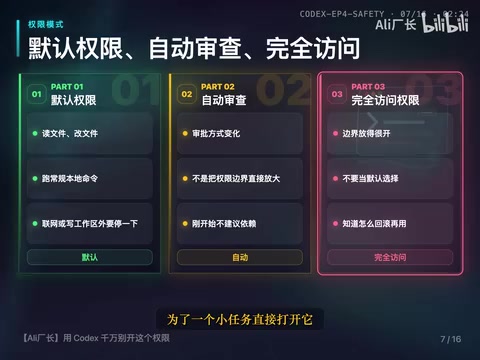
Simple memory aid: Default permissions is beginner mode, Auto Review is daily mode, and Full Access is high-risk mode.
Approval Mechanism: It's a Brake, Not a Nuisance
The role of approval is to make Codex pause before performing actions that require additional confirmation—such as accessing the network, writing outside the workspace, or executing more sensitive commands.
When you see an approval request, don't mechanically click approve. First check three things:
- What command does it want to run?
- What will this command affect?
- Is this permission actually needed for the current task?
If you don't understand, just ask it to explain the action. If it can't explain clearly, don't rush to approve. The essence of the approval mechanism is a "Checkpoint" set between AI autonomous execution and human oversight—each confirmation is your active intervention in the execution chain.
Risk-Level Management: From Read-Only to High-Risk
In practical use, you can manage operation risks in tiers:
Lowest Risk: Read-Only Operations
Explaining the project, finding feature locations, analyzing errors, doing reviews—for these types of tasks, you can generally let it look first without making changes.

Medium Risk: Modifying the Current Workspace
Fixing a button state, changing some copy, adding a test. The key is keeping the scope of changes small and being able to review the diff after changes.
Higher Risk: Running Commands
Check commands like npm test, pnpm link, pytest are usually fairly controllable. But installing dependencies, migrating databases, or starting external services require asking about the purpose and impact first.
Requires Additional Confirmation: Network Access
Checking official documentation, downloading dependencies, and calling external APIs may all require network access. Network access isn't off-limits, but you need to know where it's connecting to, why it needs to connect, and whether it might send sensitive information. Once AI is authorized for network access, the observability of its behavior decreases significantly—this is why network permissions require separate confirmation.
Highest Risk: Deletion and Sensitive Operations
Deleting files, moving large numbers of files, writing to directories outside the project, handling content with sensitive information. This is why full access shouldn't be casually enabled—once boundaries are too wide, the impact scope of deletion, overwriting, and moving actions also expands. When encountering such actions, first ask it to explain the reason, then confirm whether there's a smaller approach.
Five Mantras for Using Codex Safely
Safe Codex usage can be built into five habits—just say them to Codex:
- Read first, don't modify — Let it understand the project first, no rush to act
- List a plan before modifying — Output the modification plan before making changes
- Keep changes contained — Control the scope of each change
- Verify after changes — Check the diff, confirm results
- Report risks at the end — Have it explain possible side effects
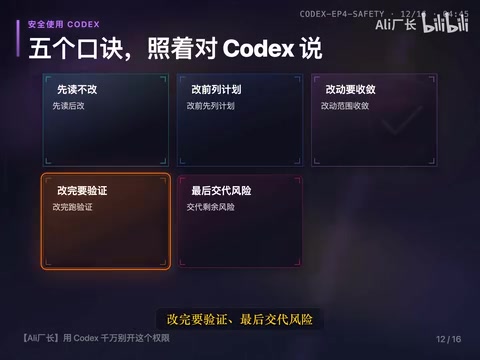
These five phrases aren't meant to limit Codex's capabilities, but to ensure every step has a basis, a boundary, and verification. This workflow corresponds to the extension of "Defensive Programming" thinking into human-AI collaboration scenarios—not assuming the AI is always correct, but actively reducing error probability through structured processes.
Handling Sensitive Information and Large Tasks
Don't casually pass sensitive information. API Keys, passwords, private keys, production database connections, customer data—none of these should be sent directly to Codex. When sensitive information enters the AI context, multiple potential risk surfaces exist: log retention, contamination of model training data, and possible exfiltration if the AI is authorized for network access. Industry best practices include environment variable isolation (.env files paired with .gitignore) and secret management services (such as AWS Secrets Manager, HashiCorp Vault)—these practices equally apply to AI tool usage scenarios. If your project has environment variable files (like .env), be aware they may contain sensitive information. Use fake data when possible, and describe the problem first when you can.
If the task is genuinely large—such as refactoring core logic, modifying payment flows, or migrating databases—it's best to create a branch first. Git's branching mechanism is essentially a low-cost "checkpoint" system: creating a new branch before AI executes large-scale modifications means that even if operations go wrong, you can restore the codebase to any historical state via git reset or git revert without affecting the main branch. If you don't know Git, at least back up key files first, or have Codex do read-only analysis and modification planning first—don't jump straight into fully automated execution.
Summary: Matching Permissions to Tasks Is Key
You only need to remember one guiding principle: Permissions aren't better when wider—they need to match the task.
- Investigating a problem → Use read-only
- Small modifications → Use default permissions
- Need network access, installing dependencies, involving content outside the project → Confirm purpose and impact first
- Full access → Don't use as your daily default
You trust Codex with tasks not because it never makes mistakes, but because you know where it's working, what it can do, and when it will stop to ask you. Once boundaries are clear, full access won't be casually enabled.
Key Takeaways
- Codex's security boundaries are built on three indispensable pillars: workspace, permission mode, and approval
- Permissions are divided into three levels—default, auto review, and full access—corresponding to different depths of intervention in the Human-in-the-Loop cycle; beginners should start with default permissions
- Operation risks can be classified into five tiers: read-only, workspace modification, running commands, network access, and deletion/sensitive operations, managed progressively
- Five mantras for safe usage: read first don't modify, list a plan before modifying, keep changes contained, verify after changes, report risks at the end
- Sensitive information (API Keys, passwords, private keys, etc.) should never be passed directly to Codex—use environment variable isolation instead; large tasks should be executed only after creating a Git branch or backup
Related articles
 Tutorials
Cursor + Codex Dual-IDE Collaboration: A Practical Methodology for Open-Source Project Customization
A complete methodology for open-source project customization based on real-world experience, detailing the Cursor+Codex dual-IDE workflow, seven-stage process, MVP validation, and AI source code reading techniques.
 Tutorials
Cursor Multi-Agent in Practice: Building a Full-Stack Next.js Blog in 50 Minutes
Build a full-stack blog in 50 minutes using Cursor IDE's multi-Agent mode with Next.js, Clerk auth, and Supabase. Learn the 4-phase AI Agent workflow and key integration pitfalls.
 Tutorials
Building an AI Software Factory from Scratch: A Cursor Engineer's Hands-On Experience with Multi-Agent Collaboration
Cursor engineer Eric shares practical insights on building an AI software factory: automation levels, guardrail design, parallel Agent management, and scaling to 1000+ Agents for 24/7 development.