Codex Switch: A Deep Dive into the Protocol Translation Tool for Connecting DeepSeek to Codex
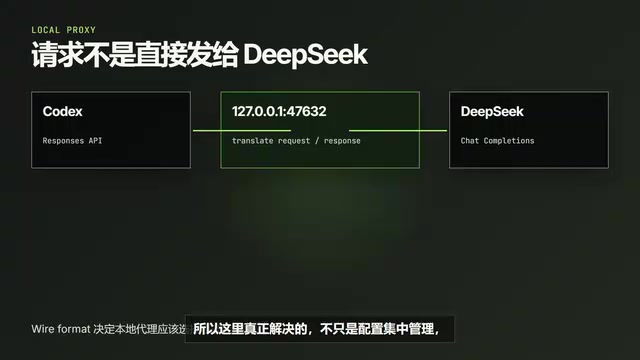
Codex Switch bridges third-party LLMs to OpenAI Codex CLI via local protocol translation proxy.
Codex Switch is an open-source tool that runs a local proxy to translate between OpenAI's Responses API and the Chat Completions format, enabling models like DeepSeek, GLM, and MIMO to work seamlessly with Codex CLI. Beyond protocol conversion, it augments pure text models with visual understanding via cascaded VLMs and web search through Function Calling, while providing unified provider management, session handoff, and image generation in a single workspace.
Introduction: The Pain Points of Connecting Third-Party Models to Codex
OpenAI's Codex CLI is a powerful AI programming tool, but it natively supports only OpenAI's own models. Codex CLI is an open-source command-line AI programming assistant released by OpenAI in 2025. It runs in the terminal and can read local codebases, execute commands, and modify files — essentially an Agent with code execution capabilities. By default, it communicates using OpenAI's Responses API — a next-generation API format introduced by OpenAI in early 2025 that natively supports tool calling, multimodal input, streaming output, and other advanced features, deeply integrated with OpenAI's Agent SDK.
If you want to use Chinese domestic models like DeepSeek, GLM, or MIMO to power Codex, you'll often run into a series of issues: protocol incompatibility, inability to process images, and lack of web search capabilities. The root cause is that third-party models typically only implement the Chat Completions interface, while Codex CLI sends requests in the Responses API format. The two differ significantly in data structure, tool calling methods, and streaming transmission formats.
A Bilibili content creator shared an open-source tool called Codex Switch that uses a local proxy approach to not only solve the protocol translation problem but also augment pure text models with visual understanding and web search capabilities. This article provides a complete walkthrough of the tool's core mechanisms and practical usage.
Starting from Scratch: Connecting DeepSeek to Codex
Step 1: Obtain an API Key and Confirm Interface Details
The first step in connecting any third-party model is creating an API Key on the corresponding platform. Taking DeepSeek as an example, go to the API Keys page on their developer platform and create a new Key (note: the Key is only displayed once, so save it immediately).
Next, you need to confirm three key pieces of information:
- Base URL: The API request endpoint
- Available model list: Confirm the exact model name you want to call
- Request format: DeepSeek uses the Chat Completions format
The Chat Completions API is the earliest conversational interface format introduced by OpenAI. Its request body centers around a messages array, with each message containing role and content fields. Due to its simplicity and first-mover advantage, virtually all third-party LLM providers (including DeepSeek, Zhipu GLM, Anthropic, etc.) have chosen to be compatible with this format, making it the de facto industry standard.
These three pieces of information directly determine whether your subsequent configuration will work. When encountering connection issues, always go back to the official documentation to verify — don't guess.
Step 2: Create a Provider in Codex Switch
Open the Providers page in Codex Switch and create a new DeepSeek Provider. A Provider can be understood as an encapsulation of a set of API connection details — once configured, other functional modules can call DeepSeek without repeatedly filling in the same information.
The fields to fill in include: provider type, Base URL, and API Key. The most critical one is Wire Format — it tells the local proxy which protocol to use when processing requests. The Wire Format selection determines how the proxy maps data structures when forwarding requests: whether to send in the Chat Completions messages format, the Responses API input format, or some other custom protocol.
Step 3: Common Pitfalls and Troubleshooting
In the actual demonstration, the creator intentionally did not set the Wire Format to the correct Chat Completions option, which produced a very typical problem: the model list refreshed normally, but actual conversations failed.
This phenomenon is extremely common when connecting third-party models. The correct troubleshooting approach is:
- Model list returns successfully → Base URL and API Key are most likely correct (because the list endpoint is typically a simple GET request that doesn't involve complex request body formatting)
- Conversation fails → First check the model name and Wire Format (request protocol) (because the conversation endpoint requires the correct request body structure)
After changing the Wire Format to Chat Completions, DeepSeek immediately returned results normally.
Core Mechanism: How the Codex Switch Protocol Translation Proxy Works
It's worth understanding Codex Switch's working principle in depth here. Codex natively sends Responses API requests, while DeepSeek accepts the Chat Completions format — two different protocols.
Specifically, the Responses API uses an input array instead of messages, supports more complex content types (such as built-in tools like file_search and code_interpreter), and the response format changes from a single choices array to a structure containing output items. The two differ significantly in how tool calls are declared, the SSE event format for streaming, and how multimodal content is encoded. This is the fundamental reason why simply changing the Base URL cannot connect third-party models to Codex.
Codex Switch launches a compatibility proxy on the local machine (listening on 127.0.0.1:47632), following a classic reverse proxy/protocol gateway pattern. The workflow is as follows:
- Codex sends a Responses API request in its native format
- The request first reaches the local proxy
- The proxy converts the request into the Chat Completions format that DeepSeek can understand (including mapping the input structure to messages, rewriting authentication headers, converting tool declaration formats, etc.)
- After DeepSeek returns results, the proxy converts the response back into the format Codex expects (wrapping choices as output items, converting streaming event formats, etc.)
This architecture is completely transparent to Codex CLI — it believes it's communicating with a service that supports the Responses API, while the actual backend can be any model compatible with Chat Completions.
What Codex Switch solves goes beyond centralized configuration management. Its core value lies in bridging the differences between different API protocols. This means that theoretically any model compatible with Chat Completions can be connected to Codex through this approach.
Capability Augmentation: Visual Understanding and Web Search
Giving Pure Text Models "Eyes"
DeepSeek's text model cannot directly understand images, but in real-world programming scenarios, you frequently need to handle screenshots, UI mockups, error images, and other visual content. Codex Switch provides an elegant solution:
In the vision settings, you can configure an additional Provider and model that supports image input. Common Vision Language Models (VLMs) include GPT-4o, Claude 3.5 Sonnet, Qwen-VL, and others, which encode images into token sequences through architectures like Vision Transformer and feed them into the language model alongside text tokens for understanding. This vision model doesn't replace DeepSeek — it's specifically responsible for "seeing images":
- When Codex encounters an image task, the image is first sent to the vision model
- The vision model reads the image content and generates a text description (including UI element positions, text content, layout relationships, error messages, etc.)
- Codex Switch passes the description as context to DeepSeek
- DeepSeek performs subsequent analysis and code modifications based on the text description
Essentially, DeepSeek hasn't "suddenly learned to see images" — there's simply an additional visual description step upfront that fills in the information it was previously missing. While this "model cascading" strategy may lose some visual details, it's practical enough for code-related scenarios (such as error messages in screenshots or UI layout references), and it avoids requiring the primary model to have multimodal capabilities. The vision model and the primary model can use different Providers, offering high flexibility.
Web Search: Tools Fetch Information, Models Think
Many third-party models lack native web search capabilities. Codex Switch addresses this by configuring a WebSearch tool. The demonstration used Tavily as the search service. Tavily is a search API designed specifically for AI Agents. Unlike traditional search engine APIs, its results are optimized for LLM consumption, including content summary extraction, relevance ranking, and structured output, enabling models to utilize search results more efficiently.
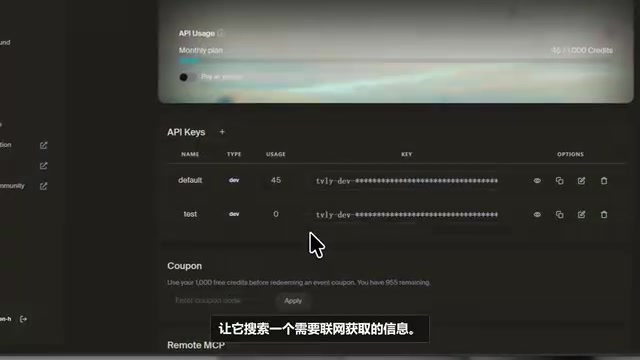
The actual workflow is:
- When the model determines it needs online information, it calls the locally provided WebSearch tool
- If it needs to read specific webpage content, it then calls the WebFetch tool
- The tools return search results and webpage content
- DeepSeek organizes the answer based on this content while preserving information sources
From a technical implementation perspective, search capability is injected through the Function Calling mechanism: when forwarding requests, the proxy declares WebSearch and WebFetch as two available functions along with their parameter schemas in the tool list. When the model determines it needs external information, it generates a tool call request in its response (containing the function name and parameters). The proxy intercepts this request, actually executes the search operation, and returns the results as a tool response for the model to continue reasoning. This "model decides + tool executes" separation architecture is the mainstream design pattern for current AI Agents.
A major advantage of this process is that it's easy to debug. In the terminal, you can clearly see which tools were called, what search results were returned, and which pages were read. If the answer is incorrect, you can precisely determine whether the issue lies in the search keywords, webpage content, or model comprehension.
Web search capability isn't crammed directly into the model — instead, it's supplied to the Agent through local tools. The model is responsible for thinking, while the tools are responsible for fetching the latest information.
Additional Features: Image Generation, Conversation Testing, and Session Management
Drawing: Unified Image Generation Management
Codex Switch also integrates image generation functionality. Select a saved Provider and image model, enter a prompt (with optional reference images), and call the image generation API.
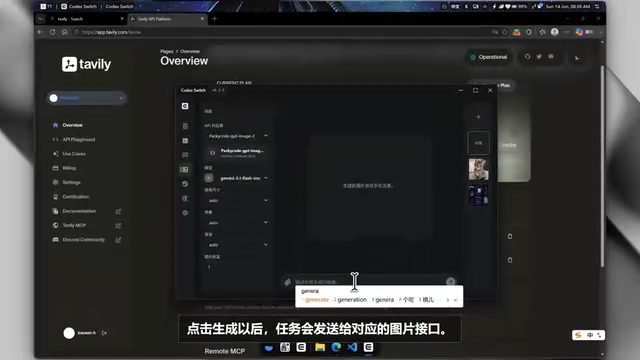
Generated results are saved in local records for easy future reference. While it's not professional drawing software, having the image generation interface within the same workspace eliminates the hassle of switching between multiple tools.
Talking: Quick Conversation Testing
If you just want to verify whether a Provider can be called successfully, the Talking page is much faster than restarting an Agent. Simply select a Provider and model to conduct a quick conversation test — ideal for rapidly verifying connectivity during the configuration phase.
Sessions: Session Management and Handoff
Codex Switch reads session records saved locally by the Agent and displays them in a centralized view. A particularly useful feature is Handoff — rather than copying an entire conversation, it distills the information most needed for the next phase of work: current progress, which files were modified, what needs to be verified next, and what risks remain unaddressed.
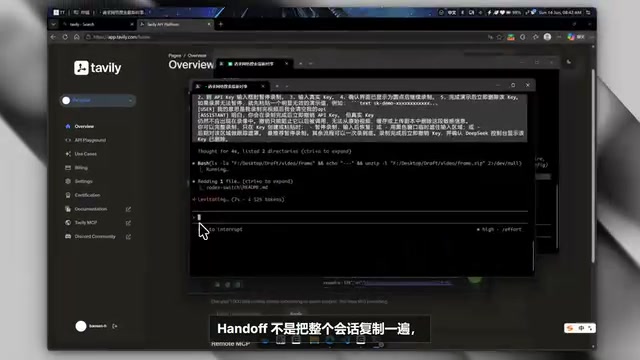
Handoff is an important concept in Agent engineering, originating from work handover scenarios in human team collaboration. In long-running programming projects, a single conversation's context window is limited (even a 128K token model can overflow when facing large codebases), and developers may continue the same task at different times using different models. The Handoff mechanism performs intelligent summarization of historical sessions, extracting key state information — preserving "decision-relevant information" rather than "conversation process information." In OpenAI's Agent SDK, Handoff is also a core primitive used to transfer task control between multiple Agents.
This is extremely useful for long-term projects, because when you're actually working on a project, much of the context can't be conveyed with a simple "continue where we left off."
Conclusion: Who Is Codex Switch For?
The value of Codex Switch can be summarized across three dimensions:
- Protocol translation: Enables models that otherwise can't connect to Codex (DeepSeek, GLM, MIMO, etc.) to seamlessly integrate through a local proxy
- Capability augmentation: Adds visual understanding and web search capabilities to pure text models, extending functionality boundaries through toolchains rather than the model itself
- Unified management: Providers, model configurations, session records, and image generation are all organized within a single workspace
The tool has been open-sourced on GitHub, with the Windows version available for download from GitHub Releases. For developers who want to use Chinese domestic models with Codex or Claude Code, this is an open-source project worth keeping an eye on.
However, it's important to note that protocol translation itself introduces additional latency (requests need to go through the local proxy's parsing, conversion, and re-packaging), and capability differences between models still exist — tools can solve interface compatibility issues, but the model's reasoning quality still depends on the model itself. Choosing the right model combination (primary model + vision model + search tools) is the key to maximizing the value of this solution.
Related articles
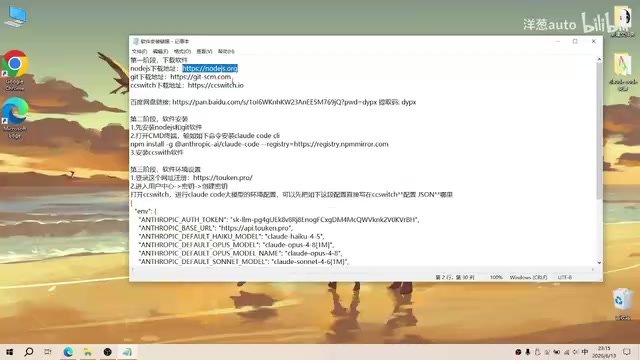
Complete Guide to Installing Claude Code CLI in China: Four Simple Steps
Step-by-step guide to installing Claude Code CLI in China using Node.js, Git, CC Switch, and an API relay service to bypass Anthropic's access restrictions.

The Compute Crisis: Why Google and Anthropic Are Paying SpaceX a Premium to Rent GPUs
Microsoft, Google, and Anthropic face severe compute shortages. Anthropic pays SpaceX $1B/month for GPUs. From TSMC capacity to HBM, storage, and power, the AI supply chain is in full crisis.
Mistral Le Chat Image Generation Review: Can It Replace Fable?
Mistral AI launches image generation in Le Chat, dubbed Le Chaton Fat. We analyze its capabilities, compare it with Fable, and explore the trend of AI chat platforms integrating image generation.