Codex vs. Claude Code: A Complete Beginner's Guide from Registration to Hands-On Practice
A beginner's guide to Codex and Claude Code: from GPT account setup to AI-powered programming.
This guide compares Codex (OpenAI) and Claude Code (Anthropic), the two leading AI agent programming tools, and walks beginners through the entire setup process — including GPT account registration, phone verification via SMS platforms, mobile app installation, and subscription plan selection with cost-saving tips like using Turkey-region pricing.
The Era of AI Agent Programming Tools Is Here
If you've been following the AI programming space, you've surely heard of Codex and Claude Code. These aren't simple chatbot interfaces for large language models — they're what's known as AI agent tools. Think of them as giving LLMs hands and feet, enabling them to actually execute programming tasks rather than just "think."
AI agents represent one of the most significant paradigm shifts in artificial intelligence today. Traditional large language models are essentially "Q&A systems" — you ask, they answer, and the interaction ends there. AI agents, however, add a closed-loop capability of "perceive-plan-execute" on top of LLMs. In the context of programming, an agent doesn't just understand your requirements and generate code — it can autonomously run the code, observe the results, detect errors, and fix them automatically. It can even manipulate file systems, call APIs, and run test suites. This capability relies on underlying technical architectures such as Tool Use, Memory management, and Multi-step Reasoning. It's the combination of these capabilities that elevates AI programming from "assisted suggestions" to "autonomous task completion."
Whether you're a professional developer or a complete beginner with zero coding experience, these tools have become essential skills in the industry. This article will walk you through the entire process step by step, starting from the most basic environment setup.
Codex vs. Claude Code: Strengths Compared
The Two Top-Tier Contenders
In the AI programming agent space, Codex (by OpenAI) and Claude Code (by Anthropic) are widely recognized as the top-tier products. Based on real-world usage, each has its own strengths:
Codex's Core Advantages:
- Powered by the GPT-5.5 model, with stronger Chinese language comprehension
- Excellent requirements analysis — better at understanding what you actually want
- Strong full-stack development capabilities (both frontend and backend)
- Rapidly growing MCP ecosystem
- Standalone app with a great mobile experience
- Backed by OpenAI's largest resource investment
GPT-5.5 is OpenAI's latest-generation large language model, released in 2025, with significant improvements over its predecessor GPT-4o across multiple dimensions. Key enhancements include a larger context window (supporting analysis of longer code files), stronger instruction-following capabilities, and breakthrough progress in multilingual understanding. The improvement in Chinese comprehension, in particular, means Chinese-speaking users no longer need to deliberately use English or simplify their expressions when describing requirements. In programming tasks, GPT-5.5 demonstrates stronger holistic code understanding, accurately pinpointing issues in large projects and proposing systematic solutions.
Regarding the MCP ecosystem, a brief explanation is warranted. MCP (Model Context Protocol) is an open standard proposed by Anthropic in late 2024, designed to establish a unified communication interface between AI models and external tools or data sources. Think of MCP as the "USB port" of the AI world — with this standard, any developer can build plugins for AI agents, enabling models to connect to databases, call third-party APIs, manipulate local files, and more. OpenAI's Codex is also actively embracing this ecosystem, meaning users can dramatically extend Codex's capabilities through MCP plugins — for example, connecting to Figma designs to directly generate frontend code, or integrating with Jira to automatically manage project tasks.
Claude Code's Core Advantages:
- High-quality code generation, especially for complex logic
- Strong contextual understanding and retention
From personal experience, if you have both installed, I'd recommend running the same project through each. The difference in user experience is quite noticeable. Thanks to its standalone app, Codex has the edge in day-to-day convenience.
Cost Considerations
The Claude models behind Claude Code are relatively expensive, leading many users to configure domestic models like DeepSeek to reduce costs — though the results aren't as good as the native model. Codex paired with GPT also requires payment, but there are some money-saving tricks (detailed later in this article).
Complete GPT Account Registration Walkthrough
Using Codex requires a GPT account — and this is where many people get stuck at the very first hurdle. Here's the complete registration process:
Prerequisites Checklist
- VPN/Proxy tool: This is the most basic prerequisite; you'll need to set this up on your own
- An email address: Gmail, NetEase Mail, etc. — no special requirements
- SMS verification platform: For receiving phone verification codes (since a foreign phone number is required)
An SMS verification platform is an online service that provides virtual phone numbers. Here's how it works: the platform operator purchases large quantities of physical SIM cards across multiple countries or partners with telecom carriers to obtain virtual number ranges. When a user needs a phone number from a specific country to receive a verification code, the platform temporarily assigns a number and forwards any SMS received on that number to the user. Common platforms include SMS-Activate, 5SIM, and others. Note that these numbers are typically one-time use — they're recycled after verification is complete, making them unsuitable for scenarios requiring long-term phone number binding. Costs usually range from a few cents to a couple of dollars, depending on the target country and service type.
Step-by-Step Registration Guide
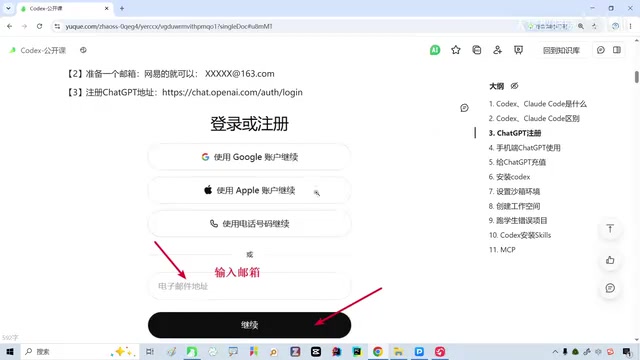
Step 1: Visit the GPT Registration Page
With your VPN active, visit OpenAI's official registration page, enter the email address you've prepared, and click Continue.
Step 2: Email Verification
The system will send a verification code to your email. Log into your email, retrieve the code, enter it, and click Continue.
Step 3: Phone Number Verification (Critical Step)
This step requires a foreign phone number. The solution is to use an SMS verification platform:
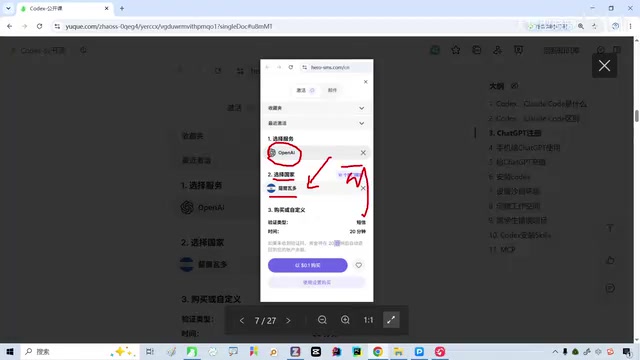
- On the platform, select "OpenAI" as the service on the left panel
- Choose an available country (the platform will indicate which ones work)
- Add a small amount of credit; the platform will assign a virtual number
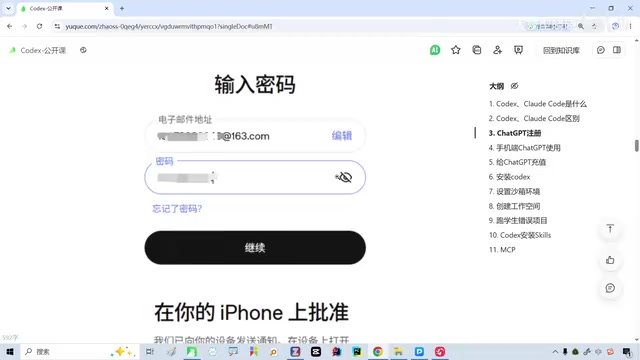
- Enter the virtual number on the GPT registration page
- Return to the SMS platform to check the received verification code
- Enter the code on the GPT page to complete verification
Step 4: Mobile App Installation
After registration, GPT will require authorization verification on a mobile device. Here's the process for iPhone:
Since a Chinese Apple ID cannot download ChatGPT, you'll need to:
- Register a US-region Apple ID
- In your Apple ID settings, switch the country/region to the United States
- Select "None" for payment method
- Use a "US address generator" to create a virtual address for the address fields
- After switching to the new Apple ID, search for and download ChatGPT from the App Store
Note: Your phone must be running iOS 16.1 or higher, and the mobile device also needs a VPN connection.
Money-Saving Tip: Register with a Turkey-Region Account
A practical cost-saving tip: choose the Turkey region instead of the US when registering. Due to exchange rate differences, subscription costs in the Turkey region are roughly half of the US region — about $20/month in the US versus approximately $9-10/month in Turkey.
The price difference has deep economic roots. Tech companies use regional pricing (also known as PPP Pricing — Purchasing Power Parity Pricing) across different markets. Companies like Apple and Google adjust digital product prices based on each country's per capita income and currency purchasing power. Due to the Turkish lira's massive depreciation in recent years (over 80% since 2021) and severe inflation, App Store and subscription service pricing in Turkey is significantly lower relative to the US dollar zone. Leveraging this price gap by switching account regions is a widespread practice, but be aware: some service providers may check whether your IP address matches your account region, which poses some account risk. It's recommended to keep your network environment consistent with your account region.
ChatGPT Subscription Plan Selection Guide
After logging into GPT, find the "Upgrade Plan" option in the left menu:
| Plan | Price | Use Case |
|---|---|---|
| Free | $0 | Basic experience, limited features |
| Plus | $20/month | Personal learning and daily use |
| Business | Per-seat pricing | Company team use |
| Pro | $200/month | Heavy professional users |
Recommendations:
- If your company has a team account, simply join it — no personal payment needed
- For the learning phase, the $20 Plus plan is sufficient
- Registering in the Turkey region can further reduce costs
For users who want to use Codex for AI programming, the Plus plan's model call quota is generally adequate for daily learning and light development. However, if you plan to do extensive code generation and project development, the Pro plan's unlimited access and priority response speed will deliver a significant efficiency boost. I'd suggest starting with Plus to get a feel for it, then deciding whether to upgrade based on your actual usage frequency.
Practical Tips and FAQ
Common Issues
- Unstable network: Activities like live streaming or video calls may affect VPN stability — operate in a stable network environment
- Can't access the SMS platform: These platforms also require a VPN, and may occasionally experience access instability
- Android users: The process is similar, but app installation differs — you'll need to use Google Play or install via APK
Next Steps After Setup
Once your GPT account is registered and subscription activated, you have the foundation to use Codex. Next steps include:
- Installing the Codex client on your computer
- Configuring the GPT model connection
- Starting your first AI programming project
It's worth noting that Codex, as an AI agent tool, works fundamentally differently from traditional IDE plugins (like GitHub Copilot's auto-completion). Codex uses a "task-driven" mode: you describe a complete development requirement (e.g., "Create a to-do app with user authentication"), and Codex autonomously plans the technical approach, creates the project structure, writes the code, runs debugging, and delivers a working project. You can intervene and adjust direction at any point during the process, but most of the execution is handled autonomously by the AI. This workflow is especially friendly for non-programmers — you only need to clearly describe "what you want" without needing to know "how to implement it."
Conclusion
The barrier to entry for AI agent programming tools may seem high, but in reality, the main bottleneck is the account registration process. Once you clear that hurdle, the subsequent user experience is quite smooth. I'd recommend that beginners follow this guide step by step, and when issues arise, make good use of search engines — most problems already have ready-made solutions.
From a broader perspective, 2025 marks a critical inflection point as AI programming tools transition from "assistive" to "autonomous." The agent paradigm represented by Codex and Claude Code is redefining what "programming" means — it's no longer a specialized skill mastered by a select few, but a creative tool accessible to everyone through natural language. Getting familiar with these tools early will give you a significant efficiency advantage in future work and learning.
Related articles

Remotion: The Open-Source Framework for Code-Driven Video Production with React
Deep dive into Remotion, the open-source framework for writing videos with React components. Covers core principles, use cases, comparison with traditional editors, and quick start guide.
Nex N2 Pro Real-World Testing: Top 5 on Official Benchmarks, Only 12th in Independent Tests
Deep-dive testing of Nex N2 Pro open-source Agent model comparing official benchmarks vs independent results. The 397B parameter model shows decent frontend generation but ranks 12th independently, not top 5 as claimed.
Claude Code Workflow in Practice: From Requirement Grilling to AFK Agent Auto-Coding
A detailed walkthrough of building real features with Claude Code: Grill Me requirement interrogation, auto-generated PRDs, AFK agent coding, and QA iteration loops with DDD and TDD strategies.