Codex vs Claude Code In-Depth Comparison: How to Choose Your AI Coding Tool
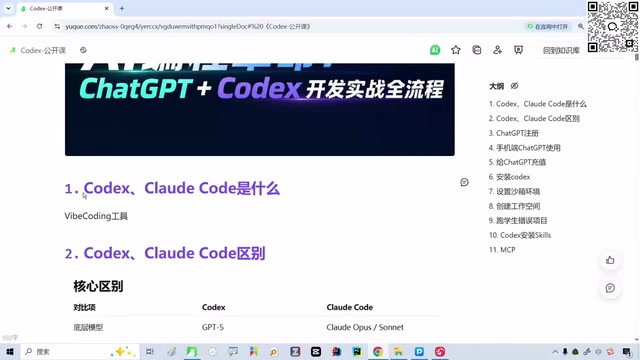
A comprehensive comparison of Codex and Claude Code to help developers choose the right AI coding agent.
This article provides an in-depth comparison of Codex and Claude Code—two leading AI agent programming tools. It covers their underlying models, Chinese language comprehension, usage costs, client forms, and MCP ecosystem support. The guide includes environment setup instructions for beginners and practical selection advice for experienced developers, concluding that Codex has a slight edge overall but both tools are worth exploring.
Introduction: The Era of AI Agent Tools Has Arrived
If you're still stuck at the stage of simple conversations with large language models, you may already be falling behind. The hottest trend in AI programming today isn't just chatting with LLMs—it's AI agent tools represented by Codex and Claude Code. The fundamental difference is this: a large model is the "brain" that can only think and answer questions, while agent tools equip that brain with "hands and feet," enabling it to actually execute tasks, write code, and manipulate files.
AI Agents represent one of the most important paradigm shifts in artificial intelligence over the past two years. Traditional large language models (LLMs) are essentially stateless text generators—they receive input, produce output, with no memory and no ability to act. Agent architecture adds a Perception layer, Planning layer, Memory layer, and Action layer on top of the LLM. This means agents can observe environmental states, formulate multi-step plans, remember previous operation results, and actually execute operations through Tool Use. The theoretical foundation of this architecture traces back to the Subsumption Architecture proposed by Rodney Brooks in 1986, but it wasn't until GPT-4-level models appeared in 2023 that LLMs possessed sufficient reasoning capability to drive reliable agent systems.
This article starts from the ground up, providing a detailed comparison of the core differences between Codex and Claude Code, along with a complete workflow from environment setup to hands-on project work, helping you make quick decisions and get started.
What Are AI Agent Programming Tools?
The Leap from LLMs to Agents
The traditional way of using large models—like asking questions on the ChatGPT web interface—is essentially a "Q&A" process: you ask, the model answers, and that's it. AI agent programming tools are completely different. They possess the following capabilities:
- Autonomous requirement analysis: Understanding your project intent and breaking complex tasks into executable steps
- Direct code manipulation: Creating files, modifying code, running and debugging—fully automated
- Full-stack development capability: Handling frontend, backend, and database in one go
- MCP ecosystem extension: Connecting to databases, APIs, and other external services through plugins and toolchains
MCP (Model Context Protocol) is a standardized protocol open-sourced by Anthropic in late 2024, designed to solve the connection problem between AI models and external tools/data sources. Before MCP, every time an AI tool needed to integrate with a new external service (such as a database, API, or file system), developers had to write custom integration code, leading to severe ecosystem fragmentation. MCP adopts a client-server architecture and defines a unified JSON-RPC communication format, allowing any MCP-compliant tool server to be called by any MCP-supporting AI client. This is similar to how the USB protocol unified peripheral interfaces—with MCP, AI agents can connect to various external capabilities as easily as plugging in a USB device. Currently, companies like OpenAI and Google have also announced support for the MCP protocol, and it's becoming the de facto standard for the AI tool ecosystem.
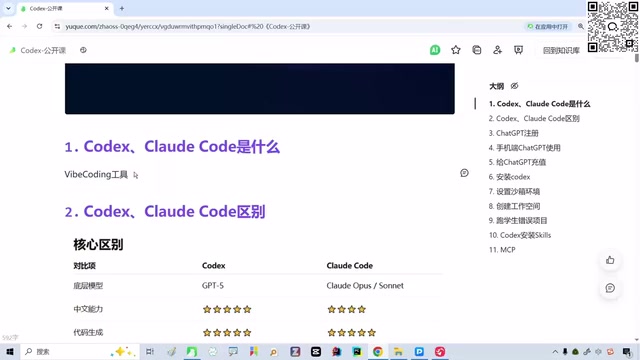
The mainstream AI agent programming tools currently available include Codex, Claude Code, Cursor, and others. Among them, Codex and Claude Code firmly occupy the first tier and are essential tools worth mastering for both programmers and non-programmers.
Who Should Use These Tools?
An important insight: AI programming tools are not just for programmers. Even if you don't know Java, Python, or any programming language, it doesn't affect your ability to use them at all. You simply describe your requirements in natural language, and the tool automatically generates complete, runnable code. For non-technical professionals, mastering these tools can also dramatically boost work efficiency.
Codex vs Claude Code: A Comprehensive Comparison of Core Differences
Model Foundation and Base Capabilities
The most fundamental difference between the two tools lies in their underlying models, which directly determines their performance across various capabilities:
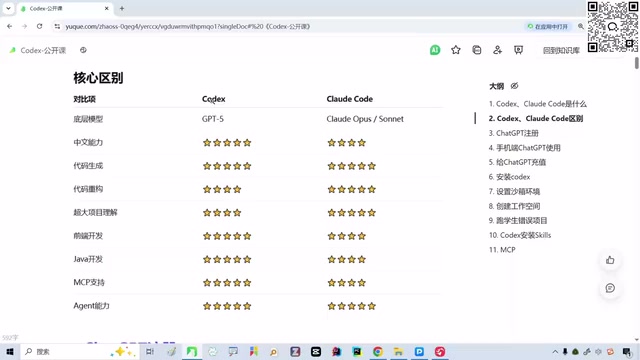
| Comparison Dimension | Codex | Claude Code |
|---|---|---|
| Underlying Model | GPT (up to GPT-5.5) | Claude series |
| Parent Company | OpenAI | Anthropic |
| Chinese Understanding | Superior | Slightly weaker |
| Cost | Requires ChatGPT subscription | Higher Claude API fees |
| Client Form | Standalone APP + IDE integration | Primarily terminal CLI |
Some background on both companies is worth knowing: OpenAI was founded in 2015, initially as a nonprofit before transitioning to a "capped-profit" company led by Sam Altman. Its core product line includes the GPT series of large models, the ChatGPT conversational product, DALL-E image generation, and the Codex programming tool. Anthropic was founded in 2021 by former OpenAI Research VP Dario Amodei and his sister Daniela Amodei, with most of the core team coming from OpenAI. Anthropic centers on "AI safety" as its core philosophy, proposing alignment methodologies like Constitutional AI, and its Claude series models excel in long-context processing and code generation. The two companies represent two different development paths in the current AI landscape: OpenAI pursues rapid expansion of capability boundaries, while Anthropic emphasizes safe and controllable incremental development.
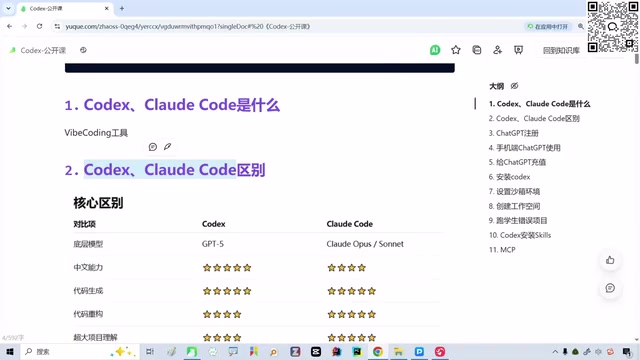
From actual usage experience, Codex stands out in the following areas:
- Stronger Chinese comprehension: GPT-5.5's understanding of Chinese requirements is noticeably better than Claude's—a key advantage for Chinese-speaking users
- Deeper requirement analysis: In complex projects, Codex's decomposition and understanding of requirements is more precise
- Balanced full-stack capabilities: Whether it's frontend UI or backend logic, performance is consistently stable
- Faster MCP ecosystem development: OpenAI has the largest official investment, with rapid iteration of toolchains and plugin ecosystems
Regarding GPT-5.5's capabilities, it's worth adding: GPT-5.5 represents OpenAI's latest generation reasoning model launched in 2025. Compared to its predecessor, it shows significant improvements in multilingual understanding (especially Chinese, Japanese, and other Asian languages), code generation accuracy and first-pass rates, context window capacity, and stability in complex multi-step reasoning tasks. Notably, model capability improvements are not linear—from GPT-4 to GPT-5.5, the model not only improved on benchmark scores but more importantly achieved a qualitative leap in "understanding intent" and "handling ambiguous requirements," which is particularly critical for programming agent scenarios.
Realistic Cost Considerations
Cost is a factor that cannot be ignored when making your choice. Many people using Claude Code opt to configure domestic models (like DeepSeek) as substitutes to save money. While this costs less, the actual results show a noticeable gap compared to the native Claude model. Using Codex with GPT also requires subscription fees, but the overall cost-effectiveness and experience consistency are better.
You might not have noticed, but the gap between domestic and international models is closing rapidly. In the future, the criteria for choosing tools may depend more on price and ecosystem.
Codex's Unique Advantage: Standalone APP Client
Compared to Claude Code, Codex has another differentiating advantage—it offers a standalone APP client. This means you don't have to open an IDE or terminal every time. In daily use, you can quickly initiate programming tasks directly through the APP, greatly improving convenience.
It's necessary to explain the usage differences between client forms: Claude Code primarily runs as a terminal command-line interface (CLI), where users type commands in the Terminal to interact with the AI. This approach is developer-friendly but presents a high barrier for non-technical users. Terminal operations require users to be familiar with basic command-line concepts like directory navigation (cd), file viewing (ls/cat), process management, etc. In contrast, IDE integration (such as VS Code plugins) provides a graphical interface where users can collaborate with AI directly in a familiar editor environment, seeing code highlighting, diff comparisons, and one-click accept/reject modifications with visual feedback. The standalone APP client goes even further, packaging the entire interaction flow into a chat-app-like experience where users need no knowledge of development tools to use it. These three forms correspond to the needs of users at different technical levels.
Environment Setup: Building Codex from Scratch
Step 1: Solving the GPT Account Issue
The first hurdle to using Codex—and where many people get stuck—is registering and configuring a ChatGPT account. The specific steps include:
- Account registration: Requires an overseas phone number or email for verification
- Subscription plan: Choose a Plus or Pro subscription based on your needs
- API configuration: Properly bind the GPT model in Codex
This process has a certain learning curve for beginners, but once completed, subsequent usage is very smooth.
Step 2: Installing and Configuring Codex
After preparing your GPT account, complete the installation with these steps:
- Download and install Codex: Get the latest version from official channels
- Login authentication: Complete identity verification using your OpenAI account
- Model selection: It's recommended to select the latest GPT model for the best experience
- Workspace configuration: Set up project directories and basic preference parameters
Usage Tips and Pitfall Avoidance Guide
Getting Started Tips for Complete Beginners
- Don't be afraid of not knowing code: Just describe the functionality you want in natural language—the tool handles all technical details automatically
- Start with small projects: Build a simple webpage or small utility first to familiarize yourself with the entire workflow
- Make good use of Chinese prompts: Codex understands Chinese well, so there's no need to force yourself to describe requirements in English
Advanced Tips for Users with Programming Experience
- Install both tools for comparison: Codex and Claude Code each have their strengths—run the same project through both to truly feel the differences
- Focus on the MCP ecosystem: MCP is the core competitive advantage of future AI programming tools; mastering it can dramatically extend tool capabilities
- Choose based on your tech stack: If your project is primarily Python, the differences are minimal; if it involves complex full-stack development, Codex may have an edge
Conclusion: Getting Started Is What Matters Most
AI agent programming tools are no longer an optional "nice-to-have"—they're gradually becoming an essential skill for everyone. Among the current first-tier options of Codex and Claude Code, Codex edges ahead in overall user experience thanks to GPT's Chinese comprehension advantage, stronger requirement analysis capabilities, standalone APP experience, and OpenAI's continued investment.
But regardless of which tool you ultimately choose, the key is to just start using it—begin with account registration, environment setup, and hands-on practice. That's the fastest learning path. AI programming tools iterate at breakneck speed, and the earlier you get started, the better positioned you'll be to ride this technology wave.
Key Takeaways
Related articles

Five Common Claude Code Mistakes — How Many Are You Making?
Five common Claude Code mistakes developers make: copy-pasting code, skipping CLAUDE.md, inefficient prompting, ignoring docs, and poor context management — with fixes.

Andrew Ng's New Course Explained: A Practical Guide to Using OpenAI's O1 Reasoning Model
Deep dive into Andrew Ng and OpenAI's Reasoning with O1 course covering test-time scaling, new prompting paradigms, multi-model orchestration, and practical applications for developers.

Learning AI After College Entrance Exams: A Complete Path from Zero to Freelancing
How to efficiently learn AI skills during summer break after exams? A complete path from mastering prompts and hands-on projects to freelancing on platforms.