Getting Started with Codex from Scratch: Why It's a Better Fit Than Claude Code for Most People
Getting Started with Codex from Scratc…
Codex outperforms Claude Code as an all-in-one AI Agent platform in stability and features.
This article provides a detailed comparison of OpenAI Codex and Claude Code, highlighting Codex's clear advantages in account stability, usage quotas, and feature completeness. As a desktop Agent, Codex goes beyond coding to offer browser control, image generation, automated tasks, and mobile remote access. Its multi-level permission management from sandbox to full access balances security with convenience, making it a comprehensive AI Agent platform for everyday workflows.
Why Choose Codex Over Claude Code
OpenAI's Codex desktop application is becoming the go-to AI Agent tool for an increasing number of developers and knowledge workers. Compared to Claude Code, Codex holds clear advantages in account stability, usage quotas, and feature completeness.
First, there's the account security issue. Frequent account bans with Claude Code have become a widely discussed pain point in the community, whereas Codex users who pay through official channels rarely encounter any ban issues. Second, when it comes to usage quotas, Codex offers more usage for the same price, and it frequently resets weekly quotas, allowing users to refresh 100% of their usage allowance early each week.
Codex currently offers three pricing tiers:
- $20 Plus tier: Sufficient for everyday work needs
- $100 Pro account: Meets the demands of most heavy workloads
- $200 tier: Designed for professional users
More importantly, Codex is far more than just a coding tool — it can handle documents, create presentations, automatically search the web, help you find the best-value products, assist with research papers, and even directly call GPT Image 2 to generate images.
The Core Difference Between Codex and ChatGPT
The fundamental difference between Codex and ChatGPT is this: Codex, as an Agent tool, can access files on your computer and use tools installed on your machine, while the ChatGPT web version is essentially limited to conversation. Although ChatGPT supports uploading files and images, it cannot directly access your folders to make modifications or use local tools.
Put simply, this is the essential difference between a chatbot and an Agent tool — the former can only converse, while the latter can actually take action.
To understand the technical depth of this distinction, you need to grasp the concept of an Agent (intelligent agent), which is currently the most important technical paradigm in AI. Unlike traditional chatbots that merely generate text, an Agent possesses a complete closed-loop capability: perceiving its environment, formulating plans, invoking tools, and executing actions. Technically, Agents are typically built on the ReAct (Reasoning + Acting) framework, where the model first reasons at each step, then decides which tool to call or which action to take, observes the result, and enters the next iteration. This "think-act-observe" loop enables Agents to handle complex multi-step tasks rather than simple Q&A exchanges. As a desktop Agent, Codex's core strength lies in having OS-level tool invocation permissions, including file system read/write, terminal command execution, and application launching — capabilities that pure web-based chat tools simply cannot achieve.
Interface and Permission Management in Detail
Codex currently offers both macOS and Windows versions, with the macOS version being more feature-complete. Upon opening the app, the central area contains the chat box, while the left sidebar has buttons for new conversations, search, plugins, and automation, along with project folder management.

Regarding permission management, Codex runs in a sandbox environment by default, preventing it from freely modifying files outside the sandbox, with network requests also being restricted.
A Sandbox is a security isolation technology that was first widely adopted in operating system and browser security. Its core principle is creating a restricted execution environment for programs, where the program can only access resources inside the sandbox and cannot reach external system files or networks. The sandbox mechanism on macOS is based on Apple's App Sandbox framework, implementing file system isolation and network access restrictions through kernel-level permission controls. Codex's use of a sandbox as its default running mode is essentially a balance between security and functionality — giving the AI Agent enough operational space to complete tasks while preventing accidental or malicious operations that could damage the system.
Permissions are divided into several levels:
- Default permissions: Can only modify the current folder
- Auto-review permissions: Adds a Reviewer Agent that intelligently decides whether to automatically approve certain requests
- Full access permissions: Grants the Agent access to all files, tools, and network (use with caution)
- Custom configuration: Fine-grained permission control through the config.toml file
The config.toml configuration file provides fine-grained permission management capabilities similar to ACL (Access Control Lists) in Linux systems, allowing users to precisely specify which directories are readable, which are writable, and which network domains are accessible, achieving precise control over the Agent's behavioral boundaries.
For model selection, GPT-5.5 is recommended with reasoning capability set to ultra-high and speed set to fast, since GPT models in Codex tend to favor deep reasoning, which makes them relatively slower.
Hands-On: Code Development and Browser Control
Codex's power lies in its ability to not only modify files on your computer but also directly invoke desktop applications and browsers.
Code Development Workflow
In code development scenarios, once you point Codex to a project folder, it first familiarizes itself with the entire file structure, understands the project's current state, then formulates a modification plan and executes it. After writing the code, it even launches the local browser on its own to verify the page.
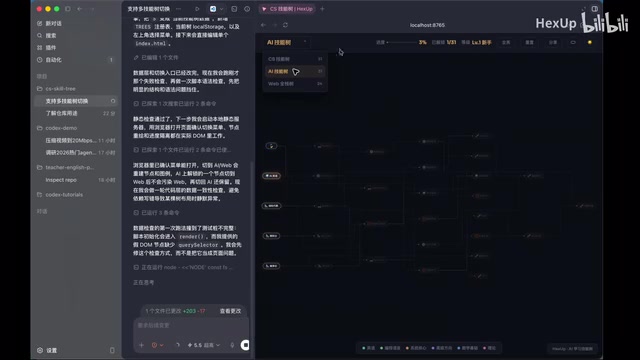
Browser Control Capabilities
Even more impressive is the browser control capability. You can directly tell Codex to search for information using Chrome, and it will invoke your browser to perform the search rather than using a built-in web search tool. This means it can browse using your account, bypassing many crawler restrictions, since it's essentially simulating real human browser behavior.
From a technical perspective, Codex's browser control represents a fusion of RPA (Robotic Process Automation) and AI Agents. Traditional RPA tools like Selenium and Playwright use the WebDriver protocol or CDP (Chrome DevTools Protocol) to programmatically control browsers, but they require pre-written precise operation scripts. Codex's innovation lies in combining the comprehension capabilities of large language models with browser automation technology — the model understands the current page state through screenshots or DOM structure, then dynamically decides the next action (click, type, scroll, etc.). Since it controls the user's local real browser instance, all operations carry the user's cookies and login state, enabling access to websites that require authentication without triggering most anti-crawler mechanisms. This stands in stark contrast to traditional crawlers using headless browsers, which are often easily identified and blocked by website bot detection systems.
Note: Desktop application and browser control features are currently only available on macOS. The Windows version is temporarily limited to command-line tools.
Plugins and Skills System
Plugin vs Skill
Codex comes with a rich plugin ecosystem. The difference between plugins and skills is:
- Plugin: An add-on package that provides functionality to Codex, potentially containing skills, MCP, and other extensions — more complex and comprehensive overall
- Skill: Primarily text-based organized instructions that tell the Agent how to perform specific tasks
The MCP (Model Context Protocol) mentioned here is an open standard protocol proposed by Anthropic in late 2024, designed to establish a unified communication interface between AI models and external tools/data sources. MCP adopts a client-server architecture where AI applications act as clients making requests, and various tools and services act as servers providing capabilities. The significance of this protocol lies in solving the previously incompatible tool-calling interfaces across different AI platforms, similar to how the USB protocol unified peripheral interfaces. Codex's plugin system is built on top of such standardized protocols, making it easy for third-party developers to extend Codex with new capabilities. As a more complete feature package, a plugin may simultaneously include an MCP server, predefined Skill instruction sets, and UI components, while a Skill is more lightweight — essentially a structured Prompt template that tells the Agent what steps and guidelines to follow in specific scenarios to complete a task.
The Three Command Symbols
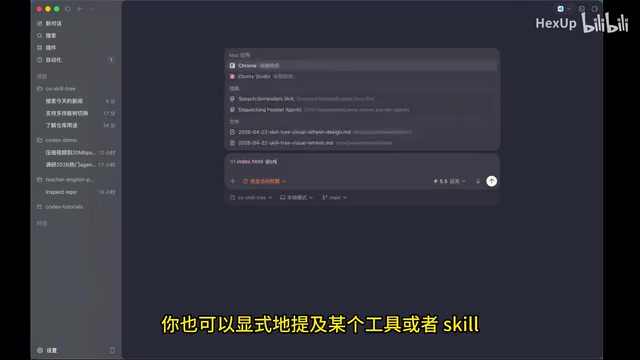
- Slash (/): Codex built-in commands for configuring Codex itself, such as switching modes or selecting models
- @ symbol: Used to reference files, tools, or apps — pulling an object into the context
- $ symbol: Specifically used to explicitly invoke a Skill
GPT Image 2 Image Generation
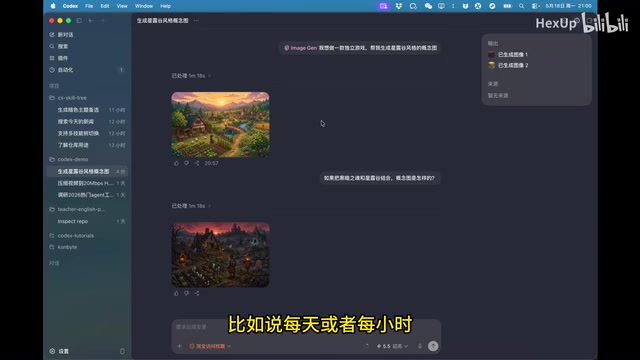
Codex can directly call GPT Image 2 to generate images, a feature that's highly practical for design references and concept validation. For example, when developing a skill tree webpage, you can have it generate UI concept images with different color schemes, then directly generate HTML code based on the selected image.
GPT Image 2 is a native multimodal image generation capability developed by OpenAI on top of GPT-4o, fundamentally different from the standalone model architecture of the earlier DALL·E series. DALL·E uses a Diffusion Model architecture, while GPT Image 2 unifies text understanding and image generation within an autoregressive Transformer framework, processing both text tokens and visual tokens simultaneously. The advantage of this architecture is that the model understands text instructions more precisely, can accurately render text, follow complex layout requirements, and maintain style consistency across multi-turn conversations. Within Codex's workflow, the integration of GPT Image 2 means that everything from concept design to code implementation can be completed seamlessly within a single Agent session — first generating visual concept images to confirm direction, then directly generating frontend code based on the approved design, dramatically shortening the design-to-development iteration cycle.
In testing, GPT Image 2 demonstrated solid aesthetic sensibility — generated UI concept images featured harmonious color schemes, well-arranged elements, and it even proactively designed button and layout variants for selection. When generating game concept art, it also showed a strong understanding of style fusion requirements, such as creatively combining elements from "Dark Souls" and "Stardew Valley."
Automated Tasks: Keeping AI Working Continuously
Codex supports scheduled automated tasks that can run by day, hour, or even minute. Automated tasks come in two types:
- Cron tasks: Start a new conversation each time to execute the task, suitable for logically independent tasks
- Heartbeat automation: Bound to a specific conversation for recurring execution, suitable for logically continuous short tasks
Cron is a classic scheduled task scheduling mechanism originating from Unix/Linux systems, with its name derived from the Greek word "chronos" (time). Traditional Cron uses crontab configuration files to define task execution schedules, using five fields (minute, hour, day, month, weekday) to precisely control scheduling frequency. Codex brings this concept into the AI Agent domain — each time a Cron triggers, it launches a brand-new Agent session where the Agent understands the task context from scratch and executes it, making it suitable for mutually independent tasks that don't need to remember the state of previous executions. Heartbeat automation follows a different design pattern, bound to a persistent conversation context where the Agent can access all previous conversation history and intermediate results each time it triggers. This design is particularly suited for scenarios requiring incremental processing, such as continuously monitoring trends in a metric or progressively optimizing a model's hyperparameters.
Practical use cases are incredibly diverse: you can schedule nightly bug scans, automatically collect the latest tutorial materials, or run large-scale parameter sweeps with result analysis on a timer. This essentially builds an automated research system — where AI runs experiments, analyzes results, and proposes improvements on its own.
Remote Codex Control from Your Phone
Codex recently launched a mobile app feature that supports remotely controlling Codex projects on your computer from your phone. The mobile app displays all computers with Codex installed, allowing you to view all conversations on each machine and start new conversations to assign tasks to your computer.
Both ends are fully synchronized, meaning you can leave your computer at the office and continue issuing work instructions via your phone while you're out. In comparison, while Claude Code also has a similar remote conversation feature, it frequently disconnects and can't match Codex's seamless connectivity.
Summary
With its stable account system, generous usage quotas, elegant desktop application design, and rich feature ecosystem, Codex is genuinely a better fit for most users. It has evolved beyond being just an AI coding tool into a full-featured Agent platform capable of controlling your computer, invoking browsers, generating images, and executing automated tasks.
If you're looking for an AI Agent tool that can truly integrate into your daily workflow, Codex is well worth a serious try.
Key Takeaways
- Codex has clear advantages over Claude Code in account stability and usage quotas — legitimate paid accounts are virtually never banned
- Codex is more than a coding tool, supporting browser control, image generation, document processing, and more
- The automated task system supports both Cron and Heartbeat modes, enabling automated research workflows
- The mobile app supports remote control of Codex projects on your computer, enabling work from anywhere
- Permission management spans multiple levels from sandbox to full access, balancing security and convenience
Related articles
 Tutorials
Cursor + Codex Dual-IDE Collaboration: A Practical Methodology for Open-Source Project Customization
A complete methodology for open-source project customization based on real-world experience, detailing the Cursor+Codex dual-IDE workflow, seven-stage process, MVP validation, and AI source code reading techniques.
 Tutorials
Cursor Multi-Agent in Practice: Building a Full-Stack Next.js Blog in 50 Minutes
Build a full-stack blog in 50 minutes using Cursor IDE's multi-Agent mode with Next.js, Clerk auth, and Supabase. Learn the 4-phase AI Agent workflow and key integration pitfalls.
 Tutorials
Building an AI Software Factory from Scratch: A Cursor Engineer's Hands-On Experience with Multi-Agent Collaboration
Cursor engineer Eric shares practical insights on building an AI software factory: automation levels, guardrail design, parallel Agent management, and scaling to 1000+ Agents for 24/7 development.