Complete Game Art in 30 Minutes with AI: A Practical Guide for Indie Developers
Complete Game Art in 30 Minutes with A…
AI image generation tools produce all game art in 30 minutes, enabling rapid indie game prototyping.
This article demonstrates a complete AI-assisted side-scrolling game development workflow: using Holopix AI's One-Click Generation, Free Canvas, and other features to produce all art assets — character designs, action frames, NPCs, and scene backgrounds — in 30 minutes, then assembling them into a playable demo in Godot engine in 2 hours. Compared to the traditional week-plus timeline for art production, AI tools dramatically lower the art barrier for indie game prototype development, enabling developers to rapidly validate gameplay ideas.
Article
What's the biggest pain point in indie game development? It's not code, it's not ideas — it's art assets. A side-scrolling game requires characters, NPCs, enemies, scene backgrounds, and UI elements, each needing multiple sets of animation frames for idle, walk, jump, attack, and other states.
The reason art production for side-scrolling games is so tedious lies in the frame sequence demands of their animation systems. Traditional 2D game animation uses frame-by-frame animation technology, where each action state requires multiple independently drawn sequential images. Take a standard action game character as an example — the basic action set alone includes: Idle (4-8 frames), Walk (6-8 frames), Run (6-8 frames), Jump (4-6 frames), Attack (6-12 frames), Hurt (3-4 frames), Death (6-8 frames), and more. Each action set also needs left-right directional mirroring, and if the game includes multiple playable characters or enemy types, the workload grows exponentially. A professional pixel artist typically needs 3-7 days to complete a full character animation set, with outsourcing costs ranging from thousands to tens of thousands of yuan — creating an extremely high barrier to entry for budget-limited indie developers. Under traditional workflows, this work could take a week or even longer. But now, some developers are using AI tools to generate all art assets in 30 minutes, then spending 2 hours assembling them in the Godot engine to produce a playable side-scrolling game demo.
This article breaks down the complete workflow, showing how AI image generation tools can truly be applied to game development.
One-Click Generation: Quickly Producing Base Character Assets
The starting point of the entire workflow is obtaining the character's base design. The author uses Holopix AI's "One-Click Generation" feature, which is very straightforward: select a template, input a prompt, and wait for the result.
Most current mainstream AI image generation tools (including Holopix AI) are based on Diffusion Model architecture, with Stable Diffusion and the DALL-E series being the most representative. The working principle of diffusion models is: during the training phase, the model learns how to progressively "add noise" to images until they become pure random noise; during the inference phase, this process is reversed, "denoising" from random noise to restore an image matching the text description. This process achieves semantic binding between prompts and visual content through text-image alignment models like CLIP (Contrastive Language-Image Pre-training). For game asset generation scenarios, the "reference image guidance" feature is typically implemented through technologies like ControlNet or IP-Adapter — these modules can extract structural features (pose, contour, style) from reference images and maintain character consistency when generating new images. This is the technical foundation for batch-generating stylistically unified action frames and NPCs.
Using a cyberpunk-style character as an example, the prompt would be something like: "Cyberpunk future warrior, full-body character design, black tactical armor, purple and blue neon decorations, glowing energy lines." The key is to establish the overall style at this stage, since all subsequent assets need to maintain visual consistency.
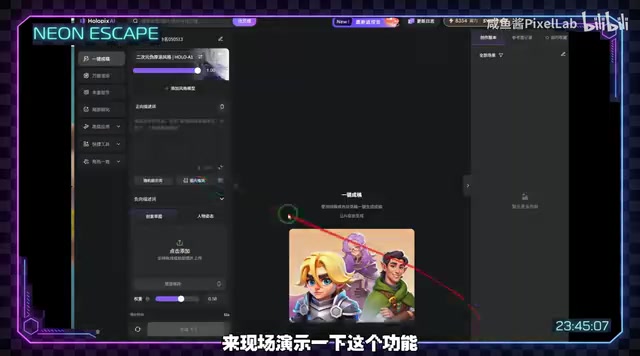
There are two image generation strategies:
- Random generation: Suitable for exploring directions when you don't have a clear idea — generate multiple times and pick the one you like
- Creative sketch: If you already have a specific concept, you can use a sketch to guide the AI toward more precise results
It's recommended to generate several sets and select the character design that best fits your game's tone as the "anchor" for all subsequent assets.
Free Canvas: Creating Game Posters and Extended Assets
Once you have the base character image, the "Free Canvas" feature handles expanding a single asset into a complete game visual system.
The workflow for creating game posters is quite streamlined: import the character image as a reference, select a game promotional template, fill in the game name and genre, and the AI automatically handles layout, effects, and lighting. One practical detail — the default resolution is portrait 9:16, so for side-scrolling games you need to manually change it to 16:9.
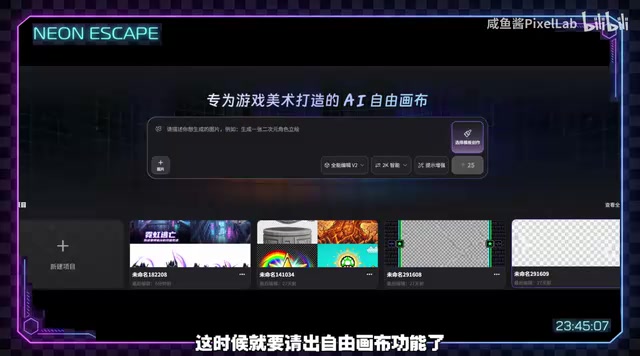
The generated results are quite impressive — neon lighting effects and light pollution textures are well-executed, and you can further refine them by adding elements like English titles. This kind of "looks expensive" quality is crucial for an indie game's first impression.
Batch Generating Character Action Frames: Bringing Characters to Life
A game character can't just be a static image — it needs to move. This is the most critical step in the entire workflow, and the author shares two methods:
Method 1: Automatic Batch Action Frame Generation
Simply upload the character image, and the AI automatically generates a series of action poses. The advantage is minimal operation — upload, click start, wait for results. The generated action quality is decent, but there are limitations in precisely controlling specific actions (such as the exact direction of an attack pose).
Method 2: Manually Specifying Actions (Recommended)
The author ultimately adopted the second method: instead of using preset templates, directly upload the character image and explicitly write the needed actions in the prompt, such as "slash attack frame" or "running frame." Note that the editing template should be set to VR level or above for higher quality action generation.
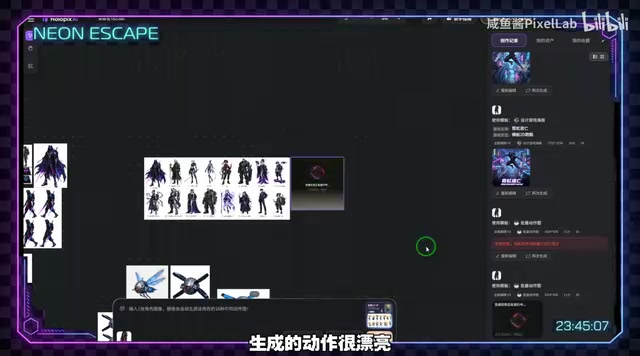
Using this method, generate idle, walk, jump, attack, and other action sequences one by one, with each animation requiring about 4 frames. While not as refined as professional pixel animation, it's more than sufficient for the demo stage.
Batch Expansion of NPCs and Scenes
A living game world can't have only a protagonist. Holopix AI provides a batch NPC generation feature — simply input the game genre or world-building description along with the desired NPC types, and it generates multiple stylistically unified NPC characters at once.
Scene background generation is even more straightforward — use the character style as a reference combined with scene description prompts. The key is maintaining visual style consistency with the character assets, which the AI tool handles quite well.
In game art, "Visual Coherence" is one of the core standards for measuring art quality, encompassing style consistency (line weight, color saturation, lighting direction), proportion consistency (relative size relationship between characters and scenes), and palette consistency (unified global color scheme). When AI tools use the same character reference image as an "anchor" to generate subsequent assets, they're actually leveraging the model's style transfer capability, encoding the reference image's visual features and injecting them into new generation processes. This approach can maintain stylistic unity between assets to a certain degree, but deviations in fine details may still occur — such as subtle changes in character facial details or loss of equipment details. This is why the author recommends using Photoshop for post-processing before engine assembly, manually bridging the consistency gaps in AI-generated content.
From Assets to Playable Demo: Complete Godot Engine Assembly Workflow
After asset generation is complete, processing is needed before they can be placed into the game engine. The author used Photoshop for post-processing (not mandatory, but helpful for fine adjustments), then completed assembly in the Godot engine.
Godot is a completely open-source, free, cross-platform game engine, officially open-sourced by Juan Linietsky and Ariel Manzur in 2014, currently maintained by the Godot Engine Foundation. Compared to Unity and Unreal Engine, Godot's core advantages include: zero royalties, no subscription fees, lightweight (installation package only ~40MB), and a rendering pipeline optimized specifically for 2D games. Godot uses its proprietary GDScript scripting language (with Python-like syntax), while also supporting C# and C++. Its Node and Scene composition architecture makes building 2D game AnimationStateMachines extremely intuitive — developers can visually manage frame sequences through AnimationPlayer nodes and handle animation state transition logic through AnimationTree nodes without writing extensive boilerplate code. After Unity announced its pricing policy changes in 2023, a large number of indie developers migrated to Godot, rapidly expanding its community ecosystem and making it one of the mainstream choices for indie game development.
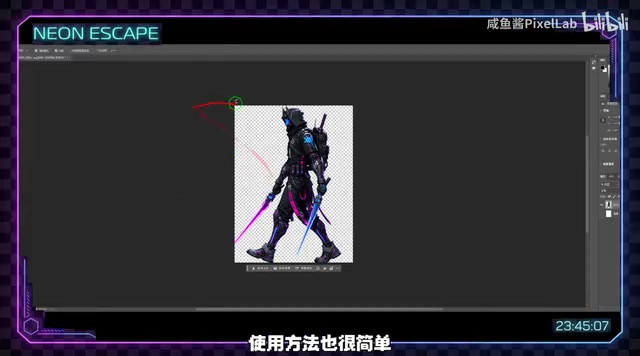
The specific engine-side work includes:
- Organize processed frame images into folders by action type
- Create animation nodes in Godot, establishing idle, walk, jump, and attack animations
- Set 4 frames per animation, using proper naming conventions for code reference
- Insert backgrounds, set up ground collision bodies to prevent character clipping
- Write scripts to control frame animation switching and playback
AI Workflow Insights for Indie Developers
The most valuable aspect of this case study isn't any specific tool, but rather that it demonstrates a complete AI-assisted game development workflow:
- Asset generation: 30 minutes (traditional workflow ~1 week)
- Engine assembly: 2 hours
- Total: Less than 3 hours from zero to playable demo
Of course, this demo is still far from a finished product — NPC interactions, level design, scrolling effects, sound systems, and more all require subsequent iteration. AI-generated assets also can't match professional art in terms of refinement. But for indie developers, rapidly validating gameplay ideas is what matters most.
"Rapid Prototyping" is a core methodology widely adopted in modern game development, with its theoretical foundation coming from the "Build-Measure-Learn" loop in Lean Startup methodology. In the game industry, this approach is concretized as: using the lowest-cost playable demo to validate whether the Core Gameplay Loop is fun, then deciding whether to invest full development resources. Developers of well-known indie games like Stardew Valley, Celeste, and Hollow Knight have all publicly stated that they used extensive Placeholder Art in early stages to test game mechanics. The emergence of AI image generation tools essentially raises the quality threshold of "placeholder art" dramatically — developers no longer need to choose between "ugly block placeholders" and "expensive professional art," but can use AI to generate assets that are "good-looking enough to show players" for early validation. Run through the prototype with AI first, confirm the direction is viable, then invest resources for polish — that's the efficient development strategy.
AI won't replace game artists, but it's dramatically lowering the barrier to entry for indie games. When art is no longer the bottleneck, more interesting ideas get the chance to become playable works.
Key Takeaways
- Using Holopix AI's One-Click Generation and Free Canvas features, all game art assets can be generated within 30 minutes
- There are two methods for character action frame generation: automatic batch generation and manual prompt-specified generation, with the latter offering better precise control
- The complete workflow covers character design, poster creation, action frame generation, batch NPC generation, and Godot engine assembly
- Art work that traditionally takes a week is compressed to 30 minutes, plus 2 hours of engine assembly to produce a playable demo
- The core value of AI tools lies in helping indie developers rapidly validate gameplay ideas, lowering the art barrier for prototype development
Related articles
 Tutorials
Cursor + Codex Dual-IDE Collaboration: A Practical Methodology for Open-Source Project Customization
A complete methodology for open-source project customization based on real-world experience, detailing the Cursor+Codex dual-IDE workflow, seven-stage process, MVP validation, and AI source code reading techniques.
 Tutorials
Cursor Multi-Agent in Practice: Building a Full-Stack Next.js Blog in 50 Minutes
Build a full-stack blog in 50 minutes using Cursor IDE's multi-Agent mode with Next.js, Clerk auth, and Supabase. Learn the 4-phase AI Agent workflow and key integration pitfalls.
 Tutorials
Building an AI Software Factory from Scratch: A Cursor Engineer's Hands-On Experience with Multi-Agent Collaboration
Cursor engineer Eric shares practical insights on building an AI software factory: automation levels, guardrail design, parallel Agent management, and scaling to 1000+ Agents for 24/7 development.