Complete Guide to Claude Skills 2.0: Skill Creation, Evaluation, and Real-World Applications
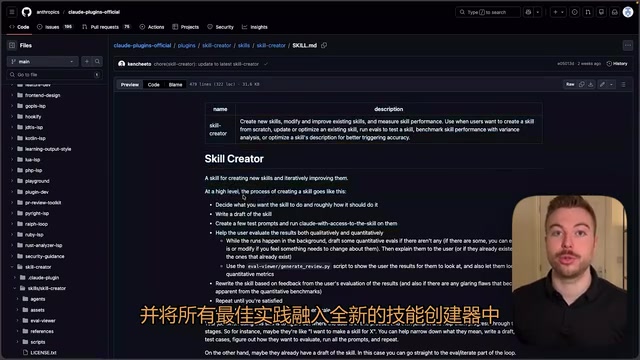
Claude Code launches Skills 2.0 with a new skill creator and evaluation system for better AI automation.
Anthropic has significantly upgraded Claude Code's skill system with Skills 2.0. The new version categorizes skills into Capability Boost and Coding Preference (end-to-end workflow) types. A built-in best-practices skill creator makes it easy for beginners to get started, while the new evaluation system quantifies skill effectiveness through controlled experiments — boosting pass rates from 40% to 100% with virtually no change in token consumption — enabling a data-driven iterative optimization loop.
Anthropic recently rolled out a major upgrade to the "Skills" feature in Claude Code, introducing a brand-new skill creator and evaluation system. This update enables developers to build more precise automated workflows that trigger automatically at the right moment, dramatically boosting efficiency in everyday development and business operations. This article provides an in-depth look at the core changes and practical applications of Claude Skills 2.0.
What Are Claude Skills?
Claude Code is Anthropic's AI coding assistant for developers. At its core, the "Skills" system is a structured encapsulation of Prompt Engineering. Unlike traditional System Prompts, Skills integrate task descriptions, execution logic, and resource references into version-controllable files, making AI behavior more predictable and reproducible.
In simple terms, Claude Skills are like reusable task templates designed to accomplish specific jobs. A skill might generate a website, run a particular workflow task, or produce a one-time output like drafting a report based on given information.
A skill file is essentially a Markdown-formatted document containing these core elements:
- Name and description: Tells Claude what the skill does
- Instruction set: Detailed steps and specifications for completing the task
- Additional resources: Scripts, reference materials, or assets that help Claude produce more consistent results
The choice of Markdown as the format for skill files is no accident. Markdown's structured nature allows LLMs to efficiently parse hierarchical relationships and semantic boundaries while remaining highly readable for human developers. This "human-machine co-readable" format design is an increasingly common engineering practice in AI toolchains and is also well-suited for collaborative management through version control systems like Git.
Take a front-end design skill as an example — the file contains extensive detailed instructions about UI implementation, enabling Claude to produce higher-quality code for front-end design tasks.
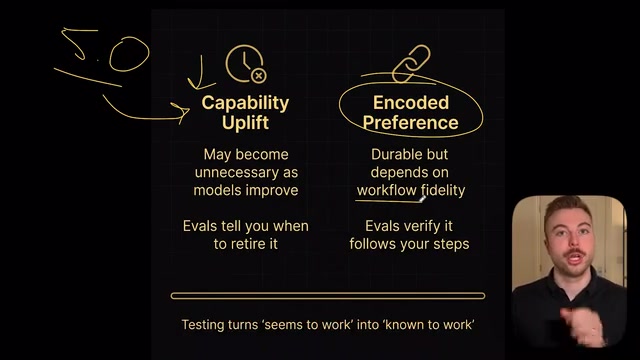
Two Skill Types in Skills 2.0
The new version clearly divides skills into two types. Understanding the difference between them is crucial for effective use.
Capability Boost
This type of skill focuses on improving the model's performance in a specific area. For example, a front-end design skill can significantly reduce subpar UI design outputs from the AI. You get better results immediately after invoking it.
However, it's worth noting that Capability Boost skills have an inherent "shelf life" issue — this fundamentally reflects how AI capability boundaries shift dynamically with model versions. Take the iteration from GPT-4 to GPT-4o as an example: code formatting tasks that previously required extensive prompting to produce stable output became default capabilities in the newer version. If a future Claude Opus 5 is already strong enough in UI design, data analysis, and similar areas, the corresponding capability boost skills would no longer be needed. This suggests that when building a skill library, developers should prioritize investing in business logic skills over model capability patch skills to achieve a longer skill lifecycle.
Coding Preference (End-to-End Workflow)
This type of skill defines a complete workflow, including what needs to be done at each step and the execution order — similar to an automated pipeline. Regardless of how the model is upgraded, these process-oriented skills essentially never become obsolete because they define business logic rather than supplementing model capabilities.
A simple distinction: Capability Boost skills address the question of "how well is it done," while workflow skills address "what process should be followed."
The New Skill Creator: Best Practices Built In
One of the biggest highlights of this upgrade is the new skill creator. Previously, creating high-quality Claude Skills required developers to read through Anthropic's complete documentation, covering fundamentals, planning considerations, design testing, iterative optimization, and many other aspects.
Now, Anthropic has embedded all best practices directly into the creator, which automatically handles these key details:
- How to create and update skills
- When to use skills and when not to
- How to run evaluation tests for benchmarking
- How to continuously optimize output quality
This means that even if you've never worked with Claude Code's skill system before, you can quickly get started through the creator and produce skill files on par with those manually written by experienced users.
Evaluation System: Data-Driven Skill Optimization
The newly added evaluation capability is another core feature of Skills 2.0. The evaluation system in Skills 2.0 draws on the mature benchmarking methodology from the LLM field. By constructing controlled experiments comparing "with skill vs. without skill," the system can quantify the impact of skills on metrics like task completion rate and output consistency. This data-driven optimization loop is highly aligned with A/B testing and Continuous Evaluation concepts in machine learning, shifting AI workflow optimization from experience-driven to data-driven.
The case study data Anthropic presented is highly compelling:
- Token usage: Remains essentially the same before and after using skills, with no additional resource overhead
- Pass rate: Reaches 100% with skills, compared to only 40% without skills
The finding that "token usage remains essentially unchanged" carries significant engineering implications. In large-scale AI applications, token consumption directly corresponds to API call costs. Skill files, as additional context injection, theoretically increase input token counts, but Anthropic's data shows this increase falls within an acceptable range. This is thanks to the lean design principle of skill files — including only necessary instructions and avoiding redundant descriptions — a practical embodiment of the "less is more" principle in prompt engineering.
The evaluation system also supports a complete iterative optimization loop: build the initial skill version → run evaluation tests → review performance → receive improvement suggestions → optimize descriptions and instructions → evaluate again. Through this cycle, skill invocation accuracy and output quality can be continuously improved, ensuring the right skill is called at the right time rather than being randomly matched.
Hands-On Demo: Creating a Cold Email Marketing Skill
Let's walk through a complete real-world example showing how to create a practical skill from scratch in Claude Code.
Installation and Activation
- Open a Claude Code instance (you can also do this in the terminal of platforms like Cursor)
- Type
/to open the plugin search, then typeSkill - Click on the creator — once installed, it's available across all instances
- Type
/reloadto reload the plugin and ensure activation
Creating the Skill
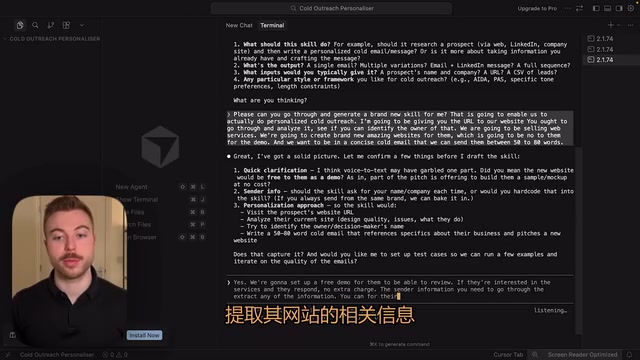
After typing Create, the creator guides you through several key questions:
- What do you want this skill to accomplish?
- What does a good output look like?
- What will typically be provided as input?
- Are there any specific style requirements?
In this demo, we set up a personalized cold email marketing skill with the following requirements:
- Input a website URL, and the skill automatically visits and analyzes it
- Identify the person responsible for the website
- Discover issues with the website and SEO optimization opportunities
- Generate a concise outreach email of 50–80 words
- Offer a free demo as an entry point
Testing and Iteration
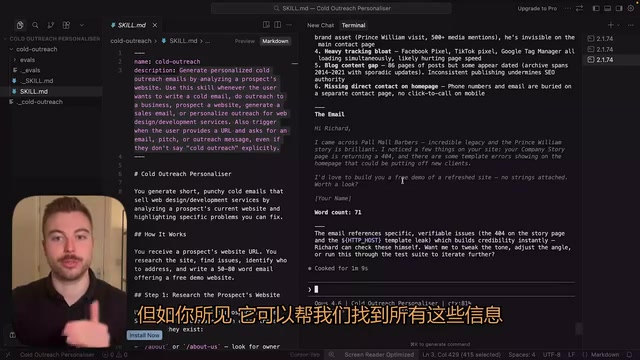
After the skill was created, we tested it with a London barbershop's website. This demo showcases the core capability combination of modern AI Agents: Web Scraping, Information Extraction, and Personalized Content Generation. This pattern of encapsulating multi-step Chain-of-Thought reasoning into a single skill invocation is a key characteristic that distinguishes Agentic AI from traditional Q&A-style AI. Claude completed the following tasks in just seconds:
- Analyzed the website content and found information about founder Richard Marshall
- Discovered a story about a visit from Prince William as a personalized hook
- Identified areas for improvement on the website
- Generated a personalized outreach email
Subsequent iterative optimization was done through simple natural language instructions:
- "Make sure the output doesn't contain hyphens to avoid revealing it's AI-generated"
- "Generate three different versions: an initial email, a follow-up email, and a third email"
- "Generate a UI design prompt for showcasing the website proposal"
All modifications were completed instantly, and the skill was updated and effective immediately. The entire process from creation to optimization took no more than ten minutes.
Core Value and Use Cases for Skills
The essence of Claude Skills is standardizing high-quality, repeatable tasks. Taking the cold email case as an example, a simple
Related articles
 Tutorials
Cursor + Codex Dual-IDE Collaboration: A Practical Methodology for Open-Source Project Customization
A complete methodology for open-source project customization based on real-world experience, detailing the Cursor+Codex dual-IDE workflow, seven-stage process, MVP validation, and AI source code reading techniques.
 Tutorials
Cursor Multi-Agent in Practice: Building a Full-Stack Next.js Blog in 50 Minutes
Build a full-stack blog in 50 minutes using Cursor IDE's multi-Agent mode with Next.js, Clerk auth, and Supabase. Learn the 4-phase AI Agent workflow and key integration pitfalls.
 Tutorials
Building an AI Software Factory from Scratch: A Cursor Engineer's Hands-On Experience with Multi-Agent Collaboration
Cursor engineer Eric shares practical insights on building an AI software factory: automation levels, guardrail design, parallel Agent management, and scaling to 1000+ Agents for 24/7 development.