Complete Guide to Codex Installation & Usage: From Prerequisites to Multi-Task Workflows

Codex installation guide and comparison with Claude Code for AI-powered development
This article introduces OpenAI Codex's four forms (CLI, web, plugin, App), with a focus on the recommended App form. Compared to Claude Code, Codex offers lower pricing, better stability, and a superior frontend experience. Installation requires Git, Node.js, and VS Code as prerequisites, along with VPN access. Codex's core advantage is multi-task parallelism, supporting multiple independent AI sessions simultaneously with three task states: in progress, awaiting approval, and completed.
What Is Codex? How Does It Differ from Claude Code?
Codex currently comes in four forms: terminal (CLI), web, plugin, and App. The App form is the most powerful and the most recommended way to use it today.
These four forms represent a modern multi-platform strategy for development tools. The CLI (Command Line Interface) form targets advanced developers who prefer terminal operations, invoking AI capabilities directly from the command line. The web version lowers the barrier to entry with no installation required. The plugin form embeds into existing IDE ecosystems. The App form provides a complete standalone runtime environment with integrated sandboxed execution, file management, and multi-task scheduling — which is why it's the most feature-rich option.
Compared to Claude Code, Codex has several clear advantages:
- Lower cost: Codex API fees are lower than Claude Code
- Better stability: No rate-limiting or account suspension issues
- Superior frontend experience: Codex pays more attention to UI details, color schemes, animations, and interaction cues
Claude Code, on the other hand, leans more toward logical correctness, code structure, and feature implementation — backend developers may prefer it. The current "big three" of AI programming tools (Cursor, Claude Code, Codex) are all worth mastering, and you should choose flexibly based on your actual use case.
From a technical perspective, Cursor is built on top of VS Code, deeply integrating AI capabilities into the editor and excelling at code completion and context understanding. Claude Code, launched by Anthropic, leverages Claude's powerful logical reasoning for complex architecture design and backend logic. Codex (from the OpenAI ecosystem) focuses more on frontend interaction experience and task orchestration. Their different underlying large language models determine their respective capability boundaries and ideal use cases.
Prerequisites: Three Essential Software Installations
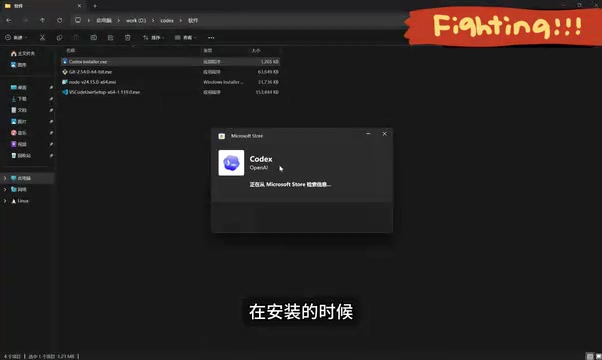
Before installing Codex, you need to install three prerequisite tools. Each serves a distinct purpose, and all are indispensable.
Installing Git
Visit the Git official website, download the version for your operating system, and follow the prompts to install. Git is a foundational tool for collaborative development and is required regardless of which AI programming tool you use.
In AI programming scenarios, Git does far more than version control. Code generated by AI tools needs to be tracked through Git, allowing developers to roll back to any historical state. Git's branching mechanism also lets developers have AI perform experimental development without affecting the main codebase. Tools like Codex rely on Git under the hood to manage file changes, diff comparisons, and conflict resolution — which is why Git is a mandatory prerequisite for all AI programming tools.

Installing Node.js
Node.js handles dependency package installation. Visit the official website to download the latest version. After installation, open CMD via Win+R and type node -v to verify the installation. Codex has no special Node.js version requirements — just install the latest version.
Node.js is a JavaScript runtime environment built on Chrome's V8 engine, enabling JavaScript to run on the server side outside the browser. Codex depends on Node.js primarily because its installation process requires npm (Node Package Manager) to manage dependencies. npm is the world's largest open-source package registry with over 2 million packages, and nearly all modern frontend toolchains (such as Webpack, Vite, ESLint, etc.) are distributed through npm. Installing Node.js automatically includes npm, which is why it serves as foundational infrastructure for frontend development and AI programming tools.
Installing VS Code
While VS Code isn't strictly required, it's strongly recommended. Codex itself doesn't provide code editing functionality — you'll still need a traditional editor for fine-tuning generated code. After installation, search for the "Chinese" plugin if you want to switch to a Chinese interface.
Codex Installation Walkthrough
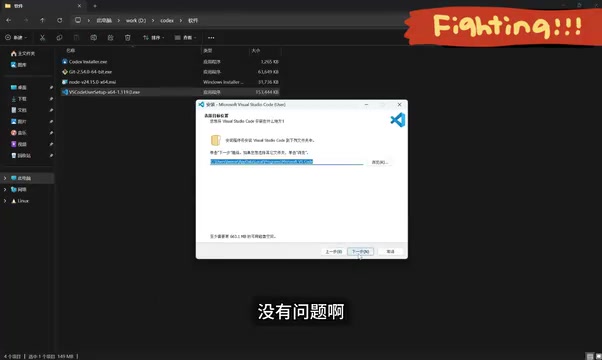
Visit the Codex official website and download the version for your operating system. The download is actually a downloader that connects to the Microsoft Store to install approximately 400MB of data.
Installation notes:
- The entire process requires a VPN/proxy for network access
- On first launch, you'll be prompted to set up a sandbox — just click the setup button
- The interface automatically switches to your system language
Regarding the sandbox environment: this is an important security isolation technology. The sandbox provides a restricted execution environment for AI-generated code, preventing malicious or erroneous code from damaging the host system. Specifically, the sandbox limits file system access scope, network request permissions, and system call capabilities. This means that even if the AI generates harmful operations (such as deleting system files) while executing code in the sandbox, your actual system remains unaffected. This is a critical security design consideration for AI programming tools.
Basic Usage: Workspaces and Multi-Task Parallelism
Creating a Workspace
Create a folder and drag it to the left panel of Codex to use it as a workspace. You can also add one via the "Add New Project" button. When starting a conversation, select the associated project, and generated content will be saved to the corresponding project directory.
Multi-Task Parallel Operations
One of Codex's core advantages is the ability to run multiple tasks simultaneously. Press Ctrl+N to open a new conversation window, and you can execute multiple tasks across different projects at the same time, dramatically boosting development efficiency.
This multi-task parallel capability relies on an asynchronous task scheduling mechanism. Each conversation window corresponds to an independent AI session context, and tasks don't interfere with each other. This differs from the traditional single-threaded conversation model — users don't need to wait for one task to finish before starting the next. This design is particularly well-suited for scenarios where you're advancing multiple modules simultaneously, such as having AI generate page components in one task while another task handles data interface logic.

Tasks have three states:
- In Progress: Spinning icon
- Awaiting Approval: Requires your confirmation for file creation, permissions, etc.
- Completed: Displays a blue dot
The "Awaiting Approval" state reflects a Human-in-the-Loop design philosophy — the AI pauses and requests user confirmation before executing sensitive operations like file creation or dependency installation, balancing efficiency with security boundaries.
Conversations started without selecting a project are categorized under the "Conversations" section in the lower left, suitable for general Q&A scenarios.
Summary
Codex has a low barrier to installation and getting started, making it especially friendly for frontend developers and users with no programming experience. The App form paired with VS Code delivers the best experience, and multi-task parallelism is a key differentiator from other AI programming tools. It's recommended to use Codex alongside Cursor and Claude Code, switching flexibly based on project requirements.
Related articles
 Tutorials
Cursor + Codex Dual-IDE Collaboration: A Practical Methodology for Open-Source Project Customization
A complete methodology for open-source project customization based on real-world experience, detailing the Cursor+Codex dual-IDE workflow, seven-stage process, MVP validation, and AI source code reading techniques.
 Tutorials
Cursor Multi-Agent in Practice: Building a Full-Stack Next.js Blog in 50 Minutes
Build a full-stack blog in 50 minutes using Cursor IDE's multi-Agent mode with Next.js, Clerk auth, and Supabase. Learn the 4-phase AI Agent workflow and key integration pitfalls.
 Tutorials
Building an AI Software Factory from Scratch: A Cursor Engineer's Hands-On Experience with Multi-Agent Collaboration
Cursor engineer Eric shares practical insights on building an AI software factory: automation levels, guardrail design, parallel Agent management, and scaling to 1000+ Agents for 24/7 development.