Complete Guide to Connecting Claude Code with Claude Opus 4 via Microsoft Foundry
Route Claude Code through Azure Foundry for stable, ban-free access to Claude Opus 4.
This guide walks developers through deploying Claude Opus 4 on Microsoft Azure Foundry and connecting it to Claude Code. It covers prerequisites (paid Azure subscription, correct region selection), five-step cloud deployment, local installation, environment variable configuration, authentication via Entra ID or API key, and verification — providing a stable alternative to direct Anthropic API access.
Why Use Microsoft Foundry to Connect Claude Code?
For developers in China, using Anthropic's native API directly comes with numerous inconveniences — account bans, unstable network connections, and payment difficulties are persistent headaches. By routing Claude Opus 4 model calls through Microsoft Azure's Foundry platform, you not only get enterprise-grade stability guarantees but can also completely eliminate the anxiety of account bans.
Microsoft Foundry (formerly Azure AI Foundry) is a unified AI development platform launched by Microsoft in late 2024, consolidating previously scattered AI service entry points like Azure OpenAI Service and Azure AI Studio. Foundry's core value lies in providing a "model marketplace" — developers can not only call Microsoft's own GPT series models but also access third-party models like Anthropic Claude, Meta Llama, and Mistral through a unified API. This "Models as a Service" architecture means developers only need to maintain one set of Azure credentials to freely switch between different models, significantly reducing the complexity of multi-model management.
This article is based on a complete configuration walkthrough shared by a Bilibili content creator, organized into a full end-to-end operation manual from environment preparation to final verification, helping developers quickly set up a stable Claude Code production environment.
Prerequisites: Two Critical Conditions to Confirm
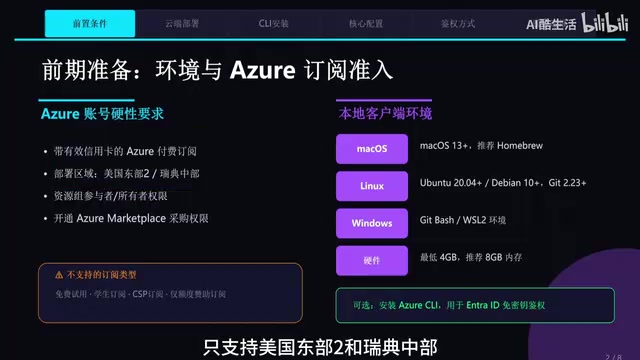
Before getting started, two hard requirements must be met — otherwise everything that follows will be wasted effort.
Azure Account Requirements
You must use an Azure account with a paid subscription, such as the "Pay As You Go" type. Free trial accounts and student subscription accounts are not supported — make sure to note this.
Deployment Region Restrictions
This is the most common pitfall — Claude Opus 4 model deployment only supports two regions:
- East US 2
- Sweden Central
Choosing the wrong region means you won't be able to find the corresponding model. This restriction is hard at the current stage with no workaround. This regional limitation stems from the collaborative deployment strategy between Anthropic and Microsoft — third-party models need to complete compliance reviews and hardware adaptation at specific data centers before going live. As the partnership deepens, this will likely expand to more regions in the future.
Cloud Resource Deployment: Five Steps to Complete Foundry Configuration
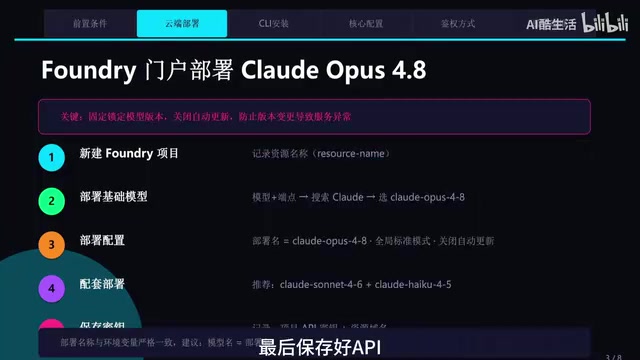
After entering the Azure Foundry portal, the core operations break down into five steps:
Step 1: Create a New Project and Record the Resource Name
Create a new project in the Foundry portal. After project creation, make sure to record the Resource Name — you'll need it when configuring environment variables later.
Step 2: Search and Deploy the Model
Search for and select the Claude Opus 4 model in the model catalog. Claude Opus 4 is Anthropic's flagship model launched in 2025, with particularly significant breakthroughs in coding capabilities — it set new records on code evaluation benchmarks like SWE-bench, which is why it was chosen as Claude Code's default model. In Anthropic's model hierarchy, the Opus series targets professional scenarios requiring deep reasoning, complex code generation, and long-text analysis, while Sonnet is positioned as mid-tier general purpose, and Haiku focuses on low-latency lightweight tasks.
For the deployment name, it's recommended to simply use claude-opus-4 for easy identification and management. Select Global Standard for the deployment mode.
Step 3: Lock the Model Version (Essential for Production)
This step is critical — disable auto-updates and lock the current version. In production environments, unexpected model version changes can lead to inconsistent output behavior, affecting business stability. This is a best practice for enterprise-grade deployments. When large language models undergo version updates, even minor iterations within the same series can exhibit different behavioral patterns on specific tasks — such as changes in code style preferences or differences in handling edge cases — which can trigger hard-to-diagnose issues in automated pipelines.
Step 4: Deploy Auxiliary Models as Needed
Based on actual requirements, you can additionally deploy models like Sonnet and Haiku for different use cases (e.g., using Haiku for lightweight tasks to reduce costs).
Step 5: Save API Information
After deployment is complete, securely save the API endpoint and key information — these are the core credentials for subsequent local configuration.
Installing Claude Code Locally
Claude Code is an AI programming terminal tool released by Anthropic, essentially an intelligent coding agent that runs in the command line. Unlike IDE plugins such as GitHub Copilot, Claude Code runs directly in the terminal environment, capable of reading project files, executing shell commands, modifying code, and running tests — forming a complete "understand-write-verify" loop. Its design philosophy is closer to an "AI pair programming partner" rather than a simple code completion tool. Developers can describe requirements in natural language, and Claude Code will autonomously plan implementation steps and execute them progressively.
Installation methods for Claude Code vary slightly depending on the operating system.
After installation, enter the following command in your terminal to verify the installation was successful:
claude --version
Note that the installation process in China differs slightly from the global version, mainly in terms of mirror sources and network configuration.
Core Configuration: Claude Code Environment Variables Explained
This is the most critical part of the entire process. If configured incorrectly, Claude Code will default to Anthropic's native API rather than routing through Foundry.
Required Environment Variables
First, you must set the following environment variables to tell Claude Code to use Foundry as the API provider:
# Bash syntax (macOS/Linux)
export CLAUDE_CODE_USE_FOUNDRY=1
export AZURE_RESOURCE_NAME=your-resource-name
export CLAUDE_MODEL=claude-opus-4
# PowerShell syntax (Windows)
$env:CLAUDE_CODE_USE_FOUNDRY=1
$env:AZURE_RESOURCE_NAME="your-resource-name"
$env:CLAUDE_MODEL="claude-opus-4"
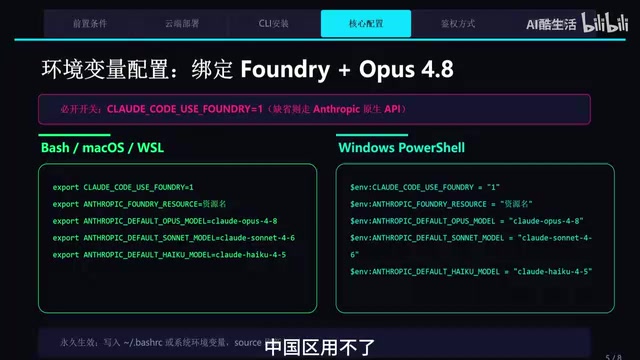
If you want the configuration to be persistent, write these variables into ~/.bashrc (Linux/macOS) or system environment variables (Windows) to avoid re-setting them every time you open a terminal.
Choose One of Two Authentication Methods
Two authentication methods are available:
| Method | Command | Use Case | Security |
|---|---|---|---|
| Entra ID Login (Recommended) | az login | Production | High |
| API Key | Set environment variable | Quick testing | Medium |
For production environments, Entra ID authentication is strongly recommended — simply run az login to complete identity verification, which is secure and reliable. Entra ID (formerly Azure Active Directory) is Microsoft's enterprise-grade identity authentication service. Compared to using API keys directly, its security advantages include: keys are not stored in plaintext in environment variables, authentication tokens automatically rotate and expire, and it supports multi-factor authentication and conditional access policies. In team scenarios, administrators can also use Entra ID's role-based access control (RBAC) to granularly manage each member's access permissions and quotas for AI models — something API keys cannot achieve. After running az login, Azure CLI obtains short-lived access tokens via the OAuth 2.0 protocol, and sensitive credentials never touch disk throughout the process.
For quick testing, you can copy the API key from the Foundry portal and set it in the corresponding environment variable.
Verification and Operations: Three Steps to Confirm Successful Configuration
After configuration is complete, verify everything is working properly with these three steps:
- Launch the Claude Code client
- Run the
/statuscommand - Confirm the output: API provider shows Foundry, model shows Claude Opus 4
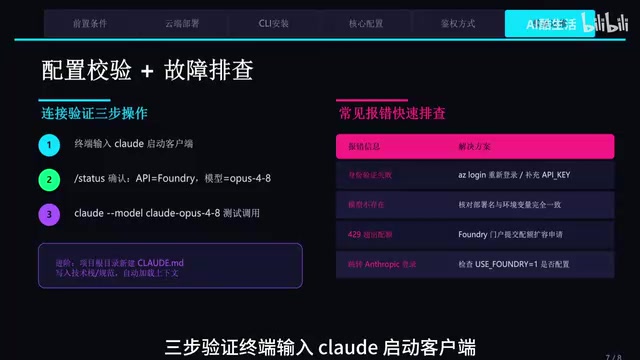
Once you see the correct status information, your Claude Code programming companion is fully configured. Send a test command to verify that model responses are working normally.
Practical Tips and Considerations
Cost Control
Calling Claude models through Foundry is billed per token. It's recommended to use lightweight models like Haiku during development, and only switch to Opus 4 when high-quality output is needed, to optimize your cost structure.
A token is the basic unit of measurement for how large language models process text — one token corresponds to approximately 3-4 characters in English or 1-2 characters in Chinese. Azure Foundry charges for Claude models on a pay-per-use basis, billing separately for input tokens and output tokens, with output token pricing typically 3-5x that of input tokens. For Claude Opus 4, a single complex code generation task might consume thousands to tens of thousands of tokens, with costs ranging from a few cents to tens of cents. Haiku's token pricing is roughly one-tenth of Opus's, making mixed model usage during daily development and debugging a highly effective cost control strategy.
Version Management
The "disable auto-updates" step mentioned earlier is very important. In team collaboration, a unified model version ensures output consistency and avoids debugging difficulties caused by version discrepancies.
Network Stability
Compared to direct connections to Anthropic's API, routing through Azure Foundry provides significantly improved network stability within China — this is one of the core values of choosing this technical approach. Azure has over 60 data center regions globally, and its backbone network connections to mainland China are specifically optimized. Compared to directly accessing Anthropic's API endpoints in the US, requests routed through Azure show notable improvements in both latency and packet loss rates.
Summary
Connecting Claude Code through Microsoft Foundry is essentially leveraging Microsoft's cloud infrastructure for a more stable and secure AI development experience. The entire configuration process isn't complicated — it boils down to three things: Azure resource deployment, environment variable configuration, and authentication method selection. Once you've mastered this approach, developers can confidently use Claude Opus 4's powerful capabilities in production environments without worrying about uncertainties at the account and network level.
Related articles

A Gen-Z Woman Making $1.5M/Month: Deconstructing the Growth Methodology Behind AI Apps
Gen-Z indie dev Nicole built 4 hit AI apps earning $1.5M/mo. Deep dive into her industrialized UGC engine, traffic testing system, and minimalist tech stack.
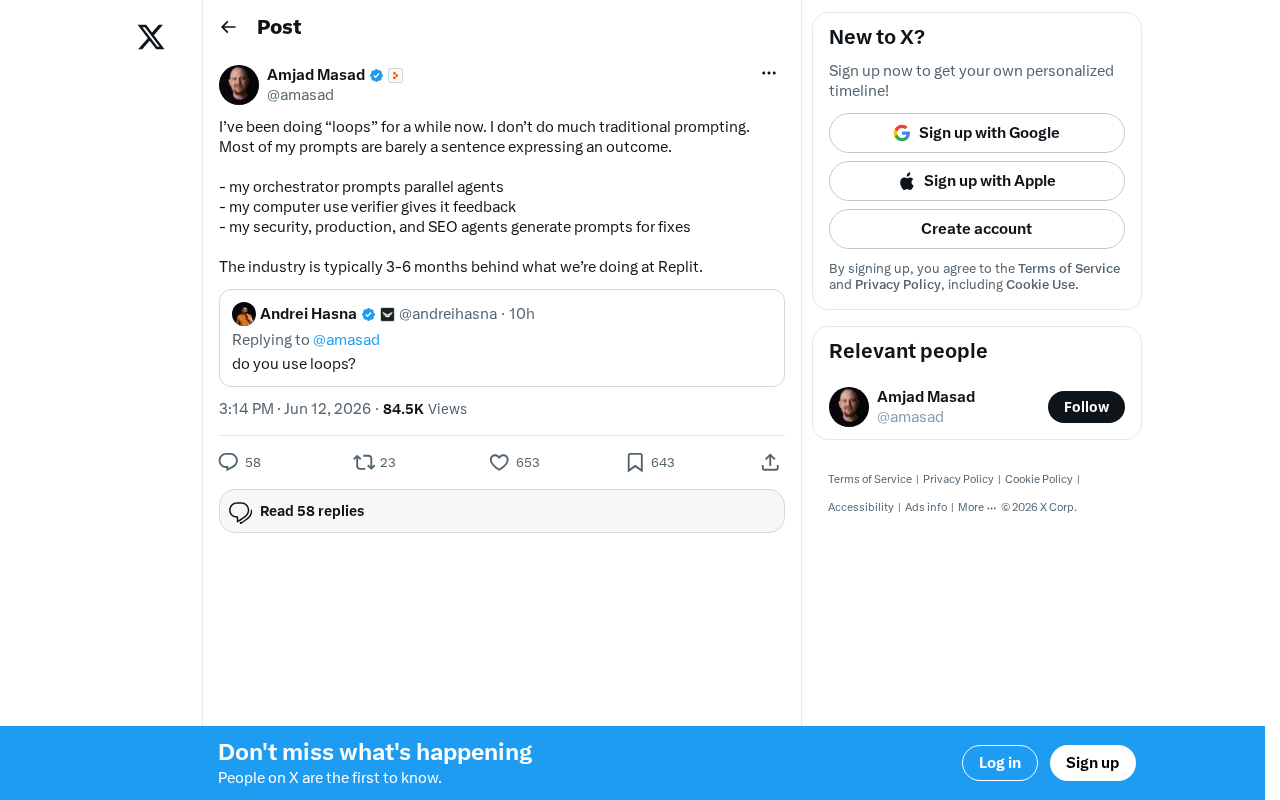
Replit's AI Loops Workflow Explained: Multi-Agent Collaboration Replaces Prompt Engineering
Deep dive into Replit's AI Loops workflow: how orchestrators, parallel agents, and Computer Use Verifiers build automated closed-loop systems through multi-agent collaboration.
Claude Code + Skills: A Practical Guide to AI-Powered Test Case Generation
Learn how to use Claude Code + Skills to auto-generate enterprise-grade test cases. Covers AI Agent vs LLM differences, the four core capabilities, and the complete workflow from requirements to test cases.