Complete Guide to Connecting DeepSeek V4 with Claude Code: CC Switch Configuration Tutorial

A configuration tutorial for integrating DeepSeek V4 models into Claude Code using the CC Switch tool.
This article explains how to use CC Switch, an API proxy middleware tool, to integrate the DeepSeek V4 series models into the Claude Code programming assistant. Configuration steps include downloading and installing CC Switch, adding DeepSeek as a provider, mapping V4 Pro to the high-performance tier (Opus/Sonnet), mapping V4 Flash to the lightweight tier (Haiku), entering the API Key, and activating. The entire process takes about 5 minutes and solves network stability and cost issues for developers in China.
Introduction
Claude Code is a powerful AI programming assistant that uses Anthropic's own Claude models by default. Claude Code is a command-line AI programming assistant developed by Anthropic that runs directly in the terminal environment. It can understand the context of an entire codebase, perform file edits, run commands, conduct code reviews, and more. Unlike traditional IDE plugin-based AI assistants, Claude Code operates in Agent mode, capable of autonomously planning and executing multi-step programming tasks. Anthropic's Claude model family includes three tiers: Opus (strongest reasoning), Sonnet (balanced performance), and Haiku (fast response), each corresponding to different task complexity levels.
However, for developers in China, connecting to domestic large language models not only reduces costs but also provides a more stable network connection experience. The recent release of the DeepSeek V4 series has attracted widespread attention, with multiple Bilibili content creators (such as "学AI的乘风同学") sharing solutions for connecting DeepSeek V4 to Claude Code. This article provides a detailed guide on how to seamlessly integrate Claude Code with DeepSeek V4 Pro using the CC Switch tool.
What is CC Switch
CC Switch is a model switching tool designed specifically for Claude Code, allowing users to dynamically switch between different model providers. From a technical architecture perspective, CC Switch is essentially an API proxy middleware that establishes a forwarding layer between the Claude Code client and the actual model service. When Claude Code sends an API request, CC Switch intercepts it, replaces the model identifier with the target model (such as DeepSeek V4 Pro), converts the request format from Anthropic's Messages API to a format compatible with the target platform (typically OpenAI-compatible format), and then forwards it to the corresponding Base URL. This architectural design allows users to transparently switch underlying models without modifying any configuration in Claude Code itself.
You can freely choose to use domestic models like DeepSeek or Qwen within Claude Code's interface without changing your existing workflow.
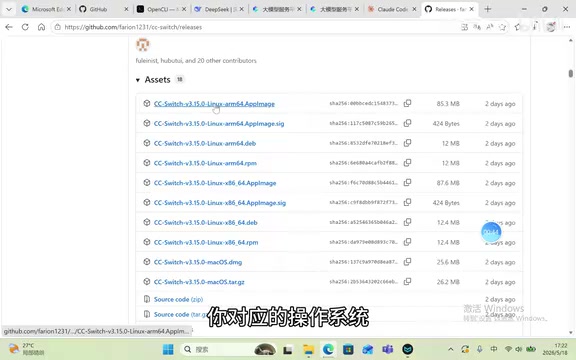
The tool supports multiple operating system platforms including Windows and macOS — users simply need to download the installation package corresponding to their system version.
Detailed Configuration Steps
Step 1: Download and Install CC Switch
Go to CC Switch's official download page and select the version corresponding to your operating system. Windows users can expand the Windows option and click the corresponding download link to begin downloading. The installation process is straightforward — just follow the prompts to complete it.
Step 2: Add DeepSeek as a Model Provider
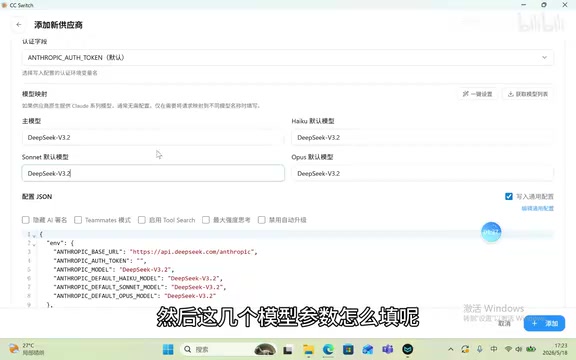
After opening CC Switch, click "Add Model Provider" and select DeepSeek. The tool will automatically populate the request address (Base URL) for you — no manual input required for this step.
Step 3: Configure Model Parameter Mapping
Claude Code has three internal model tiers that need to be mapped:
- Opus/Sonnet tier (high performance) → Enter
DeepSeek V4 Pro - Haiku tier (lightweight and fast) → Enter
DeepSeek V4 Flash
The mapping logic is clear: DeepSeek V4 Pro, as the flagship model, corresponds to scenarios in Claude Code that require strong reasoning capabilities; while DeepSeek V4 Flash offers faster response times, making it suitable for handling simple completions and lightweight tasks.
The technical background of the DeepSeek V4 series deserves further explanation. DeepSeek V4 is a new-generation large language model series released by DeepSeek in 2025. DeepSeek previously earned an excellent reputation in the open-source community with its V3 and R1 models, and its MoE (Mixture of Experts) architecture significantly reduces inference costs while maintaining high performance. V4 Pro, as the flagship version, achieves industry-leading performance in code generation, mathematical reasoning, and complex instruction following; V4 Flash achieves extremely low-latency fast responses through model distillation and architecture optimization, making it suitable for high-frequency calling scenarios. This is why the mapping scheme of Pro for the high-performance tier and Flash for the lightweight tier makes sense.
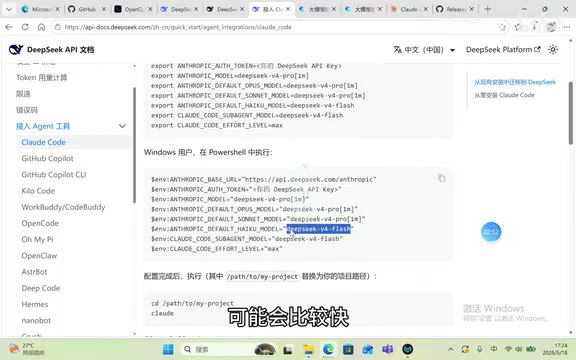
Interestingly, DeepSeek's official API documentation already includes specific instructions for connecting to Claude Code's Agent tools, indicating that DeepSeek has proactively adapted to this use case.
Step 4: Apply for and Enter Your API Key
Go to the DeepSeek Open Platform and create a new Key on the API Key management page. Important: Make sure to copy and save it immediately after creation, as you won't be able to view the full Key value again after closing the dialog.
It's worth explaining why API Keys can only be viewed once. An API Key is an identity credential for accessing large model services, similar to a digital key. For security reasons, major AI platforms (including OpenAI, Anthropic, DeepSeek, etc.) all adopt a "one-time display" policy — the Key is shown in full once at creation, after which the system only stores its hash value rather than the plaintext. This means that even if the platform's database is compromised, attackers cannot obtain users' original Keys. Users should store Keys in a secure password manager, avoid hardcoding them in code repositories, and rotate them regularly to reduce the risk of leakage.
Paste the copied API Key into the corresponding input field in CC Switch, then click the "Add" button to complete the configuration.
Step 5: Enable and Verify
After configuration is complete, click the "Use" button to activate the DeepSeek model. At this point, open Claude Code, and the interface should display that the current model in use is DeepSeek V4 Pro.
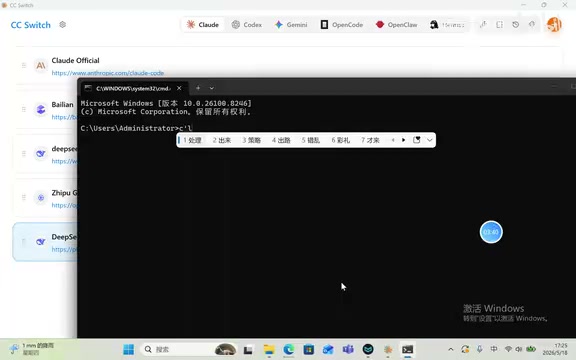
Enter a test message — if you receive a normal response, the integration has been successfully completed.
Practical Usage Recommendations
Balancing Cost and Performance
DeepSeek V4 Pro excels in code generation and logical reasoning, while V4 Flash has a clear advantage in response speed. It's recommended to use the Pro model for daily programming assistance and switch to the Flash model when you need quick completions or simple Q&A. Since DeepSeek uses an MoE architecture, its API call pricing is considerably lower than dense models of equivalent performance, which is an important economic factor for Chinese developers choosing DeepSeek.
Advantages of Dynamic Switching
The greatest value of CC Switch lies in its support for dynamic multi-model switching. You can flexibly switch between DeepSeek, native Claude models, and other domestic models based on different task requirements to find the best solution for the current scenario. For example, use Claude Opus or DeepSeek V4 Pro when handling architecture design problems that require deep reasoning, and use Flash-level lightweight models for routine code completion. This tiered strategy effectively controls API call costs while maintaining quality.
Conclusion
With the CC Switch tool, Chinese developers can easily integrate the DeepSeek V4 series models into Claude Code, with the entire configuration process taking no more than 5 minutes. This not only solves network access stability issues but also provides developers with greater flexibility in model selection. As domestic large language models continue to improve, this "best tool + best model" combination approach will become the preferred solution for an increasing number of developers.
Key Takeaways
- CC Switch enables Claude Code to connect with domestic models and supports dynamic model switching
- DeepSeek V4 Pro maps to the high-performance tier (Opus/Sonnet), while V4 Flash maps to the lightweight tier (Haiku)
- The configuration process includes four steps: downloading the tool, adding a provider, configuring model parameters, and entering the API Key
- DeepSeek's official API documentation already provides specific instructions for Claude Code integration
- API Keys must be saved immediately after creation — they cannot be viewed again after closing the dialog
Related articles
 Tutorials
Cursor + Codex Dual-IDE Collaboration: A Practical Methodology for Open-Source Project Customization
A complete methodology for open-source project customization based on real-world experience, detailing the Cursor+Codex dual-IDE workflow, seven-stage process, MVP validation, and AI source code reading techniques.
 Tutorials
Cursor Multi-Agent in Practice: Building a Full-Stack Next.js Blog in 50 Minutes
Build a full-stack blog in 50 minutes using Cursor IDE's multi-Agent mode with Next.js, Clerk auth, and Supabase. Learn the 4-phase AI Agent workflow and key integration pitfalls.
 Tutorials
Building an AI Software Factory from Scratch: A Cursor Engineer's Hands-On Experience with Multi-Agent Collaboration
Cursor engineer Eric shares practical insights on building an AI software factory: automation levels, guardrail design, parallel Agent management, and scaling to 1000+ Agents for 24/7 development.