Complete Guide to Deploying AI-Generated Web Pages to GitHub Pages at Zero Cost

Deploy AI-generated static web pages to GitHub Pages with a custom domain at zero cost
This article presents a completely free solution for deploying AI-generated static web pages online. The core workflow involves generating an HTML file with AI tools, uploading it to a GitHub repository with Pages hosting enabled, then obtaining a free domain through Dincit and configuring Cloudflare DNS resolution for custom domain access. This approach is ideal for personal showcase pages and portfolios, though free domains cannot be ICP-registered and will be blocked within WeChat.
Introduction
Many people have already learned how to use AI to generate beautiful static web pages, but how do you make these pages accessible to others? Based on a tutorial shared by Bilibili creator 喵拉蒂奇 (Miao La Di Qi), this article presents a complete zero-cost solution for deploying AI-generated static web pages to GitHub Pages and binding a custom domain.

Generating Static Web Pages with AI
What Are Static Web Pages?
Static web pages are web files with fixed content that don't rely on server-side programs for dynamic generation. They typically consist of three parts: HTML (defining page structure), CSS (controlling style and appearance), and JavaScript (implementing interactive effects). Unlike dynamic web pages, static pages don't require database support or backend language runtime environments like PHP or Python — browsers can render them by simply reading the files directly. This characteristic makes hosting costs for static web pages extremely low, as virtually any platform that supports file storage can serve them.
Generation Steps
- Create a new folder and open it with an editor
- Create a file named
index.html(index.htmlis the default entry file that web servers look for — when a user accesses a directory, the server automatically returns this file) - Feed your prompt to an AI (such as Claude, ChatGPT, etc.) and wait for the page to be generated
This step is very straightforward — any AI chat tool can help you generate a complete HTML page. Current mainstream AI tools like Claude (made by Anthropic, excels at generating well-structured code), ChatGPT (made by OpenAI, with the richest ecosystem), and Chinese alternatives like DeepSeek and Kimi can all generate single-page HTML files with complete styling and interactivity based on natural language descriptions. You simply describe the desired page effect — for example, "Generate a personal portfolio page with three sections: self-introduction, project showcase, and contact information, using a modern minimalist style" — and the AI will output ready-to-use code.
Deploying to GitHub Pages
About GitHub Pages
GitHub Pages is a free static website hosting service provided by GitHub that allows users to publish web pages directly from a GitHub repository. It's built on GitHub's global CDN network, providing fast loading speeds for visitors. Each GitHub account can create one user site (username.github.io) and multiple project sites (username.github.io/project-name). The service has some usage limits: repository size should ideally stay under 1GB, website content should not exceed 1GB, monthly bandwidth is limited to 100GB, and builds are limited to 10 per hour. For personal showcase pages, these limits are more than sufficient. Compared to similar platforms like Vercel and Netlify, GitHub Pages' advantage lies in its deep integration with the GitHub ecosystem and lowest barrier to entry.
Uploading Files to a GitHub Repository
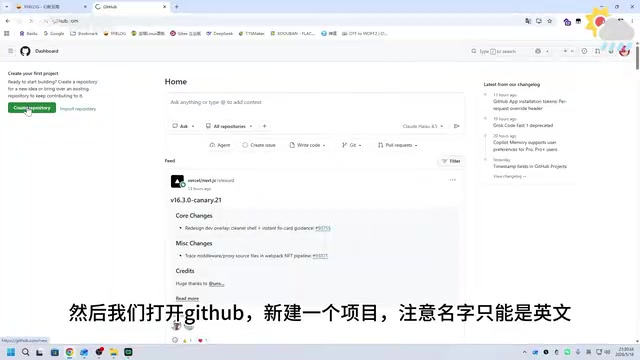
- Open GitHub and create a new repository (the name must be in English, as it becomes part of the access URL)
- Click "Upload an existing file" and select your generated HTML file to upload
- Fill in the commit message (a description of the changes made), then click "Commit changes"
Enabling Pages Hosting Service
- Go to the repository Settings → Pages
- Select the deployment source (Source) — typically choose "Deploy from a branch" and specify the root directory of the main branch, then click the confirm button
- Go to the Actions page and wait for deployment to complete (GitHub automatically triggers a build process, usually finishing within 1-2 minutes)
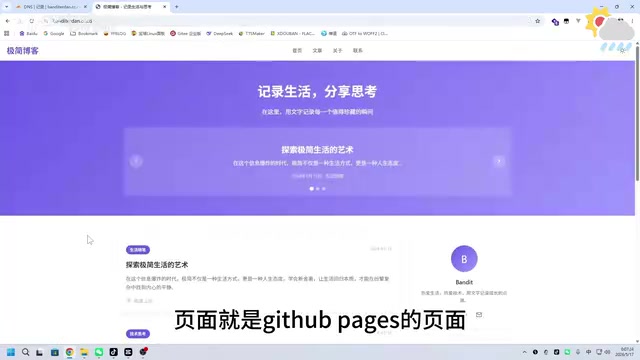
- Once deployment succeeds, you can access the page at
your-username.github.io/project-name

Binding a Free Custom Domain
If you want to access your site using your own domain, you can obtain a free domain through Dincit and use Cloudflare for DNS resolution. A custom domain not only makes the URL cleaner and more memorable but also enhances the page's professional appearance.
Registering a Free Domain
- Visit the Dincit website and register an account (new users may need an invitation code or GitHub verification)
- Choose a root domain (such as .cc or other suffixes that can be resolved by Cloudflare)
- Add your desired domain prefix and complete registration
A domain name is a human-readable address used to identify websites on the internet — it's essentially an alias for an IP address. Typically, registering a domain requires an annual fee (.com domains cost around $8-14/year), while free domains from platforms like Dincit have limited suffix options but are sufficient for personal project showcases. Note that free domains may be less reliable in terms of stability and renewal policies compared to paid domains, so paid domains are recommended for important projects.
Configuring Cloudflare DNS Resolution
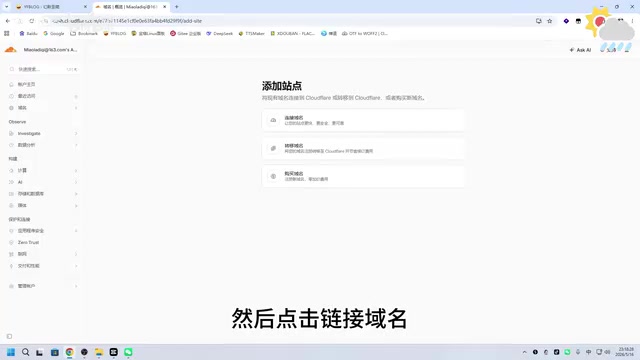
- Add your domain in Cloudflare and select the free plan
- Copy the two DNS addresses (Name Servers) provided by Cloudflare and enter them in Dincit's DNS server settings
- Wait for DNS activation (typically takes anywhere from a few minutes to 48 hours, though most activate within 30 minutes)
How DNS Resolution Works: DNS (Domain Name System) acts as the internet's "phone book," responsible for translating human-readable domain names into machine-recognizable IP addresses. When you enter a domain name in your browser, the system sequentially queries the local cache, recursive DNS servers, root name servers, and top-level domain servers to ultimately find the IP address corresponding to that domain. As one of the world's largest DNS providers, Cloudflare not only offers free DNS resolution services but also includes CDN acceleration (caching website content across 200+ data centers worldwide) and DDoS protection — meaning your web page will load quickly from anywhere in the world.
Binding the Domain to GitHub Pages
- In Cloudflare's DNS records, add a CNAME record: set the name to
wwwand the target to your GitHub Pages domain (e.g.,username.github.io) - Return to GitHub Pages settings, enter your custom domain, and save
- Wait for DNS resolution to complete — no errors means the binding was successful
About CNAME Records: CNAME (Canonical Name) is a type of DNS record that points one domain name to another domain name, rather than directly to an IP address. The benefit is that when the target server's IP address changes, you don't need to manually update your DNS records. Other common DNS record types include A records (pointing directly to IPv4 addresses), AAAA records (pointing to IPv6 addresses), and MX records (specifying mail servers).
Important Notes
-
Free domains cannot be filed for ICP registration, so they will be blocked when opened within WeChat, but they work normally in regular mobile browsers. This is because according to mainland China's internet regulations, all websites providing services within the country must undergo ICP registration, which requires the domain suffix to be on the MIIT-approved list and the domain registrar to have Chinese qualifications. Free domains typically don't meet these conditions. WeChat's built-in browser blocks unregistered domains with a "non-official webpage" warning — this is WeChat's security policy rather than an issue with the domain itself.
-
This method is only suitable for static pages — dynamic functionality requires a cloud server. The core difference between static and dynamic pages is: static page content is fixed on the server and identical for all users, while dynamic pages require server-side programs to process requests in real-time — features like user login, data queries, and form submissions all need backend support. If your needs are limited to displaying information (personal resumes, portfolios, event pages, etc.), static pages are perfectly sufficient.
-
GitHub and Cloudflare accounts need to be registered in advance (both support free usage; using an international email like Gmail is recommended during registration)
-
The entire process is completely free, suitable for personal showcase pages, portfolios, event landing pages, resume pages, and similar scenarios
-
If you need to update page content later, simply re-upload the modified HTML file to the GitHub repository, and Pages will automatically redeploy
Summary
The core pipeline of this solution is: AI generates HTML → GitHub Pages hosts it → Cloudflare handles DNS resolution → Custom domain access. The entire process is zero-cost, making it ideal for individuals who want to quickly showcase AI-generated web pages.
From a technical architecture perspective, this pipeline cleverly combines three free services: AI handles content production, GitHub handles file storage and web serving, and Cloudflare handles domain resolution and global acceleration. This simplified version of the Jamstack (JavaScript + API + Markup) philosophy is becoming the mainstream approach for personal website building.
Related articles
 Tutorials
Cursor + Codex Dual-IDE Collaboration: A Practical Methodology for Open-Source Project Customization
A complete methodology for open-source project customization based on real-world experience, detailing the Cursor+Codex dual-IDE workflow, seven-stage process, MVP validation, and AI source code reading techniques.
 Tutorials
Cursor Multi-Agent in Practice: Building a Full-Stack Next.js Blog in 50 Minutes
Build a full-stack blog in 50 minutes using Cursor IDE's multi-Agent mode with Next.js, Clerk auth, and Supabase. Learn the 4-phase AI Agent workflow and key integration pitfalls.
 Tutorials
Building an AI Software Factory from Scratch: A Cursor Engineer's Hands-On Experience with Multi-Agent Collaboration
Cursor engineer Eric shares practical insights on building an AI software factory: automation levels, guardrail design, parallel Agent management, and scaling to 1000+ Agents for 24/7 development.