Complete Guide to Local LLM Deployment with Ollama: AI That Works Offline
Complete Guide to Local LLM Deployment…
Complete guide to deploying open-source LLMs locally using Ollama for free, offline AI
This article covers why local LLM deployment matters (cost, reliability, privacy) and recommends Ollama as the most stable local model management tool. Built on llama.cpp with a model-UI separation architecture, Ollama supports Llama 3, Qwen, and other open-source models. Setup takes three steps: install Ollama, download models, and configure CORS. Through quantization, 7B models run with just ~6GB VRAM, making it ideal for zero-cost batch content generation and automation.
Why Deploy LLMs Locally?
While ChatGPT is powerful, it comes with practical challenges: it requires network access (and in some regions, a VPN), paid subscriptions, and occasional service instability. On the very afternoon this content was being recorded, ChatGPT went down for over an hour. If your workflow heavily depends on AI, such interruptions are unacceptable.
More importantly, if you need to generate content at scale—batch copywriting, automated text processing—every ChatGPT API call costs real money. A locally deployed open-source LLM, once configured, is free to use forever and runs independently even offline.
Open Source LLMs are large language models whose weight files and inference code are publicly available. Unlike closed-source models like ChatGPT, open-source models allow users to download complete model parameter files and run them locally without calling remote servers via API. Meta's Llama series and Alibaba's Qwen series are currently the most representative open-source LLMs, approaching or even surpassing closed-source models of similar scale on multiple benchmarks.
This article introduces the most stable local LLM management tool available today—Ollama—and how to use it to run Llama 3, Qwen, and other mainstream open-source models locally.
Ollama vs Other Solutions: Why Choose It?
A previously popular local LLM solution in the community was Jan (an integrated LLM management app), but it revealed several issues in practice:
- Unstable when running Llama 3, frequently failing
- Unable to continue conversations after a few rounds
- No support for Chinese open-source models (like the Qwen series)
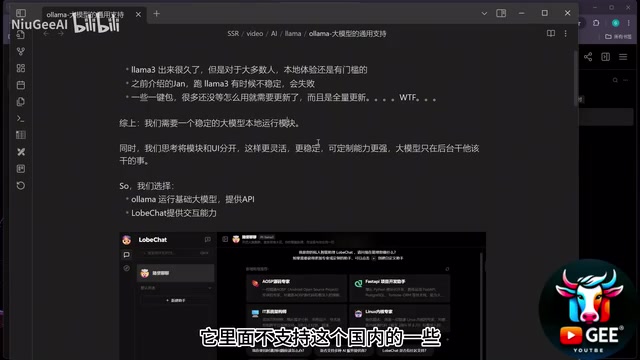
Ollama solves all these pain points. It adopts a model management and UI separation architecture—Ollama focuses on downloading, loading, and running models to ensure service stability, while the chat interface can be handled by dedicated frontend tools like LobeChat. This decoupled design makes the entire system more stable and reliable.
Under the hood, Ollama is built on llama.cpp, a highly optimized C++ inference engine specifically designed for CPU and GPU hybrid inference scenarios, supporting Apple Silicon Metal acceleration, NVIDIA CUDA acceleration, and AMD ROCm acceleration. On top of this, Ollama provides a Docker-like model management experience—each model has its own Modelfile, and through a unified CLI and REST API, pulling, running, and switching models becomes as simple as managing container images.
Ollama Installation: Three Steps
Step 1: Download and Install Ollama
Visit the Ollama website (ollama.com) and download the installer for your system. It supports macOS, Linux, and Windows.
Installation is extremely simple: open the installer, click "Install", done. No complex configuration, no environment dependencies, ready out of the box.
Step 2: Download and Run Models
After installation, open a terminal and use the following commands to download and run models:
# Run Llama 3 (8B version), auto-downloads on first run
ollama run llama3

# Run Qwen2 (default 7B version)
ollama run qwen2

# Run Qwen2 0.5B small model
ollama run qwen2:0.5b

# Download model only without running
ollama pull qwen2

# List locally downloaded models
ollama list
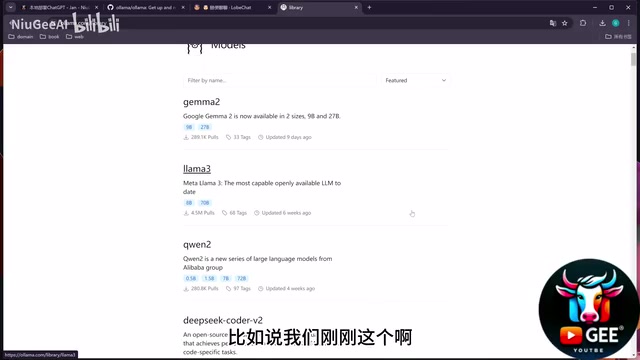
Ollama supports resumable downloads—if your network drops while downloading a large model, it picks up where it left off next time. With a proxy configured, download speeds can reach 20-30 MB/s.
Notably, Ollama uses Quantization by default to compress model size. Quantization converts model weights from 32-bit floating point (FP32) to 4-bit or 8-bit integers, reducing VRAM usage to 1/4 or 1/8 of the original while retaining most model capabilities. This is why a 7B model with 7 billion parameters can run smoothly with only about 6GB of VRAM.
Step 3: Configure Cross-Origin Access (Critical)
Ollama listens on http://127.0.0.1:11434 by default and can be interacted with via API. However, if you want to call this endpoint from a web-based chat interface (like LobeChat), you'll encounter CORS (Cross-Origin Resource Sharing) restrictions.
CORS is a browser security mechanism. When a webpage (e.g., LobeChat on localhost:3000) tries to make a request to a service on a different port (e.g., Ollama on localhost:11434), the browser sends a preflight request first, and only allows the actual data request if the server explicitly permits that origin.
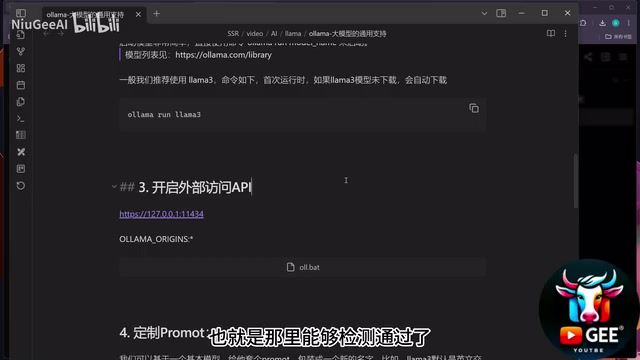
The solution is to set a system environment variable:
OLLAMA_ORIGINS=*
This tells Ollama to add Access-Control-Allow-Origin: * to response headers, allowing cross-origin access from any source. Two ways to set this:
- Permanent: Add it to system environment variables (on Windows, via System Properties > Environment Variables)
- Temporary: Use a batch script (.bat file) to inject the environment variable before launching Ollama
Model Selection and VRAM Requirements
Ollama supports a rich variety of models, viewable on its Models page. The parameter scale of LLMs (the B in 7B, 14B stands for Billion) directly determines the model's capability ceiling and hardware requirements. Here's a comparison of commonly used models:
| Model | Parameters | VRAM Required (approx.) | Highlights |
|---|---|---|---|
| Llama 3 8B | 8 billion | ~7GB | Meta open-source, strong overall |
| Qwen2 7B | 7 billion | ~6GB | Alibaba open-source, excellent Chinese |
| Qwen2 0.5B | 500 million | ~352MB | Ultra-lightweight, extremely fast |
| Qwen2 14B | 14 billion | ~10GB | Higher accuracy, needs more VRAM |
Core principle: larger parameters mean higher accuracy but greater VRAM demands. For reference, running Llama 3 8B uses about 7GB of VRAM; 12-14B models are feasible, but 16B would be too much for a typical consumer GPU.
Real-World Comparison: Llama 3 vs Qwen
Llama 3 8B
Asked to generate a Docker Compose config with Nginx + MySQL, it produced a correct basic structure—MySQL on port 3306 with volume mounts and configuration notes. Generally usable, with occasional minor imperfections.
Qwen2 14B
For the same Docker Compose task, Qwen2 14B performed noticeably better: it returned a correct Docker Compose V3 configuration with complete environment variables, proper port mapping (3306 exposed), and helpful comments throughout.
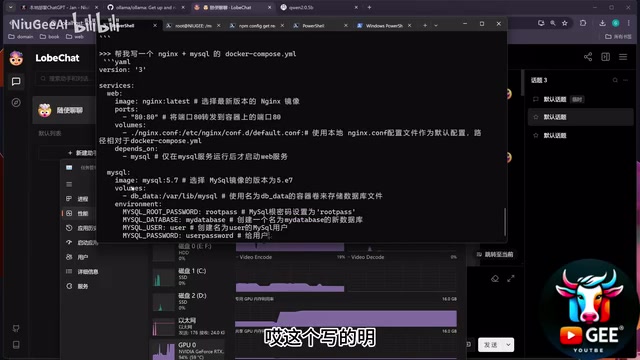
Notably, the Qwen series is significantly faster than Llama 3 in response speed, especially with more natural Chinese support. The technical reason: Qwen's pre-training corpus contains a much higher proportion of quality Chinese text, and its optimized Tokenizer encodes Chinese characters more efficiently, requiring fewer tokens for equivalent text—directly resulting in faster inference and lower context usage.
Practical Value of Local LLM Deployment
You might ask: if ChatGPT works so well, why bother with local deployment? The core value lies in:
- Cost control: For high-volume generation (batch copy, automation scripts), local models have zero marginal cost
- Reliability: No network dependency, unaffected by third-party outages, works offline
- Privacy: Sensitive data never leaves your machine, suitable for enterprise use
- Diverse output: Different models have different "styles," producing content distinct from ChatGPT
- Automation integration: Easily plugs into automation workflows via API
For domain-specific tasks, with well-crafted prompt templates, local open-source models can fully meet requirements. Ollama handles stable model execution, paired with frontend tools like LobeChat, creating a fully private AI workstation.
Key Takeaways
- Ollama is the most stable local LLM management tool available, built on llama.cpp, supporting Llama 3, Qwen, and other mainstream open-source models with offline capability
- Deployment is extremely simple: one-click install, download and run models via CLI with resumable downloads; Ollama uses quantization to dramatically reduce VRAM requirements
- Setting the OLLAMA_ORIGINS=* environment variable is required to resolve browser CORS restrictions for web-based chat interfaces
- Model choice depends on available VRAM: 8B models need ~7GB, 14B models perform better but require more resources
- Core value of local deployment: zero-cost bulk usage, offline availability, and data privacy—ideal for automated content generation scenarios
Related articles
 Tutorials
Cursor + Codex Dual-IDE Collaboration: A Practical Methodology for Open-Source Project Customization
A complete methodology for open-source project customization based on real-world experience, detailing the Cursor+Codex dual-IDE workflow, seven-stage process, MVP validation, and AI source code reading techniques.
 Tutorials
Cursor Multi-Agent in Practice: Building a Full-Stack Next.js Blog in 50 Minutes
Build a full-stack blog in 50 minutes using Cursor IDE's multi-Agent mode with Next.js, Clerk auth, and Supabase. Learn the 4-phase AI Agent workflow and key integration pitfalls.
 Tutorials
Building an AI Software Factory from Scratch: A Cursor Engineer's Hands-On Experience with Multi-Agent Collaboration
Cursor engineer Eric shares practical insights on building an AI software factory: automation levels, guardrail design, parallel Agent management, and scaling to 1000+ Agents for 24/7 development.