Complete Guide to MCP Protocol in Claude Code: Configuration, Management, and Context Optimization
A comprehensive guide to configuring, managing, and optimizing MCP protocol in Claude Code.
This guide covers everything you need to know about using MCP (Model Context Protocol) in Claude Code — from understanding what MCP is and how tools work, to adding servers, configuring three scope levels (Local, User, Project), and optimizing your context window. It includes four key strategies to prevent MCP from consuming too many tokens and best practices for team collaboration.
What Is the MCP Protocol?
Model Context Protocol (MCP) is an open standard that enables Claude Code to connect to external tools and data sources. When you ask a question, Claude automatically determines when to use these tools to better understand your needs.
MCP was officially released and open-sourced by Anthropic in late 2024. Its design was partly inspired by the Language Server Protocol (LSP). LSP solved the M×N integration problem by defining a standard protocol that allows any editor to communicate with any language server. MCP takes a similar approach: it establishes a unified protocol layer between AI models and external data sources, enabling any MCP-compatible AI application to interface with any MCP server without writing custom integration code for each data source. Before MCP, developers typically had to write dedicated API adapters for each external service — a costly approach that was difficult to maintain and reuse. MCP transforms this point-to-point integration model into a standardized plug-and-play model.
When using Claude Code, context is one of the most critical elements. However, vast amounts of contextual information are scattered across various places — your databases, productivity apps, public code repositories, and more. MCP was built to solve exactly this problem.

Understanding the Concept of "Tools" in MCP
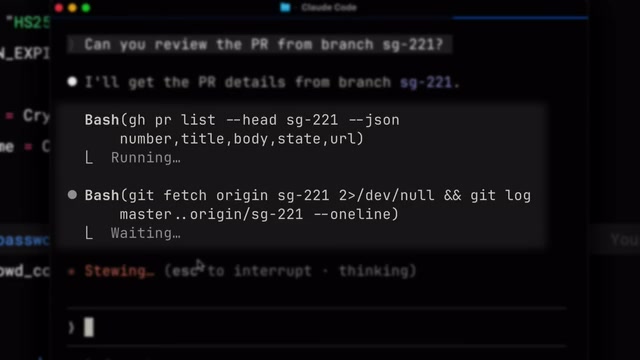
When discussing AI Agents, it's essential to first understand the concept of "Tools." Tools give Agents like Claude Code the ability to perform concrete actions, enabling them to complete tasks more effectively. This is fundamentally different from traditional AI that simply returns text output — Agents can proactively invoke tools to retrieve information and execute commands, not just generate text.
From a technical perspective, Tool Use (also known as Function Calling) is a core capability of modern large language models. The basic workflow follows the ReAct (Reasoning + Acting) paradigm: the model first reasons about whether the current task requires assistance from external tools; if so, the model generates a structured tool call request (Acting) containing the tool name and parameters; the external system executes the tool and returns results; the model then continues reasoning based on the returned results to decide the next action. This "think-act-observe" loop can iterate multiple times until the task is complete. Tools in MCP are a concrete implementation of this mechanism — each MCP server exposes a set of tool definitions (including tool names, functional descriptions, and parameter schemas) to the model, which uses these definitions to decide when and how to invoke them.
Practical MCP Use Cases
Here are a few typical examples:
- Project Management Integration: If your team uses Linear as a project management tool, you can add a Linear MCP server to bring specific issue details directly into Claude Code's context. Linear is a project management tool widely popular among development teams, known for its smooth user experience and robust API support. Through MCP integration, Claude Code can directly read issue titles, descriptions, priorities, associated Pull Requests, and more — giving it complete task context while coding, without requiring developers to manually copy and paste this information.
- Real-Time Documentation Queries: When you need the latest documentation for a dependency library, Context7 MCP is an excellent choice. Context7 is a documentation service designed specifically for AI coding assistants that crawls and indexes the latest documentation for various open-source libraries in real time. Unlike potentially outdated documentation in model training data, Context7 ensures you get current API docs and usage guides — particularly important for rapidly iterating frontend frameworks and cloud service SDKs.
- More Connectors: There are hundreds of different connectors available on cloud.com.
How to Add and Manage MCP Servers
Adding MCP Servers
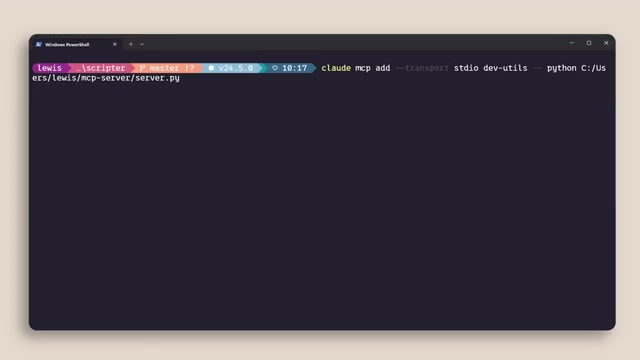
Use the claude mcp add command to add MCP servers. MCP servers come in two main types:
- HTTP Servers: Used for remote services, hosted by service providers and connected over the network. HTTP-type MCP servers communicate with clients via Server-Sent Events (SSE) or the newer Streamable HTTP transport mechanism. The advantage is that servers can be deployed in the cloud, maintained and updated by third parties, and clients only need a URL to connect. Typical scenarios include connecting to official MCP servers for SaaS services (such as Jira, Notion, Slack, etc.). Since network communication is involved, HTTP servers typically need to handle authentication (such as OAuth 2.0) and authorization, and latency is relatively higher.
- STDIO Servers: Used for local processes that run directly on your machine. STDIO (Standard Input/Output) servers communicate with Claude Code via standard input/output streams through inter-process communication. Claude Code launches the STDIO server as a child process, then sends JSON-RPC formatted requests via stdin and receives responses via stdout. The advantages are zero network latency, no additional network configuration needed, and data flows entirely locally for better security. Most MCP servers installed via npm or pip fall into this category, such as file system access and local database connections.
Viewing and Managing Connected Servers
Within a Claude Code session, use the /mcp command to view currently connected servers, their status, and data. You can also add new MCP servers or disable unneeded ones during a session.
Three Scope Levels for MCP Configuration
MCP servers can be configured at three different levels:
- Local: Available only to you in the current project. Configuration is stored in the
.claude/folder within the project directory, won't affect other projects, and won't be visible to other team members (.claude/is typically added to.gitignore). Suitable for personal debugging or experimental MCP servers. - User: Available across all your projects. Configuration is stored in a global config file under your home directory (e.g.,
~/.claude/). These servers are automatically loaded regardless of which project you launch Claude Code in. Suitable for commonly used personal tools like calendars, note-taking apps, etc. - Project: Uses a
.mcp.jsonfile committed to version control, so anyone working on the codebase automatically gets the exact same server configuration.
The project-level scope is particularly recommended — it ensures consistency during team collaboration, allowing new members to use the same MCP toolset without manual configuration. This "Configuration as Code" philosophy is widely adopted in modern DevOps practices, similar to how .editorconfig unifies editor settings and .eslintrc unifies code standards. Including MCP configuration in version control means toolchain changes can also be tracked, reviewed, and rolled back.
Context Window Optimization: Preventing MCP from Consuming Too Many Resources
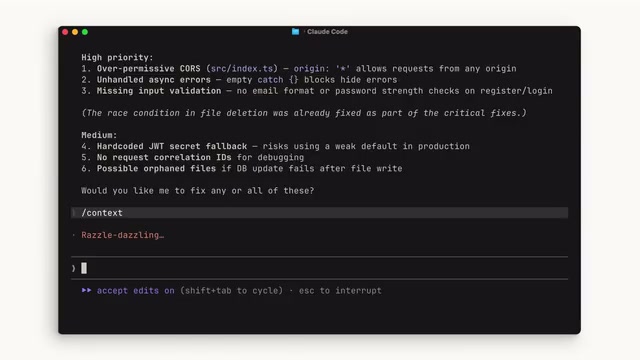
This is the most easily overlooked yet critically important point when using MCP: MCP servers add tool definitions to your context window. Even if you don't use these tools during coding, their definitions still occupy precious context space. If you have many servers configured, this can seriously erode your available context.
To understand the severity of this issue, you need to understand the nature of the context window. The basic unit of information processing for large language models is the Token — an English word typically corresponds to 1-2 tokens, and a Chinese character usually corresponds to 1-2 tokens. The model's context window has a fixed token limit (e.g., Claude's context window is 200K tokens), and this window must accommodate system prompts, tool definitions, conversation history, code file contents, and model output. Each MCP tool definition includes the tool name, functional description, parameter JSON Schema, etc., and a single tool definition can consume hundreds to thousands of tokens. If you connect 10 MCP servers, each exposing 5-10 tools, tool definitions alone could consume thousands or even tens of thousands of tokens — a significant overhead for programming scenarios that need to process large code files.
Four Optimization Strategies
Strategy 1: Promptly disable unused servers. Run the /mcp command to check current connection status and disable any servers you're not currently using or don't expect to use.
Strategy 2: Prefer CLI alternatives. If a tool has a CLI equivalent (such as GitHub's gh command or AWS's aws command), the CLI approach is more context-efficient because it doesn't add persistent tool definitions. Claude Code has built-in Shell command execution capability (via the built-in Bash tool). When you use CLI instead of MCP, Claude only needs to construct and execute a Shell command when needed — the command itself consumes very few tokens, unlike MCP tools that require continuous context space throughout the session to store tool definitions. For example, using gh issue view 123 to fetch GitHub Issue information achieves the same result as calling the get_issue tool through the GitHub MCP server, but the former has virtually zero context cost.
Strategy 3: Leverage the Skill mechanism. Skills have names and descriptions that are loaded into context. Similar to MCP, Claude only loads a Skill into the context window when it determines one is needed. You can wrap command-line tools as Skills to enable on-demand loading. Skills are essentially structured instruction sets stored in Markdown files (typically in the .claude/skills/ directory), each containing a name, description, and detailed execution steps. The key difference from MCP tools is: MCP tool definitions are fully loaded into context at session start, while Skills use a "lazy loading" strategy — only the Skill's name and brief description are preloaded (consuming minimal tokens), and Claude loads the full content into context only when it determines a Skill is relevant to the current task. This design allows you to define numerous Skills without worrying about context bloat.
Strategy 4: Understand the automatic tool search mode. When your MCP tools occupy more than 10% of the context window, Claude Code automatically switches to Tool Search Mode, discovering appropriate tools on demand. However, note that this mode may not perform as well as having tools directly in context, since tool definitions aren't directly visible in the context. The underlying mechanism of Tool Search Mode is similar to RAG (Retrieval-Augmented Generation): the system builds a semantic index of all available tools, and when a user makes a request, Claude first performs semantic retrieval based on the request content to find the most relevant tools, then temporarily loads those tool definitions into context. This process introduces an additional retrieval step that can cause two issues: first, the retrieval itself consumes extra inference time; second, semantic matching may not be precise enough, potentially missing tools that are actually needed or introducing irrelevant ones. Therefore, for core tools you use frequently, it's best to ensure they're directly visible in context rather than relying on search mode.
Summary: MCP Best Practices Checklist
MCP opens the door for Claude Code to connect with the external world, enabling the AI coding assistant to reach beyond code itself and access project management, documentation, databases, and various other resources. Here are the core best practices:
- Use
claude mcp addto add servers - Include configuration in version control via
.mcp.jsonfiles to ensure team consistency - Always monitor context usage and disable inactive servers
- Prefer CLI when available, and wrap tools as Skills when possible
Using MCP wisely can significantly boost Claude Code's productivity, but over-configuration can backfire. Finding the balance between tool richness and context efficiency is the key to using MCP effectively.
Related articles
Remotion: The Open-Source Framework for Code-Driven Video Production with React
Deep dive into Remotion, the open-source framework for writing videos with React components. Covers core principles, use cases, comparison with traditional editors, and quick start guide.
Nex N2 Pro Real-World Testing: Top 5 on Official Benchmarks, Only 12th in Independent Tests
Deep-dive testing of Nex N2 Pro open-source Agent model comparing official benchmarks vs independent results. The 397B parameter model shows decent frontend generation but ranks 12th independently, not top 5 as claimed.
Claude Code Workflow in Practice: From Requirement Grilling to AFK Agent Auto-Coding
A detailed walkthrough of building real features with Claude Code: Grill Me requirement interrogation, auto-generated PRDs, AFK agent coding, and QA iteration loops with DDD and TDD strategies.