Complete Tutorial: Building AI Apps with Zero Code in Google AI Studio

Build a complete ADHD planning app with zero code using only Google AI Studio prompts.
This tutorial shows how to build an AI-powered ADHD planning app similar to Teemo using only prompts in Google AI Studio. Using an incremental prompting strategy, it walks through building the frontend layout, calendar, task creator, focus timer, AI chat assistant, and notes feature, culminating in one-click deployment to Google Cloud. The article also notes that getting from web app to App Store still requires additional technical steps.
Overview
Building an app worthy of the App Store no longer requires programming experience. This tutorial demonstrates how to build an AI-powered planning app from scratch using only prompts in Google AI Studio — similar to Teemo, an ADHD assistant app generating $70,000 per month.

What is Google AI Studio?
Google AI Studio is Google's generative AI development platform built on the Gemini large language model. Beyond text generation and multimodal interaction, it introduced a "Canvas" feature in 2025 that allows users to generate runnable web application code (HTML/CSS/JavaScript) directly through natural language prompts. This essentially combines LLM code generation capabilities with instant preview and one-click deployment, enabling non-technical users to rapidly build functional prototypes. Similar to Anthropic's Claude Artifacts and OpenAI's Canvas, Google AI Studio's differentiator is its deep integration with the Google Cloud ecosystem, allowing generated apps to be deployed directly as publicly accessible web services.
Why an ADHD Assistant App as a Case Study?
ADHD (Attention Deficit Hyperactivity Disorder) affects approximately 5-7% of children and 2-5% of adults worldwide. In recent years, as societal awareness of ADHD has grown, the related digital health tools market has expanded rapidly. Apps like Teemo help ADHD users overcome executive function challenges by gamifying task breakdown, time management, and focus timers. These apps can generate tens of thousands of dollars in monthly revenue, reflecting the enormous commercial potential of the Mental Health Tech space. Similar products include Tiimo, Structured, and Routinery — all sharing design principles of reducing cognitive load, providing visual time perception, and delivering immediate positive feedback.
Build Process: Starting with Frontend Layout
Building the Basic Interface
The core strategy is to avoid building the entire system at once — start with the frontend layout first. With a simple prompt, ask Google AI Studio to create a mobile-optimized web app with three core sections: Dashboard, Notes, and Settings. The generated interface immediately presents a modern mobile design.
Incremental Prompting: Why Not Generate Everything at Once?
Incremental Prompting is a core methodology in AI-assisted development. Compared to generating a complete app in one shot, this strategy breaks complex systems into independent functional modules, with each prompt focusing on one clear objective. The advantages are: First, it reduces "hallucinations" and logic errors when LLMs process complex instructions; Second, each step's output can be verified and adjusted, forming a controllable iteration loop; Third, when issues arise at any step, you only need to roll back that step rather than rebuild the entire system. This essentially borrows from modular design and agile development in software engineering, simply replacing "writing code" with "writing prompts."
Adding a Calendar System
Tasks need to be bound to time, so the next step is adding a calendar view. A prompt requests a clean, dynamic calendar layout, laying the foundation for subsequent events and scheduling.
Building the Task Creator

This is the key step where the app becomes truly usable. A prompt builds an advanced yet clean task creator supporting tags, categories, folders, priorities, and more. After creating sample tasks, everything runs smoothly — tasks appear in the correct location, and status updates instantly when marked complete.
Advanced Features: Events, Focus Timer & AI Assistant
Event Creation & Focus Timer
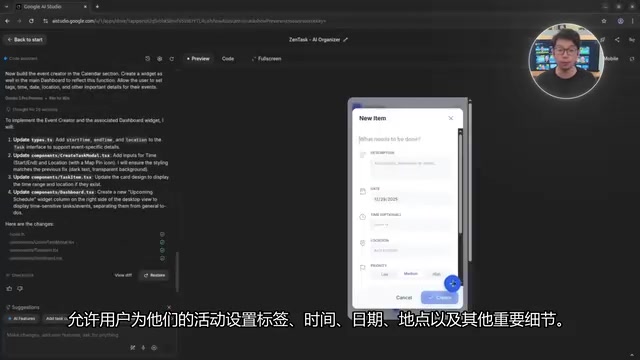
The event creator supports setting tags, times, locations, and other details, automatically linking to the calendar. The focus timer provides preset durations and custom options to help users concentrate. The focus timer design draws inspiration from the Pomodoro Technique — a method of splitting work into fixed intervals with short breaks that research has shown to be especially effective for ADHD individuals, as it transforms vague "long work sessions" into concrete, perceivable short-term goals.
AI Chat Assistant Integration
The most transformative feature is the AI assistant — users simply describe their needs in natural language, and the AI automatically creates tasks, notes, and events within the app. For example, typing "Create a task for a meeting with Michael" automatically generates and adds the task to the system.
The core technology behind this is Intent Recognition and Entity Extraction. When users input natural language commands, the AI identifies the action intent (create task), relevant people (Michael), task type (meeting), and other structured information, then calls internal app functions to complete the operation. This pattern is called "Conversational UI" or "LLM as Controller" architecture — the LLM no longer merely generates text responses but serves as the app's control hub, translating natural language commands into specific system operations. This aligns with OpenAI's Function Calling and Google's Tool Use mechanisms.
Notes Feature

The notes section supports creating, coloring, and tagging notes, integrating planning, scheduling, focus, automation, and free-form recording all within one system.
One-Click Deployment
Once the app is built, click the "Deploy App" button in the upper right corner of Google AI Studio, select a Google Cloud project, and within seconds the app goes live with a public link. No additional configuration required.
From Web App to App Store: How Far Is It?
There are three main technical paths to get a web app on the App Store: First, using PWA (Progressive Web App) technology with Service Workers for offline access and push notifications, though Apple's PWA support is limited with strict review policies; Second, using WebView wrapper tools (like Capacitor or Cordova) to package the web app in a native container that can access device APIs but with limited performance; Third, rewriting core logic using cross-platform frameworks like React Native or Flutter. Apple's App Store Review Guidelines Section 4.2 explicitly states that simple repackaging of websites may be rejected — apps need to provide sufficient native functionality and user value. Therefore, going from web prototype to official listing typically requires adding local storage, push notifications, native navigation, and other features.
Summary and Reflections
This case study demonstrates a new paradigm for AI app development: building functional modules step by step through incremental prompts, progressing from layout to logic. While going from web app to App Store listing still requires additional packaging steps, the core development process has been fully achieved with zero code.
It's worth noting that converting a web app to a native app and passing review still has a certain threshold. However, as a rapid prototyping tool, Google AI Studio's capabilities are already quite impressive. This "prompts as product" development model is redefining the barrier to entry for software development — work that previously required months of development time and professional teams can now be completed as a demonstrable prototype by one person in a few hours. For indie developers and entrepreneurs, this means the cost of validating product ideas approaches zero.
Key Takeaways
- Google AI Studio can build complete mobile apps through natural language prompts with zero code
- Uses an incremental build strategy: frontend layout first, then progressively adding calendar, tasks, events, timer, and other features
- AI chat assistant can create tasks and events directly through conversation within the app
- One-click deployment to Google Cloud for a public link after building
- Going from web app to App Store still requires additional packaging steps (PWA, WebView wrapper, or cross-platform framework rewrite)
- Incremental prompting strategy effectively reduces error rates and complexity in AI-generated code
Related articles
 Tutorials
Cursor + Codex Dual-IDE Collaboration: A Practical Methodology for Open-Source Project Customization
A complete methodology for open-source project customization based on real-world experience, detailing the Cursor+Codex dual-IDE workflow, seven-stage process, MVP validation, and AI source code reading techniques.
 Tutorials
Cursor Multi-Agent in Practice: Building a Full-Stack Next.js Blog in 50 Minutes
Build a full-stack blog in 50 minutes using Cursor IDE's multi-Agent mode with Next.js, Clerk auth, and Supabase. Learn the 4-phase AI Agent workflow and key integration pitfalls.
 Tutorials
Building an AI Software Factory from Scratch: A Cursor Engineer's Hands-On Experience with Multi-Agent Collaboration
Cursor engineer Eric shares practical insights on building an AI software factory: automation levels, guardrail design, parallel Agent management, and scaling to 1000+ Agents for 24/7 development.