Complete Zero-Code Workflow for Cloning YouTube Channels with Claude AI

A complete breakdown of using free AI tools to clone successful YouTube channels, with risk analysis.
An overseas creator shared a complete YouTube channel cloning workflow using free tools including Claude AI, Google AI Studio, Google Flow, and Meta AI — covering channel analysis, script generation, voiceover production, batch visual asset generation, and final editing to publishing. The method builds analysis and generation engines through custom prompts, paired with Chrome automation extensions for batch processing, but faces copyright risks, monetization uncertainty, tool sustainability concerns, and ethical controversies.
Overview: An AI-Driven YouTube Channel Cloning Methodology
An overseas creator shared a complete workflow demonstrating how to clone a successful YouTube channel from scratch using Claude AI (free version) alongside multiple free tools. The entire process covers channel analysis, content generation, visual production, and final publishing — claiming to require no coding skills and no paid subscriptions.
This article breaks down the core steps of this workflow, the tool chain used, and analyzes its practical feasibility and potential risks.

Phase 1: Intelligent Channel Analysis & Strategy Cloning
Core Tools: Claude AI + Custom Prompts
The starting point of the entire workflow is a prompt called the "YouTube Channel Clone Engine." Claude AI is a large language model developed by Anthropic, with its free version offering basic conversational capabilities, long text input support, and structured output. The Prompt Engineering technique used here refers to guiding AI models to produce output in specific formats and quality through carefully designed instruction text. The "Channel Clone Engine" in this case is essentially a multi-step system prompt that leverages Claude's context window (capable of processing tens of thousands of characters) and instruction-following ability to break complex analytical tasks into executable sub-steps.
After pasting it into Claude AI, the system guides users through an 8-step channel analysis:
- Basic Information Collection: Provide target channel URL, description, and video page screenshots
- Deep Content Analysis: Provide complete transcripts of 2-5 popular videos
- Channel Intelligence Profile Generation: AI outputs niche, audience persona, writing style, growth strategy, etc.
- Channel Naming & Branding Suggestions: Generate 10 available channel names
- Visual Style Analysis: Generate visual profile based on video frame screenshots
- Brand Asset Generation: Output text-to-image prompts for avatar and banner
- Thumbnail Style Guide: Analyze design patterns of target channel thumbnails
- Complete Clone Guide Export: One-click download of all analysis data
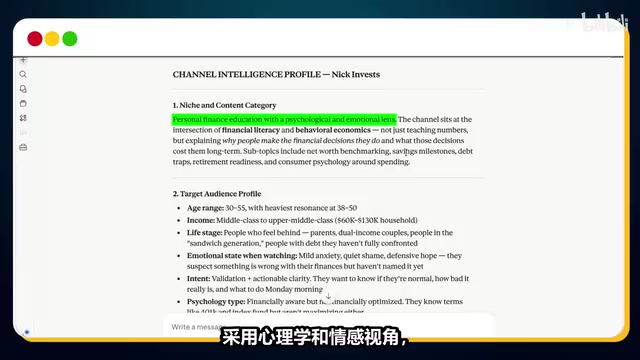
The video uses the finance channel Nikinvest as an example — a channel with 173K subscribers that has accumulated over 15 million views since January 2025, producing personal finance content in whiteboard animation format. After analysis, Claude AI generated a complete channel intelligence profile, including detailed audience personas covering age demographics, income levels, life stages, and more.
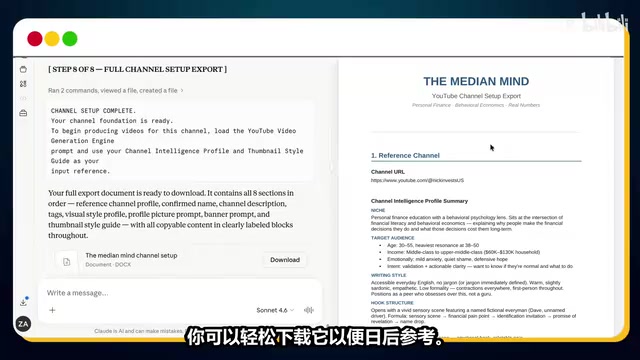
Practical Details of Channel Setup
Settings in YouTube Studio also matter:
- Set country to United States (targeting high CPM markets): CPM (Cost Per Mille) refers to the cost per thousand impressions and is a core metric for YouTube ad revenue. US market CPM typically ranges from $5-$30, far higher than most other countries (India is approximately $0.5-$2, Southeast Asian regions even lower). This setting directly affects the channel's potential ad revenue ceiling. The YouTube Partner Program (YPP) requires channels to reach 1,000 subscribers and 4,000 watch hours to enable monetization, and post-monetization revenue levels are highly dependent on the CPM values of viewers' regions.
- Select "Education" as the category
- Enable "Hold potentially inappropriate comments for review" with links and tags requiring manual approval
- Use a bell icon as a watermark to promote subscription conversion
Phase 2: Mass Production of Viral Video Content
Script Generation: 3,500+ Word Ready-to-Use Scripts
After channel setup, the creator uses another custom prompt — the "YouTube Faceless Video Generation Engine" — to produce content. This engine:
- Generates 25 topic ideas with viral potential based on the channel intelligence profile
- Creates a complete topic intelligence report for selected themes (including hook strategies, script structure, retention techniques)
- Outputs complete video scripts exceeding 3,500 words
- Generates storyboard image prompts for each scene (127 scenes in this example)
Voiceover Production: Google AI Studio Free Solution
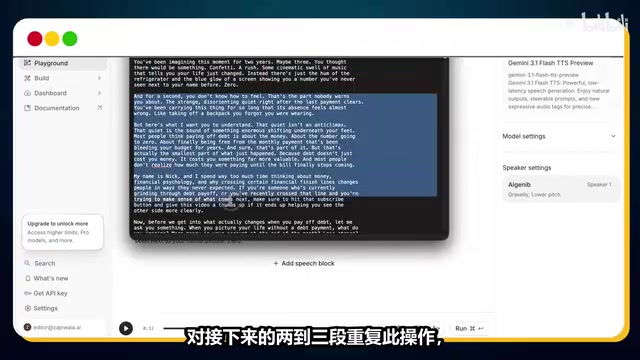
Narration uses Google AI Studio's text-to-speech functionality, selecting the lgnib voice (suitable for finance content). Google AI Studio is an AI development platform provided by Google DeepMind, with its TTS functionality based on the latest neural network speech synthesis technology. Unlike traditional concatenative TTS, modern neural TTS models use end-to-end deep learning architectures to generate audio approaching natural human speech, including appropriate pauses, intonation variations, and emotional expression.
The key technique is to not paste the entire script at once, but instead process only 2-3 paragraphs at a time — this produces more natural, rhythmic speech. This is because TTS models maintain better prosodic consistency when processing shorter text; long text inputs tend to cause quality degradation in later segments, flattening intonation, or producing unnatural breaks.
Phase 3: Batch Visual Asset Generation
Static Images: Google Flow + Batch Automation
Image generation uses Google Flow (a free AI image generator), with the Nano Banana Pro model selected and aspect ratio set to 16:9 (i.e., 1920×1080 pixels, the standard frame ratio for YouTube videos). The model used by Google Flow belongs to the Diffusion Model family, generating images by progressively denoising from random noise, capable of creating high-quality visual content from text descriptions.
For batch processing of 127 scenes, the creator recommends using a Chrome extension called "VO Automation":
- Save all prompts to a notepad file (with line breaks between each prompt)
- Set concurrent prompts with random delays of 25-40 seconds
- One-click run to automatically generate and download all images
The random delay setting simulates human operation pace to avoid triggering the platform's anti-automation detection mechanisms (Rate Limiting). This browser automation technology is essentially an application of RPA (Robotic Process Automation) on the web, completing repetitive tasks by simulating mouse clicks, keyboard inputs, and other operations.
Dynamic Video: Meta AI + Automation Extension
Using only static images will get flagged by YouTube as low-quality content, affecting channel monetization eligibility. YouTube's content quality detection system analyzes visual complexity — static images with voiceover are classified as "Slideshow Content," which was explicitly listed as potentially non-compliant with monetization standards in YouTube's 2023 policy update. Therefore, images need to be converted into dynamic video clips.
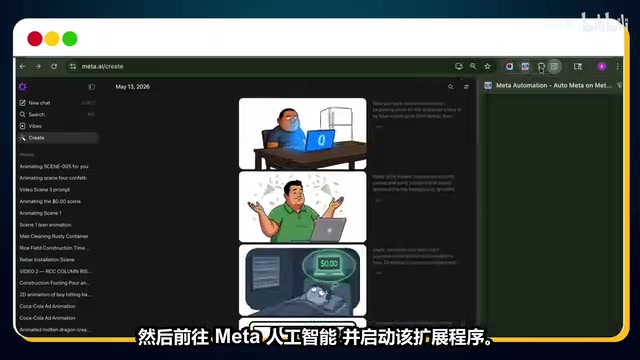
Meta AI's video generation feature is based on Image-to-Video technology, capable of transforming static images into 3-5 second dynamic video clips with added camera movements (such as slow zoom-in, panning), element animations, and other effects. Through this conversion, each scene contains pixel-level inter-frame changes, technically circumventing static content detection.
This step uses a dedicated Chrome automation extension:
- Upload all scene images in sequence
- Paste corresponding image-to-video prompts
- Set random delays of 10-25 seconds
- Ensure image numbers, prompt numbers, and scene numbers match perfectly
Important Note: The creator specifically points out that at the time of recording, this extension was completely free but may switch to paid at any time — they recommend using it as soon as possible.
Phase 4: Editing & Publishing
Editing Workflow
The final editing steps are relatively straightforward:
- Import all voiceover clips to the timeline
- Import all video clips to the timeline
- Using the AI-generated script as reference, sync narration with video scenes
- Preview, confirm, and export
SEO Optimization & Thumbnails
The Claude AI video generation engine also outputs:
- Titles with viral potential
- SEO-optimized video descriptions and tags
- 5 thumbnail prompts in different styles
Objective Analysis: Feasibility & Risk Assessment
Tool Chain Summary (All Free)
| Stage | Tool |
|---|---|
| Strategy Analysis | Claude AI (Free Version) |
| Voiceover | Google AI Studio |
| Image Generation | Google Flow |
| Video Generation | Meta AI |
| Batch Automation | Chrome Extensions |
Potential Risks
-
Copyright & Originality Issues: Directly cloning another channel's style and content strategy may face YouTube's duplicate content detection. YouTube has multiple layers of content review mechanisms: the Content ID system identifies copyrighted content through audio and video fingerprinting; Reused Content Detection analyzes whether a channel extensively uses non-original material. While "cloning" a channel's style itself doesn't constitute copyright infringement (style isn't protected by copyright), if script content is highly similar to the original channel, it may trigger text similarity detection. Additionally, YouTube's algorithm evaluates "Added Value" — whether the creator provides unique commentary, educational value, or creative transformation on top of existing material.
-
Monetization Eligibility: Even with dynamic images, whether AI-generated content can pass YouTube Partner Program review remains questionable. Since 2024, YouTube has strengthened its review of "reused content," and purely AI-generated content lacking a human creator's unique perspective and substantial original value may be rejected from YPP during manual review.
-
Tool Sustainability: Free tools may change their policies at any time — the Meta AI extension has already been noted as potentially switching to paid. The AI tools market is in a period of rapid change, with many platforms adopting a "free acquisition first, paid monetization later" strategy. Workflows dependent on a single free tool chain carry significant uncertainty.
-
Content Quality: The quality of AI-generated 3,500-word scripts requires human review and editing — full automation cannot be relied upon. AI-generated financial content may contain outdated data, inaccurate investment advice, or shallow analysis. These issues not only affect viewer experience but may also involve compliance risks in the financial domain.
-
Ethical Concerns: The word "clone" itself implies disrespect for original creators' labor and intellectual output.
Ideas Worth Borrowing
Setting aside the controversy of "cloning," several approaches in this workflow are worth referencing for legitimate creators:
- Using AI to systematically analyze successful channels' content strategies
- Batch processing repetitive visual production work
- Leveraging Prompt Engineering to build reusable content production pipelines
Conclusion
This workflow demonstrates the powerful integration capabilities of current AI tool chains — from strategy analysis to content production to visual creation, nearly every stage has a free AI solution. But "can do" doesn't equal "should do" — creators need to find a balance between efficiency tools and original value. Truly sustainable content entrepreneurship still requires unique perspectives, genuine value, and sincere service to audiences.
Related articles
 Tutorials
Cursor + Codex Dual-IDE Collaboration: A Practical Methodology for Open-Source Project Customization
A complete methodology for open-source project customization based on real-world experience, detailing the Cursor+Codex dual-IDE workflow, seven-stage process, MVP validation, and AI source code reading techniques.
 Tutorials
Cursor Multi-Agent in Practice: Building a Full-Stack Next.js Blog in 50 Minutes
Build a full-stack blog in 50 minutes using Cursor IDE's multi-Agent mode with Next.js, Clerk auth, and Supabase. Learn the 4-phase AI Agent workflow and key integration pitfalls.
 Tutorials
Building an AI Software Factory from Scratch: A Cursor Engineer's Hands-On Experience with Multi-Agent Collaboration
Cursor engineer Eric shares practical insights on building an AI software factory: automation levels, guardrail design, parallel Agent management, and scaling to 1000+ Agents for 24/7 development.