Comprehensive Review of Mainstream AI Coding Tools: Why Cursor Remains the Best Choice
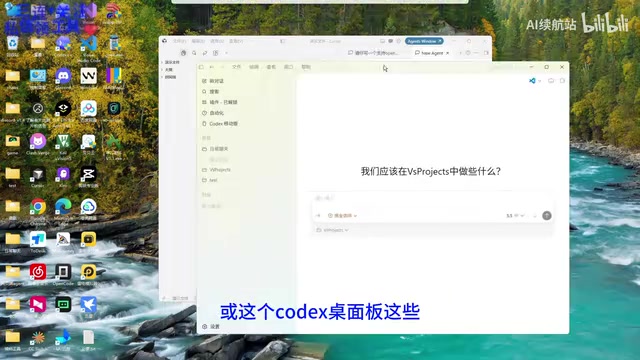
A comprehensive comparison of AI coding tools explaining why Cursor remains the top choice for most developers.
This article compares mainstream AI coding tools including Cursor, Claude Code, Codex, Windsurf, Trae, and Kiro across dimensions like learning cost, configuration complexity, and network accessibility. It explains why Cursor's VS Code foundation, zero-config setup, and China-region friendliness make it the optimal choice, and shares a practical guide to integrating multiple AI models via API proxy for maximum flexibility.
The AI Coding Tool Battle: How to Overcome Choice Paralysis?
Over the past year, the AI coding tool space has been an all-out war among giants. From terminal-based power tools like Claude Code and desktop Codex, to fully autonomous development agents like OpenClaw, and emerging players like Gemini CLI, Windsurf, Trae, and Kiro — developers face unprecedented decision fatigue.
If you're still writing code entirely by hand, or constantly switching between Claude Code and Codex to access different models, there's significant room for efficiency improvement. This article will break down the characteristics of current mainstream AI coding tools and share a practical approach to integrating multiple models within Cursor.
Quick Overview of Mainstream AI Coding Tools
Terminal-Based Tools
The core design philosophy of terminal-based AI coding tools is to embed large language model capabilities directly into the command-line environment that developers know best. These tools typically operate through a REPL (Read-Eval-Print Loop) interaction mode, where developers describe requirements in natural language and the tool executes code generation, modification, and debugging operations directly on the file system. Compared to GUI-based tools, terminal tools excel at seamless integration with existing shell workflows (git, docker, make, etc.) and have lower resource overhead, but present a steeper learning curve for non-command-line users.
- Claude Code: Anthropic's official terminal AI coding tool, ideal for developers comfortable with the command line, but requires VPN access and has a higher configuration barrier
- Codex (Desktop): OpenAI's coding assistant tool, powerful but also subject to network access restrictions
- Gemini CLI: Google's terminal AI tool, leveraging Gemini model capabilities with support for ultra-long context windows
Editor/IDE-Based Tools
The technical architecture of modern AI editors is largely built on VS Code's open-source foundation. VS Code uses the Electron framework and LSP (Language Server Protocol) architecture. The LSP protocol decouples the editor from language intelligence, allowing AI capabilities to be layered on top of existing code comprehension as an enhancement. This architectural design lets AI editors inherit a mature plugin ecosystem while deeply integrating model inference capabilities.
- Cursor: A deeply customized AI-native code editor based on VS Code, ready to use out of the box. It integrates context-aware code completion, multi-file editing, inline chat, and other AI-native features on top of VS Code, while maintaining compatibility with over 40,000 extensions
- Windsurf: An AI editor built by the Codeium team, focused on a smooth coding experience
- Trae: ByteDance's AI coding tool, network-friendly for developers in China
- Kiro: AWS's AI coding IDE, focused on Spec-Driven Development. Its core philosophy is to constrain AI behavior through structured requirement documents, design specifications, and test cases before AI generates code, ensuring generated code complies with team architecture standards, naming conventions, and security requirements — better suited for enterprise development scenarios
Agent-Based Tools
- OpenClaw: A fully autonomous AI development agent that attempts to complete development tasks end-to-end. Unlike the "human-AI collaboration" model of editor-based tools, agent-based tools aim to minimize human intervention, with AI autonomously completing the full loop of requirements analysis, architecture design, code writing, and test verification
Why Cursor Remains the Best Choice for Average Developers
After months of hands-on comparison, Cursor holds clear advantages for average developers and even coding beginners across several dimensions:
1. Zero Learning Cost: Deeply customized based on VS Code, developers familiar with VS Code can migrate seamlessly with full plugin ecosystem compatibility. This "standing on the shoulders of giants" strategy means your existing themes, keyboard shortcuts, and language plugins can all be carried over directly — no need to adapt to an entirely new set of operational logic.
2. Ready Out of the Box: No complex environment configuration needed — install and start using immediately. Compared to Claude Code, Codex, and other tools that require configuring API keys, setting environment variables, and handling network proxies, Cursor's onboarding process is far simpler.
3. China-Region Friendly: No VPN required, which is an extremely practical advantage for developers in China. In daily development, network stability directly impacts AI tool response speed and user experience — frequent connection drops severely interrupt coding flow.
Hands-On: Seamless Multi-Model Switching via API Integration
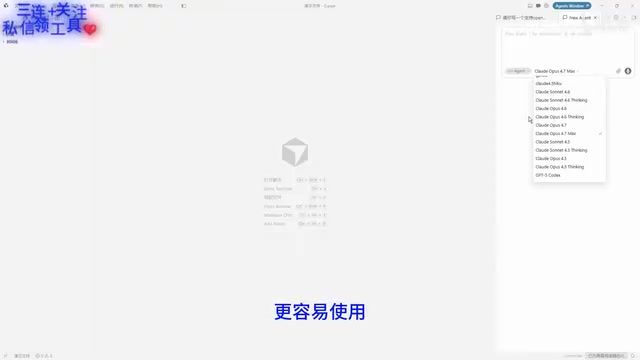
The way to truly maximize Cursor's power is to break through model limitations via API integration. Different large language models have distinct strengths in programming tasks: the Claude series excels at long-context understanding, complex architecture design, and code refactoring; the GPT series offers broad coverage in general programming knowledge and API usage; the Gemini series has advantages in multimodal understanding (e.g., generating code from screenshots) and ultra-long context windows. Through dedicated proxy tools, you can seamlessly access top-tier models like Claude 4 Opus, GPT-5.5, and Gemini 2.5 Pro within Cursor, choosing the most suitable model based on specific task characteristics for an unlimited, full-power experience.
Configuration Steps
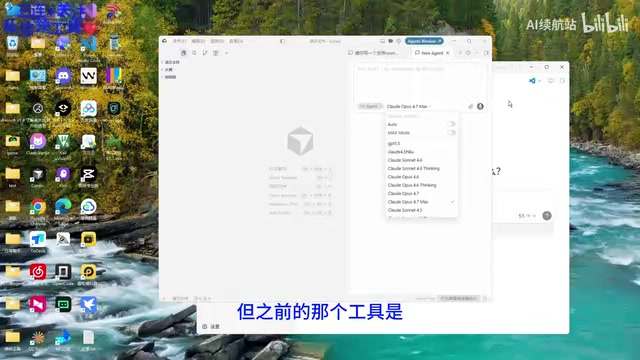
Step 1: Install the Proxy Tool
Install the XD Cursor tool (or a similar API proxy tool) — the interface is clean and intuitive once opened.
Step 2: Install the Certificate
The tool will prompt you to install a CA certificate — simply agree to install it. This is a necessary step for the proxy tool to intercept and forward requests. The technical principle is a MITM (Man-in-the-Middle) Proxy: the tool starts a local proxy server that intercepts model call requests sent from Cursor to the official backend, then redirects them to user-configured third-party API endpoints. Since communication between Cursor and the server is HTTPS-encrypted, the proxy needs to replace the original certificate with a self-signed certificate to read and forward requests, which is why installing its CA certificate is required for proper operation.
Step 3: Configure API Keys
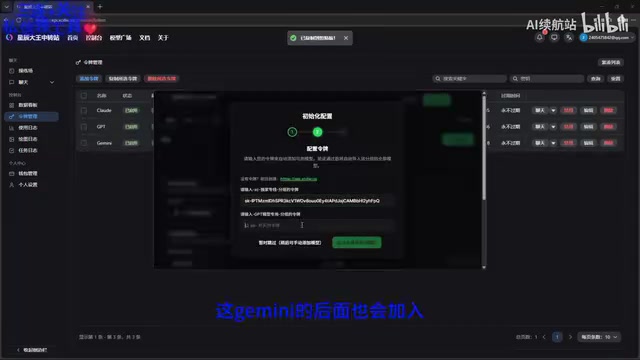
Configure API keys for different providers:
- Claude series model keys (obtained via Anthropic Console)
- GPT series model keys (obtained via OpenAI Platform)
- Gemini series (upcoming support, obtained via Google AI Studio)
Step 4: Start the Service
After configuration, click "Start Service," then open Cursor to use it directly — no Cursor account login required. The model selection list in Cursor will now display all your configured available models, and you can switch at any time based on task requirements — for example, using Claude for large-scale code refactoring and GPT for quickly generating boilerplate code.
Important Notes
- If connection issues occur, try stopping and restarting the service
- The tool is currently in beta testing and may have some minor issues
- API usage incurs costs — you'll need to pre-fund the corresponding platform's API credits. Pricing varies significantly between models (e.g., Claude Opus's per-token price is roughly dozens of times that of Haiku), so it's advisable to choose models wisely based on task complexity to control costs
- Installing a self-signed CA certificate carries certain security risks — it's recommended to use this only in development environments and ensure the proxy tool comes from a trusted source
Recommendations: Match Tools to Your Needs
| Use Case | Recommended Tool | Core Advantage |
|---|---|---|
| Daily development, quick start | Cursor | VS Code ecosystem compatibility, zero configuration |
| Heavy terminal users | Claude Code / Gemini CLI | Seamless integration with shell workflows |
| Enterprise-grade standardized development | Kiro | Spec-driven, quality-controlled |
| Fully automated prototyping | OpenClaw | Minimal human intervention |
| China network environment | Cursor / Trae | No VPN required |
Conclusion
The competitive landscape of AI coding tools is still evolving rapidly, but the core logic remains unchanged: tools serve efficiency. Rather than exhausting yourself switching between multiple tools, it's better to settle on one primary editor and integrate multiple models' capabilities through API access, flexibly invoking the most suitable model based on different task characteristics. With its VS Code DNA, zero-configuration barrier, and China-region friendliness, Cursor currently remains the optimal choice for most developers.
Of course, as newer tools like Kiro and Trae continue to iterate, and as model capabilities themselves rapidly evolve (longer context windows, stronger code comprehension, lower inference costs), this landscape could shift at any time. Staying informed and switching when appropriate is the long-term strategy — after all, in the AI era, adaptability to tools is itself one of a developer's core competitive advantages.
Related articles

Five Common Claude Code Mistakes — How Many Are You Making?
Five common Claude Code mistakes developers make: copy-pasting code, skipping CLAUDE.md, inefficient prompting, ignoring docs, and poor context management — with fixes.

Andrew Ng's New Course Explained: A Practical Guide to Using OpenAI's O1 Reasoning Model
Deep dive into Andrew Ng and OpenAI's Reasoning with O1 course covering test-time scaling, new prompting paradigms, multi-model orchestration, and practical applications for developers.

Learning AI After College Entrance Exams: A Complete Path from Zero to Freelancing
How to efficiently learn AI skills during summer break after exams? A complete path from mastering prompts and hands-on projects to freelancing on platforms.