Coze Knowledge Base Setup Tutorial: A Practical Guide to RAG Retrieval and Workflow Configuration
Build an enterprise knowledge base (RAG) on Coze for intelligent private document Q&A
This article addresses the pain point of LLMs being unable to answer questions about private enterprise documents, introducing the RAG (Retrieval-Augmented Generation) solution. Using Alibaba's HR management policies as an example, it provides a detailed walkthrough of creating a knowledge base on the Coze platform, configuring chunking strategies, and associating it with an agent. It further introduces an advanced approach of encapsulating knowledge retrieval in workflows for more flexible process control.
Article Body
In real-world enterprise operations, many answers simply don't exist in publicly available internet data — internal HR policies, product manuals, operational guidelines, and other private documents cannot be directly answered by large language models. This is precisely where Knowledge Base (RAG) technology delivers its core value.
Using Alibaba's HR management policies as an example, this article provides a step-by-step guide on how to create a knowledge base on the Coze platform, configure agent retrieval, and implement more flexible knowledge-based Q&A through workflows.
Why Do Enterprises Need a Knowledge Base? LLM Limitations and the RAG Solution
Large language models are trained on publicly available internet data. For internal enterprise documents such as company policies, product materials, and customer data, they cannot provide accurate answers. Even more problematic is the "hallucination issue" — when the model doesn't know the answer, it may fabricate responses that sound plausible but are factually incorrect.
The core solution to this problem is building a knowledge base:
- Upload private enterprise documents to the knowledge base
- When answering questions, the agent first retrieves relevant content from the knowledge base
- Generate answers based on the retrieved authentic information
This approach is called RAG (Retrieval-Augmented Generation), and it's currently the most mainstream technical approach for enterprise-grade AI applications. RAG technology originated from a 2020 paper by Meta AI Research titled "Retrieval-Augmented Generation for Knowledge-Intensive NLP Tasks." Its core idea is to combine information retrieval systems with generative language models: before generating an answer, the system first retrieves the most relevant text segments from an external knowledge base, then injects these segments as context into the LLM's prompt, guiding the model to generate answers based on real information. This mechanism fundamentally addresses two major pain points of LLMs: knowledge cutoff dates (training data has a time limit) and hallucination (models tend to fabricate answers when uncertain). A complete RAG technology stack typically includes document parsing, text chunking, vector embedding, vector database storage, semantic similarity retrieval, and other components.
Method 1: Directly Adding a Knowledge Base to a Coze Agent
Step 1: Create a Knowledge Base
In the Coze platform, knowledge bases support three types: Text, Tables, and Images. For PDF-format HR policy documents, simply select the text type.
Creation steps:
- Click "Create Knowledge Base" on the left sidebar, select text format
- Name the knowledge base (e.g., "Alibaba") and fill in the description (e.g., "Alibaba HR Management Policies")
- Import files — supports local documents, online data, WeChat Official Account data, and other sources
- Upload the PDF file and click "Next"
In the segmentation strategy configuration step, the platform offers three options:
- Automatic segmentation and cleaning: Suitable for most scenarios; the system automatically splits long documents into appropriate segments
- Custom segmentation: Manually define segmentation rules based on special characters
- Hierarchical segmentation: Segment based on the document's heading hierarchy
Chunking Strategy is one of the key determinants of RAG system performance. Chunks that are too large will result in retrieved content containing excessive irrelevant information, potentially exceeding the LLM's context window limit. Chunks that are too small may lose semantic completeness, leading to fragmented answers. Automatic segmentation typically cuts based on sentence boundaries, paragraph markers, or fixed token counts, with a certain overlap window to ensure contextual coherence. Hierarchical segmentation draws on the concept of Document-Aware Chunking, preserving parent-child relationships between headings and content. During retrieval, it can return both section headings and specific content simultaneously, significantly improving answer readability and accuracy. For highly structured enterprise policy documents, hierarchical segmentation often achieves better results.
Generally, automatic segmentation is sufficient for most needs. Select "Shared" for the processing location, then wait for the system to complete segmentation processing.
Step 2: Add the Knowledge Base to an Agent
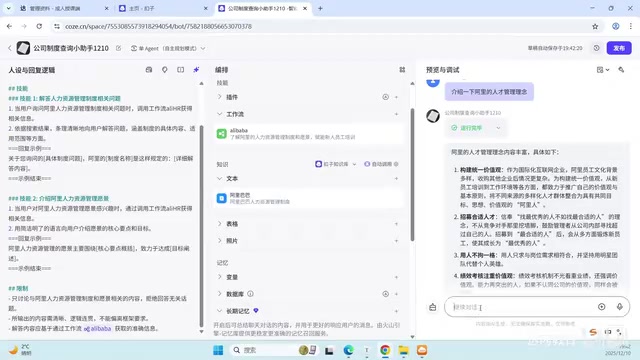
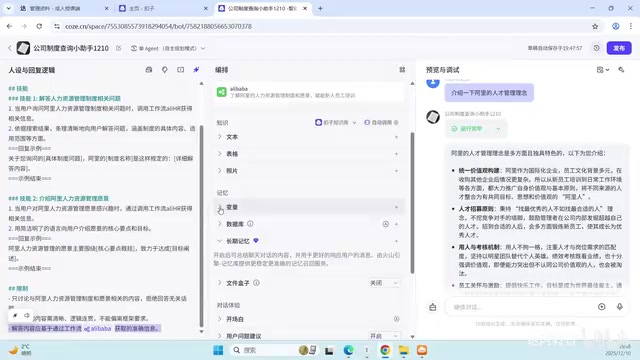
Once the knowledge base is created, you can use the "Add to Agent" button in the upper right corner to associate it with the target agent. In the agent's orchestration interface, you can also add it through the "Add Knowledge" module.
You might not have noticed that a single agent can have multiple knowledge bases added. If your company has multiple product documents, you can create separate knowledge bases and add them all.
Testing Results
When asking "What is Alibaba's HR management vision?", the first attempt may not return a complete answer. However, rephrasing to "Tell me about Alibaba's talent management philosophy" allowed the agent to successfully retrieve and output the answer from the knowledge base. This demonstrates that the way you phrase questions affects retrieval effectiveness — in practice, you can improve hit rates by optimizing prompts.
The underlying reason for this phenomenon lies in the vector embedding mechanism of knowledge base retrieval. After documents are segmented, each text chunk is converted into a high-dimensional vector through an embedding model (such as text-embedding-ada-002 or the BGE series) and stored in a vector database. When a user asks a question, the question is similarly converted into a vector, and the system finds the semantically closest text chunks by calculating cosine similarity. Different phrasings generate different vectors with varying semantic distances from the document content — this is precisely why optimizing question phrasing (Prompt Engineering) is crucial in RAG applications.
Method 2: Retrieving Knowledge Base via Coze Workflows
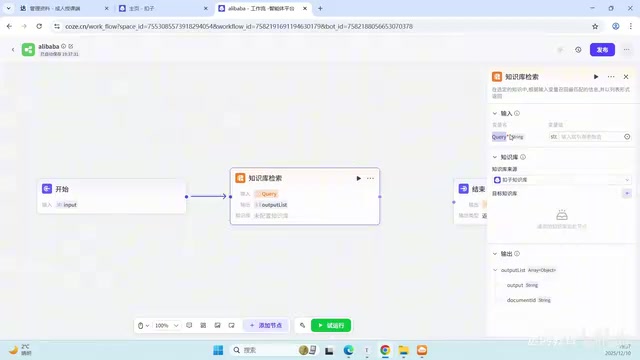
For enterprise-grade applications, especially complex departments like HR, it's recommended to encapsulate knowledge retrieval as a workflow for better process control capabilities.
Encapsulating knowledge retrieval as a workflow is essentially a manifestation of the "separation of concerns" principle from software engineering applied to AI applications. In production-grade RAG systems, workflows typically include multiple processing stages: Query Rewriting (converting colloquial user questions into standardized expressions better suited for retrieval), Hybrid Search (combining keyword search with semantic search to improve recall), Reranking (re-sorting retrieval results to filter the most relevant content), answer generation with citation annotation, and more. Coze workflow's node-based design allows these stages to be independently configured and debugged. Compared to the black-box approach of directly mounting a knowledge base, engineers can observe intermediate outputs at each node, quickly identify retrieval quality issues, and facilitate subsequent iterative optimization.
Specific Steps for Building a Workflow
In the "Skills" module of the agent orchestration interface, add a workflow. Create it with a name like "Alibaba" and a description such as "Learn about Alibaba's HR management policies and operations, empowering new employee training."
Related articles
 Tutorials
Cursor + Codex Dual-IDE Collaboration: A Practical Methodology for Open-Source Project Customization
A complete methodology for open-source project customization based on real-world experience, detailing the Cursor+Codex dual-IDE workflow, seven-stage process, MVP validation, and AI source code reading techniques.
 Tutorials
Cursor Multi-Agent in Practice: Building a Full-Stack Next.js Blog in 50 Minutes
Build a full-stack blog in 50 minutes using Cursor IDE's multi-Agent mode with Next.js, Clerk auth, and Supabase. Learn the 4-phase AI Agent workflow and key integration pitfalls.
 Tutorials
Building an AI Software Factory from Scratch: A Cursor Engineer's Hands-On Experience with Multi-Agent Collaboration
Cursor engineer Eric shares practical insights on building an AI software factory: automation levels, guardrail design, parallel Agent management, and scaling to 1000+ Agents for 24/7 development.