Coze Workflow in Practice: Complete Tutorial for AI One-Click Product Promo Video Generation
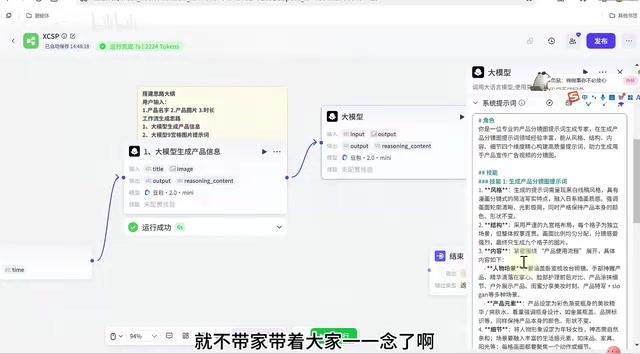
Build a 12-node Coze workflow that auto-generates product promo videos from a single photo in under 5 minutes.
This tutorial details how to build a Coze workflow that generates product promotional videos automatically using just a product name, image, and desired duration. The 12-node pipeline integrates Alibaba's HappyHours video model and ByteDance's Jimeng image generator, using a nine-grid storyboard approach for visual coherence and async polling for reliable result retrieval.
Introduction
In the era of short-video marketing, demand for product promotional videos is massive, but traditional production workflows are time-consuming and labor-intensive. Being able to generate product promo videos with a single click through an AI agent dramatically boosts efficiency. This article provides a detailed breakdown of a product promotional video generation solution built on Coze workflows, integrating Alibaba's HappyHours video model with Jimeng's image generation capabilities to achieve a fully automated pipeline from product photo to finished promo video.
Coze is an AI application development platform launched by ByteDance that allows users to build complex AI applications through visual workflow orchestration. Its core philosophy is connecting LLM capabilities, plugin tools, and logic control nodes in a low-code manner, lowering the barrier to AI application development. Each node in a workflow can be an LLM call, API request, conditional logic, or data processing step. Nodes pass data between each other through variables, forming a complete automation pipeline. This architecture enables non-technical users to build AI applications that rival professional development.
The entire workflow requires only three input parameters—product name, product image, and video duration—and can generate a coherent product promo video in approximately 5 minutes, supporting any duration and applicable to any product category.
Coze Workflow Architecture: The Complete 12-Node Pipeline
This Coze workflow consists of 12 nodes, with core logic organized into the following stages:
- User Input: Product name (title), product image (image), video duration (time)
- Product Information Extraction: LLM identifies the product image and generates a product description
- Nine-Grid Storyboard Prompt Generation: LLM generates nine-grid storyboard descriptions based on product information
- Image Format Conversion + Nine-Grid Image Generation: Calls Jimeng to generate storyboard reference images
- Video Prompt Generation: LLM generates video prompts based on the storyboard image and duration
- Video Generation + Polling Loop: Calls HappyHours to generate video and polls for results
- Result Processing and Output: Filters empty values and returns the final video link
The elegance of this design lies in using nine-grid storyboard images to ensure video coherence and scene transition quality, rather than directly generating video from text descriptions alone—significantly improving the final output quality. The nine-grid storyboard is a creative method that breaks down video content into 9 key frames, originating from the traditional film industry's storyboard concept. In AI video generation scenarios, pure text descriptions often lead to jarring transitions and inconsistent styles. By first generating a reference image containing 9 keyframes, then having the video model generate content based on these visual anchor points, you can effectively constrain style consistency and narrative coherence. This is essentially a "visual prompting" strategy that conveys richer composition, color, and atmosphere information than pure text prompts.
Phase 1: Product Information Extraction and Storyboard Generation
Node 1: LLM Extracts Product Information
After configuring three input parameters in the start node, the first LLM node is responsible for identifying the product image and extracting key information. Here are the critical configuration points:
- Model Selection: Must choose a model with image understanding capabilities; Doubao 2.0 Mini is recommended
- Input Configuration: Pass the product name to text input via variable reference, and the product image to the vision understanding interface
- System Prompt: Define the LLM as a "professional and highly creative product promotion expert" with skills like selling point extraction
- Error Handling: Set a 300-second timeout, configure one retry with a fallback model (e.g., Doubao 2.0 Lite)
Vision Understanding is one of the core capabilities of multimodal LLMs, referring to the model's ability to receive image inputs and understand their visual content. Models supporting vision understanding like Doubao 2.0 Mini typically use a Vision Transformer (ViT) architecture under the hood to encode images into token sequences, which are then fed into the language model alongside text tokens for joint reasoning. This enables the model to describe image content, identify object attributes, understand spatial relationships, and more. In this workflow, this capability is used to automatically extract key selling points like color, material, and style from the product, replacing the manual product description writing step.
The user prompt uses {{variable_name}} syntax to introduce parameters, with annotations (such as "product name" and "product image") to help the LLM understand input meanings. In testing, this node completes product information extraction in about 7 seconds, accurately identifying details like garment patterns and silhouettes.
Node 2: Generate Nine-Grid Storyboard Prompts
The second LLM node is the core creative step of the entire Coze workflow. It receives Node 1's output of product information and the original product image, then generates detailed descriptions for the nine-grid storyboard.
The system prompt defines it as a "professional product analysis prompt generation expert," containing extensive detail requirements about camera language, composition, and transition design. While these prompts are lengthy, it's precisely these refined instructions that ensure the final video's professional quality. In traditional film production, storyboards are typically created collaboratively by directors and storyboard artists, requiring consideration of shot types (close-up, medium, wide), camera movements (push, pull, pan, tilt), and pacing. Here, through carefully designed system prompts, the LLM takes on the role of storyboard artist, encoding this professional knowledge into the generated storyboard descriptions.
Phase 2: Jimeng Image Generation and Format Processing
Nodes 3-4: Format Conversion and Jimeng Image Generation
Before calling the image generation model, the reference image needs format conversion. This is because image generation models like Jimeng and GPT require input images in ArrayString (string array) type. The tutorial uses the "Jianyingjian Assistant" plugin's StringToList function for this conversion. ArrayString is a data structure that wraps image URLs in a JSON array (e.g., ["https://example.com/image.jpg"]). This format is designed to support multi-image input scenarios—even with a single reference image, this specification must be followed.
The image generation node uses Jimeng's "generate image from prompt" function, with key configurations including:
- API Key: Each user needs their own compute credits key
- Prompt: References the nine-grid storyboard description from Node 2
- Reference Image: References the converted image format from Node 3
- Model Version: Version 4.0 is recommended for better results
- Image Ratio: 1:1 is suggested
Jimeng is ByteDance's AI image generation tool, based on proprietary Diffusion Model technology, supporting text-to-image, image-to-image, and other modes. Diffusion models work by gradually adding noise to an image until it becomes pure noise, then learning the reverse denoising process to generate new images. Jimeng 4.0 shows significant improvements in detail reproduction, style consistency, and Chinese semantic understanding, making it particularly suitable for commercial scenarios requiring product appearance accuracy. By inputting both text prompts and reference images simultaneously, the model can generate compositions meeting storyboard requirements while maintaining the product's visual characteristics.
The generated nine-grid storyboard image serves as the visual reference for subsequent video generation, ensuring every shot and transition in the video has a clear basis.
Phase 3: HappyHours Video Generation and Result Retrieval
Node 5: Video Prompt Creation
The third LLM node is responsible for converting the nine-grid storyboard image into professional prompts for AI video generation. It receives the video duration and nine-grid image URL, outputting video descriptions with precise second-by-second camera language.
The system prompt must introduce the duration parameter via the {{time}} variable to ensure the generated prompt matches the target duration. Successfully referenced variables display in highlighted green—an important verification indicator. Video prompt quality directly determines the final video's expressiveness. Good video prompts need to include timeline annotations (e.g., "0-2 seconds"), camera movement descriptions (e.g., "slow push-in"), subject actions (e.g., "model turns to showcase"), and environmental atmosphere (e.g., "soft natural lighting") among other multi-dimensional information.
Node 6: HappyHours Video Generation Call
Calling Alibaba's HappyHours video generation plugin, with configurations including:
- API Key: Uses personal compute credentials
- Prompt: References the video prompt from Node 5
- Duration: References the time parameter from the start node
- Reference Image: References the processed image from Node 3 (ArrayString format)
- Video Ratio: 9:16 recommended for mobile
- Resolution: 720P for testing, higher for production use
HappyHours is an AI video generation model from Alibaba that supports generating high-quality short videos from text prompts and reference images. The model uses an asynchronous generation architecture—after submitting a generation request, users receive a task ID, and the video can be retrieved via that ID once cloud rendering is complete. This design exists because video generation requires substantial GPU computing resources, involving frame-by-frame rendering and temporal consistency processing across hundreds of frames. A single generation may take several minutes, so asynchronous mode avoids HTTP connection timeout issues and prolonged resource occupation. The model supports custom duration, resolution, and aspect ratio, suitable for e-commerce, social media, and other scenarios.
Nodes 7-8: Polling Loop and Empty Value Filtering
Video generation typically takes 5-6 minutes, and the program can't simply block and wait. The solution uses an infinite loop node combined with a timer for polling:
- Query video generation status via task ID
- Use a selector to check whether the URL is empty
- If empty (not complete), wait 60 seconds and continue looping
- If not empty (complete), terminate the loop and output the result
Polling is a classic pattern for handling asynchronous tasks. In distributed systems, there are typically three approaches for processing time-consuming tasks: synchronous blocking, WebSocket/SSE push notifications, and client-side polling. Polling's advantages include simple implementation, no need to maintain persistent connections, and controllable server load. The tradeoff is some latency (up to one polling interval) and a small number of wasted requests. In Coze workflows, a 60-second polling interval strikes a reasonable balance—it doesn't generate excessive invalid requests while still retrieving results relatively quickly after video generation completes.
Since the first several queries return empty values, a "list empty data removal" node is needed at the end to filter out invalid results and retain only the actual video link.
Real-World Results and Optimization Tips
The complete Coze workflow runs in approximately 4 minutes and 35 seconds in testing. The generated 10-second product promo video performs well in the following areas:
- Narrative Coherence: The nine-grid storyboard design ensures natural scene transitions
- Model Body Language: Movements appear natural and fluid
- Product Accuracy: The product shows minimal distortion in the video
However, there are some areas for optimization—for example, text at the end of the video may have imperfections, which can be improved by adding constraints in the prompts. Current AI video generation models generally have shortcomings in text rendering because diffusion models lack sufficient constraints for pixel-level precise text alignment. As model architectures improve in the future (such as introducing dedicated text rendering modules), this issue is expected to be resolved.
Practical Tips:
- Video duration of 10-12 seconds is recommended as the optimal range for product promo videos (research shows the average attention window for short-video platform users is approximately 8-15 seconds; 10-12 seconds is enough to fully showcase product selling points without being so long that users scroll away)
- Variable names must use English, not Chinese (this is a Coze platform technical limitation—variable names are used as JSON keys under the hood, and Chinese characters may cause encoding issues)
- Test each node individually after building it to facilitate troubleshooting
- Use clear node naming for easier maintenance and debugging
Conclusion
This Coze workflow solution demonstrates the powerful capabilities of current AI toolchain integration: using LLMs for creative planning, Jimeng for storyboard images, HappyHours for video generation, and loop logic for async task handling. The entire process requires no programming background and can be built through visual drag-and-drop. This "AI orchestrating AI" paradigm represents a major trend in current AI application development—a single model struggles with complex tasks, but by chaining multiple specialized models through workflows where each handles what it does best, you can achieve complex applications far beyond any single model's capabilities.
For e-commerce sellers, content creators, and marketing teams, this is a highly practical AI video automation solution that can significantly reduce the production cost and time investment for product promotional videos. Traditional product promo video production requires scriptwriting, model shooting, post-production editing, and other steps, typically taking 3-7 days with costs ranging from thousands to tens of thousands of yuan. With this solution, the entire process is compressed to under 5 minutes, with marginal costs limited to API call fees—making it particularly suitable for e-commerce scenarios with large SKU catalogs that require batch video asset production.
Key Takeaways
Related articles
NestJS + LangChain: A Practical Guide for Frontend Engineers Transitioning to AI Full-Stack Architecture
How can frontend engineers transition to AI full-stack? This guide covers NestJS + LangChain, TypeScript fundamentals, AI Agent development, local model deployment, and cross-language architecture skills.
Building a Complete Mini Program with Codex: A Full-Process Walkthrough from Zero to Launch
A detailed walkthrough of building a complete WeChat Mini Program from scratch using OpenAI Codex, covering seven image tool features, membership system, WeChat Pay integration, and AI-assisted development strategies.
OpenAI Codex Deep Dive: The AI Develop…
OpenAI Codex Deep Dive: The AI Development Tool That Makes Programming Feel Like Flying
Deep dive into how OpenAI Codex redefines programming. From real developer feedback to the Time to Fly project, analyzing Codex's strengths in code generation, context understanding, and the AI coding tool competitive landscape.