CreateNow Agent Configuration Tutorial: One-Click Integration with DeepSeek and Other Major LLMs
A complete guide to configuring CreateNow agents with mainstream Chinese LLMs via one-click or custom setup.
This tutorial walks through the full process of configuring AI agents in CreateNow, covering one-click integration for mainstream models like DeepSeek and Kimi, custom configuration for providers like Xiaomi's LLM, and step-by-step API Key acquisition guides. It also provides a comparison of major Chinese LLM providers to help users choose the right model for their needs.
Introduction
How to efficiently integrate large language models into your workflow is a question many developers and creators care about. CreateNow, as an agent configuration tool, provides a convenient way to integrate mainstream AI services like DeepSeek, Kimi, and Xiaomi's LLM into "digital employees," allowing them to play roles such as product managers and engineers in project development.
The "agent" mentioned here is fundamentally different from a simple chatbot. An agent emphasizes being an AI entity with a specific role, task objectives, and behavioral patterns. In CreateNow's context, each agent is positioned as a "digital employee" — it's not just a chat window, but rather a professional role pre-configured through System Prompts, capable of continuously providing specialized output in specific business scenarios. This design philosophy aligns with multi-agent frameworks like AutoGPT and MetaGPT, with the core goal of evolving AI from a general assistant into a professional collaborator.
This article provides a detailed walkthrough of the complete CreateNow agent configuration process, including one-click integration for mainstream models, manual configuration for custom models, and how to obtain API Keys from various providers.
Two Ways to Configure CreateNow Agents
Mainstream Models: One-Click Quick Configuration
CreateNow currently offers preset configurations for mainstream models, significantly lowering the barrier to integration. Taking DeepSeek as an example, the configuration steps are very straightforward:
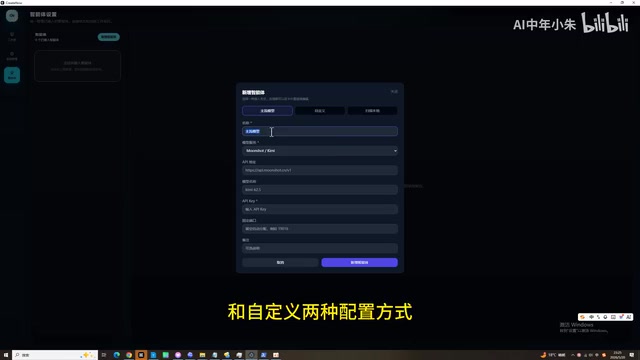
- Enter the agent configuration interface and click "Add New Agent"
- Select the "Mainstream Model" configuration method
- Enter a name (e.g., DeepSeek)
- Select DeepSeek as the model service
- The API address and model name will auto-fill — just enter your API Key
- Click the Add button and wait for configuration to complete
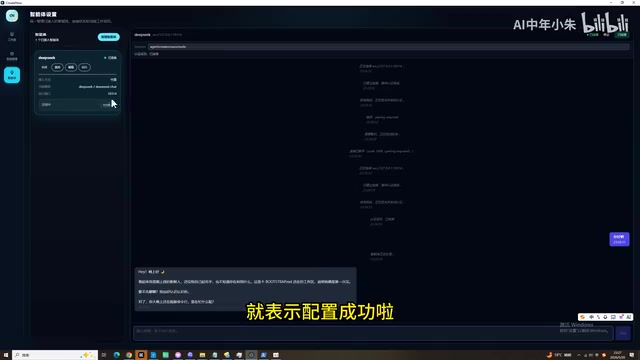
Once configured, click the "Connect" button, and the chat window will display "Connection Successful." Send any message — if the agent responds normally, the configuration is successful. Currently, mainstream model presets support DeepSeek and Kimi.
The reason "one-click configuration" is possible is that these providers' API interfaces all follow a unified technical specification. When OpenAI launched the ChatGPT API, it defined a set of RESTful interface standards, including endpoints like /v1/chat/completions, message role definitions (system/user/assistant), and the Server-Sent Events protocol for streaming output. Due to OpenAI's first-mover advantage, this interface specification has become the de facto industry standard. Domestic providers like DeepSeek and Kimi (Moonshot AI) largely chose to be compatible with this specification when designing their own APIs, meaning tools only need to preset the address and model name, and users can complete integration simply by entering their Key.
Custom Models: Flexible Integration with Any LLM
For model services without presets, CreateNow provides a custom configuration method. Taking Xiaomi's LLM as an example:
- Enter the name and provider identifier
- Manually fill in the API address provided by Xiaomi's official documentation (note: the address ends with B1)
- Enter your API Key
- Use the "Detect Models" feature and select a base model (be careful not to select TTS or other non-conversational models)
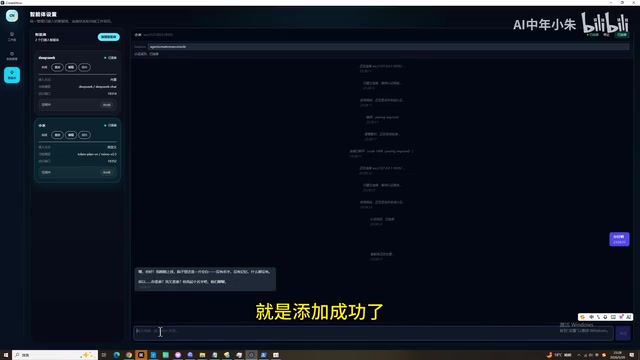
- Test the chat functionality after adding
It's important to distinguish between model types here: LLM providers typically offer multiple AI services on the same platform, including chat models, text-to-speech (TTS) models, image generation models, and more. When configuring an agent, you should select a chat model, since the core interaction method for agents is text-based conversation. While TTS models are also called via API, their input/output formats are completely different from chat models and cannot be used in agent scenarios.
The core elements of custom configuration are just two: API address and API Key. As long as you can obtain these two pieces of information, theoretically any LLM service compatible with the OpenAI interface specification can be integrated into CreateNow.
API Key Acquisition Guide for Various Providers
Before obtaining and using API Keys, it's important to understand the significance of their security management. An API Key is essentially a key string used for authentication, representing the user's access permissions and billing identity for the API service. Once leaked, others can use your Key to call API services, and the resulting charges will be billed to your account. Therefore, you should not hardcode Keys in public code repositories, should not transmit them through insecure channels, should rotate Keys regularly, and should create independent Keys for different use cases to facilitate tracking and management. Most providers also support setting call rate limits and budget caps for Keys as additional security measures.
How to Get a DeepSeek API Key
The process for obtaining a DeepSeek API Key is as follows:
- Search for "DeepSeek" and go to the official website
- Register or log in to your account
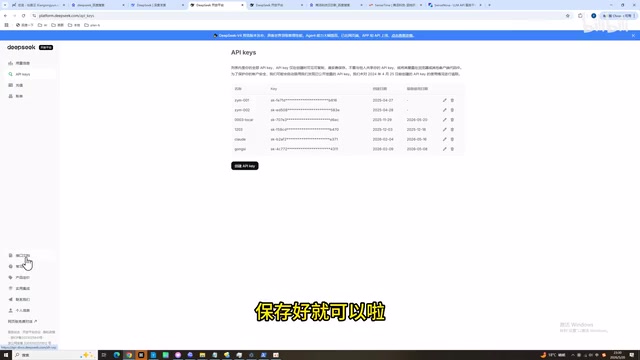
- Click to enter the "API Open Platform"
- Find the "API Keys" button in the left menu
- Click to create a new API Key and save it securely
DeepSeek is very affordably priced among mainstream LLM providers, making it an ideal default model for daily development. Known for its open-source strategy and extreme cost-effectiveness, DeepSeek-V3 and R1 models perform excellently across multiple benchmarks, with input pricing around ¥1/million Tokens and output around ¥2/million Tokens — highly competitive in the industry.
SenseTime SenseNova: Free Credits for Trial
SenseTime's LLM platform "SenseNova" (日日新) offers free Token credits, suitable for initial exploration and testing. The "Token" mentioned here is the basic unit for how large language models process text — it's not simply equivalent to one character or one word. For Chinese, one character is typically encoded as 1-2 Tokens; for English, a common word is about 1 Token, while longer or rarer words may be split into multiple Tokens. LLM API billing typically charges separately for input Tokens and output Tokens, with output Token pricing usually higher than input. Understanding the Token mechanism helps developers optimize prompt design and control costs.
Configuration steps for SenseTime SenseNova:
- Search for "SenseTime SenseNova" and enter the console
- Find the API Keys management interface and create a new Key
- In the usage examples, find the HTTPS address and extract the portion before "VE" as the API address
- Configure the address and Key in CreateNow
General Steps for Obtaining API Keys
The API Key acquisition process is similar across providers. The core steps are:
- Register an account on the provider's open platform
- Enter the console or API management page
- Create and save your API Key
- Find the corresponding API endpoint address
Domestic LLM Provider Ecosystem and Selection Guide
The providers mentioned in this article represent different technical approaches in China's LLM landscape. Understanding their characteristics helps make more informed choices in practice:
- DeepSeek: Known for its open-source strategy and extreme cost-effectiveness, with comprehensive model capabilities suitable for general development scenarios
- Kimi (Moonshot AI): Its core selling point is an ultra-long context window (supporting 2 million characters), particularly suitable for long document processing and code repository analysis
- Xiaomi LLM (MiLM): Leveraging Xiaomi's ecosystem, it has unique advantages in on-device deployment and IoT scenarios
- SenseTime SenseNova: Deep expertise in multimodal capabilities (image and video generation), with free credits suitable for exploration
Different models have different strengths, which is the core value of CreateNow's multi-model integration support — users can choose the most suitable model based on task characteristics, or even have multiple agents collaborate together.
Key Takeaways for Agent Configuration
Regardless of which LLM you're integrating, it's essentially the same process: Get API address + API Key → Enter into CreateNow → Test connection. This unified integration approach allows users to flexibly combine multiple "digital employees" and choose the most appropriate model for different task scenarios.
Once configured, these agents can play their roles in subsequent project development — acting as product managers to discuss requirements, serving as engineers to provide technical solutions, truly achieving an AI-assisted full-process development experience.
Final Thoughts
The barrier to LLM API integration is continuously decreasing, and tools like CreateNow further simplify the configuration process. For users who want to try AI-assisted development, it's recommended to start with free or low-cost models (such as SenseTime SenseNova or DeepSeek), get familiar with the workflow, and then choose a more suitable model combination based on actual needs.
It's worth noting that with the rapid development of China's LLM ecosystem, the pace of model capability iteration far exceeds expectations. Today's optimal choice may need to be reassessed in just a few months. Staying informed about new models and leveraging the flexible integration capabilities of tools like CreateNow to quickly try new models will help you stay at the forefront of AI-assisted development.
Related articles
Anthropic London Developer Conference: Claude Model Upgrades, Enterprise Agent Platform, and Developer Tools Fully Evolved
Anthropic's first London Code with Claude event unveiled Opus 4.7, Mythos, Cloud Managed Agents, Claude Code Routines, and more for AI-assisted development.
Claude Code Desktop Status Capsule: An Open-Source Widget for Real-Time AI Coding Status Monitoring
An open-source desktop status capsule that monitors Claude Code's idle, working, and completed states in real time, with multi-conversation management, memos, and music control for developers.

GPT-5.2 Codex vs Opus 4.5 Hands-On: A Comprehensive Comparison of Coding Ability, Speed, and Developer Experience
Hands-on comparison of GPT-5.2 Codex vs Opus 4.5 across frontend generation, physics simulation, 3D scenes, and code refactoring, with practical selection advice.