Cursor 3.0 Deep Dive: The AI Agent Command Center Rewritten in Rust
Cursor 3.0 Deep Dive: The AI Agent Com…
Cursor 3.0 rewrites in Rust, transforming from code editor to AI agent management platform
Cursor has completed three major evolutions in two years: from an AI autocomplete fork of VS Code, to a terminal-controlling coding assistant, to version 3.0—an agent management platform rewritten from scratch in Rust, completely abandoning VS Code. The new version supports multi-agent parallel orchestration, generating tens of thousands of lines of code in minutes, shifting the developer's role from code writer to AI task dispatcher. However, the transparency controversy around the in-house Composer 2 model, along with quality, security, and maintainability concerns for AI-generated code, remain challenges the industry must face.
From Copilot to Air Traffic Controller: Cursor's Three Evolutions
In just two years, Cursor has undergone three major transformations: from an AI fork of VS Code, to a coding assistant that takes over the terminal, to what it is today—an agent management platform completely rewritten from scratch in Rust, abandoning VS Code entirely. The ambition of version 3.0 is no longer to help you write code, but to make it so you don't need to write code manually at all. But controversy has followed along this path.
Looking back at Cursor's development trajectory, you can clearly see the paradigm shift in AI programming tools:
- Cursor 1.0 (2023): A fork of VS Code with AI code autocomplete as its core feature, playing the role of a "copilot"—you write code, AI assists.
- Cursor 2.0 (roughly six months later): Upgraded chat interface where AI can directly take over the terminal to help build complete feature modules, upgrading its role to "captain."
- Cursor 3.0 (recently released): A complete rewrite, no longer based on VS Code, aiming to turn developers into "air traffic controllers"—simultaneously directing multiple AI agents working in parallel across multiple repositories, machines, and even the cloud.
It's worth noting that VS Code itself is built on the Electron framework—a cross-platform desktop application framework that bundles the Chromium browser engine with the Node.js runtime. This architecture gives VS Code exceptional cross-platform compatibility and a massive ecosystem of over 40,000 extensions, but at the cost of significant memory overhead (typically 300-500MB+ when idle). Cursor 1.0, as a "fork" of VS Code, inherited all the pros and cons of this architecture, which is precisely why it could quickly win developer trust with zero migration cost.
The direction of this evolution is crystal clear: the developer's role is shifting from "code writer" to "AI task dispatcher." You no longer need to type code line by line—instead, you plan architecture, assign tasks, and review results.
Composer 2 Model: Excellent Performance but a Transparency Disaster
Two weeks before Cursor 3.0's release, the team launched their in-house trained Composer 2 coding model. According to official benchmarks, this model surpasses Claude Opus in intelligence while costing only a fraction of the price and running much faster.
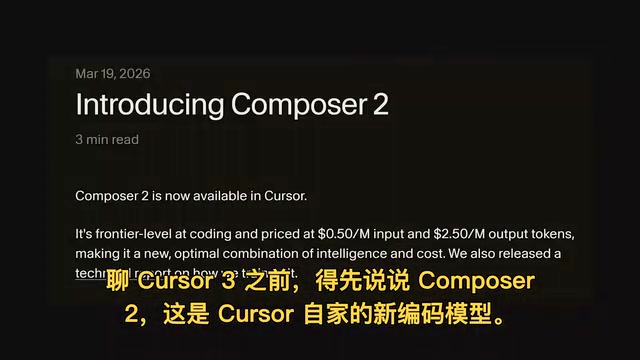
However, things quickly became awkward. Cursor initially didn't disclose Composer 2's underlying architecture—then someone discovered the model ID in the metadata, revealing that Composer 2 is actually based on Moonshot's Kimi (Kimikaze) model, fine-tuned with extensive reinforcement learning. Even more ironic, Kimi itself has been accused of using Claude's outputs for training, as it occasionally blurts out "Hi, I'm Claude."
This controversy touches on two core issues in AI model training. First is the relationship between "base models" and "fine-tuned models": performing reinforcement learning fine-tuning (RLHF/RLAIF) on existing large models is standard practice in modern AI development—OpenAI and Anthropic's commercial models all go through similar processes. Second is training data compliance: using a competitor's model outputs to train your own model is legally and ethically contentious—Anthropic's terms of service explicitly prohibit using Claude's outputs to train competing models. This reflects the reality that the entire AI industry has yet to establish clear standards for model provenance and intellectual property.
The Cursor team subsequently apologized and published a full technical report, acknowledging insufficient transparency. But from a practical standpoint, these "origin controversies" don't affect the model's actual performance. In AI programming, a model that is smart, fast, and low-cost is the core competitive advantage—which base model it was trained on isn't the most important thing for end users.
Rewriting in Rust: The Pros and Cons of Leaving VS Code Behind
Cursor 3.0's biggest technical decision is rewriting the entire interface from scratch in Rust and TypeScript, completely departing from the VS Code codebase.

Rust was developed by Mozilla Research and released version 1.0 in 2015. Its core innovation is the "Ownership System"—guaranteeing memory safety at compile time rather than runtime, fundamentally eliminating memory leaks, dangling pointers, and other common C/C++ issues without introducing a garbage collector (GC), resulting in performance close to C++. Microsoft, Google, Amazon, and the Linux kernel team have all adopted Rust for core system development. For Cursor, which needs to handle numerous concurrent AI agent tasks simultaneously, Rust's zero-cost abstractions and thread safety provide ideal low-level support—compared to Electron applications, native Rust GUI applications typically reduce memory usage by 60-80%.
Advantages of the Rewrite
- Dramatically reduced memory usage: Rust's memory safety and performance advantages mean Cursor no longer devours memory like VS Code.
- Greater architectural freedom: No longer constrained by VS Code's extension system, enabling a custom-built interface for AI agent workflows.
- Agent-first design: The new interface's core is no longer a code editor but an agent management panel.
Concerns to Watch
- VS Code ecosystem compatibility uncertain: Can the VS Code plugins, themes, and keyboard shortcuts that many developers depend on migrate seamlessly?
- Learning curve: Developers accustomed to VS Code workflows will need to readapt.
- Homogenization with OpenAI Codex: Many have criticized Cursor 3.0's agent management model as being too similar to OpenAI Codex.
You might not have noticed, but the old VS Code editor hasn't been completely removed—however, the new interface's focus has clearly shifted toward agent orchestration.
Hands-On Experience: 13,000 Lines of Code Generated in Minutes
In practical demonstrations, Cursor 3.0's workflow shows stunning efficiency. Taking the construction of a complete web application prototype as an example:
Step 1: Planning Mode—Enter planning mode and let the AI complete the basic architecture design first.

Step 2: Parallel Orchestration—While the AI handles architecture, you can launch other tasks in parallel in the background: have another agent build a marketing landing page, connect to a cloud server via SSH for remote work, or even switch to an entirely different project. All of this operates seamlessly within the same window.
This multi-agent parallel orchestration capability is built on AI Agent architectures that have matured rapidly over the past two years. Unlike traditional single-turn Q&A AI, Agent systems give models "Tool Use" capabilities—including reading/writing files, executing terminal commands, calling APIs, browsing the web, and more—and autonomously complete multi-step tasks through a "plan-execute-reflect" loop (the ReAct framework). An "Orchestrator" agent breaks down high-level goals, multiple "Worker" agents process subtasks in parallel, and humans ultimately consolidate and review.
Step 3: Monitoring and Review—Manage multiple agents through status indicators:
- 🟡 Yellow dot: Requires human intervention (typically authorizing unsafe commands)
- 🔵 Blue dot: Work complete, awaiting review
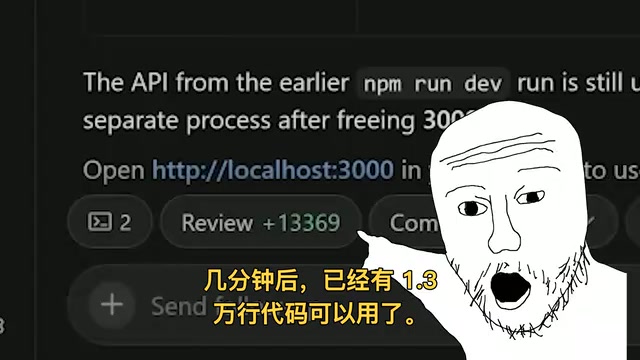
Within minutes, the system has generated 13,000 lines of usable code. The right panel lets you view Git history, open the terminal, and browse the file structure.
Built-in Browser and Design Mode
One of the most impressive features is the built-in browser, which lets you open and preview your application directly within Cursor. When you spot a design issue, switch to Design Mode, highlight the problematic element, and tell the AI in natural language to fix it—for example, "the text on these green buttons is hard to read"—and the AI will automatically modify the CSS in the background. You don't even need to wait for results; you can continue queuing up other modification requests.
This asynchronous "submit request-queue-keep working" pattern essentially turns developers into project managers.
Controversy and Reflection: Is AI Programming Headed in the Right Direction?
Cursor 3.0's direction has polarized the community:
Supporters argue: Code itself isn't the goal—the product is. If AI can generate a usable prototype in minutes, developers should focus their energy on architectural decisions, product design, and quality control rather than manually typing code.
Critics worry:
- Generating 13,000 lines of code is easy, but who ensures code quality, security, and maintainability?
- When developers no longer read and understand code, debugging and optimization become far more difficult.
- Over-reliance on AI agents could create "technical debt black boxes"—you might not even know what landmines are buried in your project.
"Technical Debt" is a concept coined by software engineer Ward Cunningham in 1992, referring to design compromises made for short-term delivery speed that must be "repaid" in the future through higher maintenance costs. AI-generated code at scale faces unique challenges on this front: models tend to generate code that "runs but isn't elegant," lacking long-term consideration for overall architectural consistency; generated code may contain known security vulnerability patterns (such as SQL injection, XSS) without awareness; more critically, when developers no longer read code line by line, the effectiveness of Code Review drops dramatically. Additionally, multi-agent architectures face "hallucination cascade" risks—one agent's erroneous output can become the next agent's erroneous input, making final code quality unpredictable. Internal research at Google, Meta, and other major companies shows that while AI-assisted programming boosts initial productivity, some teams have also observed accelerating codebase complexity growth.
From an industry trend perspective, Cursor 3.0 represents not just a tool upgrade, but a critical turning point in the AI programming paradigm from "assisted coding" to "autonomous coding." Whether or not you agree with this direction, it's becoming reality at breakneck speed.
Conclusion
Three major versions in two years—Cursor's evolution speed is jaw-dropping. From a VS Code plugin to a standalone Rust application, from code completion to agent cluster management, each step redefines the boundaries of what it means to be a "developer." The Composer 2 transparency controversy reminds us that trust-building for AI tools is equally important. And 3.0's agent model poses an even more fundamental question: When AI can write all the code, what is a programmer's core value?
The answer may be exactly what Cursor 3.0 implies—not writing code, but deciding what code should be written.
Key Takeaways
- Cursor 3.0 is rewritten from scratch in Rust, completely departing from VS Code, transforming into an AI agent management platform
- The in-house Composer 2 model is fine-tuned from Kimi, outperforming Claude Opus but sparking transparency controversy
- The new version supports multi-agent parallel orchestration, generating 13,000 lines of usable code in minutes
- Built-in browser and design mode let developers preview and modify applications directly without manually writing CSS
- The developer's role shifts from code writer to AI task dispatcher, though code quality and maintainability concerns remain
Related articles
 Product Reviews
Qoder vs Cursor Real-World Comparison: Which $20/Month AI IDE Is Better?
Hands-on comparison of Qoder vs Cursor AI IDEs: Agent autonomy, human interaction count, and architecture decisions. Qoder needed only 2 interactions vs Cursor's 8.
 Product Reviews
Cursor Cloud Agent Demo: Eliminating Bottlenecks Across the Entire Software Development Lifecycle
Deep analysis of Cursor's Cloud Agent demo showing how cloud VMs, automated test artifacts, and a full-chain control plane systematically eliminate human bottlenecks across the software development lifecycle.
 Product Reviews
Cursor 3.0 Deep Dive: Multi-Agent Parallelism, Design Mode, and Best-of-N Model Comparison
Cursor 3.0 evolves from an AI coding assistant into an Agent fleet command center. Explore multi-agent parallelism, Design Mode, and Best-of-N model comparison.