Cursor AI + Back4App Full-Stack Development in Practice: Build Production-Ready Web Apps with a Single Prompt
Cursor AI + Back4App Full-Stack Develo…
Cursor AI + Back4App use MCP protocol to enable natural language-driven production-ready full-stack app development.
Traditional AI coding tools can only generate prototypes, lacking backend infrastructure, authentication, and database capabilities needed for production. Back4App, as a BaaS platform, deeply integrates with Cursor AI through the MCP protocol, enabling developers to automatically create databases, configure user authentication, and deploy websites using a single natural language prompt to build complete full-stack web applications. The solution offers enterprise-grade security compliance certifications and is ideal for solo developers and startup teams rapidly building MVPs.
The Limitations of AI Coding Tools and Back4App's Solution
Various AI coding tools have made it easier than ever to kick off a web project — write a few prompts, and you can quickly generate a prototype. However, these tools share a critical shortcoming: they can only produce prototypes, not production-ready applications.
Specifically, most AI coding tools face the following problems:
- Lack of secure, reliable backend infrastructure
- No enterprise-grade services (authentication, databases, web hosting, scalability)
- Require integrating multiple third-party platforms to build a complete application
- No CI/CD pipeline, making code iteration and automated testing difficult
What is CI/CD? CI/CD is a core practice in modern software engineering. CI (Continuous Integration) refers to developers frequently merging code into the main branch and using automated tests to catch issues quickly. CD (Continuous Delivery/Deployment) means code is automatically deployed to production after passing tests. Code generated by traditional AI coding tools is often a one-off static artifact, lacking version control hooks and automated testing frameworks, which makes subsequent iteration difficult. Having CI/CD capability means the application can continuously evolve, with every code change safely and traceably pushed to production.
Back4App was built to solve exactly these problems. As a BaaS (Backend as a Service) platform built on the open-source Parse Platform, it packages backend infrastructure — database management, user authentication, file storage, API gateways, and more — into cloud services that can be called directly. Developers don't need to set up server environments from scratch; they simply use SDKs or API calls to access enterprise-grade backend capabilities. Combined with an intelligent IDE like Cursor AI, developers can use natural language prompts to build web applications with full backend functionality. This article walks through a hands-on case study of building a "Personal Finance Tracker" app, demonstrating the complete development workflow from zero to deployment.
Sign Up for Back4App and Create a Backend Application
Registration and Initialization
First, visit back4app.com and go to the sign-up page. Back4App supports one-click registration with a Google account, making the process very straightforward.
After logging in, you'll see the platform's dashboard. Find the "New App" option on the right side, enter an app name (for example, "TCB" in this tutorial), and click create. Within seconds, your backend application is initialized.
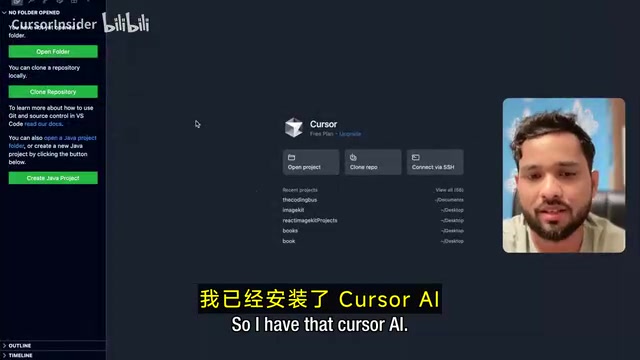
At this point, the app's database is empty with no data tables — this is exactly what we'll have Cursor AI auto-generate next.
Configure the MCP Protocol to Connect Cursor AI with Back4App
What Is the MCP Protocol?
MCP (Model Context Protocol) is the bridge connecting AI tools with external services. The protocol was proposed and open-sourced by Anthropic in late 2024, aiming to solve the standardized integration problem between AI large language models and external tools and data sources. Before MCP, every AI tool needed a custom adapter for each external service, resulting in extremely high maintenance costs. MCP defines a unified client-server communication protocol: AI applications (like Cursor) act as MCP clients, external services (like Back4App) act as MCP servers, and both sides exchange data and instructions through standardized JSON-RPC message formats. This allows AI tools to operate remote services as if calling local functions — database creation, authentication configuration, website deployment, and more — all without manually writing backend code.
Manual Configuration Steps
-
Get the MCP configuration code: In the Back4App dashboard, click "MCP Settings," select Cursor as the target tool, then choose manual setup. Copy the configuration code corresponding to your operating system (macOS or Windows).
-
Paste the configuration in Cursor: Open Cursor AI, navigate to "Settings → Cursor Settings → MCP and Integrations," click "Add Custom MCP," paste the copied configuration code, and save the file.
-
Verify the connection status: After saving, wait a few seconds. Back4App will automatically load all available tools. When you see the "11 tools loaded" notification, the connection is successful.
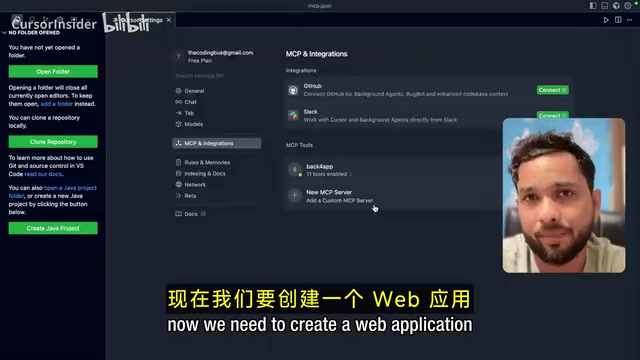
Test Whether the Connection Works
In Cursor's Agent mode, enter a simple test command, such as listing all applications in Back4App. If it correctly returns the list of apps you've created, Cursor AI has successfully connected to the Back4App backend.
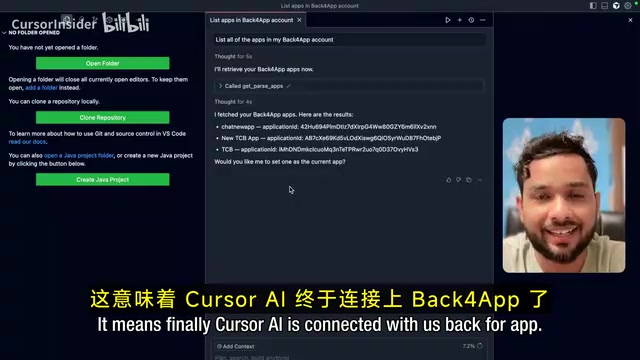
Next, use a command to select the app you want to work with (e.g., "Select the TCB app"), and Cursor will confirm that it's now connected to the specified Back4App application.
Build a Full-Stack Application with Natural Language Prompts
Writing the Core Prompt
This is the most critical and exciting step in the entire workflow. In Cursor's Agent mode, after ensuring the correct app is selected, enter the following prompt:
Build a finance tracker app using Cursor and Back4App. Users can sign up and log in, add or delete income and expense transactions, view transaction history, and automatically calculate total income and total expenses. It needs a clean, responsive UI.
Notice the elegance of this prompt: it doesn't just describe frontend UI requirements — it includes complete business logic: user authentication, CRUD operations, and data calculations. With a regular AI coding tool, you'd get a static UI at best. But combined with Back4App, the authentication system, database, and hosting services are all configured automatically.
Automated Build Process in Detail
After submitting the prompt, Cursor AI automatically performs the following operations:
- Activates Back4App web hosting: Enables the Web Hosting feature for the TCB app
- Creates the database schema: Auto-generates the data table structure for the Transaction Class
- Deploys a responsive frontend: Generates a complete frontend interface with authentication functionality
- Runs smoke tests: Automatically verifies that basic features are working properly
- Generates a live URL: Provides an accessible online address after deployment is complete
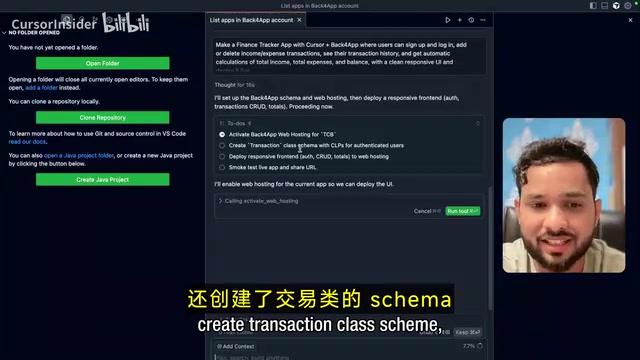
The entire process takes only a few tens of seconds to a few minutes, and a web application with full frontend and backend functionality is live.
Feature Verification and Backend Database Inspection
Frontend Feature Testing
Open the generated live URL, and you'll see a complete finance tracker application interface, including:
- Sign up / Log in / Log out: A complete user authentication flow
- Add transactions: Enter income or expenses with amounts and descriptions
- Automatic calculations: Total income, total expenses, and current balance update in real time
As a practical test: after adding a "Content Creation" income of $5,000, the total income shows 5,000 and the balance shows 5,000. Then, adding a "Coffee" expense of $100, the balance automatically updates to $4,900. All calculation logic runs on the backend, and data is persistently stored in Back4App's database.
Backend Data Verification
Back in the Back4App dashboard, click the Database option, and you can clearly see the auto-generated data tables:
- Session table: Records user session information
- Transaction table: Stores all transaction records, including fields for amount, type, description, etc.
- User table: Saves registered users' detailed information
This is not a prototype — it's a production-ready application with full data persistence.
Cursor + Back4App Technical Architecture Advantages
Comparison with Pure AI Coding Tools
| Capability | Pure AI Coding Tools | Cursor + Back4App |
|---|---|---|
| Frontend UI | ✅ Can generate | ✅ Auto-generated |
| User Authentication | ❌ Requires manual integration | ✅ Auto-configured |
| Database | ❌ Requires third-party | ✅ Built-in and scalable |
| Web Hosting | ❌ Requires separate deployment | ✅ One-click deployment |
| Security & Compliance | ❌ No guarantees | ✅ ISO/HIPAA certified |
| CI/CD | ❌ None | ✅ Supported |
Back4App's core advantage lies in its deep integration of BaaS (Backend as a Service) with AI development tools. Developers don't need to switch between multiple platforms, nor do they need to manually write backend APIs, configure database connections, or handle authentication logic — all of this is done automatically through the MCP protocol.
Why ISO/HIPAA Certification Matters: ISO 27001 is an information security management system certification published by the International Organization for Standardization, and it's a critical threshold for enterprise SaaS products entering Western markets. HIPAA (Health Insurance Portability and Accountability Act) is a U.S. regulation for healthcare data protection that defines standards for the storage, transmission, and access of electronic health information, with violation fines reaching millions of dollars. For applications handling sensitive data, choosing an infrastructure platform with these certifications significantly reduces compliance risk and is often a prerequisite for signing enterprise clients.
Use Cases
This full-stack development approach is particularly well-suited for:
- Solo developers looking to quickly validate product ideas and ship directly to production
- Startup teams rapidly building MVPs (Minimum Viable Products) in the early stages — building the leanest possible product version to validate core hypotheses, pushing it to market quickly to gather real user feedback, then deciding whether to continue investing or pivot based on that feedback. Cursor + Back4App compresses the traditional MVP development cycle from weeks to hours, dramatically accelerating the "Build-Measure-Learn" feedback loop
- Traditional developers looking to accelerate full-stack development with AI
- Projects requiring enterprise-grade security and compliance (e.g., healthcare, finance)
Conclusion
With the Cursor AI + Back4App combination, we used just a single natural language prompt to build a full-stack web application complete with user authentication, database storage, real-time calculations, and a responsive interface. The entire process required no hand-written backend code, no server configuration, and no third-party authentication service integration.
This represents an important direction for AI-assisted development: not simply generating code snippets, but delivering end-to-end, runnable, production-ready applications. The MCP protocol, as a standardized bridge between AI tools and external services, is redefining how developers interact with infrastructure. The maturity of BaaS platforms has turned "natural language-driven full-stack development" from concept into reality. For developers who want to quickly turn ideas into working products, the Cursor AI + Back4App toolchain is well worth a serious try.
Related articles
 Tutorials
Cursor + Codex Dual-IDE Collaboration: A Practical Methodology for Open-Source Project Customization
A complete methodology for open-source project customization based on real-world experience, detailing the Cursor+Codex dual-IDE workflow, seven-stage process, MVP validation, and AI source code reading techniques.
 Tutorials
Cursor Multi-Agent in Practice: Building a Full-Stack Next.js Blog in 50 Minutes
Build a full-stack blog in 50 minutes using Cursor IDE's multi-Agent mode with Next.js, Clerk auth, and Supabase. Learn the 4-phase AI Agent workflow and key integration pitfalls.
 Tutorials
Building an AI Software Factory from Scratch: A Cursor Engineer's Hands-On Experience with Multi-Agent Collaboration
Cursor engineer Eric shares practical insights on building an AI software factory: automation levels, guardrail design, parallel Agent management, and scaling to 1000+ Agents for 24/7 development.