Cursor Beginner's Guide: A Complete Strategy to 10x Your Productivity with AI Programming from Scratch

A comprehensive guide comparing AI programming tools and outlining the complete Cursor learning path.
This article explores the AI-driven programming revolution powered by large language models, provides a side-by-side comparison of mainstream AI programming tools including Cursor, GitHub Copilot, Windsurf, and Trae, and recommends Cursor as the current top choice. It also outlines a three-stage Cursor learning path from beginner to practitioner, emphasizing that mastering prompt engineering and effective AI communication is the core competitive advantage in the AI programming era.
What Is AI Programming? Why Should You Care?
In the traditional programming model, software development is a highly specialized task. Programmers need to master at least one programming language (such as Python, Java, C++, etc.), have a clear understanding of complex logic and algorithms, and precisely tell the computer what to do line by line. This process has a high barrier to entry and long development cycles, discouraging many people without a technical background.
However, with the rapid advancement of AI large models, the way we code is undergoing a revolutionary transformation. Large Language Models (LLMs) are the core technology driving this revolution — these models are pre-trained on massive code repositories and natural language text, learning to understand human intent and translate it into executable code. Modern large models represented by GPT-4, Claude 3.5, and DeepSeek typically have parameters in the tens or even hundreds of billions, possessing powerful contextual understanding and code reasoning capabilities. It's precisely this capability that has turned "writing programs in natural language" from science fiction into reality.
Today, almost every developer leverages AI tools to some degree — even if they don't use Cursor, they'll use DeepSeek, ChatGPT, or Doubao to generate code snippets and find solutions. This has become a very common practice in developers' daily workflows.

But AI programming goes far beyond that. Previously, we only asked AI to help generate simple code snippets, but now the goal is much clearer: Through natural language conversation, combined with powerful AI large models and intelligent processing capabilities, make AI a true programming assistant that helps us solve problems and shorten development cycles. Projects that used to take one or two months can now be completed in a week with AI tools; projects that used to take a year might be finished in three months.
More importantly, this paradigm dramatically lowers the barrier to programming. Whether you're a beginner or a developer with some experience, you can leverage AI large models' intelligent assistance to quickly bring your ideas to life.
Cursor vs. Mainstream AI Programming Tools: A Side-by-Side Comparison
There are several excellent AI programming tools on the market today. Understanding their respective strengths and weaknesses will help you make the best choice for your needs.
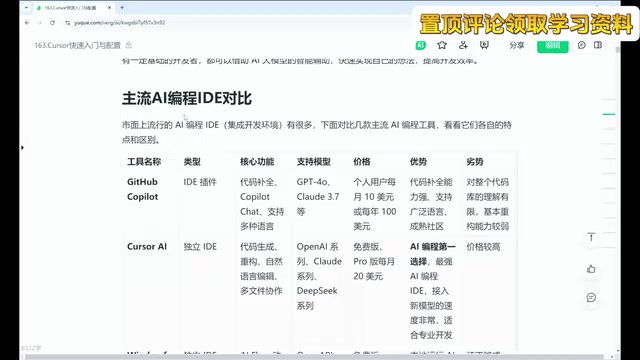
GitHub Copilot: The Veteran AI Programming Assistant
GitHub Copilot was one of the earliest AI programming tools, existing as an IDE plugin that supports VS Code, IntelliJ IDEA, and many other editors. Core features include code completion, chat conversations, and code modification, with support for models like GPT-4 and Claude 3.5.
Copilot's core advantage comes from its training data — as the world's largest open-source code hosting platform, GitHub has hundreds of millions of public code repositories. This gives Copilot particularly deep understanding of various programming patterns, framework conventions, and open-source libraries, often providing suggestions that closely align with real-world engineering practices in code completion scenarios.
Strengths: Excellent code completion, supports a wide range of programming languages, leverages the GitHub open-source community for strong code comprehension.
Weaknesses: Limited understanding of entire codebases, relatively weak refactoring capabilities.
Cursor: The Current Top Choice for AI Programming
Cursor is widely recognized as the preferred choice in the AI programming space. It excels in code generation, refactoring, natural language editing, and multi-file collaboration, while also supporting advanced features like MCP. However, it comes at a relatively higher price point.
It's worth highlighting Cursor's support for MCP (Model Context Protocol). MCP is an open standard proposed by Anthropic in 2024, designed to solve the connection problem between AI models and external tools/data sources — it's like a "USB port" for the AI world, enabling AI assistants to invoke external resources such as file systems, databases, and APIs in a standardized way. Cursor's MCP support means developers can build more complex AI workflows, such as having AI directly read databases, call third-party services, or control browsers. This represents an important capability boundary that distinguishes it from ordinary code completion tools.
Windsurf: The New Independent IDE Contender
Windsurf is a standalone IDE tool whose core features are AI Flow and dynamic thinking canvas. It runs AI models locally for faster speed and is centered around web development.
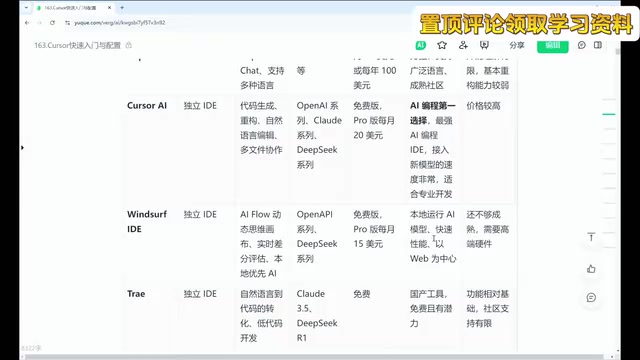
Weaknesses: Features are not yet mature enough, and hardware requirements are high.
Free Domestic Options: Trae and Tongyi Lingma
If you're budget-conscious, domestic Chinese AI coding tools are a solid choice. ByteDance's Trae recently released a new version with impressive intelligence levels, supporting natural language to code conversion and completely free. Tongyi Lingma is similarly free and effective.
Domestic tools generally adopt a free pricing strategy, with all the essential code writing and editing features you'd expect. However, there's still a gap in supporting infrastructure and feature completeness compared to paid tools. For example, Cursor supports advanced features like MCP development, which some free tools currently lack.
Codeium (Kodum): Cross-Platform IDE Plugin
As a plugin-based tool, Codeium supports virtually all mainstream IDEs, including VS Code, IntelliJ IDEA, PyCharm, and more — ideal for users who don't want to switch their development environment.
Cursor Course System: A Learning Path from Beginner to Practitioner
This Cursor tutorial is structured into three progressive chapters, covering the complete path from zero foundation to advanced application.

Chapter 1: Quick Start and Basic Configuration
This is the fundamentals section, covering the following core content:
- Installation and Setup: Cursor installation process, interface configuration, model invocation settings
- Core Feature Introduction: Using the Chat conversation feature, operating the Compose function
- Common Commands: Frequently used commands and shortcuts for coding with Cursor
Chapter 2: Advanced Skills and Techniques
Moving into the advanced stage, the focus is on:
- Smart Completion and Code Generation: Deep understanding of Cursor's code completion mechanism
- Terminal Integration: Integrating command-line tools to boost development efficiency
- Add Tags and Annotations: Efficient tagging and annotation methods
- Cursor Rules: Configuration and usage of custom rules. Cursor Rules is a project-level AI behavior customization mechanism that allows developers to constrain AI code generation behavior by writing rule files (typically
.cursorrules). The underlying principle is injecting rule content as a System Prompt into the context of each AI conversation, achieving continuous constraints on code style, technology choices, naming conventions, and more. For example, you can specify "always use TypeScript instead of JavaScript" or "follow Google code style guidelines," ensuring AI maintains consistency throughout the entire project development process. - Advanced Conversation Techniques: How to communicate more effectively with AI
Chapter 3: Real-World Productivity Scenarios
This is the most practically valuable section, covering multiple real-world scenarios:
- Efficiency Configuration: YOLO mode, feature windows, code completion optimization
- Content Creation: Literature reading, video topic selection, outline generation, writing assistance
- Technical Applications: Combining DeepSeek for research, data analysis and visualization
- Project Development: Rapid personal website development, web page generation
How to Choose the Right AI Programming Tool for You
Facing so many options, here's a framework for making your decision:
- Budget Considerations: If budget is limited, prioritize free domestic tools like Trae and Tongyi Lingma; if you're willing to pay, Cursor is currently the best choice.
- Use Cases: If you mainly do web development, Windsurf is worth trying; if you need comprehensive code understanding and refactoring capabilities, Cursor has the edge.
- Development Environment Preference: If you don't want to switch your existing IDE, choose plugin-based options like Copilot or Codeium; if you're open to trying a new environment, both Cursor and Windsurf offer standalone IDE experiences.
- Learning Curve: For users starting from scratch, Cursor's natural language interaction and comprehensive feature system make it an ideal starting point for AI programming.
Regardless of which tool you choose, the core skill is learning to communicate effectively with AI — that is, mastering the fundamental methodology of Prompt Engineering. Prompt Engineering refers to the techniques and methods of carefully designing input instructions to guide AI models toward producing high-quality outputs. In AI programming scenarios, effective prompts typically need to include: clear task descriptions, technology stack specifications, input/output examples, boundary condition constraints, and expected code style. How to write good prompts, how to make AI understand your requirements, how to iteratively optimize through conversation — this is the most important core competency in the AI programming era, and an emerging skill direction that's receiving increasing attention as AI tools become more widespread.
Key Takeaways
- AI programming dramatically lowers the barrier to coding through natural language conversation combined with large models, potentially shortening development cycles by several times
- Cursor is the current top choice in AI programming, excelling in code generation, refactoring, and multi-file collaboration, with MCP protocol support for complex AI workflows
- Mainstream AI programming tools each have their strengths: Copilot excels at code completion, Windsurf is fast, and domestic tools are free but relatively limited in features
- The Cursor learning path has three stages: basic configuration → advanced skills (Rules, smart completion) → real-world scenarios (research, website development, etc.)
- Choosing an AI programming tool requires considering budget, use cases, development environment, and learning curve — the core skill is mastering prompt engineering and learning to communicate effectively with AI
Related articles
 Tutorials
Cursor + Codex Dual-IDE Collaboration: A Practical Methodology for Open-Source Project Customization
A complete methodology for open-source project customization based on real-world experience, detailing the Cursor+Codex dual-IDE workflow, seven-stage process, MVP validation, and AI source code reading techniques.
 Tutorials
Cursor Multi-Agent in Practice: Building a Full-Stack Next.js Blog in 50 Minutes
Build a full-stack blog in 50 minutes using Cursor IDE's multi-Agent mode with Next.js, Clerk auth, and Supabase. Learn the 4-phase AI Agent workflow and key integration pitfalls.
 Tutorials
Building an AI Software Factory from Scratch: A Cursor Engineer's Hands-On Experience with Multi-Agent Collaboration
Cursor engineer Eric shares practical insights on building an AI software factory: automation levels, guardrail design, parallel Agent management, and scaling to 1000+ Agents for 24/7 development.