Cursor Deep Dive: Core Advantages and Use Cases of an AI-Native Programming Tool
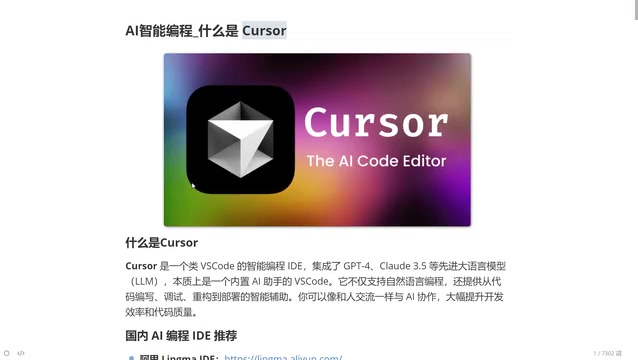
A comprehensive analysis of Cursor as an AI-native programming tool and how it redefines coding workflows.
This article provides an in-depth analysis of Cursor, an AI-native code editor built on VS Code's foundation. It explores Cursor's four core features — AI-native design, intelligent code generation, context awareness, and multi-model support — compares it with traditional IDEs across six dimensions, examines the domestic vs. international AI tool landscape, and identifies who benefits most from adopting this new programming paradigm.
What is Cursor?
Cursor is an intelligent programming tool with a built-in AI assistant — think of it as an "upgraded VS Code." But this isn't a simple feature add-on. Cursor was designed from the ground up for AI, fundamentally reimagining how traditional IDEs approach programming.
Its relationship with VS Code is straightforward: VS Code is Microsoft's free code editor, widely used for Python, frontend development, and more. Since its release in 2015, VS Code has rapidly become the most popular code editor among developers worldwide, thanks to its lightweight design, rich plugin ecosystem, and cross-platform support. According to Stack Overflow's annual developer survey, VS Code has held over 70% market share for multiple consecutive years. Its success lies in pioneering a product category between lightweight text editors (like Sublime Text) and heavyweight integrated development environments (like IntelliJ IDEA) — maintaining advantages in startup speed and resource usage while achieving near-traditional IDE functionality through its plugin mechanism. Cursor builds upon this mature editor foundation with deep modifications, integrating world-class large language models including DeepThink (free) and Claude 3.5/3.7/4.0 (paid) — currently among the most capable AI models for programming — to assist developers throughout the entire workflow of code writing, debugging, error detection, and refactoring.
It's worth explaining why large language models are particularly good at programming tasks. Code is essentially a highly structured language with strict syntax rules and clear logical relationships, forming a stark contrast to the ambiguity of natural language. During training, large language models are exposed to billions of lines of open-source code on GitHub, learning various programming paradigms, design patterns, and best practices. The Claude series, developed by Anthropic, is renowned for its excellence in long-text comprehension and code generation, while DeepThink excels in reasoning capabilities, making it particularly suited for complex logical deduction and algorithm design problems. Cursor integrates these models with different strengths, allowing developers to choose the most suitable "AI partner" for each specific task.
In simple terms, you can tell Cursor what you need using natural language (Chinese works fine) — for example, "write me a login API" — and it will understand the context, automatically generate code, and explain the implementation logic.
Cursor's Four Core Features
AI-Native Design
Cursor isn't an AI plugin "bolted onto" a traditional IDE — it was built from the ground up for AI interaction. This means AI capabilities permeate every corner of the editor, rather than existing as a standalone add-on feature.
To understand why this matters, consider the evolution of smartphones. Early "smartphones" were traditional feature phones with a touchscreen and basic operating system slapped on top, while the iPhone was designed from scratch around touch interaction, reimagining the entire hardware and software architecture. The user experience difference was night and day. Similarly, most AI programming tools on the market (like GitHub Copilot) are embedded into existing IDEs as plugins — they can only operate within the extension interfaces the IDE provides, unable to deeply integrate with the editor's file management, terminal interaction, version control, and other core modules. As a standalone editor product, Cursor can be designed holistically around AI at the UI layer, data flow layer, and interaction logic layer. For example, AI can directly manipulate the file system, read terminal output, and understand Git commit history. This depth of integration represents a qualitative leap, not just an incremental improvement.
Intelligent Code Generation
Traditional IDE code generation relies on preset templates and code snippets, while Cursor can generate complete business logic code from natural language descriptions. You simply describe your requirements, and it generates appropriate implementation solutions based on the business scenario and logic.
Context Awareness
One of the core bottlenecks of current large language models is context understanding — when conversations get too long, models tend to "forget" or hallucinate.
Two key concepts need explanation here. Context Window refers to the maximum text length a large language model can "see" and process in a single interaction. Early GPT-3.5 had only a 4K token context window (approximately 3,000 Chinese characters), while the latest models have expanded to 128K or even longer. But even so, a medium-sized software project might contain hundreds of thousands of lines of code, far exceeding any model's context window. Hallucination refers to when an AI model, lacking sufficient information, "confidently fabricates" content that seems plausible but is actually incorrect — such as referencing an API function that doesn't exist, or generating code that's syntactically correct but logically completely wrong.
Cursor has deeply optimized for this challenge. It employs a technical approach known as RAG (Retrieval-Augmented Generation): when you ask the AI a question, Cursor doesn't dump the entire project's code into the model. Instead, it first uses code indexing and semantic search to intelligently retrieve the code snippets, file structures, and dependency relationships most relevant to your current question, then sends this curated context information along with your question to the model. This both solves the context window limitation and significantly reduces the probability of hallucinations. It can understand project structure, variable relationships, and inter-code dependencies, providing real-time suggestions as you write code — not just simple completions based on syntax analysis.
Multi-Model Support
Cursor supports free switching between multiple top-tier AI models, including the Claude series, Google's models, and more. Developers can choose the most suitable model for different task scenarios, offering extremely high flexibility. The value of this multi-model strategy lies in the fact that different models excel at different tasks. For example, Claude performs exceptionally well at understanding complex codebases and conducting large-scale refactoring, while certain models are superior at mathematical reasoning and algorithm design. Through free switching, developers can always use the "optimal solution" for their current task without being constrained by a single model's capability boundaries.
Six-Dimension Comparison: Cursor vs. Traditional IDEs
Code Completion
Traditional IDE code completion is based on syntax analysis — function names you've written before will be automatically suggested the next time you type. This completion is essentially a "dictionary lookup" mechanism that only knows which symbols (variable names, function names, class names) exist in your project but doesn't understand your current programming intent. Cursor's completion is "predictive" — it understands your current coding intent, anticipates what you're going to do next, and proactively offers complete code suggestions. For example, after you finish writing a database query function, Cursor might predict that you'll need error handling logic and result formatting code next, offering complete suggestions directly. This capability goes beyond "completion" and is closer to "collaborative programming."
Problem Solving and Error Handling
In traditional development, when beginners encounter errors, they typically need to rely on search engines and documentation to troubleshoot. Experienced programmers can quickly locate problems because they've seen the same errors many times and accumulated experience. Cursor's built-in AI assistant can directly analyze error messages, combine them with code context, and provide fix suggestions and explanations — like having an experienced colleague available for guidance at all times. More importantly, the number of error cases an AI model has "seen" during training far exceeds what any individual programmer could encounter in a lifetime. It essentially combines the collective experience of millions of developers, capable of identifying extremely rare but real edge cases and hidden bugs.
Code Refactoring and Optimization
Code refactoring in traditional IDEs is highly dependent on the developer's personal experience — junior programmers write junior code, senior programmers write senior code.
Code refactoring is a crucial but often overlooked aspect of software engineering. Refactoring means improving the internal structure of code without changing its external behavior. Martin Fowler systematically summarized dozens of refactoring techniques in his classic book Refactoring: Improving the Design of Existing Code, including Extract Method, Inline Variable, Introduce Parameter Object, and more. In practice, code quality directly impacts software maintainability and team collaboration efficiency — statistics show that developers spend over 60% of their working time reading and understanding existing code rather than writing new code. Therefore, high-quality code structure can significantly reduce a team's long-term maintenance costs.
With Cursor, you simply request "optimize this function for me," and the AI can provide optimization suggestions based on best practices from its training data. It might suggest splitting a 200-line monolithic function into multiple small functions with single responsibilities, replacing the current implementation with more efficient data structures, or even pointing out potential performance bottlenecks and security vulnerabilities. This means a junior programmer working with Cursor can potentially produce code approaching the quality level of a programmer with five years of experience.
Development Efficiency and Learning Curve
Traditional IDEs require memorizing numerous keyboard shortcuts and feature locations, resulting in a steep learning curve. Cursor's interaction model is conversational — most operations can be completed through natural language. Of course, the quality of your prompts directly affects the output — the more precisely you describe your needs, the better the AI-generated code will match your expectations.
This touches on a rapidly emerging field: Prompt Engineering. Prompt engineering studies how to guide AI models toward optimal outputs through carefully designed input text. In AI programming scenarios, a vague prompt like "build me a website" versus a precise prompt like "create a single-page application with user registration and login functionality using the Next.js framework, with JWT for authentication and PostgreSQL as the database" will produce vastly different quality results. Good prompts typically include clear technology stack choices, functional boundary definitions, performance requirements, and exception handling expectations. Mastering prompt engineering is essentially learning how to transform vague business requirements into precise technical descriptions — which happens to be one of the most core competencies of excellent programmers.
Domestic vs. International AI Programming Tool Ecosystem
There are several noteworthy AI programming tools in China:
- Tongyi Lingma: Alibaba's AI programming assistant, built on the Tongyi Qianwen large model and deeply integrated with Alibaba Cloud's development ecosystem. Its advantage lies in more precise understanding of Chinese development documentation and domestic technology stacks (such as Spring Cloud Alibaba, Ant Design, etc.), while naturally meeting domestic enterprise data compliance requirements — code is not processed through overseas servers, which is particularly important for industries sensitive to data security like finance and government.
- Trae: An intelligent IDE launched by ByteDance, also adopting an AI-native design philosophy. Trae's distinguishing feature is its backing by ByteDance's powerful AI infrastructure and Doubao large model, with extensive optimizations for code generation speed and Chinese interaction experience, along with a free-to-use strategy to rapidly build its user base.
From a technical roadmap perspective, domestic tools focus more on localization adaptation and support for domestic technology stacks, while Cursor maintains advantages in cutting-edge model capabilities and global developer community ecosystem integration. These tools have also introduced AI capabilities, but in terms of overall feature integration and intelligence level, Cursor currently maintains a certain lead. This is why it's still worthwhile to learn and understand Cursor even after mastering domestic tools. It's worth noting that the competitive landscape in AI programming tools is evolving rapidly — domestic tools are iterating at very high speed, and the gap may narrow further in the future.
Who Should Use Cursor?
Cursor's target audience is extremely broad:
- Senior developers: Too tedious to manually type simple, repetitive code — let AI generate it and make minor modifications, dramatically improving efficiency
- Junior to mid-level programmers: Can compare AI-written code with their own implementations to learn better coding practices and design patterns
- Complete beginners: Can describe requirements in natural language and have Cursor generate runnable code
A key mindset shift: once you master AI programming tools, your core competitive advantage is no longer "how many lines of code you can write" but "whether you can accurately understand and describe business requirements." Understanding your company's business logic and communicating it clearly to AI — that's the core competency of future programmers. This shift aligns perfectly with a long-term trend in the software industry — from assembly language to high-level languages, from hand-written SQL to ORM frameworks, every technological evolution has freed programmers from low-level implementation details, allowing them to devote more energy to higher-level thinking like business logic and system design. The emergence of AI programming tools is the latest and most disruptive step in this trend.
Conclusion
Cursor represents an important evolutionary direction for programming tools — from "humans adapting to tools" to "tools understanding humans." It won't completely replace programmers, but it will redefine how programmers work. Whether you're a veteran looking to boost development efficiency or a newcomer just entering the field, investing time in learning and mastering AI programming tools like this is a worthwhile investment.
Key Takeaways
Related articles
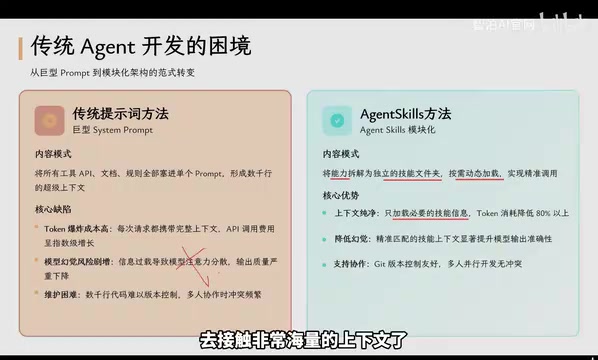
Agent Skills: Folders as Skills — Making AI Produce Precise, Template-Based Output
Agent Skills splits AI capabilities into independent skill folders with on-demand loading and progressive disclosure, cutting token costs by 80% and reducing hallucinations for template-based output.

Five Common Claude Code Mistakes — How Many Are You Making?
Five common Claude Code mistakes developers make: copy-pasting code, skipping CLAUDE.md, inefficient prompting, ignoring docs, and poor context management — with fixes.

Andrew Ng's New Course Explained: A Practical Guide to Using OpenAI's O1 Reasoning Model
Deep dive into Andrew Ng and OpenAI's Reasoning with O1 course covering test-time scaling, new prompting paradigms, multi-model orchestration, and practical applications for developers.