Cursor Multi-Agent Workflow: A Practical Guide to Main Thread & Grunt Collaboration
Cursor Multi-Agent Workflow: A Practic…
Cursor multi-agent workflow using a main thread for complex tasks and a grunt for simple parallel tasks.
This article introduces the "Main Thread & Grunt" workflow for Cursor AI programming: two chat windows use a high-tier model (main thread) for complex reasoning tasks and a low-tier model (grunt) for simple tasks in parallel. The main thread follows an Ask mode planning → plan confirmation → Agent execution flow, while the grunt quickly handles UI tweaks and minor fixes during wait times, avoiding multi-agent code conflicts while maximizing development time.
Introduction: Why Do You Need a Multi-Agent Workflow?
When using Cursor for AI-assisted programming, many people just open a single chat window and execute tasks one after another in sequence. But as your project grows in complexity, the efficiency bottleneck of this approach becomes apparent — while the main thread is handling complex logic, all you can do is sit and wait.
The "Main Thread & Grunt" workflow introduced today is a highly efficient multi-agent collaboration method proven in real-world development. The core idea is simple: use a high-tier model to handle complex tasks while simultaneously using a low-tier model to process simple tasks in parallel, maximizing every minute of your development time.
This approach has a solid technical foundation. Multi-Agent Systems (MAS) are an important research area in artificial intelligence, with the core idea of decomposing complex tasks among multiple agents with different capabilities for collaborative completion. In the era of Large Language Models (LLMs), this concept has been reinterpreted: models of different parameter scales and training objectives can collaborate like team members with specialized roles. Research from OpenAI, Anthropic, and others has shown that using appropriately matched models for tasks of varying complexity not only reduces inference costs but also improves overall output quality — this is precisely the theoretical basis of the "Main Thread & Grunt" workflow.
What Is the Cursor "Main Thread & Grunt" Workflow?
Division of Roles
The core of this workflow is opening two chat windows simultaneously in Cursor, each with different responsibilities:
- Main Thread: Uses a higher-tier model (such as Claude Sonnet 4, GPT-5, etc.) to handle complex reasoning tasks, architecture design, and multi-step workflows. Runs in Ask mode first to plan, then switches to Agent mode to execute after confirming the approach.
- Grunt: Uses a lower-tier model to handle quick, simple tasks — code changes that you could write yourself but don't need to bother with. Runs directly in Agent mode for rapid execution.
The models offered by mainstream AI coding assistants typically fall into multiple tiers: lightweight models (such as Claude Haiku, GPT-4o mini) have faster inference speeds and lower API call costs, making them suitable for format conversion, simple refactoring, and similar tasks; flagship models (such as Claude Sonnet/Opus, GPT-4o) offer stronger long-context understanding and complex reasoning capabilities, but with higher response latency and greater token quota consumption. In Cursor's subscription system, different models consume different amounts of "fast request" quota, so allocating model usage wisely is not just an efficiency issue but also a cost management concern. Having the Grunt use a low-tier model for simple tasks essentially maximizes quota utilization while maintaining quality.
Why Not Just Run Multiple Agents in Parallel?
In the early stages of a project, you can indeed run five or six agents in parallel, rapidly building landing pages, login pages, registration pages, and other foundational components. But as the number of code files grows and project complexity increases, multiple agents modifying code simultaneously can easily cause conflicts and chaos.
There's a clear technical reason behind this: when multiple AI agents modify the same codebase in parallel, they essentially face the "write conflict" problem from distributed systems. When two Agents simultaneously modify different parts of the same file, the later write operation may overwrite the earlier one's changes, or produce syntactically broken merge results. This shares the same root cause as merge conflicts in Git version control, but AI Agents typically lack the ability to resolve conflicts automatically. In the early stages of a project, when there are fewer files and modules are relatively independent, the risk of parallel conflicts is low; as code coupling increases, shared state (such as global style files, route configurations, type definitions) becomes a hotspot for conflicts.
The advantage of the "Main Thread & Grunt" workflow is: the main thread focuses on deep reasoning for one complex task, while the grunt fills in the gaps during the main thread's runtime to complete small tasks. This serializes the primary write operations to avoid multi-agent conflict risks while eliminating wasted waiting time.
Practical Demonstration: The Complete Workflow
Step 1: Help the Agents Understand the Project Context
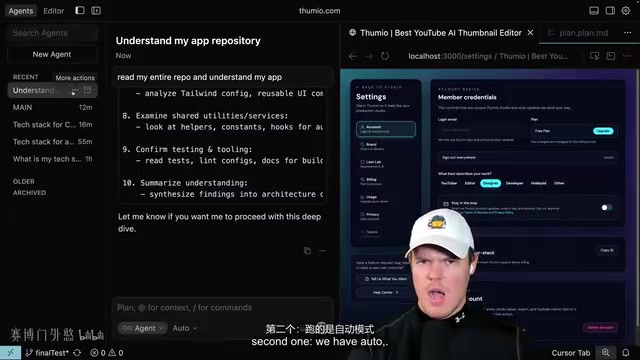
Before starting any task, first ensure both agents understand the full picture of the current project. Here's how:
- Open the first chat window, select the high-tier model, and switch to Ask mode
- Send the prompt: "Read my entire repository and understand my application"
- Enable browser mode to ensure the application is running
- Click "New Agent" to open a second chat window, send the same instruction, but switch to Auto mode
- Rename the first window to "Main Thread" and the second to "Grunt"
It's worth noting that an LLM's Context Window determines how much information it can "see" in a single inference pass. Current mainstream models have context windows ranging from 32K to 200K tokens, but codebase sizes often far exceed this limit. As the number of project files grows, the strategy of "having AI read the entire repository" faces two problems: first, exceeding the context limit causes information truncation; second, irrelevant code introduces noise that reduces reasoning accuracy. This is the technical reason why subsequent steps emphasize "providing precise context for specific pages" — manually specifying file scope to inject relevant code precisely into the context is a core engineering technique for AI-assisted programming in large projects.
Step 2: Main Thread Handles Complex Tasks
When you need to implement a more complex feature, hand it to the main thread. Using "clicking a folder icon to change its color" as an example:
- First, have the main thread understand all the code for a specific page (not the entire application)
- Provide visual context with screenshots and clearly describe the requirements
- Discuss the approach with the main thread in Ask mode — for example, confirming that only 6 preset colors are needed, with no custom color input
- Switch to plan mode and have the main thread create an execution plan
- After confirming the plan, switch to Agent mode to start building
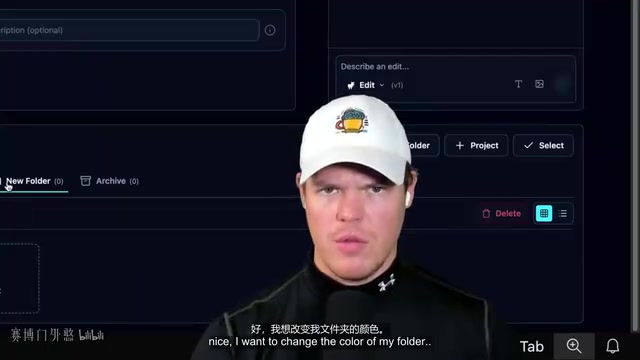
This "plan first, execute second" process is crucial, and behind it lies the fundamental difference between Ask mode and Agent mode. Ask mode is pure conversational reasoning (Chain-of-Thought), where the model only outputs text suggestions without directly operating on the file system; Agent mode grants the model tool-use capabilities (Tool Use/Function Calling), allowing it to read and write files, execute terminal commands, and call external APIs. This distinction technically corresponds to the separation of "thinking" and "acting" — first aligning objectives in a low-risk conversational environment, then executing in an Agent environment with real side effects. This is an important engineering practice for reducing AI programming error rates. For complex tasks, letting AI jump straight into writing code often leads to detours, while aligning goals in Ask mode first and confirming steps in plan mode significantly improves the first-attempt success rate.
Step 3: Grunt Fills the Waiting Time
Building complex features on the main thread might take 5-10 minutes. Don't spend that time scrolling social media — switch to the grunt window and handle small issues you've noticed while browsing the application:
- Adding highlight styles to numbers
- Adjusting copy and wording
- Removing unnecessary features (e.g., an image edit button that a thumbnail platform doesn't need)
- Fine-tuning UI details
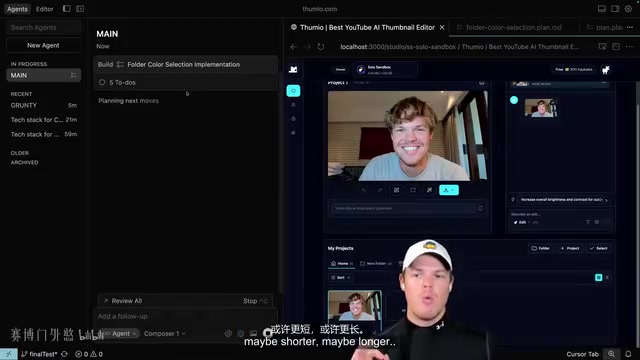
The grunt's tasks are characterized by being simple, clear, and requiring no deep reasoning. Just use Agent mode, give the instruction, and let it run. Even with a lower-tier model, handling these types of tasks is more than sufficient.
Step 4: Debugging and Model Switching
After the main thread finishes, come back to check the results. Complex tasks don't always succeed on the first try — that's completely normal.
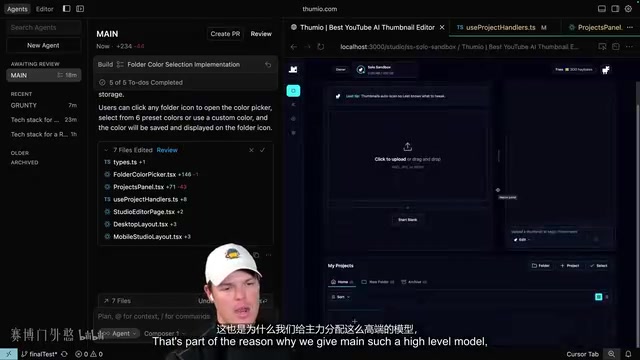
Debugging tips:
- Screenshot feedback: If the feature doesn't match expectations, take a screenshot and describe the specific issue (e.g., "the popup appeared but the color wasn't saved after clicking")
- Console logs: Open the browser developer tools, copy error messages, and paste them directly to the main thread
- Switch models decisively: If a model gets stuck on a problem for too long, switch models immediately. In practice, it's common for a problem that one model can't solve to be resolved on the first try by a different model. This isn't coincidental — different models have differences in pre-training data distribution and RLHF alignment strategies, leading to different "thinking patterns" for the same problem. Switching models essentially introduces a different reasoning path
Core Principles of the Cursor Multi-Agent Workflow
Focus Your Brainpower on the Main Thread
Running two main threads simultaneously is not recommended because human attention is limited. You need to concentrate all your thinking energy on the main thread's complex tasks — understanding requirements, planning approaches, and reviewing results. The grunt is simply a tool for utilizing fragmented time.
Context Management Is Key
Don't let agents have a "vague impression" of the entire application. Instead, provide precise context for specific pages or functional modules. You can set up a route sandbox (e.g., /studio/sandbox) to have agents focus only on a specific scope of code. This approach technically corresponds to the core concept of RAG (Retrieval-Augmented Generation): rather than letting the model search through massive amounts of information on its own, the developer proactively filters and injects the most relevant context, resulting in more accurate and stable output.
Upgrade the Grunt Model When Needed
If the grunt can't handle a task with a low-tier model (for example, if it can't understand image context), don't hesitate to temporarily upgrade to a higher-tier model. The grunt's role is to "quickly complete simple tasks," but the definition of "simple" sometimes needs dynamic adjustment.
Conclusion
The essence of the "Main Thread & Grunt" workflow is time management — using another AI to continuously push the project forward during the waiting period while AI handles complex tasks. This isn't some advanced technique; it's a practical development habit. When your codebase is large enough that multi-agent parallel sprinting is no longer viable, this one-primary-one-support rhythm actually delivers a more stable and efficient development experience.
Remember three key points: the main thread uses a high-tier model to plan first and execute second, the grunt uses a low-tier model to quickly handle small tasks, and when you hit a wall, switch models decisively. Master this workflow, and your Cursor development efficiency will level up significantly.
Key Takeaways
- The "Main Thread & Grunt" workflow divides work across two chat windows: the main thread uses a high-tier model for complex tasks, while the grunt uses a low-tier model to handle simple tasks in parallel
- The main thread should follow a three-step process: "Ask mode to align goals → Plan mode to confirm steps → Agent mode to execute," avoiding jumping straight into complex tasks
- The grunt's core value is filling the waiting time while the main thread runs, converting social-media-scrolling downtime into project progress
- When a model repeatedly fails to solve a problem, decisively switching to a different model often resolves it on the first try
- In early project stages, multiple agents can work in parallel for rapid scaffolding; as the codebase grows, switch to the stable one-primary-one-support rhythm
Related articles
 Tutorials
Cursor + Codex Dual-IDE Collaboration: A Practical Methodology for Open-Source Project Customization
A complete methodology for open-source project customization based on real-world experience, detailing the Cursor+Codex dual-IDE workflow, seven-stage process, MVP validation, and AI source code reading techniques.
 Tutorials
Cursor Multi-Agent in Practice: Building a Full-Stack Next.js Blog in 50 Minutes
Build a full-stack blog in 50 minutes using Cursor IDE's multi-Agent mode with Next.js, Clerk auth, and Supabase. Learn the 4-phase AI Agent workflow and key integration pitfalls.
 Tutorials
Building an AI Software Factory from Scratch: A Cursor Engineer's Hands-On Experience with Multi-Agent Collaboration
Cursor engineer Eric shares practical insights on building an AI software factory: automation levels, guardrail design, parallel Agent management, and scaling to 1000+ Agents for 24/7 development.