Databricks Open-Sources Omni: A Meta-Framework for Unified Management of All AI Agents
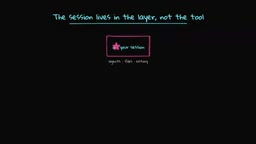
Databricks open-sources Omni, a meta-framework that unifies and orchestrates multiple AI Agents.
Databricks has open-sourced Omni under the Apache 2.0 license — a meta-framework that sits above AI Agent harnesses like Claude Code, Codex, and Pi. It provides unified session management across devices, YAML-based agent composition, cross-vendor code review, enforced security policies with cost caps and sandboxing, and real-time collaboration with session forking. Omni tackles vendor lock-in by making agents interchangeable plugins.
Why Do We Need a "Meta-Framework"?
If you're an active AI developer, chances are you're using multiple AI Agents simultaneously—Codex, Claude Code, Pi, and more. Each Agent has its own capability boundaries, but they're completely isolated from one another: different memory, different UIs, different conversation histories. You end up being the "human middleware" constantly copying and pasting between them.
The root of this problem is that every Agent is a combination of "model + harness." The model handles text prediction, while the harness does the real work—including the agent loop, tool calls, memory management, and user interface. Codex, Claude Code, Pi—each is a differently implemented harness, but they share one critical commonality: their external interfaces are identical—input is messages and files, output is text and tool calls.
If the interfaces are the same, why not build another layer on top of all harnesses? That's the core idea behind the "Meta-Harness." Omni, just open-sourced by Databricks under the Apache 2.0 license, is exactly this concept brought to life.
Omni's Core Architecture: All Agents Under One Roof
Unified Sessions: One Session, Multiple Entry Points
Omni's most intuitive value lies in unified session management. Sessions exist at the meta-framework layer rather than the individual tool layer, so there's only one Session object—containing your Agent files and complete history. Whether you access it through a terminal, web browser, desktop app, mobile device, or REST API, you see the same session state.
You can start a task in the terminal, switch to a browser to continue, or even check progress on your phone. Same Agent, same files, just different windows—and they sync in real time. For developers who need to switch between devices, this delivers a significant productivity boost.
Three Core Capabilities at a Glance
Under the hood, Omni consists of three key modules: on the left are the various Agents you bring in, on the right are the apps and tools you want to use, and in the middle is the unified orchestration layer. It unlocks three core capabilities: Composition, Control, and Collaboration.
Composition: Agents as Configuration, Switch Frameworks with One Line of YAML
In Omni, an Agent is simply a short YAML file containing prompts, a tool list, and a harness selection. Switching from Claude to Codex requires changing just one line of configuration. You can even run multiple Agents simultaneously as a team, and Agents can write Agents—just describe your requirements, and it automatically generates the configuration file.
Omni comes with two highly practical pre-built Agents:
Polly (Tech Lead): Polly doesn't write code itself—it handles planning and task decomposition. It breaks down objectives into subtasks, assigns them to different coding Agents for parallel execution (using independent Git worktrees), then hands each Agent's code to an Agent from a different vendor for review. For example, code written by Claude Code gets reviewed by Codex, and code written by Codex gets reviewed by Claude. This cross-vendor review is only possible at the meta-framework layer—you don't want the Agent that wrote the code reviewing its own work, because it has inherent bias.
Debbie (Brainstorming Partner): Debbie calls Claude and GPT simultaneously, generating two parallel answers for every question. After entering the /debate command, the two models critique each other's viewpoints, converging after several rounds of debate. This is extremely valuable for scenarios like architecture decisions that benefit from multiple perspectives.
Control: Enforced Security Policies
Every operation must pass through a gating mechanism: allow, deny, or ask the user first. This isn't a "polite request" in a prompt—it's a policy enforced on every tool call.
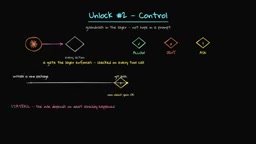
Because policies exist at the meta-framework layer, rules can depend on historical context. You can configure:
- Cost caps: Set daily budgets per session or per user (e.g., $10), and define soft warning thresholds
- Risk controls: Reject requests involving PPI (Personal Private Information)
- File and repository scoping: Restrict Agents to specific directories only
- Tool and connector access permissions
Under the hood, all Agents run inside an OFlix sandbox, with access only to files and networks you've explicitly authorized. More critically, Agents can never directly read your keys—the meta-framework layer injects keys at request time through an approval proxy. Even when running in YOLO mode, security is far superior to handing keys directly to an Agent.
Collaboration: Real-Time Sharing and Session Forking
When your session is active, you can share a link so teammates can watch work progress in real time, or even interact directly within the session. This is essentially "pair programming" at the AI Agent level. If a teammate wants to explore a different direction, they can fork the session and explore independently without interference.
Hands-On Demo: From Installation to Multi-Agent Orchestration
Getting Started
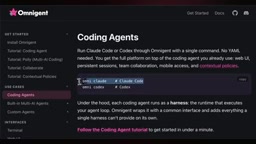
Installation requires just one command. After installation, first configure your API keys or subscriptions—you can use a Claude Code subscription, Codex subscription, and Pi can even use local Ollama models.
Multi-Agent Orchestration in Practice
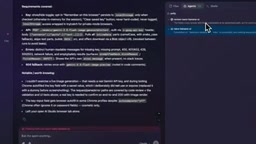
In the demo, the author used the Polly Agent to create a web application for image generation using the Gemini Nano model. The workflow went as follows:
- Task decomposition: After receiving the requirements, Polly automatically broke the task into subtasks
- Parallel implementation: Claude Code handled the code implementation, working in an independent Git worktree
- Independent review: Once implementation was complete, Codex performed an independent code review, receiving only the diff rather than the full codebase
- Issue fixing: Codex identified specific issues and fed them back to the implementation Agent for fixes
- Re-testing: After fixes, automated re-testing ran automatically
Throughout the process, the terminal and Web UI displayed identical session content, and you could view each Agent's real-time work status from any interface. After the session ended, you could also see detailed cost analysis—how many tokens each model consumed and the total spend.
One notable detail: you can interact directly with a specific Agent at any point during orchestration. For example, while Codex is reviewing code, you can separately ask Claude Code a question without any interference.
Why the Meta-Framework Layer Matters
A core pain point in the current AI landscape is vendor lock-in. If you've built extensive Agent logic on a particular framework, when a better model or more powerful framework emerges, you need to rebuild all your pipelines—migration costs are extremely high.
Omni's meta-framework approach turns Agents into interchangeable work units. Each harness is a plugin, reducing switching costs to a minimum. This not only solves today's multi-Agent coordination challenges but also provides a buffer layer for future technological evolution.
The project is still in its early stages and may require some tweaking and adaptation, but as an Apache 2.0 open-source project, the pace of community-driven iteration is promising. For any developer or team using multiple AI Agents simultaneously, Omni is a project worth watching closely.
Related articles
Codex AI Coding Agent Explained: What's the Real Difference from ChatGPT?
Deep dive into OpenAI's Codex coding agent, comparing Codex vs ChatGPT in programming scenarios and how AI agents are reshaping software development.
Generating 10 Web Games with One-Line Prompts: A Hands-On Claude Code Experience
A senior developer uses Claude Code to generate 10 playable web games including 2048, Gomoku, and Tetris with one-line prompts in under an hour. A deep dive into AI programming's real capabilities.
Five Essential Cursor Skills Every QA Engineer Needs: A Complete Breakdown
A detailed guide to five essential Cursor Skills for QA engineers: PRD analysis, test case generation, JMeter scripting, load test reports, and web automation.