DeepSeek GUI Hands-On Review: How Powerful Is This Cache-First Local AI Coding Assistant?
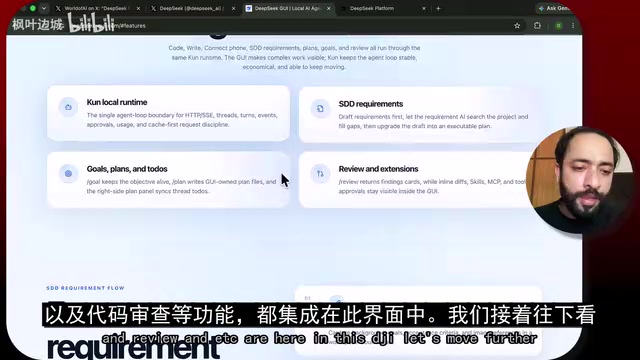
DeepSeek GUI evolves into a cache-first local AI coding workbench with massive Token savings.
DeepSeek GUI has transformed from a simple chat tool into a full agent workbench featuring a cache-first local runtime (KUN), multi-project management, built-in task scheduling, and code review. With a permanent 75% discount on V4 Pro bringing output tokens to just $0.87/million, it offers over 10x cost savings compared to GPT-4o and Claude. Its local-first architecture ensures privacy while the cache system reduces Token consumption by 60-90%.
Overview: From Chat Tool to Full-Featured Coding Workbench
DeepSeek GUI (GGUI) recently received a major update, evolving from a simple chat interface into a Full Agent Workbench. This AI coding assistant champions a "local-first" philosophy, supporting multi-project management, code review, task scheduling, and more — all while dramatically reducing Token costs through its unique cache-first design.
An overseas developer shared a comprehensive hands-on review of the tool on Bilibili. Here's an in-depth breakdown of its core features.
Core Features: A Cache-First Local Agent Architecture
KUN Local Runtime
DeepSeek GUI introduces a local runtime environment called KUN, the core component powering its local coding Agent. KUN is built on a "Cache-First" design philosophy — the system caches input and output Token values, and when users request similar content, results are retrieved directly from the cache instead of consuming additional API credits.
Token caching (also known as Prompt Caching) is a key optimization trend in the LLM API space. Providers like OpenAI and Anthropic have already rolled out similar mechanisms — when a user's request prefix closely matches a previous request, the system can skip recomputing the repeated portion and only run inference on the new content. DeepSeek GUI deeply integrates this mechanism into its local runtime, meaning that when developers iteratively refine code within the same project, a large amount of contextual information (such as file structures and existing code) can be cached and reused, reducing Token consumption by 60%-90%. For coding scenarios that require frequent AI interaction, this is critical for cost control.
The elegance of this design lies in the fact that for common development scenarios like e-commerce and blog projects, the system comes pre-loaded with extensive cached content, minimizing actual Token consumption. Combined with the local HTTP SSE Agent loop, the entire system delivers clear advantages in both response speed and cost efficiency.
HTTP SSE (Server-Sent Events) is a web standard that allows servers to push data to clients unidirectionally. Unlike WebSocket's bidirectional communication, SSE is more lightweight and naturally suited for the "request-streaming response" interaction pattern of AI Agents. In DeepSeek GUI's architecture, the local Agent continuously receives the model's streaming output via SSE, achieving a real-time typing effect similar to a terminal, while avoiding the resource overhead of persistent connections. This design allows the local runtime to maintain efficient communication with cloud-based models at minimal system resource cost.
Cross-Platform Installation & Support
DeepSeek GUI currently supports macOS and Windows, with a very straightforward installation process. On Mac, for example, you simply download the installer and drag it to the Applications folder. Upon launch, you're greeted with a beautifully designed welcome screen displaying "Welcome a local agent," with a clean and intuitive overall UI.
Pricing Advantage: Permanent 75% Discount on V4 Pro
DeepSeek recently made a major announcement: the 75% discount on DeepSeek V4 Pro will be permanent, rather than expiring on May 31, 2026 as previously stated.
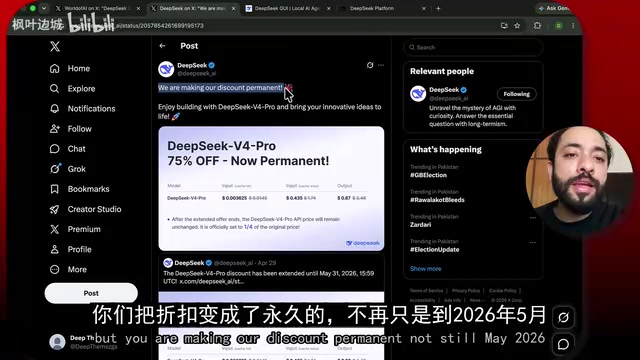
Here's a specific price comparison:
| Item | Before Discount | After Discount |
|---|---|---|
| Input Tokens (including cache hits) | $0.01454 | $0.003625 |
| Output Tokens | $3.48 | $0.87 |
This pricing strategy makes DeepSeek GUI one of the most cost-effective AI coding assistants on the market. The minimum API top-up is just $2.20 (plus a $0.12 processing fee), making the barrier to entry extremely low. For comparison, OpenAI's GPT-4o charges $15 per million output tokens, Claude 3.5 Sonnet also charges $15 per million, while DeepSeek V4 Pro's discounted rate is just $0.87 per million output tokens — a price gap of over 10x. This is one of the key reasons it has rapidly gained traction in the developer community.
Hands-On Experience: Multi-Project Management & Workflows
Multi-Project Management
In practice, DeepSeek GUI supports managing multiple projects simultaneously. Users simply click the folder icon and select a local project directory to import it. During testing, three different projects were successfully imported, with seamless switching between them.
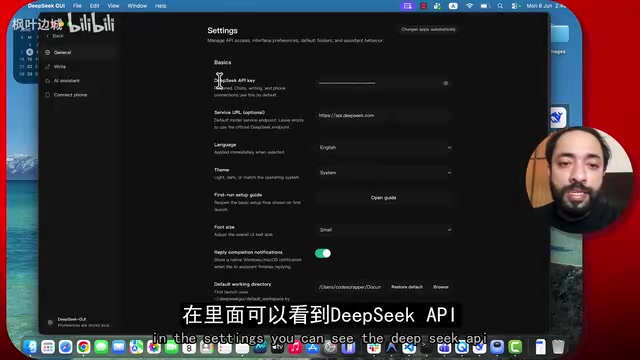
Each project automatically detects Git information, including the current branch. Even more conveniently, users can push code directly to GitHub from within the GUI, eliminating the need to switch to the terminal.
Coding Agent Features in Detail
Typing a forward slash (/) in the editor brings up a command menu with the following main options:
- Plan: Add planning markers to organize tasks before sending
- Goals: Set coding objectives
- Code Review: Automatically review code in the main directory
Users can choose from different reasoning modes — Normal, Medium, High, and Ultra — as well as different DeepSeek model versions (Pro, Flash, Reasoner, Chat), allowing flexible adjustment based on task complexity.
Specifically, Pro is the flagship model suited for complex architecture design and deep code generation; Flash is the lightweight, fast version ideal for simple completions and quick Q&A; Reasoner focuses on complex problems requiring multi-step reasoning (such as algorithm design and bug diagnosis); and Chat is optimized for conversational experiences. This multi-model matrix strategy is not uncommon in the industry — similar to Claude's Haiku/Sonnet/Opus tiering, the goal is to let users select the most cost-effective model for their task complexity, avoiding overkill resource usage.
Built-in Task Scheduling System
DeepSeek GUI includes a powerful Task Scheduling System (Scheduler), which is uncommon among similar AI coding tools. Users can create scheduled tasks with the following configuration options:
- Task name and instruction description
- Model selection: Auto, Pro, or Flash
- Reasoning intensity: Off / Low / Medium (default)
- Execution frequency: Daily, one-time, interval-based, or manual trigger
- Target directory: Specify which project the task applies to
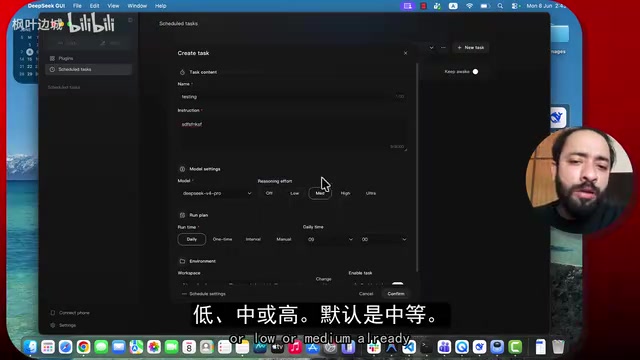
Here's a practical example: you could set up a task that automatically runs a code review every morning at 9 AM, so the AI has a review report ready before you start your workday. This automation capability is extremely valuable for team collaboration and continuous integration scenarios.
This design philosophy aligns closely with the CI/CD (Continuous Integration/Continuous Delivery) concept in software engineering. Traditional CI/CD tools like Jenkins and GitHub Actions typically require configuring complex YAML files and server environments, whereas DeepSeek GUI simplifies AI-driven automated tasks into visual configurations. This approach is especially well-suited for solo developers and small teams — no need to set up dedicated CI servers to achieve scheduled code reviews, automated test report generation, and other workflows, significantly lowering the DevOps barrier.
Writing Workspace
Beyond coding features, the right side of the GUI integrates a Writing Workspace that supports Markdown editing with source code, live preview, and split-screen modes. Users can create Markdown drafts in the sidebar, select text, and directly invoke the AI writing assistant for polishing or rewriting — perfect for writing technical documentation and project READMEs.
Plugin Ecosystem & Extensibility
DeepSeek GUI also includes a built-in Plugin System, leaving room for future feature expansion. While specific plugins haven't been fully showcased yet, this architectural choice signals the team's intention to build an extensible development platform rather than a single-purpose tool. Plugin-based architecture has a proven track record in the developer tools space — VS Code rose to become the go-to editor for developers precisely because of its rich plugin ecosystem. If DeepSeek GUI can cultivate an active plugin community, it could potentially replicate a similar network effect.
Additionally, the GUI includes IM (instant messaging) and calendar management modules, though these are primarily integrations targeting the Chinese market and have relatively limited use cases for international users.
Verdict: Is DeepSeek GUI Worth Trying?
This update marks DeepSeek GUI's transformation from a simple AI chat tool into a fully-featured local coding workbench. Its core competitive advantages can be summarized in three points:
- Extremely low usage costs: The cache-first design combined with the permanent 75% discount makes daily usage costs negligible
- Local-first architecture: Both data and the runtime environment stay local, balancing privacy protection with response speed. This is particularly important for enterprise users — business logic and sensitive data in codebases don't need to be fully uploaded to third-party servers. Only necessary context snippets are sent to the API for inference, maximizing code asset security while meeting functional requirements
- Comprehensive feature coverage: From code writing and review to task scheduling and documentation, it covers the entire development workflow
For developers looking for a low-cost AI coding assistant, DeepSeek GUI is a serious contender worth considering. With a minimum entry cost of just $2.20, there's virtually no risk in trying it out, and its rich feature set combined with a steady iteration cadence inspires confidence in its future development.
Related articles
Wise Large Transfer Delayed Two Weeks: How Should Cross-Border Entrepreneurs Respond?
Wise Business users face 10-14 day delays on large transfers, sparking debate on whether fintech is repeating traditional banking mistakes. Analysis and practical tips for cross-border entrepreneurs.
Perplexity Partners with Intel: Local AI Models and Hybrid Inference Come to Laptops
Perplexity partners with Intel to bring local AI models and hybrid inference to Core Ultra Series 3 laptops. We break down the architecture, NPU capabilities, and the cloud-to-edge AI trend.
AI Large Model Learning Roadmap Breakdown: Three Stages from Application Development to Model Fine-Tuning
Deep breakdown of a popular AI large model learning roadmap covering LangChain, RAG, Agent, and LoRA fine-tuning across three stages, with analysis of its strengths and limitations for career changers.