DeepSeek ZOI In-Depth Review: An Open-Source Local AI Agent Desktop Workspace
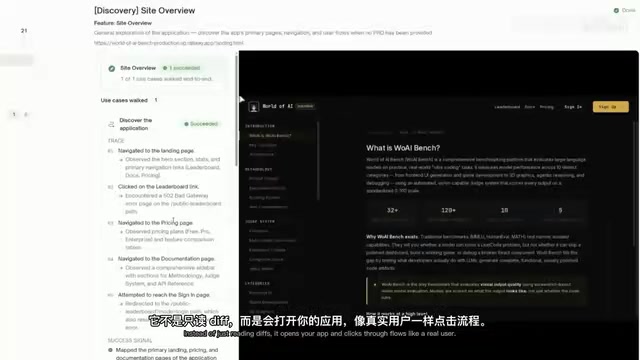
DeepSeek ZOI is an open-source desktop AI Agent workspace offering ultra-low-cost coding and writing powered by DeepSeek.
DeepSeek ZOI is an open-source desktop application that brings Codex-style AI Agent capabilities to the DeepSeek ecosystem. Featuring Code Mode for project-level coding, Write Mode for Markdown writing, and Cone Runtime for token efficiency optimization, it delivers a near-commercial experience at a fraction of the cost — completing frontend projects for less than one cent. While not an official DeepSeek product, it represents one of the most cost-effective AI coding setups available today.
When OpenAI has Codex, Anthropic has Claude Code, and Google has its own developer workspace, the DeepSeek ecosystem has long been missing a fully-featured local Agent workspace. An open-source desktop application called DeepSeek ZOI is filling that gap — transforming DeepSeek from a model you can only call via API into a truly usable local workspace for coding, writing, and automation.
Why DeepSeek Needs a Desktop Application
A clear trend in the AI space right now is that every major AI provider is building its own application layer. OpenAI's Codex is evolving into a full-fledged AI Coding Agent platform, Anthropic's Claude Code is considered one of the best coding tools available, and Google is shaping its products into standalone developer workspaces. But DeepSeek has had nothing in this area.
What we mean by "AI Agent workspace" is a software environment that wraps a large language model with autonomous execution capabilities, enabling it to not only answer questions but also directly manipulate the file system, execute commands, and manage project workflows. The essence of this trend is AI's transformation from a "tool" to a "collaborator" — the model is no longer just passively responding but actively understanding project context, planning task steps, and executing operations. OpenAI's Codex evolved from an initial code completion model into an Agent platform capable of autonomously completing coding tasks, and Anthropic's Claude Code lets AI participate directly in the development workflow through a terminal command-line interface — both are quintessential examples of this trend.
DeepSeek ZOI was built to solve exactly this problem. It's an open-source project created by independent developers (not an official DeepSeek product), supporting macOS, Linux, and Windows. Its positioning is clear: providing a Codex-style local Agent environment for DeepSeek models.
More importantly, there's a significant cost advantage. DeepSeek V4 recently introduced a discount, with prices at roughly 75% of the original. Specifically: 1 million Input Tokens costs just 4 cents, and 1 million Output Tokens costs only 87 cents. Factor in Cache Hits, and the usage cost becomes almost unbelievably low.
It's worth explaining what Token pricing means here. Tokens are the basic units that large language models use to process text — in English, each word corresponds to roughly 1–1.5 Tokens, while in Chinese, each character is approximately 1.5–2 Tokens. Input Tokens refer to the content users send to the model, and Output Tokens refer to the model's generated responses. A Cache Hit occurs when users repeatedly send similar context (such as the same project's code files), allowing the API server to reuse previously computed Token results, dramatically reducing charges. DeepSeek's Cache Hit pricing is typically only one-tenth or even less of the normal Input price, meaning that in sustained coding sessions, actual costs drop significantly as cache utilization increases. Combine DeepSeek's ultra-low pricing with a local desktop application, and you essentially get one of the cheapest AI Coding setups available today.
DeepSeek ZOI Core Features Breakdown
DeepSeek ZOI offers two main working modes, covering the most essential daily scenarios for developers.
Code Mode: A True Project-Level Coding Agent
Code Mode is the application's core selling point. It gives the Agent access to real project files, supporting file editing, Code Review, approval workflows, and full project context understanding. You can set up a project tree, and the overall experience is very close to OpenAI's Codex.
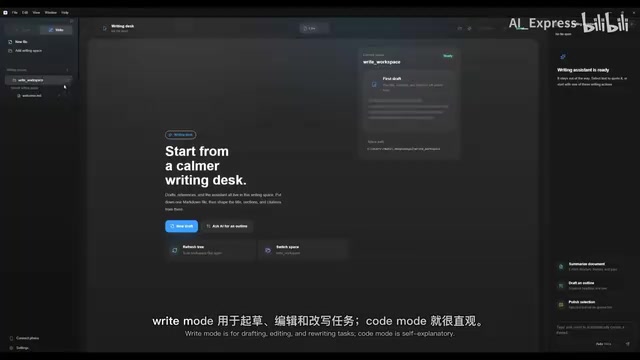
In actual testing, creating a frontend project cost less than one cent to complete. When Reasoning Effort is set to Ultra, the DeepSeek model performs noticeably better, generating frontend pages with complete dynamic effects and layout design.
Reasoning Effort is a key parameter that controls the model's reasoning depth, typically divided into levels like Low, Medium, High, and Ultra. When set to Ultra, the model spends more computational resources "thinking" — generating longer internal Chains of Thought, repeatedly verifying and correcting its output. This is similar to how humans "think a few more steps" when solving complex problems. Higher Reasoning Effort means more Token consumption and longer response times, but output quality typically improves significantly, especially in coding tasks that require complex logical reasoning, architecture design, or multi-file coordination.
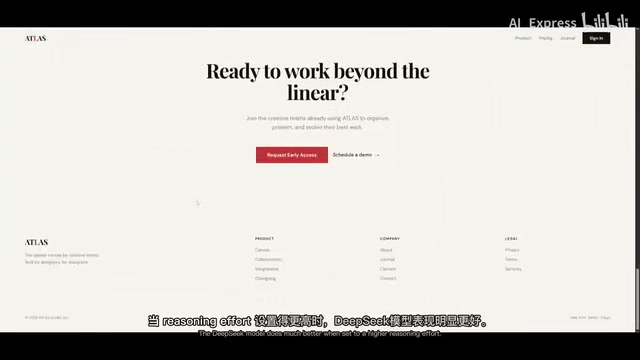
Write Mode: An Intelligent Markdown Writing Assistant
Write Mode provides a Markdown editor with AI assistance, supporting drafting, editing, rewriting, and handling long documents. For developers who need to write technical documentation, PRDs, or blog posts, this is a practical supplementary feature.
Cone Runtime: Built-in Token Efficiency Optimization
The real technical substance lies in the Cone Runtime mechanism. This is a built-in Token efficiency optimization system that adopts a Cache First approach, helping manage the context window more cleanly and improving cache hit rates.
Cache First is a software design strategy whose core principle is to prioritize retrieving data from cache, only making full requests when the cache misses. In AI Agent context management, this means the system intelligently organizes the context content sent to the model — placing unchanging parts (such as project structure and base code files) at the front of the Prompt to maximize cache reuse, and placing changing parts (such as the user's latest instructions) at the end. This design requires fine-grained management of the context window — large language models have limited context windows (such as 128K or 200K Tokens), and how to fit the most relevant information within that limited window while maintaining a cache-friendly arrangement is a technical challenge that requires engineering optimization.
Given that DeepSeek already offers Cache Hit pricing discounts, this mechanism can further reduce actual usage costs.
DeepSeek ZOI Installation and Configuration Guide
Using DeepSeek ZOI requires the following prerequisites:
- Node.js 20 or higher
- A paid DeepSeek API Key (required — the app won't work without one)
- Internet connection needed for the initial dependency installation
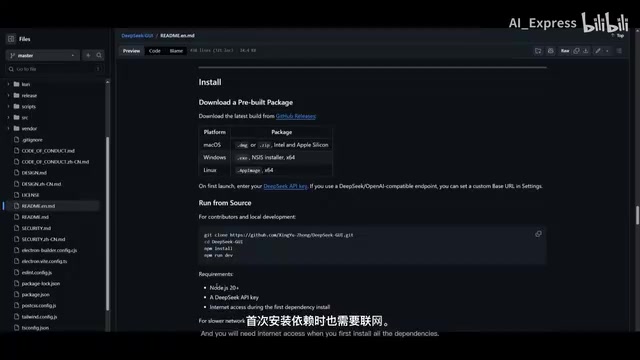
The installation steps are very standard:
- Clone the repository from GitHub
- Navigate to the project directory and run
npm install - Run
npm run devto launch the application on Localhost
Once launched, there are two ways to use it: as an Electron desktop application or directly in a browser. Electron is an open-source framework developed and maintained by GitHub that uses web technologies (HTML, CSS, JavaScript) to build cross-platform desktop applications. Well-known apps like VS Code, Slack, and Discord are all built on Electron. Its core advantage is "develop once, run on three platforms" — developers only need to write one codebase to support macOS, Windows, and Linux simultaneously. DeepSeek ZOI's choice of Electron means it's essentially a web application running locally, which also explains why it supports both desktop app and browser usage modes. Node.js 20, as a prerequisite dependency, provides the server-side runtime environment for the application, handling backend logic such as API calls and file system operations.
The application also supports connecting to your phone, which is a thoughtful bonus feature.
In Settings, you can add various configurations to customize the experience, including adjusting the Writer Agent, configuring Skills and external tools, and enhancing Agent capabilities through the MCP protocol.
MCP (Model Context Protocol) is an open protocol proposed by Anthropic that is gradually becoming an industry standard, designed to provide AI models with standardized interfaces for interacting with external tools and data sources. Through MCP, AI Agents can connect to databases, call APIs, operate browsers, access file systems, and more — without needing to write custom integration code for each tool. MCP's design is similar to what USB ports are to hardware devices — it provides a universal "socket" that allows any protocol-compliant tool to be plug-and-play for AI Agents. This enables DeepSeek ZOI to extend its capabilities through community-developed MCP servers, such as connecting to GitHub, Jira, Slack, and other tools commonly used by developers.
Hands-On Testing: Completing a Frontend Project for Less Than One Cent
In our actual testing, we used DeepSeek ZOI to create a frontend project. Several highlights are worth noting:
Auxiliary features during task execution are very rich:
- Side Conversation: Create temporary chats to ask the Agent specific questions while the main task is running
- Thread To Do List: Displays all task lists, suitable for managing long-cycle tasks
- Change Log: Directly shows code edits and Diffs
- Artifacts: Real-time preview of content generated by the DeepSeek model
Additionally, the application supports a feature called slashgo — a persistent loop-style Agent that keeps pushing tasks forward until the loop completes, making it ideal for complex tasks requiring multi-step iteration. This design philosophy is known as an "Agentic Loop" in the AI Agent field, where the Agent continuously executes an "observe-think-act" cycle, adjusting each round based on the results of the previous one, until the task objective is achieved or a preset termination condition is reached.
Things to Keep in Mind When Using DeepSeek ZOI
Although DeepSeek ZOI performs impressively, there are a few points to be aware of:
First, this is not an official product. It's an open-source tool created by independent developers and does not represent DeepSeek officially. This means ongoing maintenance and updates depend on the community and the developers' commitment.
Second, DeepSeek's data policy deserves attention. Data used through the API may be used for model training. If you're working with sensitive code or commercial projects, this is something to seriously consider.
Third, there's the issue of validating AI-generated code. This is a challenge facing the entire industry — AI Agents write code, tests pass, descriptions look clean, and developers just hit Approve. PR volumes are exploding, but fewer and fewer people are doing deep reviews. When issues surface in production, the bugs were there all along.
This problem is becoming a major challenge in software engineering. According to a research report published by GitClear in 2024, AI-assisted coding has led to a significant increase in Code Churn, but code quality metrics haven't kept pace. The core contradiction is this: AI Agents can generate hundreds of lines of code in minutes and pass automated tests, but the automated tests themselves may have insufficient coverage. When PR (Pull Request) volumes explode due to AI, human review bandwidth becomes the bottleneck. Solutions being explored in the industry include: AI-assisted code review tools, stricter automated test coverage requirements, and establishing dedicated review processes for "AI-generated code." Regardless of which AI coding tool you use, building effective code validation mechanisms is crucial.
Conclusion: One of the Most Cost-Effective AI Coding Solutions Available
The emergence of DeepSeek ZOI means the DeepSeek ecosystem is no longer absent from the desktop Agent workspace dimension. Its feature coverage is already approaching commercial products like Codex and Claude Code, while its cost advantage is overwhelming. For budget-conscious developers who still need AI coding assistance, this may be one of the most worthwhile options to try right now.
Of course, as an open-source community project, its stability and long-term development still need to be observed. But at least for now, it proves one thing: the barrier to top-tier AI coding experiences is being rapidly lowered.
Related articles
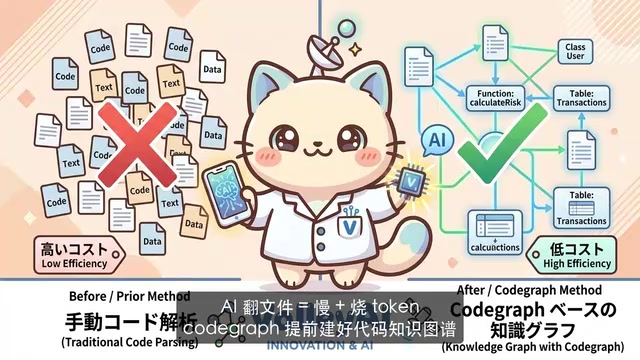
CodeGraph: The 50K-Star Open-Source Tool That Cuts AI Coding Token Usage in Half
CodeGraph is a 50K-star open-source tool that builds a code knowledge graph so AI coding assistants can locate code instantly—cutting Token usage by 47%, boosting speed by 22%, all running 100% locally.

VibeCoding Beginner's Guide: A Complete Guide to Building Software with Natural Language from Scratch
VibeCoding lets anyone build software through natural language conversations with AI. Learn the core concepts, learning path, and practical methods to get started.
Using UU Accelerator to Speed Up Cursor: A Compliant Solution for Stable AI Coding in China
Learn how to use NetEase UU Accelerator to speed up Cursor AI coding tool in China, with step-by-step setup including node selection and launch configuration.