Dify Local Deployment Tutorial: Setting Up an AI Development Platform from Scratch with BT Panel + Docker

A complete guide to deploying the open-source Dify LLM platform locally with BT Panel and Docker.
This article introduces Dify, an open-source LLM application development platform, covering its core concepts, feature advantages, and use cases. It provides a detailed walkthrough of local deployment using VMware + Ubuntu + BT Panel + Docker. Dify combines BaaS and LLMOps concepts, supports hundreds of models, and includes built-in prompt orchestration, RAG knowledge bases, and Agent tool calling — making it more production-ready than LangChain for rapid delivery scenarios.
What Is Dify? Why Is It Worth Learning?
Dify is an open-source large language model (LLM) application development platform that combines the concepts of Backend as a Service (BaaS) and LLMOps, enabling developers — and even non-technical users — to quickly build production-grade generative AI applications.
Two key concepts are worth elaborating here: BaaS (Backend as a Service) is a cloud computing service model that abstracts backend infrastructure (such as databases, user authentication, file storage, API management, etc.) into ready-to-use services, so developers don't need to build and maintain server-side logic from scratch. LLMOps is an extension of MLOps (Machine Learning Operations) into the large language model domain, covering the full lifecycle management of LLM applications — from development, testing, and deployment to monitoring — including prompt version management, model performance monitoring, cost tracking, A/B testing, and other operational practices. By merging these two concepts, Dify provides both out-of-the-box backend capabilities and a built-in toolchain for managing the entire LLM application workflow.
Compared to LangChain, another well-known AI development library, if LangChain is a toolbox (providing individual tools like hammers and nails), then Dify is more like a complete scaffolding system — it offers not only tools but also an overall architecture that has been engineered and tested, ready to support production environment requirements.
More specifically, LangChain is an open-source Python/JavaScript library initiated by Harrison Chase in late 2022. It provides various abstraction components for interacting with LLMs, such as Chains, Agents, Memory, Document Loaders, and more. Developers need to write code to assemble these components into complete applications. While it offers extreme flexibility, the learning curve is steep, and going from prototype to production deployment requires solving engineering challenges on your own (such as concurrency handling, error retries, logging and monitoring, etc.). Dify takes a different product philosophy: it provides a visual orchestration interface, productizes common LLM application patterns (chatbots, workflows, knowledge base Q&A), and includes the infrastructure needed for production environments. The two are not substitutes — LangChain is suited for developers who need deep customization, while Dify is ideal for scenarios that prioritize rapid delivery and team collaboration.

Dify's core advantages lie in three areas:
- Broad model support: Supports hundreds of large language models, including international ones like OpenAI, Gemini, and Claude, as well as Chinese models such as Zhipu, Baichuan, iFlytek Spark, Tongyi Qianwen, Wenxin Yiyan, DeepSeek, and more
- Complete feature set: Built-in prompt orchestration interface, high-quality RAG engine (external knowledge base), Agent tool calling, workflow design, and other key capabilities
- Open source and free: Developers can freely extend the platform on its open-source foundation, focusing their energy on innovation and business logic
What Can Dify Do? An Overview of Key Use Cases
Dify covers a wide range of application scenarios, including:
- Building intelligent chatbots and Agents: Quickly create various AI assistants through prompt orchestration and tool calling
- Integrating into existing business systems: Embed LLM capabilities into existing applications via Dify's API
- Designing automated workflows: Orchestrate AI-driven workflows for specific business scenarios
- Mounting enterprise knowledge bases: Use product documentation, specifications, and other enterprise data as an external knowledge base for AI, enabling precise business Q&A
- Publishing as web applications: Deploy built AI applications as public-facing web sites for user access
Among these, RAG (Retrieval-Augmented Generation) is a core technical architecture for overcoming the knowledge limitations of large language models, and it's worth understanding in depth. Here's how it works: when a user asks a question, the system first retrieves the most relevant document fragments from an external knowledge base, then feeds those fragments as context along with the user's question into the LLM to generate an answer. This approach addresses the LLM's training data cutoff limitations, hallucination issues, and the pain point of enterprise private data being inaccessible to the model. Key steps in RAG include document chunking, vector embedding, vector database storage and retrieval, and reranking. Dify's built-in RAG engine encapsulates these complex processes — users simply upload documents to build a knowledge base.
One detail worth noting: among the models Dify supports, different models have different capabilities. For example, to build an Agent that can call tools, you need to select a model that supports Function Calling, such as OpenAI, Moonshot, DeepSeek, etc. Models with vision capabilities can process image inputs. You should match your model selection to your actual requirements.
Function Calling is a key capability first introduced by OpenAI in June 2023. It allows large language models to identify user intent during conversations and call predefined external functions or APIs in a structured manner. The specific process works like this: developers predefine a set of available tool descriptions (including function names, parameter formats, and capability descriptions). After understanding the user's request, the LLM determines whether a tool needs to be called. If so, it outputs standardized JSON-formatted call parameters, which the application layer executes. The results are then returned to the LLM to continue generating a response. This mechanism is the foundation for building AI Agents, evolving LLMs from pure text generators into intelligent entities capable of interacting with the external world. Not all models support this capability, so model selection matters when building Agents in Dify.
Preparing the Environment for Dify Local Deployment
Dify supports multiple deployment methods, including source code startup and Docker deployment. This tutorial uses the BT Panel + Docker approach, which is the most beginner-friendly option.
The reason for choosing Docker deployment: Docker is an OS-level virtualization technology that packages applications along with all their dependencies (runtime environment, system libraries, configuration files, etc.) into standardized container images. Unlike traditional virtual machines, Docker containers share the host machine's OS kernel, resulting in fast startup times and low resource consumption. For complex applications like Dify that contain multiple microservice components (web frontend, API service, Worker processes, database, Redis cache, vector database, etc.), Docker Compose can define and orchestrate the startup order and network relationships of all services through a single configuration file, greatly simplifying deployment complexity. This is why the BT Panel + Docker approach is beginner-friendly — it simplifies what would otherwise require manually configuring over a dozen services into just a few clicks.
Step 1: Install VMware Virtual Machine
First, you need to download two pieces of software:
- VMware Workstation (or VMware Player): For running a Linux virtual system
- Ubuntu 22.04 ISO image: As the virtual machine's operating system
When installing VMware, note: Do not install it on the C drive, as running virtual machines generates large cache files that can easily fill up the system drive.
Step 2: Create and Install the Ubuntu Virtual Machine
After opening VMware, follow these steps:
- Click "Create a New Virtual Machine" and select "I will install the operating system later"
- Select Linux as the system type and Ubuntu 64-bit as the version
- Allocate 20GB of disk space (sufficient for deploying Dify alone)
- After creation, go to the virtual machine settings and load the Ubuntu ISO image file in the CD/DVD option
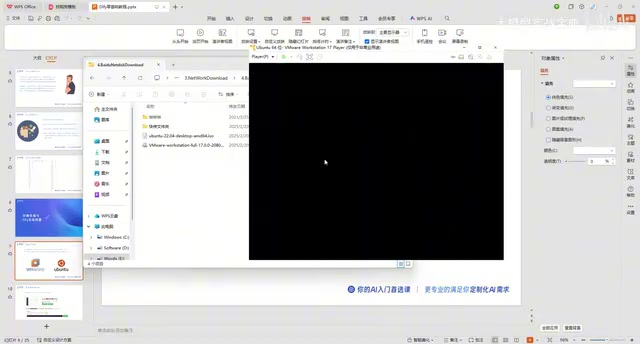
After loading the image, play the virtual machine and select "Try or Install Ubuntu." In the installation interface:
- Select "Simplified Chinese" for the language (or your preferred language)
- Choose "Minimal installation" for the installation type (sufficient for deploying Dify)
- Select "Erase disk and install" for the disk option
- Set a username and password (a simple password like 123456 is fine; you can enable auto-login)
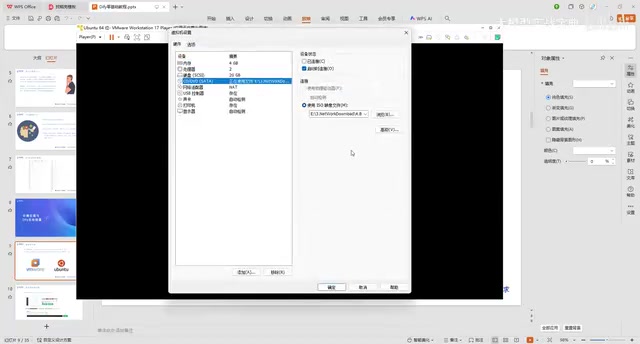
After installation, restart, and the Ubuntu system is ready.
Installing BT Panel
After entering the Ubuntu system, open a browser and visit the BT Panel official website. Select "BT Linux Panel" → "Install Free Version" and copy the installation command for Ubuntu.
Paste the command in the terminal (open with the shortcut Ctrl+Alt+T) and execute it. Enter the system password and wait for the installation to complete. After successful installation, BT Panel will provide:
- A local network access address
- Default username and password
Optimizing BT Panel Configuration
The default port number and security entry path are hard to remember. It's recommended to run the bt command in the terminal to modify them:
- Change the port number to something easy to remember (e.g., 8899)
- Change the security entry path to a short path (e.g., /backend)
- Change the username and password to something familiar
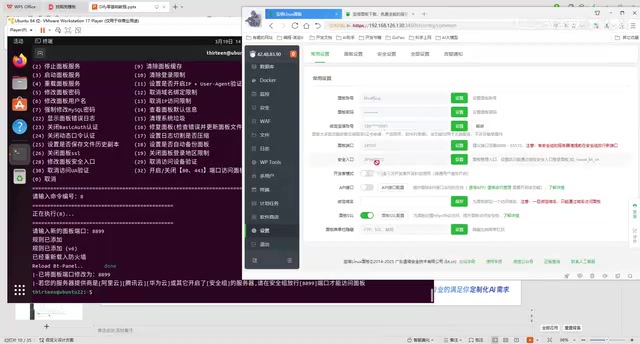
After making changes, access the BT Panel at http://VM-IP:8899/backend. From this point on, all operations can be done in the browser, and the virtual machine window can be minimized.
Deploying Dify with Docker via BT Panel
Installing the Docker Environment
Find the "Docker" module on the left side of the BT Panel, click install, and use the default configuration. The installation takes a few minutes.
Deploying the Dify Application
After Docker is installed, search for "Dify" in the Docker module and click install. If you encounter installation failures (the common BT File error), try the following solutions:
Solution 1: Modify DNS Configuration
Edit the DNS configuration file in the virtual machine terminal:
nano /etc/resolv.conf
Change the nameserver to:
nameserver 8.8.8.8
nameserver 8.8.4.4
These are Google's public DNS server addresses. DNS (Domain Name System) is responsible for resolving human-readable domain names (like github.com) into machine-readable IP addresses. In certain network environments, the default DNS may fail to correctly resolve Docker image repository addresses, causing image pull failures. Changing DNS to 8.8.8.8 (Google primary DNS) and 8.8.4.4 (Google backup DNS) provides more stable domain name resolution.
Save the file, restart the BT Panel, and reinstall Dify.
Solution 2: Configure Docker Mirror Acceleration
Modify the acceleration URL in Docker settings. BT Panel's help documentation provides multiple domestic acceleration links — try entering them one by one and restart the Docker service. The principle behind Docker mirror acceleration is to cache and distribute images that would normally be pulled from Docker Hub (located overseas) through domestic proxy nodes, solving issues with slow or unreachable network access.
Accessing the Dify Admin Dashboard
After successful installation, change HTTPS to HTTP in Dify's access URL, set the port to 8088, and append /install at the end to access Dify's initialization setup page. After setting up your email and username, the local deployment is complete.
Summary and Further Learning Path
This tutorial covered the entire process of deploying Dify from scratch, using the VMware + Ubuntu + BT Panel + Docker tech stack. While there are many steps, each one involves graphical operations, making it very beginner-friendly.
After deployment, there's much more to explore:
- Building intelligent chatbots and Agents
- Configuring AI tool calling
- Designing automated workflows
- Setting up RAG knowledge bases
- Integrating with external applications via API
As one of the most active open-source LLM application development platforms, Dify's ecosystem and features continue to evolve rapidly. Mastering local deployment is the first step — from there, you can gradually dive deeper into each module based on your actual business needs.
Key Takeaways
- Dify is an open-source LLM application development platform supporting hundreds of domestic and international models, with complete features including prompt orchestration, RAG knowledge bases, and Agent tool calling
- This tutorial uses the VMware + Ubuntu + BT Panel + Docker deployment approach, which is the most beginner-friendly option
- Common network issues during deployment can be resolved by modifying DNS configuration (8.8.8.8) or configuring Docker mirror acceleration
- After deploying Dify, you can build chatbots, design workflows, mount knowledge bases, and integrate with existing business systems via API
- Compared to LangChain, Dify provides a complete, engineered scaffolding solution better suited for production environments
Related articles
 Tutorials
Cursor + Codex Dual-IDE Collaboration: A Practical Methodology for Open-Source Project Customization
A complete methodology for open-source project customization based on real-world experience, detailing the Cursor+Codex dual-IDE workflow, seven-stage process, MVP validation, and AI source code reading techniques.
 Tutorials
Cursor Multi-Agent in Practice: Building a Full-Stack Next.js Blog in 50 Minutes
Build a full-stack blog in 50 minutes using Cursor IDE's multi-Agent mode with Next.js, Clerk auth, and Supabase. Learn the 4-phase AI Agent workflow and key integration pitfalls.
 Tutorials
Building an AI Software Factory from Scratch: A Cursor Engineer's Hands-On Experience with Multi-Agent Collaboration
Cursor engineer Eric shares practical insights on building an AI software factory: automation levels, guardrail design, parallel Agent management, and scaling to 1000+ Agents for 24/7 development.