Digital Worker in Practice: Full Record of Building an Automated Noise Monitoring & Reduction System

Built an automated noise reduction system with a digital worker—automation succeeded but noise reduction failed
A developer plagued by early-morning construction noise built an automated noise reduction system using a local plugin-based digital worker framework: Windows Task Scheduler wakes the computer, auto-starts a noise monitoring plugin, and plays pink noise when thresholds are exceeded. The automation pipeline ran flawlessly end-to-end, but noise reduction failed—20-second response delay and pink noise itself disrupted sleep. The project demonstrates the engineering value of plugin architecture and complete automation loops.
Project Background: Using an AI Digital Worker to Combat Early-Morning Construction Noise
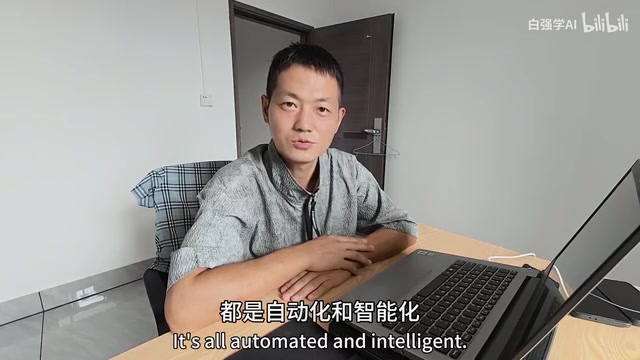
Real-life pain points are often the best drivers for technical practice. A Bilibili content creator, plagued by construction noise that started disturbing sleep in the early morning hours near their rental apartment, decided to put their previously built "digital worker" system to use—adding noise monitoring and automatic noise reduction capabilities to achieve fully unattended, intelligent noise countermeasures.
The "digital worker" mentioned here is essentially a locally-running automation Agent framework that extends functionality through a plugin mechanism. Plugin Architecture is a classic design pattern in software engineering for achieving high cohesion and low coupling: the core system provides foundational capabilities like lifecycle management, event bus, and configuration loading, while specific business logic is independently developed and hot-swappable as plugins. This design is widely used in IDEs (like VS Code Extensions), browsers (Chrome Extensions), and recent AI Agent frameworks (like LangChain's Tools, AutoGPT's Plugins). For individual developers, adopting a plugin-based design means new features can be added without modifying core code—just develop a new plugin following the agreed-upon interface—greatly reducing system maintenance complexity.
Although this project ultimately failed in terms of "noise reduction effectiveness," it was a complete and valuable engineering exercise in automation implementation. The system wake-up, task scheduling, noise monitoring, and automatic response components involved are all relevant references for any developer looking to build local automation systems.
Technical Solution Design for the Automated Noise Reduction System
Overall Architecture and Workflow
The entire system workflow was designed as follows:
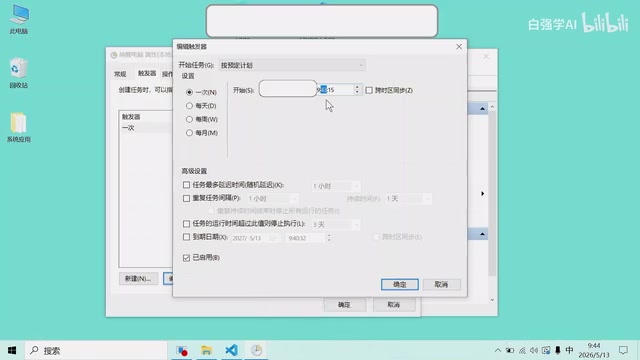
- Scheduled Wake-up: Every day at 5 AM, the computer automatically wakes from sleep via Windows Task Scheduler
- Auto-start Digital Worker: After waking, a BAT script automatically runs—first turning on the screen, then launching the digital worker program
- Enter Monitoring State: The digital worker automatically loads the noise monitoring plugin and begins real-time environmental sound level collection
- Threshold-triggered Response: When detected noise exceeds the preset threshold, pink noise is automatically played as a "countermeasure"
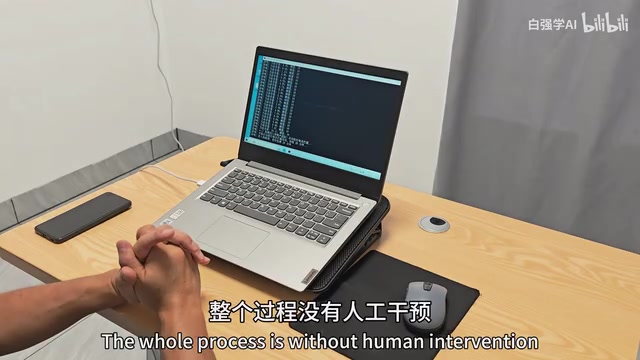
The entire process requires zero manual intervention, demonstrating a complete automation loop from perception to decision-making to execution.
Key Technical Implementation Details
Windows Task Scheduler and System Wake Mechanism
Windows Task Scheduler is a built-in automation scheduling tool in the Windows operating system, supporting task triggering based on time, events, or conditions. In this project, by creating a scheduled task and enabling the "Wake the computer to run this task" option, it leverages the RTC (Real-Time Clock) wake function from the ACPI (Advanced Configuration and Power Interface) standard—the RTC chip on the motherboard remains powered and running even during system sleep (S3 state), capable of sending wake signals to the power management module at preset times. This mechanism is commonly used for server scheduled maintenance and backup tasks, but is equally an effective low-cost approach for implementing scheduled startup in personal automation projects.
After implementing chain startup with two launch programs, the creator discovered a subtle issue in practice—the screen doesn't automatically turn on after the computer wakes up, which prevents video recording of the process. This issue stems from Windows power management policy: when the system wakes from sleep and the trigger source is a scheduled task rather than user input (like keyboard/mouse), the display adapter may not automatically activate. Common solutions include using PowerShell to call SendKeys to simulate keypress input, or using the SendMessage Windows API to send an SC_MONITORPOWER message to force the display on. The creator wrote an additional BAT file to solve this problem.
BAT (Batch) files are the most classic scripting automation tool in the Windows environment, implementing task orchestration through sequential execution of command-line instructions. In this project, the BAT script serves as the "glue layer"—chaining independent operations like system wake-up, screen activation, and program launch into a coherent workflow.
Noise Monitoring Module
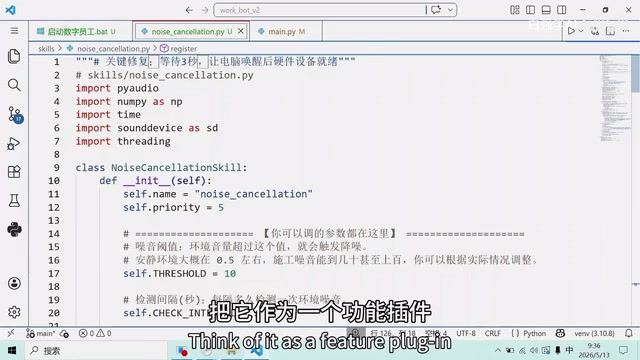
Noise monitoring is integrated into the digital worker system as a plugin, containing two core functions—real-time noise monitoring and over-threshold response.
The monitoring component continuously captures environmental sound through the microphone and calculates decibel levels. This process involves the fundamental digital audio processing pipeline: the microphone converts sound pressure fluctuations into analog electrical signals, which are then sampled by the sound card's ADC (Analog-to-Digital Converter) to produce PCM (Pulse Code Modulation) digital audio data. Decibel calculation typically uses the RMS (Root Mean Square) method—taking the root mean square of amplitude values within a sampling window, then converting to decibel scale via 20×log10(RMS/reference value). Note that ordinary computer microphones are not acoustically calibrated, so their output decibel values are relative rather than absolute Sound Pressure Level (SPL), but this is sufficient for threshold comparison and trend analysis. In Python, PyAudio or sounddevice libraries are commonly used for real-time audio stream capture.
The response component triggers pink noise playback when the preset value is exceeded.
Pink Noise Generation Approach
The creator initially planned to play light music or sleep-aid music, but ultimately chose to generate pink noise directly with code due to copyright concerns.
Pink Noise (also called 1/f noise) has a power spectral density inversely proportional to frequency, meaning equal energy within each octave. Noise can be classified into various "colors" by spectral characteristics—white noise (uniform energy across all frequencies, sounds sharp), pink noise (stronger low-frequency energy, 3dB attenuation per octave), brown noise (energy drops rapidly with increasing frequency, sounds deep like thunder), blue noise, and violet noise. Compared to white noise which sounds harsh in high-frequency ranges, pink noise's spectral distribution more closely resembles natural sounds (like waterfalls and steady wind), making it widely used in audio system calibration and sleep-aid scenarios.
Common methods for generating pink noise in code include: the Voss-McCartney algorithm (superimposing multiple random number generators with different update frequencies), IIR filtering (applying an infinite impulse response filter with approximate 1/f characteristics to white noise), and the FFT frequency-domain method (adjusting amplitude of each frequency component by 1/√f in the frequency domain before inverse transform). In Python, this can be implemented using numpy to generate white noise and then applying filtering through scipy's signal processing module.
Test Results: Automation Succeeded but Noise Reduction Failed
Automation Flow Verification: Complete Success
From a technical implementation perspective, the entire automation chain ran successfully end-to-end: computer wakes on time → digital worker auto-starts → automatically enters monitoring state → detects noise exceeding threshold → automatically plays pink noise. Zero manual intervention throughout—automation and intelligence objectives achieved.
Noise Reduction Effectiveness Analysis: Two Fatal Problems
However, in terms of actual noise reduction effectiveness, this solution had two fatal problems:
- Excessive Response Delay: It took approximately 20 seconds after noise exceeded the threshold to trigger a response—completely unacceptable for a "noise reduction" scenario since the person would already be awake. This 20-second delay likely accumulated from multiple stages: audio sampling buffer fill time, RMS calculation window length, threshold judgment debouncing logic (to avoid false triggers from transient noise), and pink noise generation plus audio device initialization overhead.
- Pink Noise Is Still Noise: Using one type of noise to "counter" another doesn't actually feel comfortable. It essentially uses controllable noise to mask uncontrollable noise (acoustically known as the "auditory masking effect") rather than truly eliminating noise. Auditory masking requires the masking sound's spectrum to cover the frequency range of the masked sound with sufficient volume, meaning the pink noise playback volume can't be too low—which may further impact sleep quality.
Deep Dive: Why Active Noise Cancellation (ANC) Is So Difficult
The creator proposed a more ideal solution in the video—using inverse sound waves (the ANC active noise cancellation principle) to truly eliminate noise. But they also admitted that the difficulty of this approach is "no less than intercepting a missile."
The core principle of active noise cancellation is: capture noise in real-time → calculate anti-phase sound waves → emit anti-phase waves before the noise reaches the ear for destructive interference. This requires the system to have:
- Millisecond or even microsecond-level response speed: The entire processing chain must complete before the sound wave reaches the ear
- Precise sound wave analysis capability: Accurate identification of noise frequency, phase, and amplitude is needed
- Ultra-low latency sound wave generation: Anti-phase sound waves must align precisely with the original noise
From a technical classification perspective, active noise cancellation is divided into Feedforward and Feedback architectures. Feedforward places a reference microphone on the noise source side, capturing noise in advance and predicting the waveform when it reaches the ear; Feedback places an error microphone inside the speaker, continuously monitoring residual noise and making corrections. Modern high-end headphones mostly use Hybrid ANC, combining the advantages of both. ANC's core algorithms are typically based on adaptive filters, with the most classic being the LMS (Least Mean Squares) algorithm and its variant FxLMS (Filtered-reference LMS), which requires real-time modeling of the secondary path transfer function from speaker to error microphone.
This is why all mature ANC solutions currently operate within headphones—extremely short distances in enclosed spaces. In headphone scenarios, sound wave propagation distance is only a few centimeters, giving the system approximately 0.1-0.5 milliseconds of processing window; the more enclosed the environment, the simpler the sound waves to process. In open rooms, uncertain sound source directions, complex reflection paths (multipath effects from walls, furniture, etc.), and long propagation distances cause computational complexity and sensor requirements to grow exponentially. Actively canceling construction noise from uncertain directions in open spaces has only achieved limited results in laboratory environments for specific low-frequency noise—it's truly a goal beyond current consumer-grade technology.
Project Value and Practical Insights
Although the noise reduction effect was unsatisfactory, this project demonstrated several valuable practical approaches:
- Flexibility of Plugin Architecture: Integrating noise monitoring as a plugin into the digital worker system reflects good modular design thinking. This architecture allows system capabilities to continuously expand—noise monitoring today, temperature/humidity monitoring, automatic email replies, or any other automation task tomorrow—without modifying the core framework.
- Complete Automation Loop: From scheduled wake-up to automatic response, it demonstrates how to build a complete automation workflow using simple tools (Task Scheduler + BAT scripts + Python programs). This "low-code + script glue" combination approach offers extremely high cost-effectiveness for individual developers rapidly validating ideas.
- Problem-driven Iterative Thinking: Screen not turning on? Write a script to fix it. Copyright issues? Generate audio with code. This rapid iteration mindset is worth learning. In engineering practice, perfect solutions rarely exist—the ability to quickly identify problems and find "good enough" solutions is more important than pursuing optimal ones.
For readers with similar needs, more practical advice might be: a pair of ANC-enabled sleep earbuds (like Bose Sleepbuds or similar products), or pre-set continuous white/pink noise playback (no trigger needed), would likely be more effective than this complex system. But the value of technical exploration lies not only in results but also in the engineering experience accumulated along the way—understanding system wake mechanisms, practicing audio processing workflows, designing automation architectures—this knowledge will continue to deliver value in future projects.
Key Takeaways
- Built a complete unattended automated noise reduction system using Windows Task Scheduler + BAT scripts + Python programs
- The system achieved a complete loop: scheduled wake-up → auto-start → noise monitoring → threshold-triggered response
- Actual noise reduction failed: ~20 second response delay and pink noise itself impacts sleep
- True active noise cancellation (inverse sound waves) requires millisecond-level response speed and is extremely difficult to implement in open spaces
- The project demonstrates the engineering practice value of plugin architecture and problem-driven iteration
Related articles
 Tutorials
Cursor + Codex Dual-IDE Collaboration: A Practical Methodology for Open-Source Project Customization
A complete methodology for open-source project customization based on real-world experience, detailing the Cursor+Codex dual-IDE workflow, seven-stage process, MVP validation, and AI source code reading techniques.
 Tutorials
Cursor Multi-Agent in Practice: Building a Full-Stack Next.js Blog in 50 Minutes
Build a full-stack blog in 50 minutes using Cursor IDE's multi-Agent mode with Next.js, Clerk auth, and Supabase. Learn the 4-phase AI Agent workflow and key integration pitfalls.
 Tutorials
Building an AI Software Factory from Scratch: A Cursor Engineer's Hands-On Experience with Multi-Agent Collaboration
Cursor engineer Eric shares practical insights on building an AI software factory: automation levels, guardrail design, parallel Agent management, and scaling to 1000+ Agents for 24/7 development.