ESP32+OLED Desktop Gadget for Monitoring Claude Code Status

ESP32C3+OLED desktop gadget that monitors Claude Code status and flashes alerts for authorization waits.
A developer built a desktop clock gadget using an ESP32C3 and a 0.96-inch OLED screen that displays Claude Code's working status in real time. Its core feature is flashing the screen when Claude Code pops up an authorization prompt waiting for user action, solving the pain point of users missing authorization waits after switching tasks. The project cleverly uses a skill file to let Claude Code handle its own installation, costs under $4 in hardware, and is fully open source.
Never Let Claude Code Wait for You in Silence Again
One of the most frustrating scenarios when coding with Claude Code: it pops up an authorization prompt, but you have no idea, and by the time you notice, it's been silently waiting for ten minutes. When Claude Code performs sensitive operations that might affect the file system, run shell commands, or access the network, it displays an authorization dialog requiring explicit user consent — a security design to prevent AI from executing destructive operations unsupervised. But in practice, frequent authorization requests interrupt workflow, especially when users switch to other tasks, leaving Claude Code waiting silently in the background for minutes or even longer.
Now, a Bilibili creator has built a desktop clock gadget using an ESP32C3 and a 0.96-inch OLED screen that displays Claude Code's working status in real time — and crucially, when Claude Code needs authorization, the screen flashes to alert you, catchable even in your peripheral vision.
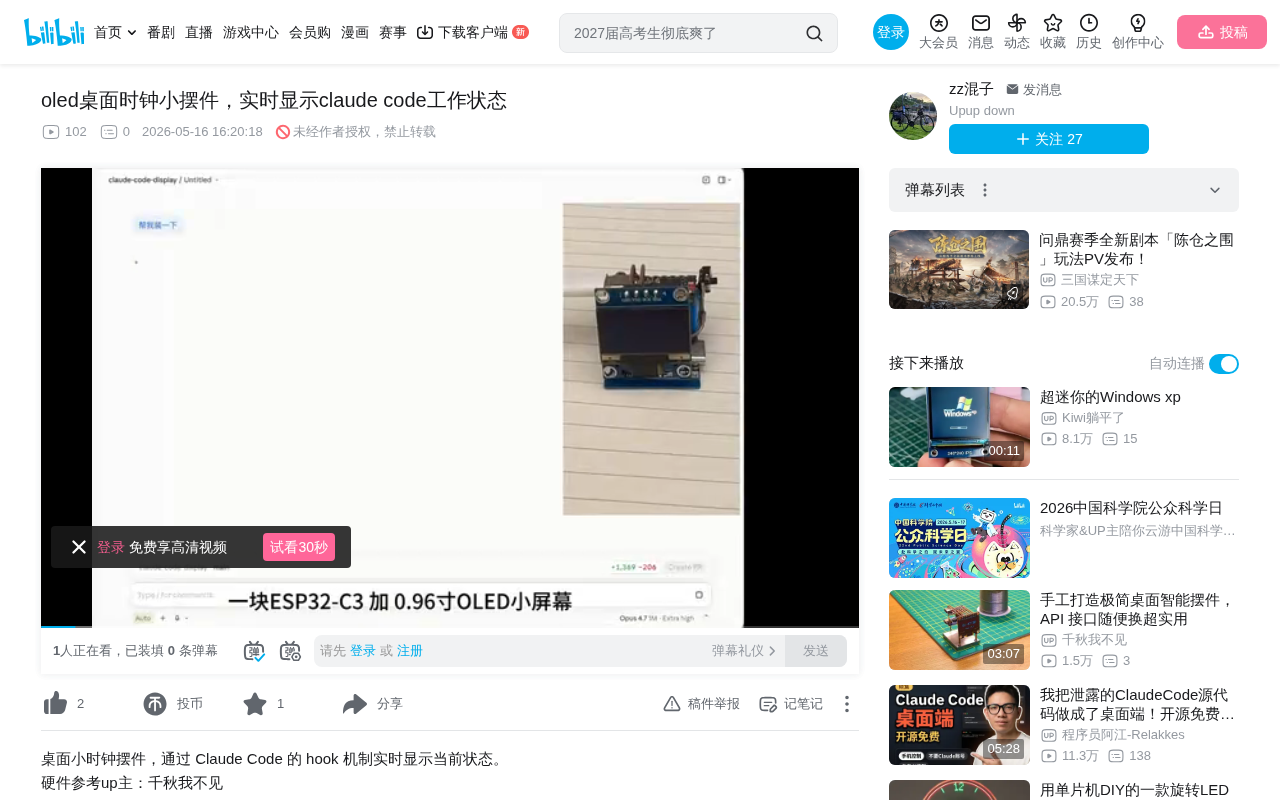
Hardware: Minimalist but Practical
The hardware cost for this project is extremely low, requiring only two core components:
- ESP32C3 Development Board: A low-power WiFi/Bluetooth microcontroller based on the RISC-V architecture, produced by Espressif. It typically costs around a couple of dollars. Unlike the traditional ESP32's Xtensa architecture, RISC-V is an open-source instruction set that has rapidly gained popularity in the IoT space in recent years. The ESP32C3 integrates 2.4GHz WiFi and Bluetooth 5.0 (LE), features 400KB SRAM and 4MB Flash, runs at 160MHz — more than sufficient for network communication and display driving tasks — and consumes only 5μA in deep sleep, making it ideal for always-on desktop devices.
- 0.96-inch OLED Screen: A classic small-form-factor display with 128x64 resolution, typically driven by the SSD1306 chip, communicating with the microcontroller via I2C or SPI protocol. The key difference between OLED (Organic Light-Emitting Diode) and traditional LCD is that OLED is self-emissive — it doesn't need a backlight layer, so it consumes zero power when displaying black and offers extremely high contrast. Thanks to this self-emissive property, screen flashing has far greater visual impact than on LCD, making it particularly suitable for status alerts.
This combination is a classic pairing for embedded hobbyists — compact, unobtrusive on a desk, and extremely low power for long-term operation. Developers typically program using the Arduino framework or ESP-IDF (Espressif's official SDK), with a mature ecosystem and rich community resources. Though the screen is small, it's more than adequate for displaying time, work status, and short prompt summaries.
Installation: Let Claude Code Install Itself
The most clever design of this project is the installation method — the author wrote the entire installation process as a skill file, which Claude Code reads and then completes the installation on its own.
A skill file is a configuration mechanism for Claude Code, essentially a Markdown-formatted instruction document stored in the project's .claude/ directory. When Claude Code starts up or is asked to perform a specific task, it reads these skill files as contextual guidance to understand how to complete certain types of operations. This design encodes complex installation workflows (such as dependency installation, firmware compilation, serial port flashing, etc.) as natural language steps that Claude Code autonomously executes via command-line operations. This is essentially an "infrastructure as documentation" approach — turning operational procedures into instruction sets that AI can understand and execute.
The entire process requires just one sentence:
"Help me install this"
Claude Code follows the skill file's guidance to automatically complete the following steps:
Firmware Flashing
- Claude Code reads the skill file and understands the installation workflow
- All prompts during installation are handled automatically
- Firmware flashing completes in 1-2 minutes
WiFi Configuration
After flashing, the OLED screen displays an IP address:
- Open that IP address in a browser
- Access the WiFi connection configuration page
- Enter WiFi name and password
- Select timezone (UTC+8 for China, select 8)
- Click save, and the device connects to WiFi
Once connected, the screen displays the current time, and the basic desktop clock functionality is ready.
Core Feature: Real-Time Status Monitoring
Work Status Display
After you send a prompt to Claude Code, the OLED screen switches in real time to show:
- Working: Indicates Claude Code is processing a task
- Prompt content: Displays a summary of your current instruction
- Time display: Functions as a regular desktop clock when idle
Authorization Flash Alert
This is the project's core pain-point solution. When Claude Code pops up an authorization dialog and stops to wait for user action, the OLED screen starts flashing. Even if you're looking at another screen or scrolling your phone, the flashing light in your peripheral vision catches your attention, prompting you to come back and handle the authorization request.
While users can choose to authorize one at a time, batch-authorize certain operation types, or use the --dangerously-skip-permissions flag at startup to skip all confirmations, most developers still prefer to keep the authorization mechanism for security reasons. This makes a physical reminder device an effective compromise between security and efficiency.
Extended Features
Beyond Claude Code status monitoring, this gadget also supports:
- Stock price display
- Cryptocurrency token price display
- Other custom features (code is open source)
Technical Reflection: The Value of Physical Feedback
Though simple, this project solves a real efficiency problem. When using AI coding assistants, we frequently switch between multiple windows, and the AI assistant's waiting state is easily overlooked. Software-level notifications (like system popups or sound alerts) are often ignored or dismissed during focused work, while a continuously flashing physical device provides "ambient awareness" level reminders — you don't need to actively look at it; it's just there at the edge of your visual field.
This design philosophy aligns with "Ambient Computing," a concept traceable to Mark Weiser's 1991 vision of "Ubiquitous Computing": information should blend into the environment rather than requiring users to actively check screens. Similar commercial products include Luxafor's USB status lights, LaMetric smart clocks, and CI/CD build status lights commonly used by development teams. Cognitive psychology research shows that "peripheral attention" feedback from physical devices is less likely to cause attention interruption than software notifications, while still effectively conveying status information.
This approach can extend to other scenarios: CI/CD build status, server monitoring alerts, long-running task completion notifications — all can benefit from similar physical devices providing non-intrusive status feedback.
Give It a Try
The project code is open source, hardware costs under 30 RMB (about $4), and the installation process can even be completed by Claude Code itself. If you're a heavy Claude Code user, this little gadget is worth trying. Of course, you can also build your own features based on the open-source code — after all, having an AI coding assistant help you build a tool that monitors an AI coding assistant is inherently fun.
Related articles
 Tutorials
Cursor + Codex Dual-IDE Collaboration: A Practical Methodology for Open-Source Project Customization
A complete methodology for open-source project customization based on real-world experience, detailing the Cursor+Codex dual-IDE workflow, seven-stage process, MVP validation, and AI source code reading techniques.
 Tutorials
Cursor Multi-Agent in Practice: Building a Full-Stack Next.js Blog in 50 Minutes
Build a full-stack blog in 50 minutes using Cursor IDE's multi-Agent mode with Next.js, Clerk auth, and Supabase. Learn the 4-phase AI Agent workflow and key integration pitfalls.
 Tutorials
Building an AI Software Factory from Scratch: A Cursor Engineer's Hands-On Experience with Multi-Agent Collaboration
Cursor engineer Eric shares practical insights on building an AI software factory: automation levels, guardrail design, parallel Agent management, and scaling to 1000+ Agents for 24/7 development.