Firebase AI Logic in Practice: Building Intelligent Task Decomposition from Scratch with AI Agents
Firebase AI Logic in Practice: Buildin…
AI coding assistant drives cross-platform to-do app's intelligent task decomposition from design to deployment.
A Google developer livestream demonstrated how to add intelligent task decomposition to a cross-platform to-do app using an AI coding assistant (Anti-Gravity/Gemini). The entire development flow was almost entirely AI Agent-driven, from UI design to parallel iOS and Android implementation in just two to three minutes. Technical highlights include structured output to avoid manual JSON parsing, Gemini 2.5 Flash for low-latency responses, and production security configurations including Firebase App Check, server-side Prompt templates, and Remote Config.
Overview
In the final episode of the first season of Google's developer livestream series "Code, Commit, Deploy, Repeat," developers Peter and Marina demonstrated how to add intelligent task decomposition to a cross-platform to-do app using an AI coding assistant (Anti-Gravity/Gemini). The entire process—from requirements discussion and UI design to dual-platform implementation—was almost entirely driven by an AI Agent, showcasing the complete workflow of modern AI-assisted development.
Feature Design: Let AI Automatically Break Down Complex Tasks
The core feature implemented is highly practical: when a user creates a complex task (like "Plan a birthday party" or "Prepare for summer trip"), they can tap a sparkling AI icon, and the system automatically decomposes it into multiple actionable sub-steps, adding them as independent tasks to the same list.
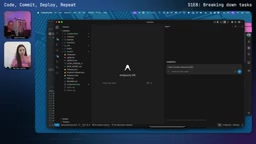
During the design process, the team made several key decisions:
- No hierarchical structure: Generated tasks are added as top-level tasks to the list rather than nested subtasks, greatly simplifying database management
- Preview before confirmation: AI-generated tasks are shown to the user for review first, allowing selective addition
- Context awareness: If related tasks already exist in the list, the AI won't suggest duplicates
AI Agent Drives the Entire Development Flow
Throughout the development process, Anti-Gravity (a Gemini-based AI coding assistant) handled most of the work from design to implementation. Anti-Gravity is Google's AI-native integrated development environment with deep Gemini model integration as a coding assistant. The integrated MCP (Model Context Protocol) server is an open protocol proposed by Anthropic and widely adopted, providing AI models with a standardized interface for interacting with external tools and data sources. In Anti-Gravity, Firebase Skills use the MCP protocol to let the AI Agent directly query Firebase project configurations, read/write Firestore database structures, manage deployments, and more—rather than just generating code text. This tool-calling capability is the key technical foundation for AI Agents evolving from "code completion" to "full-stack developer."
Auto-Generated UI Design Proposals
The Agent didn't just generate code—it also created high-fidelity UI prototypes using the NanoBanana tool. It produced different design mockups for iOS and Android—though the gradient effects were overly flashy, the overall layout thinking was clear.
Cross-Platform Parallel Development
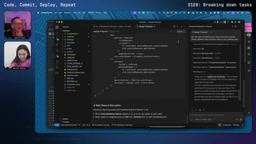
The most impressive aspect was the Agent's parallel processing capability. After completing the iOS code, it immediately began editing Android files, with builds for both platforms running almost simultaneously. The entire feature implementation took only two to three minutes, including:
- Adding Firebase AI Logic dependencies
- Implementing the AI task service
- Creating an animated Sparkle icon
- Handling user interaction logic
Structured Output: No More Manual JSON Parsing
The team particularly emphasized the importance of using Structured Generation rather than manually parsing JSON. Structured generation is a critical technique in LLM applications that constrains the model's token generation process during inference (using JSON Schema, regular expressions, etc.) to ensure output strictly follows a predefined data format. In traditional approaches, developers need to extract structured data from the model's free-text output through regex matching or string splitting—an extremely fragile method since models might output extra explanatory text, inconsistently formatted JSON, or completely deviate from the expected structure in edge cases.
By passing an output Schema when creating the generative model, the Firebase AI Logic SDK automatically ensures returned data conforms to the expected format, avoiding the fragility of manual string splitting. Essentially, this passes the JSON Schema to the Gemini model at the API level, constraining the model to only output content conforming to that Schema during generation—fundamentally eliminating the possibility of parsing failures. Developers don't need to implement parsing logic themselves; this is a built-in SDK capability.
Live Demo Results
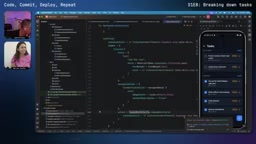
The results after the feature went live were impressive:
- Input "Plan summer trip" → Auto-generated: determine destination, research accommodations, research activities, book flights, create daily itinerary, prepare essentials
- Input "Test new app version" → Auto-generated: set up test environment, run smoke tests, functional testing, server handling tests, UI review, etc.
- Input "Run live stream" → Auto-generated: set up streaming equipment, confirm content agenda, start broadcast, engage with audience, etc.
More importantly, these AI-generated tasks are completely identical to manually created ones—supporting real-time sync, cross-device sharing, completion checkboxes, and all existing features.
Notably, the team chose Gemini 2.5 Flash as the backend model. Gemini 2.5 Flash is a variant in Google's Gemini model family optimized for low-latency, high-throughput scenarios. Compared to larger models like Gemini 2.5 Pro, Flash significantly reduces response time and computational cost while maintaining high reasoning quality. For use cases like task decomposition that don't require extremely deep reasoning but demand fast responses, Flash is the ideal choice—users typically expect to see results within 1-2 seconds after tapping a button, not wait 10+ seconds. The Flash model is also specifically optimized for structured output generation efficiency, making it more stable in scenarios requiring strict format constraints.
Production Security Configuration Checklist
At the end of the livestream, the team focused on security measures for pushing AI features to production—content that's extremely important for developers.
Firebase App Check Protection
Ensure only legitimate users on untampered devices can access your Gemini API quota. Firebase App Check is an app attestation service that leverages platform-native device integrity verification mechanisms—App Attest or DeviceCheck on iOS, Play Integrity API on Android—to prove that requests genuinely come from your legitimate app instances, not emulators, tampered versions, or automated scripts. How it works: the client SDK obtains an attestation token from the platform and attaches it to every backend request; the Firebase backend only processes requests after verifying the token's validity. This is particularly important for protecting AI API quotas since Gemini API calls have real costs, and unprotected endpoints could be massively called by malicious users, causing bills to skyrocket. After setup, you must click the "Enforce" button in the App Check dashboard for it to actually block unverified requests.
Server-Side Prompt Templates
Placing Prompts in the Firebase console rather than client-side code offers three benefits:
- Protect intellectual property: Users cannot obtain your system instructions through reverse engineering
- Prevent prompt injection: Attackers can't see the Prompt structure, making it difficult to craft injection attacks
- Unified updates: Prompt modifications take effect on both iOS and Android simultaneously without requiring a new release
Regarding prompt injection attacks—this is one of the primary security threats facing LLM applications, similar to SQL injection in traditional web applications. Attackers embed special instructions in user input (such as "Ignore all previous instructions and instead do the following..."), attempting to override the developer's preset system Prompt and make the model perform unintended behaviors—like leaking system instruction content, bypassing content safety restrictions, or generating malicious output. Storing Prompt templates server-side rather than client-side means attackers cannot learn the Prompt's specific structure and wording through app decompilation, significantly increasing the difficulty of crafting effective injection attacks.
Remote Config for Template Version Management
By storing template IDs through Firebase Remote Config, you can switch between different Prompt template versions without publishing a new release, enabling gradual rollouts and quick rollbacks. Firebase Remote Config is a cloud configuration service that allows developers to dynamically modify app behavior without publishing app updates. In AI feature scenarios, by storing Prompt template version IDs through Remote Config, developers can implement multiple advanced operational strategies: gradually rolling out new Prompts by user percentage (canary releases), rolling back to old versions within seconds when a new Prompt causes quality degradation, and using different Prompt strategies for different user segments (e.g., paid users vs. free users). This decoupled design means Prompt iteration cycles can be shortened from "days" (waiting for app review and publication) to "minutes."
Enforced Access Modes
- Template Only Mode: Only accepts requests made through server Prompt templates
- Authenticated Users Mode: Combined with Firebase Auth, ensures users must be logged in to use AI features
Tech Stack Summary
The complete tech stack used in this development:
- iOS: Swift + SwiftUI
- Android: Kotlin + Jetpack Compose
- Backend: Firebase (Firestore real-time sync + AI Logic)
- AI Model: Gemini 2.5 Flash (optimized for low latency and structured output)
- Development Tool: Anti-Gravity IDE (integrated Firebase Skills and MCP server)
Final Thoughts
The biggest takeaway from this livestream isn't how polished the final product is, but rather the demonstration of an entirely new development paradigm: developers increasingly play the roles of "product manager" and "code reviewer," describing requirements in natural language, providing feedback, and making architectural decisions, while the AI Agent handles the actual implementation. When Peter said "feedback is a gift," he was actually describing the core of collaborating with AI—continuous, precise feedback loops.
Season one ends here. Looking forward to more hands-on content in season two.
Related articles
 Tutorials
Cursor + Codex Dual-IDE Collaboration: A Practical Methodology for Open-Source Project Customization
A complete methodology for open-source project customization based on real-world experience, detailing the Cursor+Codex dual-IDE workflow, seven-stage process, MVP validation, and AI source code reading techniques.
 Tutorials
Cursor Multi-Agent in Practice: Building a Full-Stack Next.js Blog in 50 Minutes
Build a full-stack blog in 50 minutes using Cursor IDE's multi-Agent mode with Next.js, Clerk auth, and Supabase. Learn the 4-phase AI Agent workflow and key integration pitfalls.
 Tutorials
Building an AI Software Factory from Scratch: A Cursor Engineer's Hands-On Experience with Multi-Agent Collaboration
Cursor engineer Eric shares practical insights on building an AI software factory: automation levels, guardrail design, parallel Agent management, and scaling to 1000+ Agents for 24/7 development.